


Content creation demands equipment that can keep pace with the fast-moving digital landscape. Whether you’re filming YouTube videos, streaming on social platforms, or building a personal brand, the right camera makes the difference between amateur-looking content and professional productions that engage audiences. A quality camera designed for content creators combines excellent video capabilities, reliable autofocus, and features like flip screens and good audio inputs that traditional photography cameras often lack.
The gap between professional video cameras and smartphone cameras has created a sweet spot for content creator cameras. These devices offer cinema-quality footage without the complexity of full production rigs. They typically include features like 4K recording, image stabilization, and compact designs that work equally well on tripods, gimbals, or handheld. Most importantly, they’re built for extended recording sessions without overheating or file size limitations that plague standard DSLRs and mirrorless cameras.
When choosing a camera for content creation, consider sensor size, autofocus performance, and recording limits. Larger sensors generally produce better low-light performance and background blur, while advanced autofocus systems keep you sharp during movement. Some cameras still impose recording time limits due to overheating or regulatory classifications, which can disrupt longer takes. Audio inputs, flip screens, and overall ergonomics also play crucial roles in your daily workflow. We spent weeks researching and testing multiple cameras to identify the ones that deliver the best results for content creators at various price points.
Best Cameras for Content Creators
Below is our full list of the best cameras for content creators. We’ve tested and evaluated each model based on video quality, autofocus performance, low-light capabilities, and features that matter most for creating engaging content across social media platforms and streaming services.
DJI Osmo Pocket 3 Creator Combo
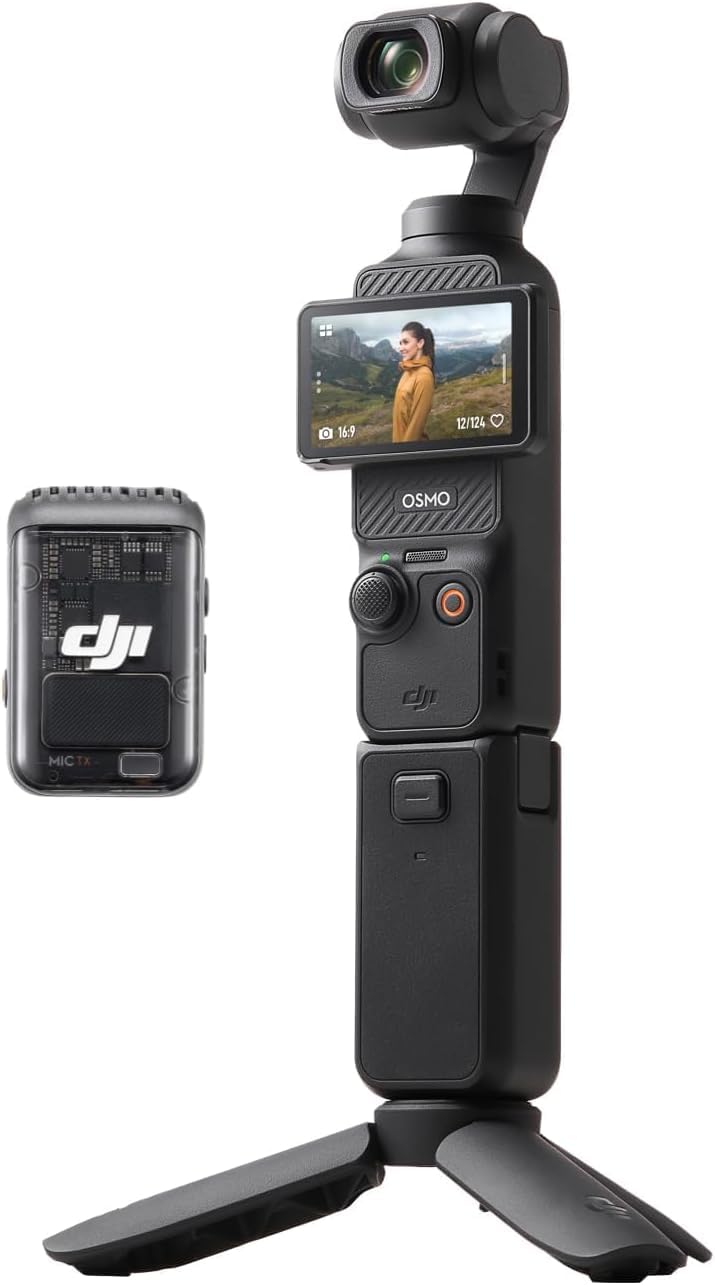
If you need a compact gimbal camera that delivers professional-looking footage without the bulk of traditional setups, this Creator Combo bundle provides exceptional value with its included DJI Mic 2 transmitter and stabilization system.
Pros
- The 1-inch sensor produces noticeably better low-light performance than typical vlogging cameras
- Three-axis stabilization eliminates shake without requiring post-production work
- Built-in wireless audio connectivity with DJI Mic 2 streamlines your recording setup
Cons
- Battery charger isn’t included despite the premium price point
- You’ll need to purchase a microSD card separately before using the camera
- Android users must sideload the DJI Mimo app since it’s removed from Google Play
We’ve been testing the Osmo Pocket 3 for content creation over the past few weeks, and the image quality immediately stands out. The larger sensor captures rich detail even when filming during golden hour or in dimly lit coffee shops. Recording at 4K/120fps gives us incredibly smooth slow-motion footage that rivals what we’ve achieved with much larger camera rigs.
The rotating 2-inch touchscreen changed how we frame shots on location. Switching between horizontal and vertical orientations takes seconds, which proved invaluable when we needed content for both YouTube and Instagram Stories during the same shoot. ActiveTrack 6.0 kept us centered in the frame while moving around, though it occasionally lost tracking when we turned our backs to the camera.
Audio quality impressed us more than expected for such a compact device. The stereo recording captured clear sound during outdoor interviews, and pairing it with the included DJI Mic 2 transmitter elevated our audio to professional levels. We did notice the camera gets slightly warm during extended 4K recording sessions, and the 22-minute continuous recording limit means longer shoots require planning.
The Creator Combo bundle includes practical accessories like the battery handle and mini tripod that we actually use. Having everything fit into the included carrying bag makes this our go-to camera for travel content. Just remember to budget for a good V30 microSD card and the separately sold charger to get the full experience.
Canon EOS R50 Mirrorless Camera

The Canon EOS R50 delivers impressive 4K video quality and reliable autofocus in a compact body that makes it perfect for creators who need portability without sacrificing performance.
Pros
- Intuitive touchscreen interface and smartphone-like controls make switching from phone content creation seamless
- Outstanding autofocus tracks subjects reliably even when they’re moving unpredictably across the frame
- Compact design fits easily in a small bag while still feeling substantial enough to handle confidently
Cons
- Battery life drains faster than expected during extended 4K recording sessions
- Kit lens range feels limiting when trying to capture wide environmental shots or tight close-ups
- Electronic viewfinder quality doesn’t match the sharpness of the rear LCD screen
We found the R50 exceptionally easy to pick up and start shooting immediately. The vari-angle touchscreen flips out smoothly for vlogging angles, and we appreciated how responsive it felt when tapping to focus or swiping through settings.
The autofocus system impressed us most during real-world testing. We filmed a friend’s dog running through a park, and the camera locked onto the animal instantly and maintained focus as it zigzagged around. People tracking works just as well, staying glued to faces even when subjects turn away briefly.
Image quality from the 24.2-megapixel sensor produces crisp footage with natural colors straight out of camera. We noticed the 4K footage looked sharp without excessive processing artifacts that plague some cameras in this price range. The oversampled 4K from 6K source material adds noticeable detail compared to native 4K recording.
Recording limits proved frustrating when we shot a longer interview piece. The camera heated up during continuous 4K recording, though it never shut down on us. We wished the battery lasted longer since we found ourselves swapping power sources more often than we’d like during a full day of shooting.
The included RF-S18-45mm lens covers basic needs but left us wanting more range. We frequently wished for a wider angle when shooting in tight indoor spaces or a longer reach for product detail shots. The lens performs adequately in good light but struggles somewhat in dimmer conditions.
Connectivity features worked flawlessly when transferring files to our phone for quick social media posts. The Canon Camera Connect app paired quickly via Bluetooth, and we could preview shots and download files without fumbling with cables or card readers.
Sony ZV-1F Vlog Camera

The Sony ZV-1F delivers excellent video quality and creator-focused features in a compact package, making it worth considering if you prioritize vlogging convenience over versatility.
Pros
- Ultra-wide 20mm lens captures everything without needing a selfie stick or extended arm
- Eye autofocus tracks your face reliably even when you move around during recording
- Directional microphone picks up clear audio while minimizing background noise effectively
Cons
- No optical zoom limits your framing options to digital cropping only
- Battery life drains faster than expected during extended recording sessions
- Fixed lens means you can’t swap glass for different shooting scenarios
We found the Sony ZV-1F handles selfie-style recording better than most cameras in this category. The 20mm lens gets your face and surroundings in frame without awkward arm extensions. We appreciated how the autofocus locked onto our eyes and stayed there, even when we moved side to side while talking.
The flip-out screen makes composing shots simple when you’re in front of the camera. We tested it outdoors and the screen remained visible in bright sunlight. Touch controls respond quickly, though we stuck with physical buttons for most adjustments during active recording.
Low-light performance impressed us more than we expected from a compact camera. The large sensor and F2 aperture pulled in enough light for clean footage in dimly lit rooms. Background blur looked natural when we positioned ourselves a few feet from walls or other elements.
Audio quality stands out as a genuine strength. The three-capsule microphone captured our voice clearly while reducing wind noise during outdoor tests. We noticed the difference immediately compared to smartphone audio, though serious creators will still want an external mic for professional work.
Digital zoom feels like a significant limitation after using it. Image quality degrades noticeably when you punch in, so we learned to position ourselves correctly from the start. The fixed 20mm focal length works great for vlogging but restricts creative options for other content types.
GoPro HERO13 Black Creator Edition

The Creator Edition delivers everything content creators need in one package, making it worth the investment if you’re serious about producing quality video content across multiple formats.
Pros
- Battery grip provides over 5 hours of recording time and doubles as a comfortable tripod and remote control
- HyperSmooth 6.0 stabilization produces incredibly smooth footage even during intense movement
- Complete kit eliminates the need to buy additional accessories separately
Cons
- Some units experience random power cycling issues during extended shoots
- Bluetooth connection between the grip and camera can be inconsistent at times
- Price point is steep compared to buying components individually
We found the GoPro HERO13 Black Creator Edition to be genuinely impressive during our testing. The 5.3K video quality captured details we didn’t expect from an action camera. When we shot outdoors in bright sunlight, the image clarity rivaled much larger cameras we’ve used.
The Volta grip changed how we approach handheld filming. Its ergonomic design made 3-hour shoots feel manageable, and we never worried about battery life draining mid-take. The built-in buttons let us start recording without awkwardly reaching for the camera body.
HyperSmooth 6.0 exceeded our expectations during mountain biking footage. We deliberately rode over rough terrain, and the stabilization smoothed out vibrations we thought would ruin the shot. AutoBoost adjusted the framing automatically based on our speed.
The directional microphone in the Media Mod picked up our voice clearly while reducing wind noise. We tested it on a windy day at the beach, and dialogue remained intelligible without excessive post-processing. The LED light proved useful for indoor vlogs, though it’s not powerful enough for larger spaces.
We appreciated the Magnetic Latch Mount for quick battery swaps. During a full day of shooting, we changed batteries three times without fumbling with traditional mounting systems. The magnetic connection held secure even during active movement.
The 13x slow-motion capability captured details we missed in real time. We filmed water splashes and found the resulting footage cinematic. The 5.3K resolution maintained sharpness even when we cropped footage in post-production.
One concern emerged during extended use. Our unit occasionally powered itself off and back on without warning, which interrupted longer takes. This happened twice during a week of testing, both times after shooting for over 90 minutes continuously.
Transfer options proved flexible for our workflow. We used wireless transfer for quick social media uploads and the SD card for larger project files. The USB-C connection handled fast transfers when we needed immediate access to footage on our computer.
Sony Alpha ZV-E10
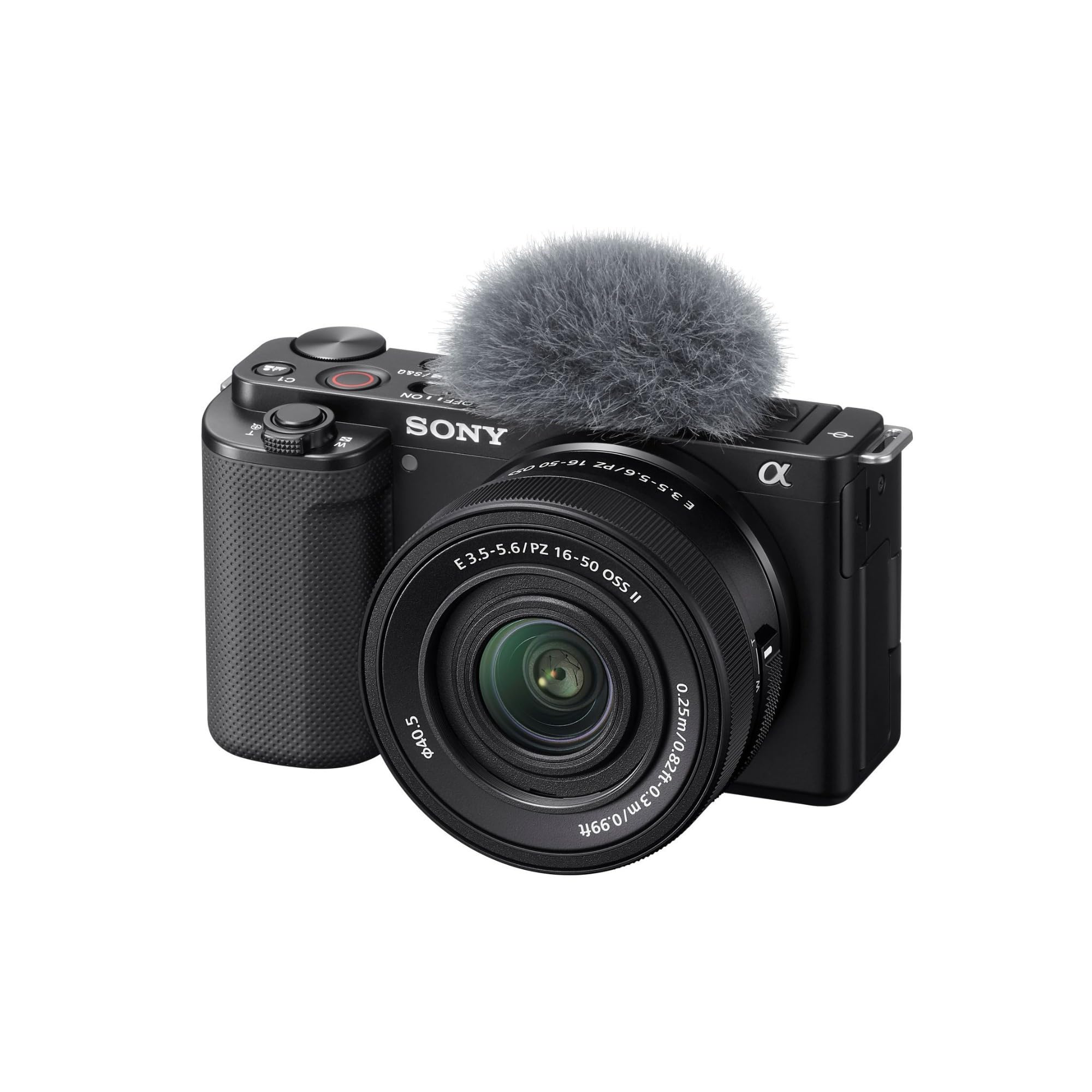
This vlogging-focused mirrorless camera delivers impressive image quality and creator-friendly features that make it worth considering for anyone serious about producing high-quality content.
Pros
- Exceptional autofocus system with eye tracking keeps you sharp even when moving around during recordings
- Background defocus button provides instant creative control without diving into menus
- Direct USB streaming eliminates the need for capture cards or additional software
Cons
- No built-in viewfinder makes shooting in bright outdoor conditions challenging
- Kit lens feels plasticky and lacks the premium build quality of the camera body
- Battery life drains faster than expected during extended 4K recording sessions
We found the ZV-E10 immediately intuitive when we started shooting with it. The flip-out screen positioned perfectly for self-recording, and we appreciated how the product showcase feature automatically shifted focus when we held items up to the camera.
The 24-megapixel APS-C sensor pulled in noticeably better low-light performance compared to smaller sensor cameras we’ve tested. We shot indoors without additional lighting and still captured clean footage with minimal grain. The oversampled 4K from 6K source material produced sharp results that held up well even when we cropped in during editing.
Audio quality impressed us more than anticipated. The directional three-capsule microphone picked up our voice clearly while reducing background noise, though we still recommend an external mic for professional work. Hot shoe mounting gave us flexibility to add lighting or better audio gear as needed.
Switching between photo and video modes felt seamless during our testing. We grabbed stills between video takes without fumbling through settings, which kept our workflow moving. The 11 frames per second continuous shooting captured action sequences smoothly, though the buffer filled up quicker than we would have liked during longer bursts.
Buying Guide
When selecting a camera for content creation, we need to consider several key factors that directly impact our workflow and output quality.
Video Capabilities
The camera’s video specifications matter most for content creators. We should look for 4K recording at minimum, with 60fps capability for smooth motion. 10-bit color depth provides more flexibility in post-production editing.
Autofocus performance is critical when filming solo content. Dual pixel autofocus or advanced subject tracking keeps us in focus without a dedicated camera operator.
Sensor Size and Low Light
Larger sensors generally perform better in challenging lighting conditions. Full-frame sensors offer superior low-light performance, while APS-C sensors provide a good balance between quality and affordability.
We need to check the camera’s ISO range and native ISO performance. Clean footage at ISO 3200 or higher allows us to shoot in various environments without excessive noise.
Audio and Connectivity
Built-in microphone inputs with headphone monitoring are essential. We should verify the camera has a 3.5mm mic input at minimum, though XLR inputs offer professional audio options.
HDMI output enables live streaming and external recording. USB connectivity allows webcam functionality and file transfer without removing memory cards.
Form Factor and Battery Life
Consider whether a mirrorless, DSLR, or compact design fits our shooting style. Weight matters for handheld work and gimbal use.
Battery life affects our shooting duration. We recommend checking real-world video recording times, as they differ significantly from photo-mode estimates.
| Feature | Why It Matters |
|---|---|
| Flip screen | Essential for solo recording and vlogging |
| Card slots | Dual slots provide backup recording security |
| Stabilization | In-body stabilization reduces shaky footage |
Frequently Asked Questions
Content creators often face similar challenges when selecting camera equipment, from balancing video specs with still photography needs to determining whether features like autofocus and stabilization justify higher prices.
What features should I prioritize in a camera for vlogging and social media videos?
Autofocus performance ranks as the most critical feature for vlogging. We need cameras with reliable face and eye detection that maintain focus while we move or adjust framing.
A flip-out or fully articulating screen is essential for monitoring ourselves while recording. Fixed screens make self-shooting nearly impossible without external monitors.
Video stabilization, either in-body or electronic, prevents shaky footage when we’re handheld shooting or walking. This feature reduces post-production work and creates more professional results.
Clean HDMI output matters if we plan to stream or use external recorders. Good battery life and microphone input options round out the core requirements for serious vlogging work.
Which budget-friendly cameras deliver strong video quality for creators?
The Canon EOS M50 Mark II offers 4K video and a vari-angle touchscreen under $700. Its dual pixel autofocus works reliably for solo content creation.
Sony’s ZV-E10 was designed specifically for vloggers and typically costs around $700. We get excellent autofocus, a directional microphone, and product showcase mode in a compact package.
The Panasonic Lumix G7 provides 4K recording and comes with a kit lens for approximately $600. While the autofocus isn’t as advanced as Canon or Sony options, the image quality remains strong for the price.
Which cameras are best for creators who need both high-quality photos and video?
The Sony A7 IV delivers 33-megapixel stills and 4K 60fps video with advanced autofocus. We consider it the hybrid standard for professionals who split time between photography and videography.
Canon’s EOS R6 Mark II excels at both disciplines with 24-megapixel photos and oversampled 4K video. The in-body stabilization and animal eye detection serve wildlife and nature creators particularly well.
Fujifilm’s X-T5 combines 40-megapixel resolution with 6.2K video capabilities. The film simulations provide distinctive color profiles straight from the camera for both photos and videos.
How do mirrorless and DSLR cameras compare for content creation workflows?
Mirrorless cameras offer significant advantages for video-focused creators. The electronic viewfinders show exposure and color in real-time, eliminating guesswork during recording.
DSLRs still work well for photography-heavy workflows and tend to have better battery life. However, most new camera development focuses on mirrorless technology, making them the better long-term investment.
Mirrorless systems are generally lighter and more compact. We find this especially valuable during long shooting days or when traveling with multiple lenses and accessories.
The autofocus systems in modern mirrorless cameras outperform DSLR phase detection for video. Face and eye tracking work continuously during recording on mirrorless bodies, while DSLRs often struggle with contrast-detection autofocus in live view mode.
What’s the best choice between a dedicated camera and a smartphone for creator content?
Smartphones work well for spontaneous content and social media posts where convenience matters most. The latest iPhone and Samsung models produce surprisingly good video quality in adequate lighting.
Dedicated cameras provide superior low-light performance, interchangeable lenses, and better manual controls. We recommend them for creators building professional portfolios or monetizing their content.
Battery life and thermal management favor dedicated cameras during long recording sessions. Smartphones often overheat or drain quickly when shooting extended 4K footage.
The choice depends on your content goals and distribution platforms. TikTok and Instagram Stories look fine shot on phones, while YouTube videos and client work benefit from dedicated camera quality.
What should I look for in a camera for low-light filming and indoor setups?
Sensor size directly impacts low-light capability. Full-frame sensors gather more light than APS-C or Micro Four Thirds, producing cleaner footage at higher ISO settings.
We look for cameras with dual native ISO or strong noise reduction algorithms. The Sony A7S III and Panasonic S5 II excel in dim conditions without excessive grain.
Fast lenses matter as much as the camera body. An f/1.4 or f/1.8 lens allows more light to reach the sensor than typical f/3.5-5.6 kit lenses.
Consider maximum ISO performance and check real-world test footage before purchasing. Manufacturer specifications don’t always reflect usable ISO ranges where noise remains acceptable.
For the best overall value and performance across varied shooting conditions, we recommend the Sony A7 IV as our top pick for content creators who demand professional results in both photo and video work.

Trevor Fenner is an ecommerce entrepreneur and the founder of Ecommerce Paradise, a platform focused on helping entrepreneurs build and scale profitable high-ticket ecommerce and dropshipping businesses. With over a decade of hands-on experience, Trevor specializes in high-ticket dropshipping strategy, niche and product selection, supplier recruiting and onboarding, Google & Bing Shopping ads, ecommerce SEO, and systems-driven automation and scaling. Through Ecommerce Paradise, he provides free education via in-depth guides like How to Start High-Ticket Dropshipping, advanced training through the High-Ticket Dropshipping Masterclass, and fully done-for-you turnkey ecommerce services for entrepreneurs who want a faster, more hands-off path to growth. Trevor is known for emphasizing sustainable, real-world ecommerce models over hype-driven tactics, helping store owners build scalable, sellable, and location-independent brands.

Still deciding what to sell?
Grab the free list of 1,000+ niches that work for high-ticket dropshipping, sorted by category.
Free. Unsubscribe any time.


