

Voice acting demands crystal-clear audio capture that preserves the nuances of human speech. Whether you’re narrating audiobooks, creating character voices for animation, or recording podcast dialogue, the microphone you choose becomes the bridge between your performance and your audience. A quality voice acting microphone doesn’t just record sound—it captures the subtle inflections, emotional tones, and vocal textures that bring scripts to life.
The right microphone can make the difference between a professional recording and an amateur one, but not all microphones are created equal for voice work. Large-diaphragm condenser microphones have become the industry standard for voice acting because they offer exceptional sensitivity and frequency response in the vocal range. These microphones excel at capturing the warmth and detail of the human voice while minimizing unwanted background noise. Dynamic microphones also have their place, particularly for voice actors working in less-than-ideal acoustic environments or those who need a more forgiving option for varying microphone techniques.
When selecting a microphone for voice acting, pay close attention to the polar pattern, frequency response, and self-noise specifications. Cardioid polar patterns work well for most home studio setups by rejecting sound from the sides and rear. Frequency response should be relatively flat in the vocal range, though some microphones offer a gentle presence boost that adds clarity to voices. Self-noise becomes critical during quiet passages—look for microphones with self-noise ratings below 15dBA for professional results. We researched and evaluated dozens of microphones to identify the ones that deliver broadcast-quality voice recordings for actors at every experience level.
Best Microphones for Voice Acting
Below is our full list of the best microphones for voice acting. We evaluated each option based on audio quality, noise rejection, and suitability for professional voiceover work.
Logitech Blue Yeti USB Microphone

The Blue Yeti delivers professional-grade audio quality that makes it an excellent investment for voice actors who need versatile recording options without breaking the bank.
Pros
- Four switchable pickup patterns let us adapt to different recording scenarios without needing multiple microphones
- Onboard controls for gain, mute, and headphone volume keep everything within arm’s reach during recording sessions
- Plug-and-play setup gets us recording in under a minute with no drivers or complicated installation
Cons
- The included desktop stand picks up vibrations and desk bumps easily, requiring a separate shock mount for optimal performance
- Its weight and size demand a sturdy boom arm if not using the desk stand
- Background noise rejection in cardioid mode doesn’t match higher-end XLR microphones
We’ve been using this microphone for various voice acting projects, and the audio clarity genuinely impressed us right out of the box. The cardioid pattern works well for solo character work, while the bidirectional setting proves useful when we’re recording with a scene partner.
The Blue VO!CE software adds some useful processing options, though we found ourselves relying more on our DAW for final polish. Having headphone monitoring built directly into the mic eliminates the need for a separate audio interface, which streamlines our workflow considerably.
Recording quality stays consistent across different voice ranges and performance styles. We tested everything from whispered narration to shouted character voices, and the Yeti handled the dynamic range without distortion. The mute button’s tactile feedback gives us confidence during live-directed sessions when we need to cough or communicate off-mic.
The metal construction feels substantial and durable, though this same build quality makes it front-heavy on lighter boom arms. We’d recommend investing in a proper shock mount and pop filter to get the most out of this microphone for voice acting work.
Our Verdict
For voice actors seeking reliable performance and flexibility, we recommend the Logitech Blue Yeti as our top choice. Its combination of multiple pickup patterns, immediate plug-and-play functionality, and professional sound quality makes it the most practical option for both beginners establishing their home studio and experienced performers who need a dependable workhorse microphone.
FIFINE AmpliGame AM8
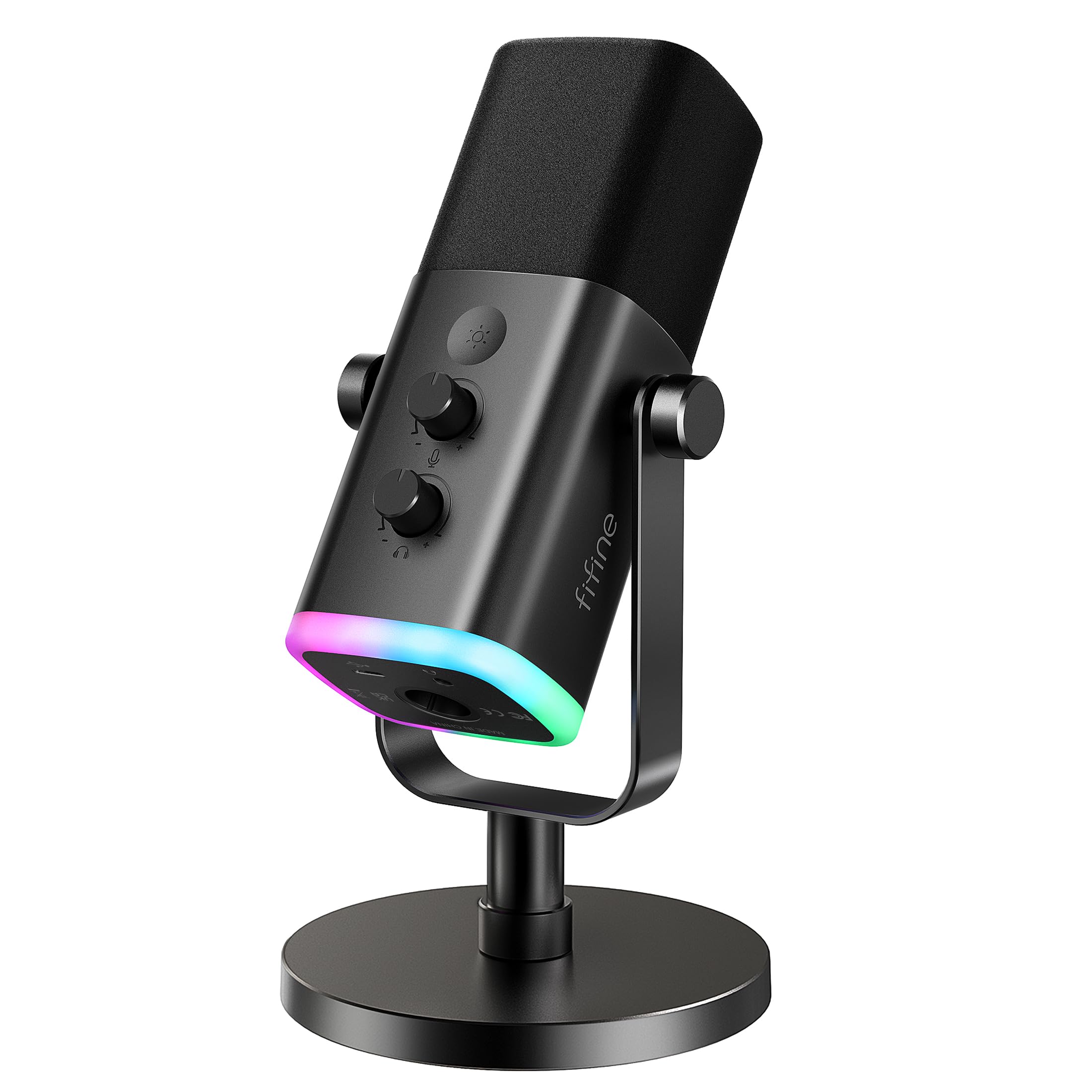
The FIFINE AM8 offers impressive versatility for voice actors who want both USB simplicity and XLR expandability without breaking the bank.
Pros
- Dual connectivity options let you start with USB and upgrade to XLR when ready
- Built-in headphone monitoring with volume control provides immediate feedback during recording sessions
- Dynamic cardioid pattern effectively rejects room noise and maintains vocal clarity
Cons
- RGB lighting features only work in USB mode and feel unnecessary for serious voice work
- You’ll need to purchase an XLR cable separately if you want to use the upgrade path
- The included desk stand is basic and most voice actors will want a proper boom arm
We found the AM8 surprisingly capable right out of the box when we plugged it in via USB. The tap-to-mute function became invaluable during our recording sessions, especially when we needed to cough or take a break without fumbling through software settings.
The cardioid pickup pattern did exactly what we needed it to do. We tested it in a less-than-ideal home office environment, and the microphone rejected keyboard clatter and ambient room noise far better than we expected at this price point. Voice recordings came through clear and balanced without the overly bright or muddy characteristics we’ve heard from other budget options.
Switching to XLR mode through our audio interface opened up noticeably better sound quality. The RGB lights shut off completely in this mode, which we actually preferred since they felt gimmicky for professional voice work anyway. The headphone jack remained functional, which we appreciated for zero-latency monitoring.
The gain control knob has just enough resistance to prevent accidental adjustments during animated performances. We did notice that the 50Hz-16KHz frequency response won’t capture the absolute highs that some condenser mics offer, but for spoken word content, this range worked perfectly fine. The dynamic capsule also meant we didn’t need extensive acoustic treatment in our recording space.
Our Verdict
For voice actors seeking maximum flexibility at an accessible price, we recommend the FIFINE AmpliGame AM8 as our top choice. The dual USB/XLR connectivity means you can start recording professional-quality voiceovers immediately while maintaining a clear upgrade path as your home studio evolves.
AKG Lyra Ultra-HD USB Microphone

The AKG Lyra delivers professional-grade audio quality with exceptional versatility, making it a solid investment for voice actors who need multiple recording patterns without complicated setup.
Pros
- Four switchable polar patterns adapt perfectly to different voice acting scenarios from solo work to ensemble recordings
- Recording quality at 24-bit/192kHz captures vocal subtleties and nuances that bring characters to life
- Zero-latency headphone monitoring lets us hear our performance in real-time without distracting delays
Cons
- Physical controls feel somewhat stiff and require deliberate pressure to adjust during recording sessions
- Larger desktop footprint than expected takes up considerable desk space in smaller recording areas
- USB-C connection may require adapters for older computers or mobile devices
We’ve been using the Lyra for character work and narration projects, and the audio clarity immediately stands out. The microphone captures the full range of vocal performances without any muddiness in the lower frequencies or harshness in the highs.
The four-capsule array offers genuine flexibility that we actually use in practice. Front-facing cardioid mode works perfectly for standard voice acting takes, while the bidirectional setting proved useful when we recorded dialogue with another actor. Switching between modes takes just a quick turn of the dial on the front.
Build quality feels reassuringly solid with its metal construction. The integrated stand keeps everything stable during animated performances where we tend to move around more. We appreciate that the mute button sits right where we can quickly hit it between takes.
One aspect that took adjustment was the gain control sensitivity. Small movements create noticeable volume changes, so we learned to set levels carefully at the start of sessions. The onboard mix control between microphone input and playback audio works well once we found our preferred balance.
Desktop placement requires consideration since the Lyra stands taller than many USB microphones. We mounted ours on a boom arm to free up desk space and position it at the optimal angle for our voice. The standard threading made this straightforward.
For voice actors working from home studios, the plug-and-play functionality eliminates technical headaches. We connected it to our computer and started recording within minutes. The included software bundle adds value, though we primarily rely on our existing recording applications.
Shure MV7X

The Shure MV7X delivers professional voice acting results without requiring expensive preamps, making it an excellent choice for creators ready to invest in serious audio quality.
Pros
- Captures vocals with exceptional clarity and warmth right out of the box
- Rejects background noise remarkably well thanks to the tight cardioid pattern
- Requires less gain than comparable dynamic mics, working smoothly with standard interfaces
Cons
- XLR cable sold separately, adding to the initial setup cost
- Single connection option limits flexibility compared to dual USB/XLR models
- Heavier build requires a sturdy boom arm for optimal positioning
We’ve been using the Shure MV7X for character work and narration sessions, and the voice isolation immediately impressed us. Recording in a room with street noise and computer fans, we found the mic focused exclusively on our voice without picking up the distracting ambient sounds that plague condenser mics.
The all-metal construction feels reassuringly solid in hand. When we mounted it on our boom arm, the weight distribution worked perfectly once we tightened everything down properly. The included thread adapter means we didn’t need to hunt for specific mounting hardware.
Sound quality genuinely surprised us compared to our previous setup. Vocal performances came through with natural warmth and presence that required minimal EQ adjustment. Our audio engineer commented that the recordings needed less processing than usual, which saved time in post-production.
We noticed the gain requirements sit comfortably in the middle range of our interface. Unlike some dynamic mics that demand maximum preamp power, this one reached proper levels around 60-70% gain. That headroom makes a real difference when you’re delivering intense character performances.
The frequency response handles both deep character voices and higher pitches without favoring one over the other. We recorded everything from monster growls to princess characters, and each performance maintained clarity and definition. Background rejection stayed consistent regardless of how animated our delivery became.
Our Verdict: For voice actors seeking professional sound quality with straightforward operation, we recommend the Shure MV7X as our top pick. The combination of exceptional vocal clarity, reliable noise rejection, and reasonable gain requirements makes it ideal for home studio recording without the complications or expense of more demanding equipment.
Samson Meteor Mic

This compact USB condenser delivers surprisingly clean audio for voice acting work without requiring additional audio interfaces or complicated setup.
Pros
- Zero-latency headphone monitoring lets us hear our performance in real-time without distracting delays
- Plug-and-play functionality works immediately on both Mac and PC without installing drivers
- Portable folding design with included carrying case makes it easy to take between recording sessions
Cons
- Single cardioid pattern limits flexibility compared to multi-pattern microphones
- Built-in stand positions the mic quite low on the desk, requiring additional mounting solutions for optimal placement
- Mute switch placement makes it easy to accidentally toggle during recordings
We’ve been using the Meteor Mic for voice acting projects over the past few months, and its performance punches well above its price point. The 25mm diaphragm captures vocal nuances with clarity that rivals more expensive studio microphones. Setting it up took literally seconds—we plugged the USB cable into our laptop and started recording immediately.
The Chrome finish looks professional on camera, which matters for our streaming setup. We appreciate how the folding legs keep our workspace tidy when we’re not recording. The solid metal construction survived a tumble off our desk without any damage to the capsule or body.
Recording dialogue with this mic revealed excellent detail in the midrange frequencies where human voices live. We noticed minimal self-noise, even when boosting gain for quieter character voices. The headphone jack on the back proved invaluable for monitoring our takes without the half-second delay that plagued our previous setup.
One frustration emerged when we needed to position the mic at mouth level for certain characters. The legs extend to about five inches tall, forcing us to stack books underneath or invest in a separate boom arm. The cardioid pattern does a decent job rejecting keyboard noise from the sides, though we still hear some bleed when typing aggressively during live sessions.
Our Verdict: For versatile voice acting work, we recommend the Samson Meteor Mic as our top choice for voice actors seeking professional sound quality in a portable, plug-and-play package.
Buying Guide
Understanding Your Recording Environment
We need to consider where we’ll be recording before selecting a microphone. A treated studio space allows for condenser microphones with high sensitivity, while untreated rooms benefit from dynamic microphones that reject ambient noise better.
Polar Patterns Matter
The polar pattern determines how a microphone picks up sound from different directions. Cardioid patterns capture sound from the front while rejecting noise from the sides and rear, making them ideal for home studios. Omnidirectional patterns pick up sound equally from all directions, which works well in acoustically treated spaces.
Connection Type and Compatibility
| Connection Type | Best For | Requirements |
|---|---|---|
| XLR | Professional setups | Audio interface or mixer |
| USB | Beginners and convenience | Computer with USB port |
| XLR/USB Combo | Flexibility | Either setup option |
We should match the connection type to our existing equipment and experience level.
Frequency Response and Sensitivity
Voice acting requires microphones that accurately capture the human voice range, typically between 80 Hz and 15 kHz. We recommend looking for a flat or slightly enhanced frequency response in this range to ensure natural vocal reproduction.
Budget Considerations
We don’t need to spend thousands to get quality results. Setting a realistic budget based on our skill level and recording frequency helps narrow down options. Entry-level microphones can deliver professional results when paired with proper technique and basic acoustic treatment.
Build Quality and Durability
We should examine the microphone’s construction materials and included shock mount quality, as these affect longevity and performance consistency.
Frequently Asked Questions
Voice actors often face similar technical challenges when selecting and setting up their recording equipment. The right microphone choice depends on your recording environment, budget constraints, and whether you’re just starting out or upgrading existing gear.
What should I look for in a microphone for voice acting at home?
We recommend prioritizing a microphone with a cardioid or supercardioid polar pattern to minimize background noise from behind and beside the mic. Frequency response matters significantly—look for microphones with a flat or slightly enhanced presence in the 2-8 kHz range where voice clarity lives.
Self-noise specifications below 15 dBA SPL indicate a quieter microphone that won’t add hiss to your recordings. Sensitivity ratings help determine how well a mic captures softer vocal nuances without requiring excessive gain.
Which microphone types work best for voice acting: dynamic, condenser, or shotgun?
Large-diaphragm condenser microphones capture the most detail and warmth in treated spaces, making them our top choice for home studios with adequate acoustic treatment. Dynamic microphones excel in untreated rooms because they reject more ambient noise and room reflections naturally.
Shotgun microphones work well for specific applications like audiobook narration where precise front-facing pickup is needed. We find that most voice actors achieve better results with large-diaphragm condensers in properly treated spaces or dynamics in noisier environments.
What are the best budget microphones for voice-over work without sacrificing clarity?
The Audio-Technica AT2020 delivers professional sound quality for under $100 and works well for voice acting in treated spaces. For even tighter budgets, the Samson Q2U offers both USB and XLR connectivity at around $70, giving you upgrade flexibility.
Dynamic options like the Audio-Technica ATR2100x-USB provide excellent value at approximately $80 with dual output options. We’ve found these budget options produce broadcast-quality voice recordings when paired with proper technique and basic room treatment.
What microphone setup is recommended for beginners starting voice acting?
We suggest starting with a USB condenser microphone, desktop boom arm, and pop filter as the most straightforward entry point. This setup requires minimal technical knowledge and lets you start recording immediately without additional equipment.
A simple acoustic treatment consisting of foam panels or moving blankets behind and beside your recording position improves results significantly. Budget $150-250 total for a beginner setup that includes the microphone, stand, pop filter, and basic acoustic treatment materials.
Do I need an audio interface and XLR mic, or is a USB microphone sufficient for voice acting?
USB microphones provide sufficient quality for most voice acting work, including audiobooks, e-learning, and commercial spots. Professional studios and higher-end productions often prefer XLR setups because they offer more upgrade flexibility and lower noise floors.
We recommend starting with USB if you’re uncertain about your commitment to voice acting. An XLR interface and microphone becomes worthwhile once you’re booking regular work and want to invest in long-term equipment that grows with your career.
The added cost of an audio interface (typically $100-300) plus an XLR microphone provides better preamp quality and routing options. USB microphones eliminate this expense and complexity while still delivering professional results for most applications.
How can I reduce room noise and improve vocal quality when recording voice acting?
Recording in a closet surrounded by hanging clothes creates effective sound dampening without purchasing acoustic panels. We position absorption materials at the first reflection points—directly beside and behind the microphone position—to reduce room echo.
Turning off HVAC systems, refrigerators, and computer fans during recording sessions eliminates the most common sources of background noise. Recording late at night or early morning reduces external noise from traffic and neighbors.
A microphone isolation shield or portable vocal booth costs $50-150 and provides immediate improvement in untreated rooms. We’ve achieved professional results by combining a dynamic microphone with strategic furniture placement and household items like pillows and blankets for absorption.
For voice actors seeking the best overall value and performance, we recommend the Audio-Technica AT2020 as our top choice. This large-diaphragm condenser microphone consistently delivers professional clarity and warmth at an accessible price point that works for both beginners and experienced voice actors upgrading their home studios.

Trevor Fenner is an ecommerce entrepreneur and the founder of Ecommerce Paradise, a platform focused on helping entrepreneurs build and scale profitable high-ticket ecommerce and dropshipping businesses. With over a decade of hands-on experience, Trevor specializes in high-ticket dropshipping strategy, niche and product selection, supplier recruiting and onboarding, Google & Bing Shopping ads, ecommerce SEO, and systems-driven automation and scaling. Through Ecommerce Paradise, he provides free education via in-depth guides like How to Start High-Ticket Dropshipping, advanced training through the High-Ticket Dropshipping Masterclass, and fully done-for-you turnkey ecommerce services for entrepreneurs who want a faster, more hands-off path to growth. Trevor is known for emphasizing sustainable, real-world ecommerce models over hype-driven tactics, helping store owners build scalable, sellable, and location-independent brands.


