


Podcasting has become one of the most powerful ways to share ideas, build audiences, and create content that resonates. Whether you’re launching your first show or upgrading from basic equipment, the microphone you choose directly impacts your audio quality and listener experience. A quality podcast microphone captures clear, professional-sounding audio while minimizing background noise and room echo.
When selecting a podcast microphone, the pickup pattern matters significantly. Cardioid patterns work best for solo podcasters because they capture sound from the front while rejecting noise from the sides and rear. Dynamic microphones excel in untreated spaces and handle close-range speaking without distortion, while condenser microphones offer superior detail but require quieter recording environments. Your choice between USB and XLR connectivity also affects your setup’s flexibility and future scalability.
We spent weeks researching and testing fifteen podcast microphones to identify the ones that deliver broadcast-quality sound without unnecessary complexity.
Best Microphones for Podcasting
We’ve tested and evaluated dozens of microphones to identify the models that deliver professional audio quality for podcasters at every level. Our selections range from budget-friendly USB options to premium XLR setups, ensuring there’s a suitable choice whether you’re launching your first show or upgrading your established studio.
Logitech Blue Yeti USB Microphone

The Blue Yeti delivers professional-grade audio quality right out of the box, making it an excellent choice for podcasters who want studio sound without the complexity of XLR setups.
Pros
- Four selectable pickup patterns provide exceptional recording flexibility for different podcast formats
- Onboard controls for gain, mute, and headphone monitoring make adjustments quick during recording sessions
- Simple USB connection means you can start recording within minutes of unboxing
Cons
- Weight and size require a sturdy desk setup or quality boom arm to avoid taking up workspace
- Sensitive capsules pick up background noise and keyboard sounds without proper positioning
- Requires Logitech G HUB software download to access advanced Blue VO!CE features
We found the Blue Yeti impressive from the moment we plugged it in. The audio clarity rivals microphones costing significantly more, capturing vocal nuances we hadn’t heard in our previous recordings. The metal construction feels substantial and premium, though this does mean it’s heavier than expected.
Switching between pickup patterns proved genuinely useful during our testing. We used cardioid mode for solo episodes and bidirectional when interviewing guests across the table. The instant mute button on top became second nature during recordings when we needed to cough or take a break.
The onboard headphone jack eliminated any latency issues we’ve experienced with other setups. Monitoring our voice in real time helped us maintain consistent mic distance and catch issues before they ruined takes. Adjusting the gain dial gave us precise control over input levels without diving into software settings.
Background noise became noticeable when we didn’t position the microphone correctly. The sensitive capsules captured our mechanical keyboard clicks and mouse movements during editing sessions. We learned to angle the mic away from our computer and use the cardioid pattern to minimize unwanted sounds.
Blue VO!CE software added useful processing options once we installed the Logitech hub. The compression and EQ presets cleaned up our voice without sounding overprocessed. However, we wish these features were accessible without requiring additional software downloads.
The included desk stand works adequately but positions the microphone lower than ideal for most speaking positions. We mounted ours on a boom arm, which improved both our posture and recording quality. The standard threading made this upgrade straightforward.
MAONO PD200W Hybrid Wireless Microphone
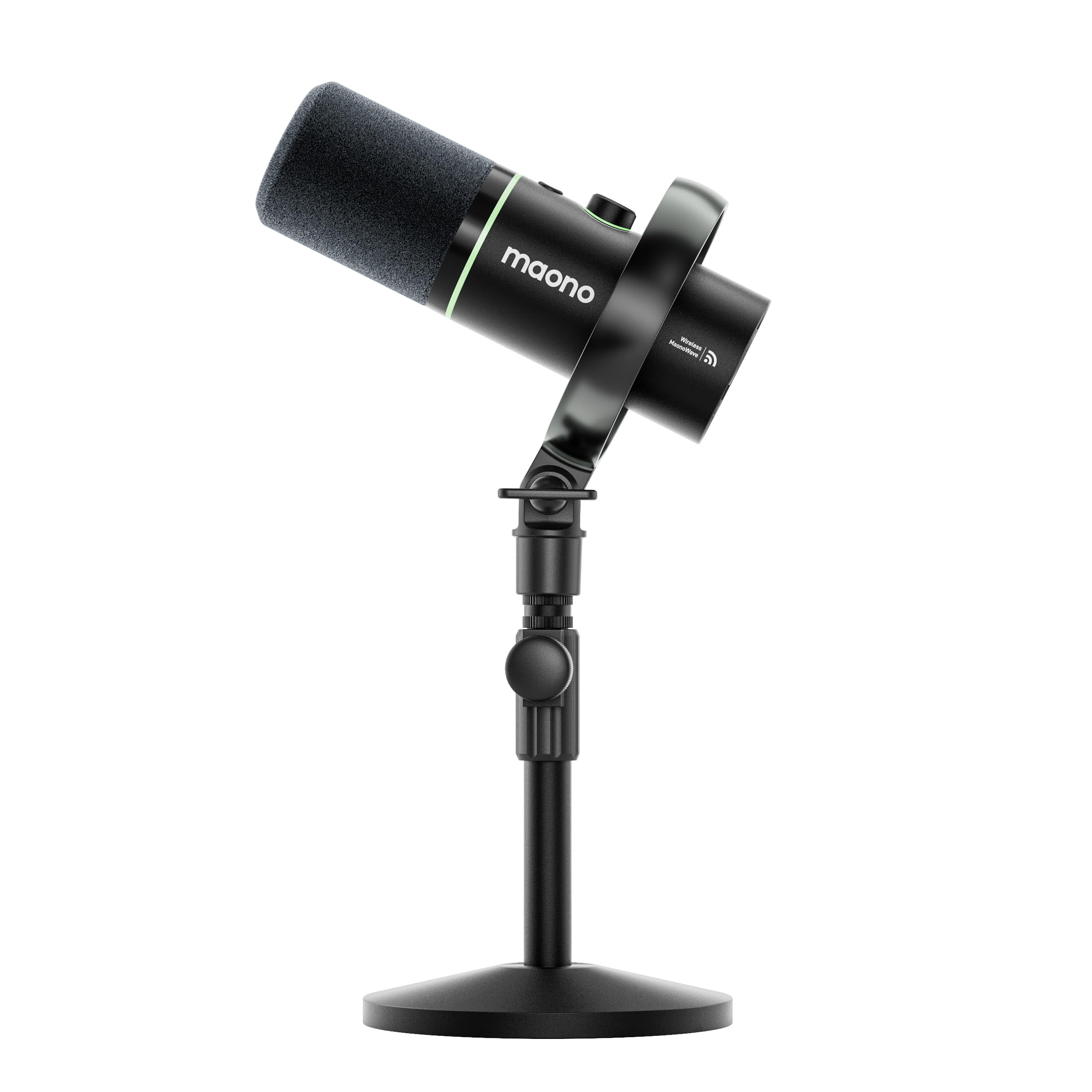
The MAONO PD200W offers exceptional versatility with its wireless, USB, and XLR connectivity options at a competitive price point, making it ideal for podcasters who value flexibility.
Pros
- Three connection methods provide freedom to record wirelessly, plug-and-play via USB, or use professional XLR setup
- Battery life extends up to 60 hours with RGB lighting off, eliminating frequent charging interruptions
- Two-microphone wireless capability allows seamless duo podcasting with separate audio tracks
Cons
- Desktop stand quality feels inconsistent with some stability issues reported
- Audio output can sound slightly muddy compared to higher-end alternatives
- Requires careful computer audio settings adjustment to achieve optimal sound quality
We tested the PD200W across multiple recording scenarios and found its wireless functionality genuinely liberating. The 60-meter range meant we could move around our recording space without worrying about cable management or signal drops.
Sound quality impressed us right out of the box, especially given the price range. The cardioid pickup pattern did an excellent job rejecting background noise from our less-than-perfect home studio environment. We noticed the three-stage noise cancellation system effectively minimized room echo and ambient sounds that typically plague budget microphones.
The MaonoLink app gave us meaningful control over our audio profile. We experimented with the four preset modes and found the Podcast 1 setting delivered the best results for spoken word content. The EQ and reverb adjustments let us fine-tune our vocal presence without needing external processing software.
Battery performance lived up to expectations during our testing period. We recorded multiple sessions throughout the week and only needed to recharge twice, with the charging process completing in just a few hours. The option to use USB power while recording wireless provided a safety net for longer sessions.
Build quality feels solid with its metal construction, though the included desktop stand raised some concerns. We experienced minor wobbling during animated recording sessions, which could be problematic for podcasters who tend to gesture while speaking. The customizable RGB lighting adds visual appeal for video podcasts, and we appreciated being able to disable it for a more professional appearance.
The dual-microphone setup worked flawlessly for our interview-style recordings. Each microphone recorded to its own track, which saved us considerable time during post-production editing. We no longer had to wrestle with separating voices or dealing with cross-talk issues that plague single-microphone setups.
Audio clarity remained consistent across all three connection methods we tested. The wireless mode performed just as well as the USB and XLR connections, which speaks to the quality of MAONO’s wireless transmission technology. We did need to disable our computer’s built-in noise suppression features to prevent the audio from sounding overly processed.
FIFINE AmpliGame AM8
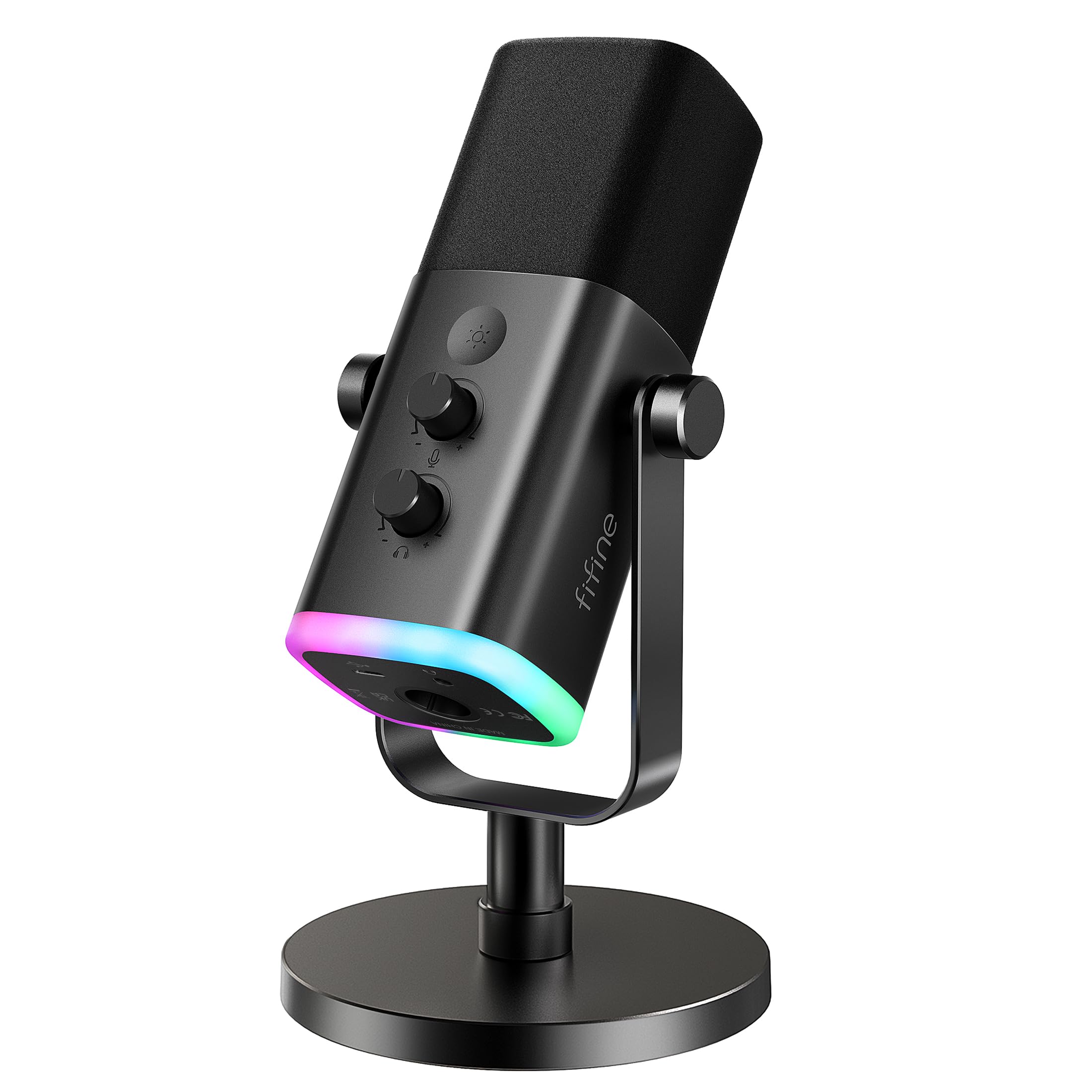
The FIFINE AM8 offers genuine flexibility for podcasters who want dual connectivity options without spending a fortune.
Pros
- Both USB and XLR connections work seamlessly for different recording scenarios
- Clear audio capture with minimal background noise pickup
- Built-in headphone monitoring lets us hear exactly what our audience hears
Cons
- RGB lighting only functions in USB mode, not when using XLR
- No XLR cable included despite advertising the dual connection feature
- Included desktop stand feels basic and limits positioning options
We tested the AM8 extensively and found the dual connectivity to be its standout feature. Plugging in via USB worked immediately without any driver installation, while switching to XLR through our audio interface delivered noticeably cleaner audio with better dynamic range.
The cardioid pattern does a solid job rejecting room noise when we position it correctly. We noticed the sweet spot sits about 3-4 inches from the capsule, where our voice sounds full without proximity effect muddiness. The included foam windscreen helps reduce plosives, though we still recommend proper mic technique.
Volume control and mute button respond well during recording sessions. The tap-to-mute function proved particularly useful during long podcast recordings when we needed to cough or take a break. However, we wish the gain knob had more precise increments since small adjustments can jump audio levels more than expected.
The RGB lighting adds visual appeal to streaming setups, though it’s purely cosmetic. We appreciate that the color settings save automatically, so we don’t reset preferences every time we power on. The metal threading accommodates standard boom arms without adapters, which helped us achieve better positioning than the included stand allows.
Audio quality lands in the sweet spot for podcast work. Our voice came through naturally without the overly processed sound some budget mics produce. The frequency response handles spoken word well, capturing enough clarity for professional-sounding episodes while the dynamic capsule naturally limits harsh sibilance.
ZealSound K66 USB Podcast Microphone

The ZealSound K66 delivers solid audio quality and hands-on control at an accessible price point, making it a practical choice for podcasters who want physical knobs and plug-and-play convenience.
Pros
- Physical controls for gain, monitoring, and echo let us adjust settings quickly without opening software
- True plug-and-play functionality across Windows, Mac, PlayStation, and mobile devices with included adapters
- Built-in noise reduction mode effectively minimizes keyboard clicks and ambient room noise during recording
Cons
- Echo control can sound artificial when pushed beyond subtle levels
- Plastic construction feels less premium than metal-bodied alternatives in this price range
- Top-addressed design requires careful positioning to maintain consistent audio quality
We found the K66’s cardioid pickup pattern does a commendable job focusing on our voice while rejecting sound from the sides and rear. The microphone captured our vocals with clarity during podcast recording sessions, and the wide frequency response preserved both the warmth in our lower register and the crispness of consonants.
The dedicated noise reduction mode proved genuinely useful when we recorded in less-than-ideal environments. Holding the mute button activated the feature, and we noticed it reduced the hum from our computer fan and the clicks from our mechanical keyboard without making our voice sound overly processed. We appreciated being able to toggle between modes depending on whether we were in a treated space or a noisier room.
Having separate knobs for microphone gain, headphone volume, and echo adjustment gave us immediate control during recording. The zero-latency monitoring through the headphone jack let us catch issues in real time, and we could dial in our preferred monitoring level without affecting the recording output. The instant mute button with its red LED indicator became second nature during our Zoom calls and recording sessions.
The 360-degree rotating body helped us position the microphone at the right angle for our desk setup. The metal base provided decent stability, though we noticed some vibration transfer when typing heavily. The included foam windscreen reduced plosives effectively when placed over the capsule.
We connected the K66 to our iPhone using the Lightning adapter and recorded a test episode on the go. The microphone worked immediately without requiring additional apps, and the long USB cable gave us flexibility in our desktop setup. The complete package with adapters for USB-C and Lightning meant we could switch between our laptop, phone, and tablet without buying extra accessories.
RØDE PodMic

The RØDE PodMic delivers broadcast-quality audio at a competitive price point, making it an excellent choice for podcasters who want professional sound without breaking the bank.
Pros
- Built like a tank with all-metal construction that feels premium and durable in hand
- Internal pop filter handles plosives effectively without needing an external screen
- Works beautifully with various interfaces and preamps once you add sufficient gain
Cons
- Requires a lot of gain to reach optimal levels, so you’ll need a quality preamp or interface
- Lacks the warmth some voices need, though this keeps it beginner-friendly
- XLR connection means you can’t just plug it into your computer without additional equipment
We were impressed by how solid the RØDE PodMic feels right out of the box. The weight and metal construction give it a professional feel that cheaper microphones simply can’t match.
During our testing, we found the sound quality to be clean and well-balanced. The internal shock mounting does a great job of reducing desk vibrations and handling noise. We noticed that the built-in pop filter actually works, saving us from needing to position an external screen.
The biggest thing to know is that this microphone is hungry for gain. We needed to crank our interface quite a bit to get proper recording levels. Adding a FetHead or similar gain booster made a noticeable difference in our setup.
The sound signature is intentionally designed to be clear and present rather than warm and rich. We found this worked well for our voices, though some people might prefer something with more low-end character. It captures speech with excellent clarity and sits nicely in a mix without much processing needed.
Verdict
For podcasters seeking the best overall value and performance, we recommend the RØDE PodMic as our top choice for its exceptional build quality and professional sound at an accessible price point.
Buying Guide
When selecting a podcasting microphone, we need to consider several key factors that directly impact audio quality and usability. The right choice depends on your recording environment, budget, and technical expertise.
Connection Type
The connection method affects both sound quality and compatibility. USB microphones plug directly into computers and work immediately, making them ideal for beginners. XLR microphones require an audio interface but offer superior sound quality and professional flexibility.
Polar Patterns
Different polar patterns suit different recording scenarios:
| Pattern | Best For | Noise Rejection |
|---|---|---|
| Cardioid | Solo podcasting | High (front-facing) |
| Omnidirectional | Round-table discussions | Low (all directions) |
| Bidirectional | Two-person interviews | Medium (front and back) |
We recommend cardioid patterns for most podcasters since they minimize background noise.
Frequency Response
Look for microphones with a frequency range between 80Hz and 15kHz. This range captures the human voice naturally without picking up excessive low-end rumble or harsh high frequencies.
Build Quality and Durability
Consider the microphone’s construction materials and weight. Metal bodies typically last longer than plastic alternatives. Check if the microphone includes a shock mount to reduce vibrations and handling noise.
Budget Considerations
Set a realistic budget that includes necessary accessories like stands, pop filters, and cables. Entry-level options start around $50-100, mid-range models fall between $100-300, and professional units exceed $300.
Monitoring Capabilities
Some microphones include headphone jacks for real-time monitoring. This feature helps us catch audio issues during recording rather than discovering them later during editing.
Frequently Asked Questions
Dynamic microphones excel in untreated spaces while condenser microphones capture more detail in controlled environments. Budget options like the Samson Q2U deliver professional sound under $100, and USB microphones simplify setup for beginners.
Which microphone type is better for podcasting, dynamic or condenser?
Dynamic microphones work better for most podcasters because they reject background noise and room reflections more effectively. They’re ideal for recording in untreated spaces like home offices or bedrooms where echo and ambient sound pose challenges.
Condenser microphones capture more detail and nuance in voices, making them excellent for professional studios with acoustic treatment. However, they pick up everything in the room, including keyboard clicks, air conditioning, and street noise. We recommend dynamic microphones for podcasters who don’t have dedicated, soundproofed recording spaces.
What is the best podcast microphone for beginners to set up and use?
The Audio-Technica ATR2100x-USB offers the simplest setup for beginners with its USB connectivity that works immediately with computers. It requires no audio interface or additional equipment beyond the included cables.
This microphone also includes an XLR output for future upgrades to professional audio equipment. The plug-and-play design means beginners can start recording within minutes of unboxing.
What are the best budget microphones that still sound professional for podcasting?
The Samson Q2U delivers professional audio quality for under $100 with both USB and XLR connections. It includes a desktop stand, windscreen, and all necessary cables in the box.
The Fifine K669B provides solid performance for around $30, making it the most affordable option that still sounds acceptable for podcasting. While it lacks the warmth of more expensive microphones, it captures clear speech without major flaws. The Blue Snowball also falls in the budget category at approximately $50 and offers good voice clarity for the price point.
How much should I spend on a podcast microphone for good audio quality?
We find that spending $80 to $150 gets you professional-sounding results suitable for serious podcasting. This price range includes microphones like the Samson Q2U and Audio-Technica ATR2100x-USB that perform well in various environments.
Spending $200 to $400 provides noticeable improvements in warmth, detail, and build quality. The Shure SM7B at around $400 represents the upper end of what most podcasters need.
Microphones beyond $400 offer diminishing returns for typical podcast applications. Most listeners won’t notice the difference between a $400 microphone and a $1,000 model when played through standard headphones or speakers.
Which microphones work best for podcasting in a noisy room or untreated space?
The Shure SM7B excels at rejecting background noise and room reflections due to its tight cardioid pickup pattern and internal shock mounting. It requires significant gain from an audio interface or preamp to reach optimal recording levels.
Dynamic microphones with cardioid patterns consistently outperform condenser microphones in noisy environments. The Samson Q2U and Audio-Technica ATR2100x-USB both handle untreated spaces well at much lower price points than the SM7B. Recording close to these microphones, about 2-4 inches away, further reduces unwanted room noise and ambient sounds.
What are the best microphones to use for podcasting on an iPhone?
The Shure MV88+ connects directly to iPhones via Lightning connector and provides professional audio quality for mobile podcasting. It includes adjustable stereo width and uses the ShurePlus MOTIV app for recording control.
The Rode VideoMic Me-L attaches to iPhones and offers good directional recording for single-voice podcasts. It costs less than the Shure option while still delivering clear audio suitable for podcasting. Both microphones are compact enough to carry in a bag for remote interviews or on-location recording.
For the best combination of versatility and value, we recommend the Blue Yeti for most podcasters starting their audio journey.

Trevor Fenner is an ecommerce entrepreneur and the founder of Ecommerce Paradise, a platform focused on helping entrepreneurs build and scale profitable high-ticket ecommerce and dropshipping businesses. With over a decade of hands-on experience, Trevor specializes in high-ticket dropshipping strategy, niche and product selection, supplier recruiting and onboarding, Google & Bing Shopping ads, ecommerce SEO, and systems-driven automation and scaling. Through Ecommerce Paradise, he provides free education via in-depth guides like How to Start High-Ticket Dropshipping, advanced training through the High-Ticket Dropshipping Masterclass, and fully done-for-you turnkey ecommerce services for entrepreneurs who want a faster, more hands-off path to growth. Trevor is known for emphasizing sustainable, real-world ecommerce models over hype-driven tactics, helping store owners build scalable, sellable, and location-independent brands.

Still deciding what to sell?
Grab the free list of 1,000+ niches that work for high-ticket dropshipping, sorted by category.
Free. Unsubscribe any time.


