


Success on Amazon is not just about having great products – it is about ensuring shoppers can actually find them. With over 2.5 million active sellers competing for attention and billions of product searches happening every month, your visibility depends entirely on using the right keywords. The difference between products that dominate their niche and those that collect dust in Amazon’s depths often comes down to strategic keyword research.
After testing the leading Amazon keyword research tools and analyzing what top sellers use to consistently rank on page one, I have created this comprehensive guide to help you choose the perfect tool for your Amazon business. Whether you are launching your first FBA product, selling on Amazon Handmade, publishing KDP books, or scaling a 7-figure brand, you will discover the exact tools and strategies you need to increase visibility, outrank competitors, and drive more sales.
The Amazon keyword research category has also expanded in 2026 to include external traffic and AI search visibility tools. A growing share of Amazon purchases now starts with a Google search, a ChatGPT recommendation, or a Perplexity answer that includes a buying-intent query. Tools that show how your Amazon products appear across Google, YouTube, and AI-generated responses are no longer optional – they are how serious brands capture pre-Amazon traffic and stay visible across the search ecosystem. This guide covers both the Amazon-native tools and the cross-platform tools that complete a modern keyword strategy.
Our top pick: Helium 10 for Amazon-native keyword research in 2026
The industry-leading Amazon seller toolkit with Magnet for keyword discovery and Cerebro reverse ASIN lookup. Largest Amazon keyword database, most accurate volume data, and the gold standard for serious FBA sellers and KDP publishers. Free tools available, paid plans from $99/mo billed yearly ($129/mo billed monthly).
For external traffic and AI search visibility tracking on top of your Amazon strategy, see Semrush One below.
Quick Comparison Table
Here is the side-by-side overview of all 11 Amazon keyword research tools at a glance. Detailed breakdowns of each tool with pros, cons, and pricing follow further down the page.
| Tool | Best For | Starting Price | Get It |
|---|---|---|---|
| Helium 10 (Top Amazon) | Amazon-native research, FBA & KDP | $129/mo ($99 billed yearly) | Try Free → |
| Semrush One (Top External/AI) | Google + AI search visibility | $139/mo | Start Trial → |
| Jungle Scout | Beginners, all-in-one toolkit | $49/mo | Visit → |
| AMZScout | Budget sellers, 12-month deal | $59.99/mo | Visit → |
| Ahrefs | Cross-platform SEO + Amazon | $129/mo | Visit → |
| MerchantWords | Real shopper search data | $39/mo | Visit → |
| SellerSprite | International marketplaces | $39/mo | Visit → |
| Keyword Tool for Amazon | Free Amazon autocomplete, KDP | Free / $88/mo | Visit → |
| Amazon Built-In Tools | First-party data, every seller | Free | Visit → |
| Google Keyword Planner | Seasonal trends, supplementary | Free | Visit → |
| Sellesta | AI listing optimization | $5/mo | Visit → |
Tools Covered in This Guide
This comprehensive review covers the 11 best Amazon keyword research tools available in 2026:
- Helium 10 – Gold standard for Amazon-native keyword research
- Semrush One – Top pick for external traffic and AI search visibility
- Jungle Scout – Complete Amazon toolkit with keyword research
- AMZScout – Budget-friendly with solid features
- Ahrefs – Cross-platform keyword research including Amazon
- MerchantWords – Real Amazon shopper search data
- SellerSprite – International marketplace support
- Keyword Tool for Amazon – Free Amazon autocomplete research
- Amazon’s Built-In Tools – Free tools directly from Amazon
- Google Keyword Planner – Free cross-platform research
- Sellesta – AI-powered listing optimization
Why Amazon Keyword Research Matters
Before diving into the tools, let us understand why Amazon keyword research is critical for seller success:
Amazon’s A9 Algorithm: Amazon’s search algorithm ranks products based primarily on relevance and performance. Keywords tell A9 what your product is, making them fundamental to being shown in search results.
Organic Visibility = Free Traffic: Unlike Amazon PPC which costs per click, ranking organically for keywords brings free, unlimited traffic. One well-optimized listing can drive thousands of sales without ongoing ad spend.
Competition Is Fierce: With millions of products, the only way customers find yours is by typing specific search terms. Without proper keywords, you are invisible no matter how great your product is.
Higher Conversion Rates: Shoppers searching specific keywords (“wireless headphones noise cancelling”) have clearer intent than those browsing broad categories, leading to better conversion rates.
Better PPC Performance: Keyword research does not just help organic rankings – it is essential for profitable Amazon PPC campaigns. Targeting the right keywords dramatically improves your advertising ROI.
Backend Search Terms: Amazon allows 250 bytes of hidden backend keywords. Strategic research helps you maximize this space with high-value terms that do not fit in your visible listing.
External Traffic and AI Visibility: A growing share of Amazon purchases now starts with a Google search or AI-generated answer (ChatGPT, Perplexity, Gemini, Google AI Overviews). Tracking how your products and brand appear across these external surfaces – and the keywords driving that visibility – is increasingly part of a complete Amazon keyword strategy.
Now let us explore the tools that will transform your Amazon keyword strategy.
Top Amazon Keyword Research Tools Reviewed
1. Helium 10 – Gold Standard for Amazon Sellers
Helium 10 has established itself as the most comprehensive and powerful Amazon seller toolkit, with industry-leading keyword research tools that serious sellers rely on.
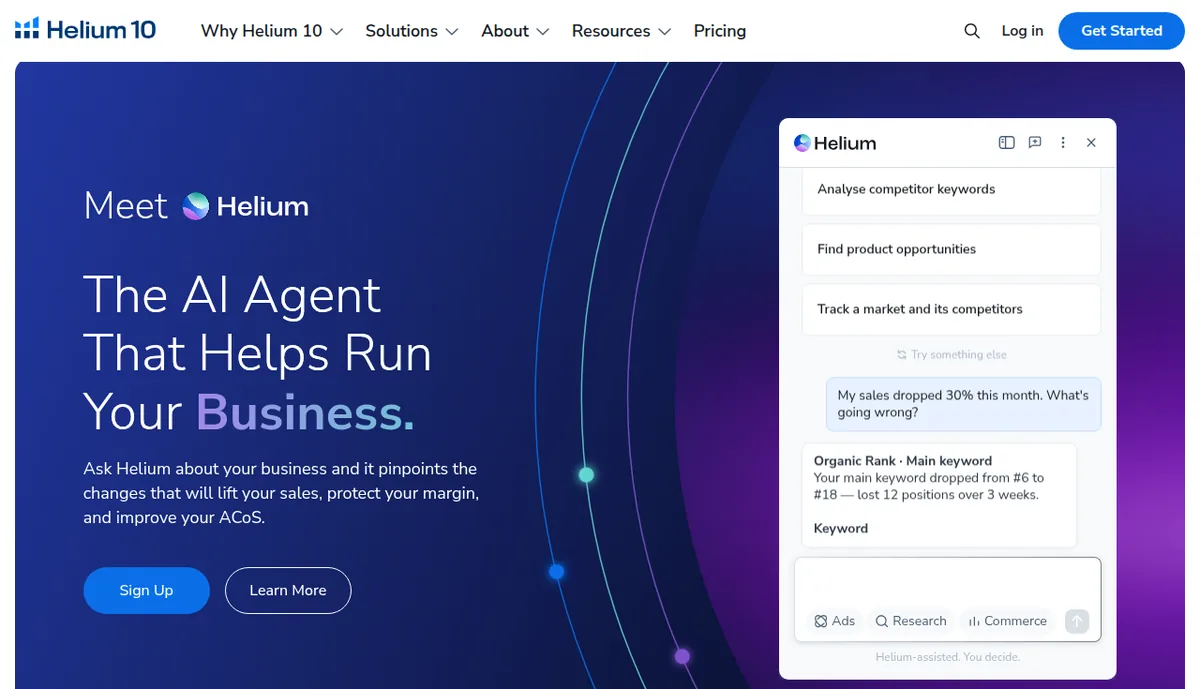
What puts Helium 10 in a league of its own is the combination of Magnet and Cerebro. Magnet is the keyword discovery tool where you enter a seed keyword and it generates thousands of related terms with search volume, competing products, and a proprietary IQ Score that tells you which keywords offer the best opportunity relative to their competition. The IQ Score alone saves hours of manual analysis because it factors in volume, competition, and trend data into one actionable number. You just sort by IQ Score and start from the top.
Cerebro is the reverse ASIN tool, and it is genuinely the most powerful competitive intelligence feature in the Amazon seller space. You take the ASIN of any competing product, drop it into Cerebro, and instantly see every single keyword that product ranks for organically, what position it holds, and its estimated search volume. You can enter up to 10 competitor ASINs at once and run a cross-analysis to find keywords that ALL your competitors rank for, keywords only SOME rank for, and keywords NONE of them target well. That gap analysis is where the real opportunities hide.
The Frankenstein and Scribbles tools complete the workflow. Once you have your keyword list from Magnet and Cerebro, Frankenstein cleans and deduplicates it, and Scribbles ensures you use every important keyword somewhere in your listing without missing any. For sellers managing dozens or hundreds of ASINs, this systematic approach prevents the messy, inconsistent keyword optimization that kills rankings. The learning curve is real, but once you get comfortable with the suite, nothing else comes close.
Key Features for Amazon Sellers
- Magnet: Generate thousands of high-volume keywords from seed phrases
- Cerebro: Reverse ASIN lookup to analyze competitor keywords
- Magnet IQ Score: Proprietary metric identifying best keyword opportunities
- Keyword Tracking: Monitor rankings across all your keywords
- Index Checker: Verify Amazon indexed your keywords
- Frankenstein: Process and optimize keyword lists
- Scribbles: Ensure you use all important keywords in listings
- 24+ Marketplace Support: Research keywords across global Amazon markets
Pricing
- Free: Limited free tools, including the Chrome extension
- Platinum: $129/month, or $99/month billed yearly (as of October 2026). EcomCrew reported Cerebro and Magnet capped at 100 searches a month on this plan in April 2026
- Diamond: $359/month, or $279/month billed yearly
- Enterprise: from $1,499/month, billed annually
Pros
- Largest Amazon keyword database (billions of data points daily)
- Most accurate search volume data
- Cerebro reverse ASIN lookup is incredibly powerful
- Comprehensive suite beyond just keywords
- Excellent for both FBA and KDP sellers
- Regular updates and new features
- Strong training and community support
- AI features for 2026
Cons
- Expensive compared to alternatives
- Overwhelming feature set for beginners
- No cheap entry plan anymore, Platinum starts at $129 a month
- Steep learning curve for all tools
Best For
Serious Amazon sellers with multiple products, FBA businesses scaling revenue, agencies managing client accounts, and sellers wanting the most accurate data available.
Get the most powerful Amazon keyword toolkit in 2026
Helium 10 Magnet, Cerebro, Frankenstein, and Scribbles in one suite. Free tools available, paid plans from $99/mo billed yearly, with Cerebro and Magnet on Platinum at $129/mo billed monthly.
2. Semrush One – Best for External Traffic and AI Search Visibility
Semrush relaunched as Semrush One in October 2025, unifying its flagship SEO Toolkit with the new AI Visibility Toolkit in a single bundled product. While Semrush is not an Amazon-native tool like Helium 10, it covers a use case that Amazon-only tools cannot: external traffic and AI search visibility for Amazon listings. A growing share of Amazon purchases starts with a Google search, a YouTube review, or an AI-generated answer from ChatGPT, Perplexity, Gemini, or Google AI Overviews. Semrush One is the most comprehensive single platform for tracking and capturing that pre-Amazon traffic.
The Keyword Magic Tool indexes more than 25 billion keywords across multiple search engines including Google, Bing, and YouTube. For Amazon sellers, this surfaces the buying-intent searches that happen before shoppers ever reach Amazon. Searches like “best wireless headphones for travel,” “Sony WH-1000XM5 review,” or “noise cancelling headphones under $200” almost always begin on Google. If your brand has content ranking for these terms – on your website, blog, or YouTube channel – you capture that traffic and funnel it directly to your Amazon listings. If you do not, your competitors do.
The AI Visibility Toolkit is the differentiator that no other tool on this list replicates. It tracks how often your brand and products appear in AI-generated responses across ChatGPT, Google AI Overviews, AI Mode, Perplexity, and Gemini. It surfaces the prompts that trigger your brand mentions, identifies competitor brands appearing for queries you should be visible on, and monitors more than 100 million LLM prompts globally. As AI search captures a larger share of pre-purchase research, this visibility tracking becomes essential infrastructure for Amazon brands serious about long-term discovery.
The Keyword Gap analysis surfaces keywords competitors rank for that your domain or brand does not. For Amazon sellers running content sites alongside their stores, this reveals where competitors capture organic Google visibility you have missed. Combined with the Position Tracking tool monitoring your rankings on Google, Bing, and YouTube, Semrush One closes the loop on external traffic strategy in a way Amazon-only tools cannot.
Key Features for Amazon Sellers
- Keyword Magic Tool: 25 billion keywords indexed across Google, Bing, and YouTube
- AI Visibility Toolkit: Track brand mentions in ChatGPT, Google AI Overviews, AI Mode, Perplexity, and Gemini
- Keyword Gap Analysis: Find keywords competitors capture that your brand misses
- Position Tracking: Monitor rankings across Google, Bing, YouTube, and 130+ countries
- Topic Research: Discover content topics driving pre-Amazon buying-intent traffic
- Backlink Analytics: Understand which content earns external links and authority
- Site Audit: Optimize your brand site for the searches that funnel to Amazon
Pricing
Semrush One bundles (Classic SEO + AI Visibility):
- Starter: $199/month (Pro-tier SEO + AI Visibility for 1 domain, 50 daily prompt checks)
- Pro+: $299/month (Pro+ tier SEO + AI Visibility for multiple domains, 100 daily prompt checks)
- Advanced: $549/month (Business-tier SEO + full AI Visibility coverage)
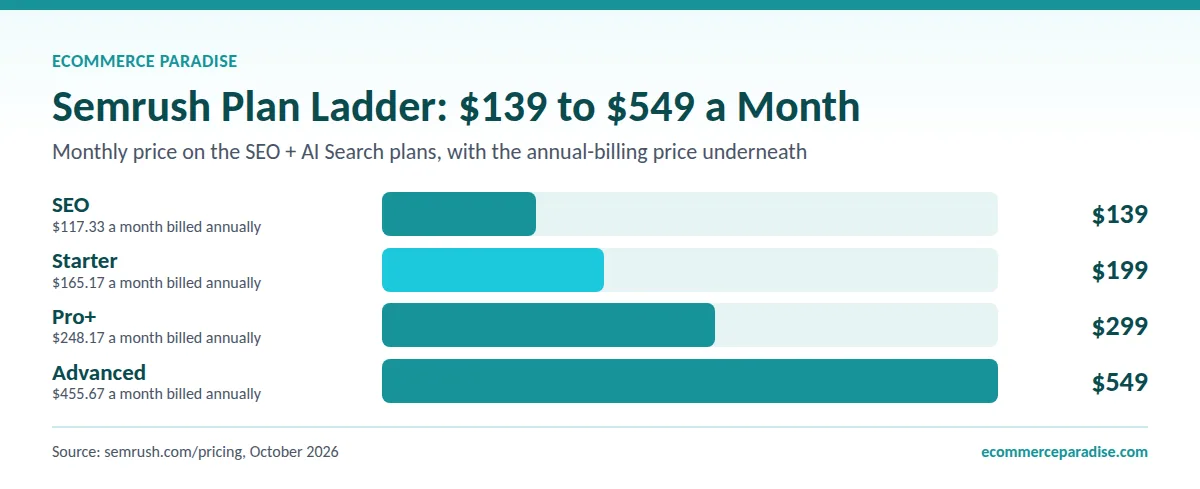
The 2026 Semrush plan ladder, read off semrush.com/pricing/seo-ai-search/ in October 2026. The old Pro, Guru and Business tiers no longer exist (without AI Visibility):
- SEO: $139/month, or $117.33 on annual billing
- Starter: $199/month, or $165.17 annual. Pro+: $299/month, or $248.17 annual
- Advanced: $549/month, or $455.67 annual
Annual billing saves up to 17 percent. A 7-day Semrush free trial is available.
Pros
- Only tool covering Google, YouTube, AND AI search visibility for Amazon brands
- AI Visibility Toolkit tracks ChatGPT, Google AI Overviews, AI Mode, Perplexity, and Gemini
- 25 billion keywords across multiple search engines
- Keyword Gap analysis surfaces external traffic opportunities Amazon-only tools cannot see
- Comprehensive intent classification at scale
- 7-day Semrush free trial included
Cons
- Not Amazon-native – Helium 10 still wins for direct Amazon keyword research
- Highest entry-level pricing on this list at $139/month
- Best paired with an Amazon-native tool, not a replacement for one
- Feature density is overwhelming for sellers without external traffic strategy
Best For
Amazon brands running websites or YouTube channels alongside their listings, sellers wanting to capture pre-Amazon traffic from Google and AI search, agencies managing multi-channel client portfolios, and brands optimizing for AI search visibility in 2026.
Capture pre-Amazon traffic from Google and AI search
Semrush One bundles 25 billion keywords with AI Visibility tracking across ChatGPT, Perplexity, Gemini, and Google AI Overviews. Plans from $139/mo (Starter at $199/mo) with a 7-day free trial.
3. Jungle Scout – Complete Amazon Toolkit with Keyword Research
Jungle Scout has earned its reputation as a go-to solution for Amazon sellers, offering powerful keyword research alongside product research, competitor tracking, and sales analytics.
Where Jungle Scout really shines compared to Helium 10 is the user experience. Everything is laid out cleanly, the data is presented in a way that makes sense even if you have never done keyword research before, and you can go from zero to a solid keyword list in about 20 minutes. For someone launching their first Amazon product and feeling overwhelmed by all the data points, Jungle Scout removes the intimidation factor without sacrificing the quality of insights you get.
Keyword Scout, their primary research tool, gives you search volume, PPC bid estimates, and a relevance score for every keyword it surfaces. The PPC bid data is particularly useful because it tells you not just what people search for, but what advertisers are willing to pay per click for those terms. High-CPC keywords indicate strong commercial intent and proven profitability. If other sellers are paying $3 per click on a keyword, that tells you there is real money being made on those searches.
The product research integration is what makes Jungle Scout a complete toolkit rather than just a keyword tool. You can seamlessly move from finding a product opportunity to validating demand with keyword research to tracking your rank after launch. That connected workflow means you are not bouncing between three different platforms trying to piece together a strategy. For sellers who want one subscription that covers product research, keyword research, and rank tracking in a single dashboard, Jungle Scout delivers that better than anyone else at its price point.
Key Features for Amazon Sellers
- Keyword Scout: Discover high-volume keywords with competition data
- Search Volume Data: Accurate monthly search estimates
- PPC Bid Estimates: Plan advertising budgets effectively
- Rank Tracker: Monitor keyword performance over time
- Competitor Keywords: See what keywords competitors rank for
- International Support: Research across multiple marketplaces
- Easy-to-Use Interface: Intuitive for beginners
Pricing
- Starter: $49/month, or $29/month billed annually
- Growth Accelerator: $79/month, or $49/month billed annually
- Brand Owner: $149/month, or $129/month billed annually
Pros
- User-friendly interface, great for beginners
- Excellent balance of features and simplicity
- Strong product research tools included
- Good international marketplace coverage
- Reliable data accuracy
- Helpful training resources
- Chrome extension for quick research
Cons
- Smaller keyword database than Helium 10
- Limited advanced filtering options
- Fewer keyword-specific tools
- More focused on product research than keywords
Best For
Amazon FBA beginners, sellers wanting all-in-one simplicity, international sellers expanding globally, and those prioritizing ease of use.
4. AMZScout – Budget-Friendly with Solid Features
AMZScout stands out as an affordable option providing essential keyword research features without the premium price tag of market leaders.
The 12-month plan is what makes AMZScout stand out on price. AMZScout now sells one AI Bundle: $59.99 for one month, $169.99 for three months, or $399.99 for twelve months, which works out to about $33 a month. The one-time purchase it used to offer is gone, so you are on a subscription like every other serious Amazon tool. Even so, the yearly price keeps it well under the premium tools. For new sellers who are still validating whether Amazon is the right business model for them, start with the one-month plan and only commit to the year once you know you will use it.
The Chrome extension is surprisingly capable for the price. You can browse Amazon, click the AMZScout extension, and instantly see estimated monthly sales, revenue, review counts, and keyword data for every product on the page. It turns casual Amazon browsing into productive research. When you are in the early product research phase trying to decide what to sell, that real-time overlay makes it easy to quickly evaluate dozens of potential niches without switching between tools.
The keyword data is not as deep or as accurate as what you get from Helium 10 or Jungle Scout. The database is smaller, the filtering options are more basic, and you will not get the advanced competitive analysis features. But for sellers with one to five products who need solid keyword fundamentals without paying $80 per month, AMZScout covers the essentials. Think of it as a reliable Honda Civic when Helium 10 is a Tesla. It gets you where you need to go, just with fewer bells and whistles.
Key Features for Amazon Sellers
- Keyword Search: Find relevant keywords with search volume
- Reverse ASIN Lookup: Discover competitor keywords
- Keyword Tracker: Monitor rankings over time
- Historical Data: Analyze keyword trends
- Simple Interface: Easy to navigate
- Chrome Extension: Research while browsing Amazon
- Multiple Marketplaces: International support
Pricing
- AI Bundle, 1 month: $59.99 (3 months: $169.99)
- AI Bundle, 12 months: $399.99, about $33 a month (as of October 2026)
Pros
- Very affordable, especially on the 12-month plan
- Straightforward, no-frills approach
- Good for budget-conscious sellers
- Decent accuracy for the price
- Chrome extension convenient
- No steep learning curve
Cons
- Smaller database than premium tools
- Fewer advanced features
- Less comprehensive filtering
- Limited keyword discovery capabilities
Best For
New sellers on tight budgets, part-time Amazon sellers, those testing Amazon before major investment, and sellers wanting basic but reliable data.
5. Ahrefs – Cross-Platform Keyword Research Including Amazon
Ahrefs, primarily known for SEO, offers powerful Amazon keyword research as part of its comprehensive keyword database covering multiple platforms.
Ahrefs’ Amazon Keywords Explorer taps into one of the largest keyword databases in the world, and their data accuracy is widely considered the best in the industry. While Amazon-specific tools like Helium 10 have deeper Amazon features, Ahrefs gives you something they cannot: a complete picture of how your product keywords perform across Google, YouTube, and Amazon simultaneously. If you sell products on Amazon but also drive traffic through a blog, YouTube channel, or Google Shopping ads, that cross-platform visibility is incredibly valuable for building an integrated marketing strategy.
The click data feature sets Ahrefs apart from nearly every other keyword tool. It does not just show you search volume. It shows you what percentage of searchers actually click on a result, and how those clicks are distributed between organic results and paid results. For Amazon sellers running PPC campaigns, knowing that 70% of clicks on a keyword go to sponsored results versus organic tells you that PPC investment on that term is probably necessary to capture meaningful traffic. That kind of insight helps you allocate your ad budget much more effectively.
At $129 per month for the Lite plan, Ahrefs is expensive if you are only using it for Amazon keyword research. The real value proposition is for sellers who also run a Shopify store, maintain a blog, or create YouTube content alongside their Amazon business. If you are already paying for Ahrefs for web SEO, the Amazon keyword research is essentially a free bonus that comes with your subscription. But if Amazon is your only sales channel, the dedicated Amazon tools at $50-80 per month give you more platform-specific functionality for less money.
Key Features for Amazon Sellers
- Amazon Keywords Explorer: Dedicated Amazon research
- Massive Database: Billions of Amazon keywords
- Keyword Difficulty: Understand ranking challenges
- Traffic Potential: Estimate real traffic, not just volume
- Click Data: See actual search behavior
- Parent Topic: Group related keywords
- Multi-Platform: Amazon, Google, YouTube, and more
Pricing
- Lite: $129/month
- Standard: $249/month
- Advanced: $449/month
Pros
- Extremely accurate data
- Works across Amazon, Google, YouTube, etc.
- Great for sellers with websites too
- Exceptional data quality
- Powerful filtering and analysis
- Good for content-based Amazon businesses
Cons
- Very expensive for Amazon-only needs
- Overkill if just selling on Amazon
- Designed more for SEO than Amazon specifically
- Limited Amazon-specific features
- No AI Visibility tracking (see Semrush One above for that capability)
Best For
Sellers with both websites and Amazon stores, content creators promoting Amazon products, agencies serving multiple platforms, and those needing cross-platform research.
6. MerchantWords – Real Amazon Shopper Search Data
MerchantWords specializes in compiling actual Amazon shopper search behavior, providing insights directly from millions of real search terms.
What makes MerchantWords different from every other tool on this list is where their data comes from. Most Amazon keyword tools estimate search volume using algorithms and third-party data sources. MerchantWords compiles their data from actual Amazon shopper searches, which means you are seeing real buyer behavior rather than statistical projections. For product categories where other tools show inconsistent or conflicting volume numbers, MerchantWords often provides the most grounded reality check.
The Emerging Trends feature is particularly valuable for sellers who want to get ahead of demand curves. It surfaces keywords that are growing rapidly in search volume before they hit their peak. If you can identify a trending product category or search term early, you can optimize your listing for those keywords before your competitors even notice the trend. In a marketplace as competitive as Amazon, that kind of early-mover advantage on keyword targeting can mean the difference between landing on page one and getting buried on page five.
The Digital Shelf comparison tool lets you see how your listing stacks up against competitors for specific keywords. It shows you where your product appears in search results versus where competitors appear, and highlights the keywords where you are losing visibility. At $39 per month, it is one of the more affordable paid options and pairs well as a supplementary tool alongside Helium 10 or Jungle Scout. You use the primary tool for discovery and optimization, and MerchantWords for validation and trend spotting.
Key Features for Amazon Sellers
- Real Search Data: Actual Amazon customer searches
- ASIN Plus: Analyze which keywords drive searches for ASINs
- Classic Search: Generate related keyword ideas
- Keyword Collections: Organize and monitor keyword lists
- Digital Shelf: Compare performance vs competitors
- Emerging Trends: Discover new trending keywords
- Multiple Marketplaces: Global Amazon coverage
Pricing
- Monthly: $39/month
- Annual: $30/month (billed annually at $360)
Pros
- Real shopper search data (not estimates)
- Good for understanding buyer behavior
- Emerging trends feature valuable
- Digital Shelf competitor comparison
- Reasonable pricing
- Focused specifically on Amazon
Cons
- Less comprehensive than Helium 10/Jungle Scout
- No reverse ASIN in all plans
- Interface could be more modern
- Limited additional tools beyond keywords
Best For
Sellers wanting real search data over estimates, understanding buyer search behavior, identifying emerging trends early, and Amazon-focused specialists.
7. SellerSprite – International Marketplace Support
SellerSprite has gained popularity especially among sellers targeting international Amazon marketplaces, offering comprehensive research across 10 countries.
If you sell on Amazon marketplaces outside the US, SellerSprite is probably the best tool for international keyword research at its price point. While Helium 10 lists 24+ marketplaces and Jungle Scout covers several, SellerSprite’s international data tends to be deeper and more accurate for non-US markets. German, Japanese, and UK Amazon marketplaces have very different keyword patterns than the US market, and SellerSprite has invested heavily in making those datasets comprehensive.
The keyword gap analysis feature is one of the most practical competitive tools in the Amazon space. You enter your ASIN alongside two or three competitors, and it shows you a Venn diagram of keyword overlap. You can instantly see which keywords your competitors rank for that you do not, which keywords only you rank for, and which high-value terms nobody is targeting well. That last category is where the biggest opportunities sit. Finding keywords with decent search volume that none of your direct competitors have properly optimized for is like finding money on the ground.
At $39 per month for the Basic plan (the list price is $49), SellerSprite sits in the middle of the pricing spectrum. It is more affordable than Helium 10 or Jungle Scout while offering features that match or exceed them in certain areas, especially international research and gap analysis. The interface is not as polished as Jungle Scout and the English language documentation could be better, but the underlying data and feature set punch well above the price tag. For sellers expanding into European or Asian Amazon marketplaces, this is the tool to look at first.
Key Features for Amazon Sellers
- Keyword Research: Generate keyword ideas with metrics
- Reverse ASIN: Analyze competitor keyword strategies
- Keyword Tracker: Monitor rankings daily
- Keyword Gap Analysis: Find keywords you are missing
- Product Database: Validate niche opportunities
- Browser Extension: Research on Amazon directly
- 10 Marketplace Support: US, UK, CA, DE, FR, IT, ES, JP, IN, MX
Pricing
- Free: Browser extension and a 3-day free trial
- Basic: $39/month ($49 list price), or $390 billed annually (as of October 2026)
- Standard, Advanced and VIP: higher tiers from $79/month
Pros
- Excellent international marketplace coverage
- Affordable compared to Helium 10
- Keyword gap analysis is powerful
- Good for global expansion
- Browser extension convenient
- Regular feature updates
Cons
- Less known than industry leaders
- Smaller community and resources
- Some features less polished
- Limited English language support in some areas
Best For
International sellers, sellers expanding to multiple marketplaces, global brands, and budget-conscious sellers wanting comprehensive features.
8. Keyword Tool for Amazon – Free Amazon Autocomplete Research
Keyword Tool for Amazon: Keyword Tool provides free Amazon keyword research by leveraging Amazon’s autocomplete feature to generate hundreds of relevant suggestions.
Keyword Tool does for Amazon autocomplete what no seller has the patience to do manually. It takes a single seed keyword and runs it through every possible prefix, suffix, and letter combination against Amazon’s autocomplete engine, generating 750 or more keyword variations in seconds. Doing that same process by hand would take hours. The free version gives you the keyword suggestions without volume data, which is still useful for brainstorming and discovering long-tail variations you would never think of on your own.
The KDP-specific keyword research is a standout feature that most Amazon tools completely ignore. If you publish books on Kindle Direct Publishing, the keyword dynamics are totally different from physical product listings. Book buyers search differently, the competition factors are different, and the backend keyword rules for KDP have their own quirks. Keyword Tool has a dedicated KDP mode that understands those differences and generates suggestions specifically tuned for book discovery. For self-published authors, this alone makes the tool worth bookmarking.
The major limitation is that the free version gives you no search volume data, just the raw keyword suggestions. Without knowing whether a keyword gets 50 searches per month or 50,000, you are flying blind on prioritization. The Pro version starts at $88 per month ($68 billed annually) and unlocks volume data, but at that price, you are getting close to Jungle Scout Growth Accelerator ($79 per month) territory where you get way more functionality. I would recommend using Keyword Tool’s free version for brainstorming and then validating the best candidates in a more comprehensive tool.
Key Features for Amazon Sellers
- Amazon Autocomplete: Real suggestion data
- Keyword Generation: 750+ suggestions per search
- Department Filtering: Target specific categories
- KDP Book Keywords: Specific for book sellers
- 21 Marketplaces: International research
- Hot Keywords: Identify trending terms
- Export Options: Download keywords
Pricing
- Free: 2 searches per day, no volume data
- Pro: $88/month (or $68/month billed annually)
Pros
- Completely free basic version
- Simple, easy to use
- Generates many keyword variations
- Good for KDP authors
- International marketplace support
- No account required for free version
Cons
- No search volume in free version
- Limited daily searches (free)
- Expensive for paid version features
- No advanced metrics
- Better for discovery than analysis
Best For
Beginners with no budget, KDP authors, quick keyword generation, supplementing other tools, and international keyword discovery.
9. Amazon’s Built-In Tools – Free Tools Directly from Amazon
Amazon provides several free keyword research tools directly in Seller Central, offering valuable first-party data at no cost.
Every Amazon seller should be using these tools regardless of what paid tools they subscribe to, because this is first-party data straight from Amazon itself. No third-party tool can match the accuracy of data that comes directly from the platform where your customers are shopping. Product Opportunity Explorer in particular is massively underused. It shows you trending search niches, the number of products competing in each niche, average pricing, and customer demand trends. It is basically Amazon telling you where the opportunities are.
Search Query Performance, available to Brand Registered sellers, is arguably the most valuable free tool in all of Amazon selling. It shows you exactly which search queries led to impressions, clicks, and purchases for your products. You can see your click share and purchase share for every keyword, which means you know precisely where you are winning and where you are losing. If a keyword drives 1,000 impressions but zero clicks, that tells you your title or main image needs work for that search term. If it drives clicks but no purchases, your listing content or pricing needs attention. That diagnostic capability is worth more than most paid tools.
The limitation is that these tools require an active seller account and Brand Analytics requires Brand Registry. They also lack the competitive analysis features that make paid tools so powerful. You cannot do reverse ASIN lookups, you cannot see competitor keyword strategies, and you cannot run gap analyses. Think of Amazon’s built-in tools as the foundation that every seller needs, and paid tools as the competitive edge that helps you outperform other sellers who are only using the free stuff.
Key Features for Amazon Sellers
- Amazon Search Bar: Autocomplete suggestions
- Product Opportunity Explorer: Trending searches and niches
- Search Query Performance: See your keyword performance
- Top Search Terms: Most searched keywords in categories
- Search Catalog Performance: Category-level insights
- Brand Analytics: For Brand Registered sellers
Pricing
Free (requires Amazon Seller account)
Pros
- Completely free
- Data directly from Amazon (most accurate source)
- No third-party estimates
- Shows actual customer behavior
- Available to all sellers
- Brand Analytics powerful for registered brands
Cons
- Requires active seller account
- Limited compared to paid tools
- No competitor analysis
- Manual research process
- No reverse ASIN lookup
- Brand Analytics only for Brand Registry
Best For
All Amazon sellers (essential baseline), sellers with no tool budget, validating paid tool data, and Brand Registered sellers leveraging Brand Analytics.
10. Google Keyword Planner – Free Cross-Platform Research
While designed for Google Ads, Google Keyword Planner provides valuable insights that can inform Amazon keyword strategy, especially for products people research on Google first.
Here is something most Amazon sellers do not realize: a huge percentage of Amazon purchases start with a Google search. Someone types “best noise cancelling headphones” into Google, reads a few review articles, and then goes to Amazon to buy whichever one the review recommended. Google Keyword Planner shows you what those pre-purchase research searches look like. If you can identify the Google search terms that funnel buyers to Amazon, you can optimize your listing and external traffic strategy to capture those customers.
The seasonal trend data is where Google Keyword Planner really earns its place in an Amazon seller’s toolkit. It shows you month-by-month search volume patterns going back years, which lets you predict exactly when demand for your product category will spike. If you sell outdoor grills and you can see that search volume starts climbing in March and peaks in June, you know to increase your inventory, ramp up PPC spend, and refresh your listing keywords in February. That seasonal timing advantage is free and most of your competitors are ignoring it.
The obvious limitation is that Google search behavior and Amazon search behavior are different. Someone searching “wireless headphones” on Google might be researching, while someone searching the same term on Amazon is probably ready to buy. The intent is different, and the keyword variations that perform well on each platform are often different too. Use Google Keyword Planner as a supplementary research layer, not as your primary Amazon keyword tool. It fills gaps that Amazon-specific tools miss, especially around seasonal patterns and broader market demand trends.
Key Features for Amazon Sellers
- Keyword Ideas: Generate related terms
- Search Volume: Monthly search estimates
- Trends: Identify seasonal patterns
- Competition Data: Understand keyword demand
- Free Access: No subscription required
- Cross-Platform Insights: Google and Amazon overlap
Pricing
Free (requires Google Ads account)
Pros
- Completely free
- Shows search trends on Google
- Good for products researched on Google first
- Seasonal planning insights
- Validates Amazon keyword ideas
- Shows related searches
Cons
- Not Amazon-specific data
- Broad volume ranges
- Designed for Google, not Amazon
- Limited Amazon relevance
- Better as supplementary tool
Best For
Supplementing Amazon research, understanding broader search behavior, seasonal planning, and sellers with websites driving Amazon traffic.
11. Sellesta – AI-Powered Listing Optimization
Sellesta uses AI to not only research keywords but also optimize entire Amazon listings with smart recommendations and automated improvements.
Sellesta takes a fundamentally different approach from every other tool on this list. Instead of giving you raw keyword data and leaving you to figure out what to do with it, Sellesta’s AI analyzes your listing against your competitors and tells you exactly what to change. It scores your title, bullet points, description, and backend keywords, then generates specific, actionable recommendations. For sellers who understand that keywords matter but feel lost trying to actually implement a keyword strategy, that guided approach removes a lot of the guesswork.
The AI text generation feature is particularly interesting for sellers who struggle with writing listing copy. You give it your product details and target keywords, and it generates optimized titles, bullet points, and descriptions that naturally incorporate those keywords without sounding stuffed or robotic. Is it as good as hiring a professional Amazon copywriter? Not quite. But at $5 per month for the Basic plan, it is a fraction of the cost and gets you 80% of the way there. For sellers launching their first few products, that is more than good enough.
The direct API publishing is a nice time-saver. Once you have optimized your listing content within Sellesta, you can push the changes directly to your Amazon listing without manually copying and pasting everything into Seller Central. For sellers managing multiple listings, that automation prevents the tedious back-and-forth that eats up time. The tool is still newer and less established than the big names, so the keyword database is smaller. But as a supplementary optimization tool at $5-39 per month, it fills a unique niche that the traditional keyword research tools do not cover as well.
Key Features for Amazon Sellers
- AI Keyword Research: Smart keyword discovery
- Listing Optimization: AI-powered recommendations
- LSI Keywords: Semantic keyword suggestions
- Listing Scoring: Grade your listings
- AI Text Generation: Create headlines and descriptions
- Competitor Analysis: Compare against top sellers
- Direct API Publishing: Update listings automatically
Pricing
- Free: 1 listing lookup
- Basic: $5/month (20 lookups)
- Pro: $39/month (500 product analyses)
Pros
- AI-powered recommendations
- Very affordable Basic plan
- Listing optimization beyond keywords
- Easy to use interface
- API integration for direct updates
- Good for listing improvement
Cons
- Newer tool, less established
- Limited features in free/basic tiers
- Focused more on optimization than research
- Smaller keyword database
- Better as supplement than primary tool
Best For
Sellers optimizing existing listings, AI-assisted content creation, budget-conscious optimization, and supplementing keyword research tools.
How to Do Amazon Keyword Research: Step-by-Step Guide
Now let us walk through the complete process of finding and using keywords to rank higher on Amazon and drive more sales.
Step 1: Understand Your Product Completely
Before researching keywords, get crystal clear on what you are selling:
Product Attributes:
- Exact product type (not just category)
- Materials, size, color, style
- Key features and benefits
- Use cases and occasions
- Target customer demographics
Example for wireless headphones:
- Product: Wireless noise-cancelling over-ear headphones
- Materials: Premium leather, aluminum frame
- Features: 30-hour battery, active noise cancellation, foldable
- Use: Travel, commuting, work-from-home
- Target: Professionals, frequent travelers
Write a detailed product description before keyword research.
Step 2: Brainstorm Seed Keywords
Seed keywords are broad terms describing your product:
How to brainstorm:
- What would YOU search for to find this product?
- How do competitors describe similar products?
- What terms appear in Amazon Best Sellers?
- What do customer reviews mention?
Example seed keywords:
- “wireless headphones”
- “noise cancelling headphones”
- “bluetooth headphones”
- “over ear headphones”
- “travel headphones”
Start with 10-15 seed keywords.
Step 3: Use Amazon’s Search Bar
The simplest free method:
Process:
- Go to Amazon.com
- Start typing a seed keyword
- Note all autocomplete suggestions
- Try variations: add words before/after
- Record all relevant suggestions
Example: Type “wireless headphones” and Amazon suggests:
- wireless headphones noise cancelling
- wireless headphones for tv
- wireless headphones over ear
- wireless headphones with microphone
These are REAL searches from Amazon customers.
Step 4: Expand with Helium 10 Magnet or Jungle Scout
Use a comprehensive tool to scale your research:
In Helium 10 Magnet:
- Enter your seed keyword
- Set filters: Search Volume 300+ monthly, Word Count 2-5 words, Competing Products under 1,000
- Sort by Magnet IQ Score
- Export promising keywords
What to look for:
- Search Volume: 300-5,000 (sweet spot for most)
- Competition: Lower is better
- Relevance: Must actually match your product
- Trend: Stable or growing
Step 5: Conduct Reverse ASIN Analysis
Spy on successful competitors:
Using Helium 10 Cerebro:
- Find top 3-5 competitors (similar products, good rankings)
- Copy their ASINs
- Enter into Cerebro
- Set filters: Organic Rank Position 1-20, Search Volume 100+
- Identify keywords ALL competitors rank for
- Find keywords SOME competitors rank for (gaps)
This reveals:
- Keywords that definitely work (all competitors use them)
- Opportunities (some competitors miss them)
- Long-tail variations specific to your niche
Step 6: Find Long-Tail Keyword Opportunities
Long-tail keywords mean less competition and higher intent:
Characteristics of good long-tail keywords:
- 4+ words
- Very specific
- Lower search volume (100-500)
- Higher conversion intent
- Easier to rank for
Example progression:
- Head term: “headphones” (too competitive)
- Medium-tail: “wireless headphones” (still competitive)
- Long-tail: “wireless noise cancelling headphones travel” (beatable)
- Ultra long-tail: “wireless noise cancelling headphones for airplane travel” (excellent)
Step 7: Analyze Keyword Difficulty and Competition
Not all keywords are realistic to rank for:
Search Volume vs Competition:
- 5,000 searches, 5,000 products = Tough
- 500 searches, 200 products = Beatable
- Target: 3:1 search-to-product ratio minimum
Top Ranking Products:
- How many reviews do they have?
- What are their ratings?
- How established are the brands?
- Can you realistically compete?
Your Product’s Competitive Position:
- New product: Target low-competition keywords
- Some reviews (10-50): Medium-competition okay
- Established (100+ reviews): Can target higher competition
Rule of thumb: If top 10 results all have 500+ reviews and you have 5 reviews, choose different keywords.
Step 8: Identify Keyword Intent
Match keywords to buyer intent:
Informational Intent: “how to choose headphones” (researching, low Amazon conversion, skip these for Amazon listings)
Commercial Investigation: “best wireless headphones” (comparing options, medium conversion, good for PPC, okay for organic)
Transactional Intent: “buy wireless headphones” or “wireless headphones prime” (ready to purchase NOW, highest conversion, prioritize these)
Brand Intent: “sony wireless headphones” (want specific brand, only rank if you sell that brand)
Focus 80% of effort on transactional and commercial investigation keywords.
Step 9: Check Seasonal and Trend Patterns
Some keywords spike seasonally:
Use Amazon Product Opportunity Explorer:
- See search trends over 12 months
- Identify seasonal patterns
- Plan inventory and launches
Example seasonal keywords:
- “christmas gifts” peaks November-December
- “back to school supplies” peaks July-August
- “summer dresses” peaks April-July
Strategy: Evergreen products use year-round keywords. Seasonal products optimize 2-3 months before peak. Trending products jump on trends early.
Step 10: Track External Traffic and AI Search Visibility
This is the step most Amazon sellers skip in 2026 and the one that captures the largest share of growth opportunity. A meaningful portion of Amazon purchases starts outside Amazon – with a Google search, a YouTube review, or an AI-generated answer from ChatGPT, Perplexity, Gemini, or Google AI Overviews. Tools like Semrush One let you track and capture that pre-Amazon traffic.
What to monitor:
- Google rankings for buying-intent keywords related to your products
- YouTube search rankings for review and comparison content
- AI Visibility: when ChatGPT, Perplexity, Gemini, and Google AI Overviews mention your brand or recommend your category
- Competitor visibility on the same surfaces – where they appear that you do not
- The specific prompts and queries triggering brand mentions in AI responses
If you operate a brand site, blog, or YouTube channel alongside your Amazon listings, this layer of visibility tracking is what closes the loop on a complete keyword strategy.
Step 11: Organize Keywords by Priority
Create a spreadsheet with: Keyword, Search Volume, Competition (number of products), Relevance (1-10), Intent (Informational/Commercial/Transactional), Difficulty (Easy/Medium/Hard), and Priority (High/Medium/Low).
Priority formula: High = (High relevance) + (Good volume) + (Low competition) + (Strong intent) + (Matches your competitive position)
Focus on top 20-30 high-priority keywords.
Step 12: Optimize Your Amazon Listing
Now strategically place keywords:
Product Title (200 characters max):
- Primary keyword first
- Include: Brand, key features, size, color, quantity
- Make it readable, not stuffed
- Example: “Wireless Noise Cancelling Headphones, BRAND Over Ear Bluetooth Headphones with 30H Battery, Foldable Travel Headphones with Microphone”
Bullet Points (1,000 characters):
- Lead each bullet with benefit
- Naturally incorporate secondary keywords
- Focus on features and benefits
- Include use cases
Product Description:
- Tell your brand story
- Include remaining high-value keywords
- Natural, readable copy
- Do not just list features
Backend Search Terms (250 bytes):
- Only include keywords NOT in title/bullets
- No punctuation or repetition
- Synonyms, alternate spellings, translations
- Related terms that do not fit visible listing
Step 13: Implement Amazon PPC Strategy
Use keywords for advertising. Campaign structure: Exact Match (highest converting, exact phrases, higher bids), Phrase Match (medium-tail variations, broader reach, medium bids), Broad Match (discovery, find new keywords, lower bids), and Auto Campaigns (let Amazon find keywords, harvest data for manual campaigns).
Step 14: Track Rankings and Performance
After optimization, monitor results using Helium 10 Keyword Tracker, Jungle Scout Rank Tracker, Amazon Brand Analytics (if Brand Registered), and Search Query Performance dashboard in Seller Central.
Step 15: Continuously Optimize and Improve
Amazon keyword research is ongoing. Monthly tasks: check keyword rankings, update backend search terms seasonally, add new keywords to PPC, test title variations. Quarterly tasks: full keyword research refresh, competitor reverse ASIN analysis, update listing with new high-performing terms, prune underperforming PPC keywords.
FAQ: Amazon Keyword Research Questions Answered
What is the best free Amazon keyword research tool?
Amazon’s own search bar autocomplete combined with Product Opportunity Explorer (in Seller Central) provides the best free foundation. The search bar shows real customer searches, while POE shows trending keywords and niches. For supplementary research, Keyword Tool for Amazon offers 2 free searches daily. This combination costs nothing and covers basic needs for new sellers.
How many keywords should I use in my Amazon listing?
There is no specific number – focus on keyword quality and natural placement. Your title should contain 5-7 important keyword phrases naturally. Use 15-25 keywords across bullet points and description. Maximize your 250-byte backend search terms (roughly 30-40 keywords depending on length). The goal is comprehensive coverage without keyword stuffing that hurts readability.
What is reverse ASIN lookup?
Reverse ASIN lookup analyzes a competitor’s product listing (using their ASIN) to discover all the keywords they rank for on Amazon. This is incredibly valuable because it reveals their entire keyword strategy – you can see which keywords bring them the most traffic and identify gaps in their strategy you can exploit. Tools like Helium 10 Cerebro and Jungle Scout Keyword Scout offer this feature.
Should I use exact competitor keywords or find my own?
Both! Start by identifying what keywords successful competitors rank for – these are proven to work. Then find unique long-tail variations they are missing to capture additional traffic. Do not blindly copy competitors; your product might have unique features or target different customers. The best strategy combines proven competitor keywords with your own unique opportunities.
How long does it take to rank for Amazon keywords?
New listings typically take 2-4 weeks to stabilize in rankings, sometimes longer for competitive keywords. Factors affecting timeline: product reviews (more = faster), conversion rate (higher = faster), sales velocity (consistent sales help), PPC support (can accelerate), keyword competition (less = faster). Some low-competition keywords can rank within days; highly competitive ones might take months.
Do I need multiple Amazon keyword research tools?
Most successful sellers use one comprehensive Amazon-native tool (Helium 10 or Jungle Scout) for primary research, plus Amazon’s free tools for validation. If you also operate a brand website or YouTube channel, adding Semrush One for external traffic and AI search visibility tracking closes the loop. Most sellers do not need three or more paid tools – better to master one Amazon tool and supplement with one cross-platform tool than spread thin across many platforms.
Can I trust Amazon keyword search volume numbers?
No tool has 100% accurate volume – they are estimates based on various data sources. Helium 10 and Jungle Scout are generally regarded as the more reliable options, but they can still be off. Use volume as relative comparison (Keyword A has more searches than Keyword B) rather than absolute truth. More important: trend direction, conversion potential, and relevance to your product.
How important is AI search visibility for Amazon sellers in 2026?
It is becoming meaningful and growing fast. A rising share of pre-purchase research now happens through ChatGPT, Perplexity, Gemini, and Google AI Overviews. When a shopper asks ChatGPT “what is the best wireless headphone under $200,” the brands the model recommends capture that recommendation traffic, and the brands it does not mention lose that visibility entirely. Tools like Semrush One’s AI Visibility Toolkit track and surface those mentions across all major AI surfaces. For brands serious about long-term Amazon visibility in 2026 and beyond, this is no longer optional.
What are backend search terms and how do I use them?
Backend search terms are hidden keywords (up to 250 bytes) you add in Seller Central that customers never see but Amazon’s algorithm uses for ranking. Use them for: synonyms, alternate spellings, related terms that do not fit in visible listing, abbreviations, and complementary product terms. Rules: no punctuation, no repetition, no ASINs or brand names, lowercase only.
How important are long-tail keywords for Amazon?
Extremely important! Long-tail keywords (4+ words) are easier to rank for as a new seller, attract higher-intent buyers, convert better (specific intent), and face less competition. While “headphones” has massive volume and competition, “wireless noise cancelling headphones airplane travel” has less volume but you can actually rank for it, and buyers searching this are ready to purchase. Target 60-70% long-tail keywords.
Should I optimize for Amazon or Google keywords?
Optimize primarily for Amazon keywords on your listings since that is where sales happen. However, if you operate a brand website, blog, or YouTube channel, you should also be researching and optimizing for Google and AI search keywords on those external properties. Many products (especially electronics, home goods) are researched on Google or asked to ChatGPT first, then purchased on Amazon. Semrush One is the standard tool for this external traffic and AI Visibility layer of the strategy.
My Recommendations: Which Tool Should You Choose?
Choosing the right Amazon keyword research tool depends on your experience, budget, business scale, and whether you operate external traffic channels alongside your Amazon listings:
If you are brand new to Amazon (first 1-3 products):
Start with Amazon’s free tools (search bar autocomplete, Product Opportunity Explorer) plus Keyword Tool for Amazon’s free version. This zero-cost combination covers basics while you learn Amazon SEO and validate your business. Once you are making consistent sales, invest in paid tools.
If you have a modest budget ($40-80/month):
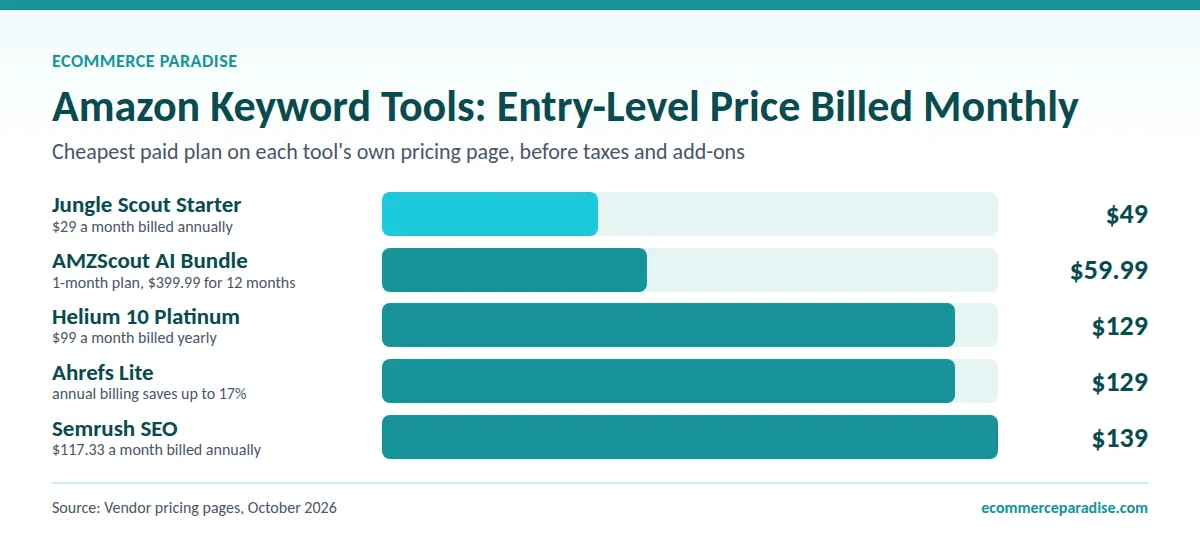
AMZScout ($59.99/month, or about $33/month on the 12-month plan) or MerchantWords ($39/month) provide solid keyword research at affordable prices. AMZScout is better for overall Amazon selling (includes product research); MerchantWords is better for pure keyword focus with real search data. Both offer enough functionality for growing sellers without breaking the bank.
If you are serious about Amazon ($80-150/month):
Jungle Scout Growth Accelerator ($79/month) or Helium 10 Platinum ($129/month, or $99 billed yearly) are the industry standards. Choose Jungle Scout if you want simplicity, great product research, and easier learning curve. Choose Helium 10 if you want the most powerful keyword tools (Magnet and Cerebro) and deeper data. Both are excellent investments for committed sellers.
If you are scaling a brand ($150+/month):
Helium 10 Diamond ($359/month, or $279 billed yearly) provides everything a serious brand needs: an AI agent, ads automation, inventory and profit reporting, and long-term keyword trend analysis. At this level, the data accuracy and time savings justify the cost. If you are doing $100K+ annually in sales, this investment pays for itself.
If you operate a brand site or YouTube channel alongside Amazon:
Add Semrush One ($199/month Starter) on top of your Amazon-native tool. Semrush One covers Google rankings, YouTube search, and AI Visibility tracking across ChatGPT, Perplexity, Gemini, and Google AI Overviews. For brands serious about capturing pre-Amazon traffic, this is the standard tool stack. Total combined cost with Helium 10 Platinum: around $328/month on monthly billing, which is fully reasonable for any brand doing $200K+ annually.
If you are international (selling in multiple marketplaces):
SellerSprite ($39/month) offers excellent coverage across 10 Amazon marketplaces at a reasonable price. Helium 10 also lists 24+ marketplaces but costs more. For global expansion, marketplace-specific research is essential – do not assume US keywords work elsewhere.
My personal recommendation for most sellers:
Start free (Amazon tools + Keyword Tool free), then invest in Jungle Scout Growth Accelerator ($79/month) for your first year. After consistent revenue ($50K+/year), upgrade to Helium 10 Platinum ($129/month) for more powerful Amazon-native keyword research. Once you launch a brand site or YouTube channel, layer in Semrush One ($199/month Starter) for external traffic and AI search visibility. This progression balances learning, budget, and long-term capability.
Summary & Tool Links
Here is a quick reference to all 11 Amazon keyword research tools covered:
- Helium 10 – Industry-leading Amazon-native toolkit with Magnet and Cerebro for comprehensive keyword research and competitor analysis (top Amazon pick)
- Semrush One – Cross-platform SEO and AI Visibility tracking covering Google, YouTube, and AI search platforms (top external/AI pick)
- Jungle Scout – User-friendly all-in-one platform with Keyword Scout, excellent balance of product research and keyword tools
- AMZScout – Budget-friendly option with essential keyword research features and a low-cost 12-month plan
- Ahrefs – Cross-platform keyword research including Amazon, best for sellers with websites and multi-channel presence
- MerchantWords – Real Amazon shopper search data compiled from millions of actual searches, focused on buyer behavior
- SellerSprite – Strong international marketplace support across 10 countries with competitive pricing
- Keyword Tool for Amazon – Free Amazon autocomplete research with 750+ suggestions, good for quick discovery
- Amazon’s Built-In Tools – Free tools in Seller Central including search bar, Product Opportunity Explorer, and Brand Analytics
- Google Keyword Planner – Free cross-platform research useful for seasonal trends and supplementary insights
- Sellesta – AI-powered listing optimization with smart keyword recommendations and automated improvements
Most successful Amazon sellers in 2026 combine:
- One comprehensive Amazon-native tool (Helium 10 or Jungle Scout)
- One external traffic + AI Visibility tool (Semrush One) if running a brand site or YouTube channel
- Amazon’s free built-in tools for validation
- Keyword Tool or search bar for supplementary discovery
- Rank tracking to monitor performance
Start with tools matching your current budget and product count, then upgrade as revenue grows. The investment in proper Amazon keyword research pays for itself many times over through increased visibility, better organic rankings, more profitable PPC campaigns, and external traffic captured before shoppers ever reach Amazon.
Ready to dominate Amazon search results? Choose one Amazon-native tool from this guide, layer in Semrush One if you operate external traffic channels, research keywords for your next 5 products, and implement the strategies outlined. Consistent, strategic keyword research is the foundation of long-term Amazon success.
Here is to your Amazon business crushing it in 2026!
Build the complete Amazon keyword stack
Helium 10 covers Amazon-native research. Semrush One covers Google, YouTube, and AI search visibility. Together they cover every surface where Amazon shoppers find products in 2026. Start with whichever you need first. Semrush has a 7-day free trial and Helium 10 has free tools.
For external traffic and AI Visibility tracking: Try Semrush One →
If you are building a high-ticket ecommerce business, keyword research is how you find what your customers are actually searching for. Combine these tools with a solid understanding of high-ticket dropshipping, the right niche selection, proper business formation, and reliable suppliers for a complete foundation.
If you want additional support, we offer services and community to help you succeed.
Turnkey Dropshipping Stores: We build your complete high-ticket store from scratch so you can skip the technical setup and focus on operations.
Private Coaching: One-on-one guidance tailored to your business goals and challenges.
Google Shopping Ads Management: We run and optimize your Google Shopping campaigns so you get real traffic from buyers ready to purchase.
Scaling Services: Already have a store? We help you scale operations, optimize conversions, and grow revenue to the next level.
Join Our Free Skool Community: Connect with other high-ticket dropshippers for live discussions, accountability, and real feedback on your store.
Related Articles
If you found this useful, these guides go deeper on related topics:
- Best Keyword Research Tools for SEO in 2026: Rank Higher on Google
- Best Keyword Research Tools for YouTube in 2026: Grow Your Channel Fast
- Best Keyword Research Tools for Ecommerce Success in 2026
- Shopify vs Amazon in 2026: Which Is Better for Selling Online?
- High-Ticket Dropshipping on Amazon: What You Need to Know
- What Is High-Ticket Dropshipping: A Comprehensive Guide
- High-Ticket Dropshipping Niches List
- How to Find the Best Suppliers for High-Ticket Dropshipping
- Business Formation: The Complete Legal and Financial Foundation Checklist
This article was written by Trevor Fenner, founder of Ecommerce Paradise. Trevor has 15+ years of experience in ecommerce and high-ticket dropshipping, helping entrepreneurs build profitable online businesses. For questions, reach out at trevor@ecommerceparadise.com.

Trevor Fenner is an ecommerce entrepreneur and the founder of Ecommerce Paradise, a platform focused on helping entrepreneurs build and scale profitable high-ticket ecommerce and dropshipping businesses. With over a decade of hands-on experience, Trevor specializes in high-ticket dropshipping strategy, niche and product selection, supplier recruiting and onboarding, Google & Bing Shopping ads, ecommerce SEO, and systems-driven automation and scaling. Through Ecommerce Paradise, he provides free education via in-depth guides like How to Start High-Ticket Dropshipping, advanced training through the High-Ticket Dropshipping Masterclass, and fully done-for-you turnkey ecommerce services for entrepreneurs who want a faster, more hands-off path to growth. Trevor is known for emphasizing sustainable, real-world ecommerce models over hype-driven tactics, helping store owners build scalable, sellable, and location-independent brands.


