

Our top pick: Semrush One for SEO + AI Visibility in 2026
The only major platform that bundles classic SEO tools with AI Visibility tracking across ChatGPT, Google AI Overviews, AI Mode, Perplexity, and Gemini in one subscription. Plans start at $139/month, and Starter is $199/month.
Keyword research sits at the foundation of every SEO strategy that actually works. It determines which content you create, which pages you optimize, how you structure your site architecture, and ultimately whether your target audience can find you at all. Google has said it sees more than 5 trillion searches a year. Without targeting the specific terms your customers use, your content is invisible to them regardless of how well-written or well-structured it is.
The keyword research tool market has changed more in the past 18 months than in the prior decade. Semrush relaunched its flagship platform in October 2025 as Semrush One, a unified product that bundles the classic SEO Toolkit with the new AI Visibility Toolkit, tracking how brands appear in ChatGPT, Google AI Overviews, AI Mode, Perplexity, and Gemini. Ahrefs has expanded its own AI tracking features. Specialized tools have emerged to fill specific gaps: question-based research, low-competition keyword discovery, visual ideation. Free Google tools have improved meaningfully while remaining genuinely limited for competitive research. The keyword research category is now an AI visibility category in disguise, and the leading platforms have repriced and repositioned to match.
The challenge for most buyers is not a shortage of options but a lack of clarity about which tool actually solves their specific problem. A new ecommerce store owner who needs to identify rankable long-tail opportunities before spending months creating content has different requirements than an agency running keyword gap analysis across 50 client domains. A content marketer building FAQ coverage for featured snippet targeting needs different functionality than an SEO consultant doing technical audits. The right tool is the one that fits your use case, not the one with the most impressive database size.
This guide covers 12 keyword research tools ranked for 2026, evaluated honestly for data accuracy, feature depth, ease of use, pricing, and fit for specific use cases. Here is a quick overview before the full breakdown.
Quick overview of recommended keyword research tools:
- Semrush One: Best all-in-one SEO and AI Visibility platform
- Ahrefs: Best for data accuracy and backlink analysis
- Moz: Best for beginners who want simplified decision-making
- Google Keyword Planner: Best free tool for initial research
- SE Ranking: Best overall value for growing businesses
- KWFinder by Mangools: Easiest to use for keyword research
- Ubersuggest: Best budget-friendly alternative with lifetime option
- AlsoAsked: Best for question-based keyword research
- LowFruits: Best for finding low-competition keywords
- AnswerThePublic: Best for visual keyword discovery
- Google Search Console: Best free tool for tracking actual performance
- Google Trends: Best free tool for seasonal trend analysis
Quick Comparison Table
Here is the side-by-side overview of all 12 keyword research tools at a glance. Detailed breakdowns of each tool with pros, cons, and pricing follow further down the page.
| Tool | Best For | Starting Price | Get It |
|---|---|---|---|
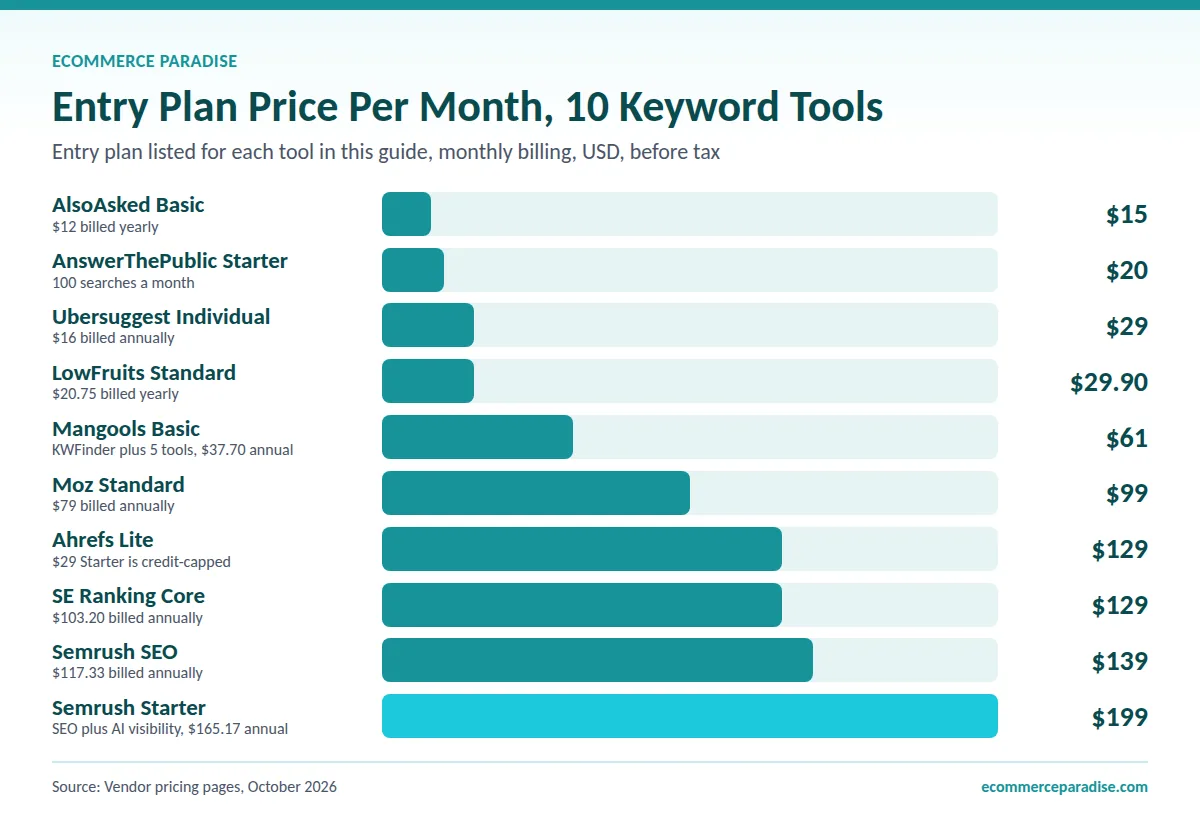
| Semrush One | SEO + AI Visibility (top pick) | $139/mo (SEO) or $199/mo (Starter) | Start → |
| Ahrefs | Data accuracy and backlinks | $29/mo (Starter) or $129/mo (Lite) | Visit → |
| Moz | Beginners and simplified scoring | $79/mo billed annually ($99 monthly) | Visit → |
| SE Ranking | Best overall value | $129/mo (Core) | Start → |
| KWFinder | Easiest to use | $61/mo ($37.70 annual) | Start → |
| Ubersuggest | Lifetime deal option | $29/mo or $290 lifetime | Start → |
| AlsoAsked | Question-based research | $15/mo | Start → |
| LowFruits | Low-competition keywords | $29.90/mo | Start → |
| AnswerThePublic | Visual keyword discovery | Free / from $20/mo | Visit → |
| Google Keyword Planner | Free initial research | Free | Visit → |
| Google Search Console | Actual performance tracking | Free | Visit → |
| Google Trends | Seasonal trend analysis | Free | Visit → |
What Is a Keyword Research Tool and Why Does It Matter for Your Business?
A keyword research tool is software that aggregates search data from search engines, analyzes patterns in what people search for, and surfaces insights about search volume, competition, ranking difficulty, and search intent across a given keyword set. At the most basic level, these tools tell you how often a term is searched, how hard it is to rank for, and what intent underlies the search. At the more sophisticated level, they reveal what your competitors rank for, where the gaps in your content strategy are, and which opportunities have the most realistic path to ranking success given your site’s current authority.
For ecommerce entrepreneurs and dropshipping store owners specifically, keyword research is not just a content marketing exercise. It determines which products to feature prominently, how to structure category pages for maximum organic visibility, which buying-intent terms to target with product descriptions, and which informational topics can build the organic traffic that reduces dependence on paid advertising over time. A high-ticket dropshipping store that ranks organically for its core product category terms has a cost-per-acquisition advantage over competitors relying entirely on Google Shopping and paid search.
The real-world cost of skipping proper keyword research is not just poor SEO results. It is months of content creation effort directed at terms that are either impossible to rank for given your site’s current authority, have no meaningful search volume, or attract traffic that has no intent to buy. Every piece of content represents a time and money investment. Keyword research ensures that investment is directed toward searches where ranking is achievable and where the audience is qualified.
What to Look For in a Keyword Research Tool
Data Accuracy and Database Size
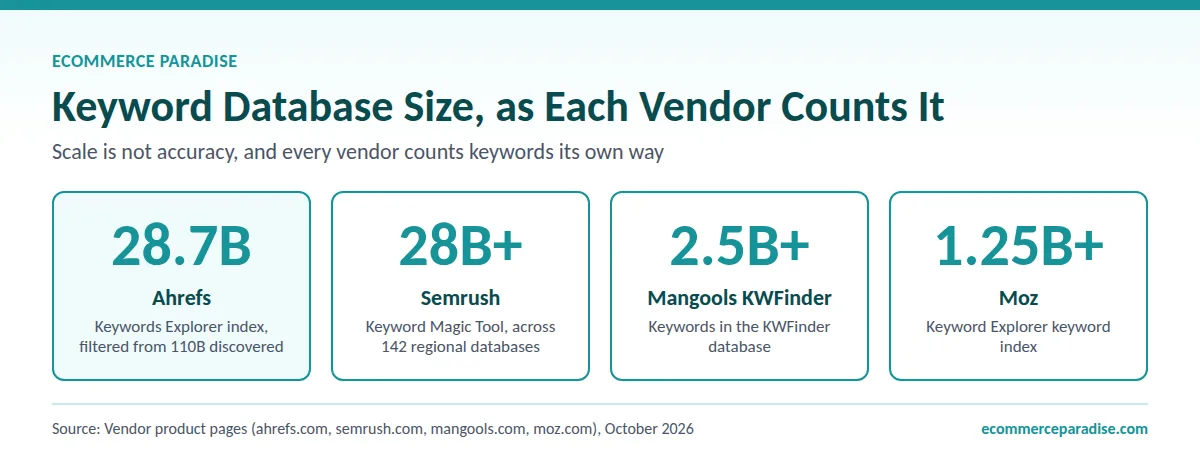
No keyword research tool has access to exact search volume data except Google itself. Every third-party tool, including Ahrefs and Semrush, works from estimates derived from clickstream data, Google Keyword Planner data, and proprietary methodologies. The practical difference between tools on accuracy is meaningful: Ahrefs and Semrush are generally considered the most accurate, though no third-party tool matches Google’s own figures. Smaller tools are often less reliable, particularly for long-tail keywords with lower volumes. For strategic decisions, relative accuracy matters more than absolute numbers: knowing that Keyword A gets more searches than Keyword B is more important than knowing the exact volume of either.
Keyword Difficulty Scoring
Keyword difficulty scores attempt to predict how hard it will be to rank on page one for a given term. The underlying methodology varies significantly between tools. Ahrefs bases its difficulty primarily on the backlink profiles of the current top-10 ranking pages. Semrush factors in a broader range of on-page and off-page signals. Moz uses its own Domain Authority and Page Authority metrics. None is perfectly accurate because Google’s ranking algorithm considers hundreds of signals, but difficulty scores are useful for identifying realistic versus aspirational targets given your site’s current authority level.
Search Intent Classification
Understanding why someone is searching a term, whether they want to learn something, compare options, or make a purchase, is as important as knowing the volume. A term with 2,000 monthly searches and strong buying intent is more valuable for a product page than a term with 10,000 searches and purely informational intent. Modern keyword tools increasingly classify intent automatically, and this classification quality is a meaningful differentiator. Semrush’s intent classification is among the most sophisticated, categorizing keywords across informational, navigational, commercial investigation, and transactional intent at scale.
AI Visibility Coverage
The newest dimension of keyword research, and the one that did not meaningfully exist 18 months ago, is AI visibility tracking. As ChatGPT, Google AI Overviews, AI Mode, Perplexity, and Gemini answer a growing share of queries directly within the AI interface rather than sending traffic to traditional search results, knowing how your brand appears in those AI-generated responses has become as strategically important as knowing where your pages rank in classic Google. Semrush One is the most developed offering in this category, bundling AI visibility tracking with traditional SEO data in one platform. Specialized tools like Profound exist, but for most marketers running a unified strategy, integrated coverage in a single platform is more practical than juggling separate tools.
Competitive Intelligence Features
The most actionable keyword research is not just finding terms in isolation but understanding what your competitors rank for, where they get their traffic, and where gaps exist that you can fill. Keyword gap analysis, which shows terms your competitors rank for that you do not, is one of the highest-leverage uses of keyword research tools. This capability requires a robust competitor research module, which the full-suite platforms provide much more completely than specialized tools.
Value Relative to Your Use Case
Full-suite keyword research platforms cost $99 to $549 per month on monthly billing, depending on the tier. That investment is clearly justified for an agency managing dozens of clients or a serious publisher where organic traffic drives direct revenue. For a new store owner still validating their first product category, starting with free tools and a mid-tier option is the more rational approach. Match the tool’s cost to the revenue your SEO efforts are currently generating, and upgrade when the data quality becomes a binding constraint on your growth.
The Best Keyword Research Tools for SEO in 2026
1. Semrush One: Best All-in-One SEO and AI Visibility Platform
Semrush relaunched as Semrush One in October 2025, unifying its flagship SEO Toolkit with the new AI Visibility Toolkit in a single bundled product. The combined platform tracks classic Google rankings, keyword research across more than 28 billion keywords, competitive intelligence, site audits, and rank tracking, alongside AI visibility data showing how your brand and content appear in ChatGPT, Google AI Overviews, AI Mode, Perplexity, and Gemini. For most serious operators in 2026, Semrush One has become the most defensible single-platform choice because it covers both halves of modern search visibility from one subscription.
Semrush One Pricing and Tiers
Semrush publishes one ladder of four plans, with annual billing saving up to 17 percent. SEO is $139 per month, or $117.33 on annual billing, covering 5 websites and 500 tracked keywords. Starter is $199, or $165.17, adding the full keyword research and optimization tools, competitor insight tools and 50 daily prompt checks on the same 5 websites and 500 keywords. Pro+ is $299, or $248.17, covering 15 websites, 1,500 keywords, historical data, content optimization and 100 daily prompt checks. Advanced is $549, or $455.67, covering 40 websites, 5,000 keywords, API data integration and 200 daily prompt checks, which suits larger agencies and enterprise teams.
An earlier version of this section treated Semrush One as a bundle sitting $40 to $50 per month above an equivalent classic SEO plan, and recommended that bundle over paying $99 per month for a standalone AI Visibility Toolkit. Both halves of that comparison are gone, so the recommendation goes with them. There is no separate classic ladder to compare against, because SEO, Starter, Pro+ and Advanced are the published plans, and AI Visibility tracking across ChatGPT, Google AI Overviews, AI Mode, Perplexity and Gemini is built into every one of those tiers at no extra charge. Semrush does not publish a standalone AI Visibility Toolkit price on that page, so there is no add-on figure left to compare a bundle against. The old arithmetic was also miscalculated: the total printed was $238.95, which carried a stray 95 cents over from the retired entry price, when $139 plus $99 is $238. The honest version is simpler than the one this article used to run. Pick a tier on the daily prompt allowance you actually need, 50 on Starter, 100 on Pro+ or 200 on Advanced, because there is no cheaper route to AI visibility on a lower tier and no bundle premium to avoid. The Pro, Guru and Business tiers this article used to quote are retired, and so are the prices that sat on them. Read off semrush.com/pricing/seo-ai-search/ on 15 September 2026.
Keyword Magic Tool
The Keyword Magic Tool generates thousands of keyword variations from a single seed term, automatically grouped by topic cluster. AI-powered intent classification categorizes each suggestion across informational, navigational, commercial, and transactional intent without manual review. Filtering by difficulty, volume, CPC, and intent simultaneously surfaces the specific opportunities most relevant to a content plan or product strategy. At over 28 billion keywords, the database covers long-tail opportunities that smaller tools miss entirely.
Keyword Gap Analysis
Semrush’s Keyword Gap tool is one of its highest-value competitive intelligence features. Entering up to five competitor domains surfaces all keywords they rank for that your domain does not, filtered by overlap, difficulty, and volume. For ecommerce stores and content publishers alike, this analysis reveals the most actionable organic opportunities with the clearest competitive framing: here is what is working for your competitors, ranked by achievability.
AI Visibility Toolkit
The AI Visibility Toolkit is the layer that distinguishes Semrush One from every other major SEO platform in 2026. It tracks how often your brand and competitors are mentioned in AI-generated responses, the sentiment of those mentions, the prompts that trigger them, and the gaps where competitors are appearing for queries your brand should be visible on. Semrush says its AI prompt database holds more than 317 million prompts and responses across ChatGPT, Gemini, Google AI Overviews, and AI Mode. For brands building visibility strategies that account for AI-driven discovery, this is the most developed integrated solution available.
Site Audit With AI Readiness
Semrush One’s site audit module now includes AI readiness checks alongside the traditional technical SEO audit. The AI readiness layer flags pages that are technically fine for Google but confusing for AI systems to parse and quote, which is increasingly important as AI search shapes brand visibility. For ecommerce stores where product page indexing affects hundreds of pages simultaneously, surfacing both classic SEO issues and AI-specific structural problems in the same audit is meaningful operational value.
Pros:
- Most comprehensive feature set in the market, combining classic SEO and AI visibility in one platform
- Tracks brand visibility across ChatGPT, Google AI Overviews, AI Mode, Perplexity, and Gemini
- Intent classification across 28 billion+ keywords at scale
- Keyword gap analysis surfaces competitor opportunities directly
- Site audit includes AI readiness checks alongside technical SEO
Cons:
- Highest entry-level pricing on this list at $139 per month for the SEO plan, and $199 for Starter
- Feature density is overwhelming for beginners who only need basic keyword data
- Search volume numbers are estimates, not exact figures
- Adding team members or extra domains increases costs significantly
Quick Specs:
- Starting price: $199/month (Starter, the plan recommended here); $139/month (the entry SEO plan)
- Keyword database: 28+ billion
- Free option: 7-day free trial on the paid plans, plus a free plan
- Best for: Agencies, serious publishers, ecommerce businesses needing both SEO and AI visibility coverage
➡ Try Semrush One: Best All-in-One SEO and AI Visibility Platform
Track your visibility on Google AND ChatGPT, Perplexity, Gemini, AI Mode
Semrush One bundles 28 billion keywords with AI Visibility tracking across every major LLM. Starter at $199/mo with a 7-day free trial.
2. Ahrefs: Best for Data Accuracy and Backlink Analysis
Ahrefs built its reputation on operating the second-largest web crawler after Google, which gives it a backlink database and keyword data set that rivals Semrush in depth while often outperforming it on accuracy. Its Keywords Explorer indexes 28.7 billion keywords across 217 locations, and its Traffic Potential metric, which estimates actual clicks rather than raw search volume, provides a more useful signal for content prioritization than volume alone. For experienced SEOs who prioritize data precision over feature breadth, Ahrefs remains the preferred tool.
Traffic Potential vs. Search Volume
Ahrefs’s Traffic Potential metric is one of its most useful differentiators. Rather than reporting only the search volume for a single keyword, Traffic Potential estimates the total organic traffic a page could receive by ranking for that term and all the related keywords the top-ranking page typically ranks for simultaneously. This gives a more realistic picture of the actual traffic opportunity than a raw volume figure, which represents only one of the many terms a well-optimized page will attract.
Click Data and SERP Analysis
Ahrefs shows what percentage of searches for a given keyword actually result in a click through to a website, which is distinct from what ends up in a featured snippet, a People Also Ask box, or an AI-generated answer that satisfies the query without a click. For traffic planning purposes, a keyword where 80 percent of searchers click through to results is a better investment than one where 60 percent of searches are satisfied by a Google feature that intercepts the traffic.
Parent Topic Clustering
Ahrefs’s Parent Topic feature identifies the broader topic a keyword is part of, grouping related terms under a single content strategy unit. This makes it easier to understand when to create one comprehensive piece of content targeting a cluster versus when separate pages serve distinct intents. For ecommerce sites managing large content libraries, this clustering intelligence reduces content duplication and helps prioritize consolidation opportunities.
Pricing Consideration
Ahrefs’ pricing page lists no free trial of its paid plans, only a limited Ahrefs Free account, which is a notable friction point for new users evaluating the platform. A $29 per month Starter plan with 200 credits a month sits below Lite for light use. The Lite plan at $129 per month covers the primary keyword research use cases for individual sites. The Standard plan at $249 per month adds more historical data and higher usage limits relevant for agencies and higher-volume publishers.
Pros:
- Traffic Potential metric gives more realistic content opportunity estimates than raw search volume
- Click data shows actual click-through percentage for SERP feature-heavy keywords
- Best backlink database in the market, directly relevant to keyword difficulty scoring quality
- Parent Topic clustering supports more strategic content planning
Cons:
- No free trial of the paid plans listed, only a limited Ahrefs Free account
- Higher learning curve than KWFinder or Moz for new users
- AI visibility tracking is less developed than Semrush One’s integrated coverage
- Expensive for small businesses or new sites where budget is constrained
Quick Specs:
- Starting price: $129/month (Lite); a $29/month Starter plan offers 200 credits a month
- Keyword database: 28.7 billion across 217 locations
- Free option: Ahrefs Free (limited Site Explorer and Site Audit); no trial of paid plans listed
- Best for: Established sites, agencies, experienced SEOs prioritizing data accuracy
➡ Try Ahrefs: Best for Data Accuracy and Backlink Analysis
3. Moz: Best for Beginners Who Want Simplified Decision-Making
Moz distinguishes itself not through database size or feature breadth but through the clarity of its decision-making signals. Its Priority Score, which combines search volume, keyword difficulty, and organic CTR into a single metric, simplifies the keyword selection process for users who do not want to weight multiple data points manually. Combined with an intuitive interface that does not overwhelm new users and its industry-standard Domain Authority metric, Moz is the most accessible entry point into professional keyword research tools for SEOs who are still building their methodology.
Priority Score
Moz’s Priority Score is the most useful feature for users new to keyword research. Rather than requiring the user to balance search volume, difficulty, and CTR data independently, the Priority Score produces a single 0 to 100 rating that reflects all three inputs simultaneously. For a content marketer or small business owner who wants to act on keyword data without developing deep SEO methodology first, this simplification delivers immediate value.
Domain Authority as a Standard Metric
Moz’s Domain Authority metric, which estimates the overall ranking strength of a domain on a 0 to 100 scale, has become an industry-standard reference point used across SEO tools, content partnerships, and link building outreach. While Ahrefs’s Domain Rating and Semrush’s Authority Score measure similar concepts, Moz’s DA remains the most widely cited in non-SEO contexts, which gives it practical utility beyond the tool itself.
Limitation Relative to Premium Competitors
Moz’s keyword database is meaningfully smaller than Ahrefs and Semrush, which affects its long-tail keyword discovery depth. Its competitive intelligence features are also more limited than the full-suite platforms, making it less suitable for gap analysis and competitor traffic research at the depth that serious content strategies require. For users who outgrow Moz’s capabilities, the upgrade path naturally leads to Semrush One or Ahrefs.
Pros:
- Priority Score simplifies keyword selection for users without deep SEO methodology
- Most beginner-friendly interface of any paid keyword research tool on this list
- Domain Authority is the most widely recognized authority metric in the industry
- Standard plan at $79 per month billed annually ($99 month to month), with AI visibility tracking included
Cons:
- Smaller keyword database than Ahrefs or Semrush limits long-tail discovery
- Weaker competitive intelligence than full-suite competitors
- Query limits on lower-tier plans constrain research volume
Quick Specs:
- Starting price: $79/month billed annually, $99/month billed monthly (Standard)
- Keyword database: 1.25 billion+ keyword suggestions, smaller than Ahrefs/Semrush but adequate for standard research
- Free option: Free trial, plus limited free access to Keyword Explorer and MozBar with a free Moz Community account
- Best for: SEO beginners, small businesses, marketers who value simplicity
4. Google Keyword Planner: Best Free Tool for Initial Research
Google Keyword Planner is the only keyword research tool on this list that sources data directly from Google rather than estimating it from third-party signals. This makes it uniquely authoritative for one specific purpose: understanding the relative search demand for terms as Google itself measures it. It was designed for Google Ads campaign planning rather than SEO, which creates specific limitations, but as a free starting point for keyword discovery before investing in paid tools, it remains genuinely useful.
Direct Google Data
The primary advantage of Keyword Planner is source credibility. While other tools estimate search volume from clickstream data and sampling, Keyword Planner’s data originates from Google’s own advertising infrastructure. For users who need to validate whether a keyword has meaningful search demand before building a content strategy around it, Keyword Planner provides that validation at zero cost.
Limitations for SEO Use
Google Keyword Planner presents search volume in broad ranges rather than exact numbers for accounts not actively running ads. It does not provide keyword difficulty scores, competitive analysis of organic rankings, or SERP analysis. It was optimized for PPC planning, so it tends to surface higher-competition, higher-CPC terms and suppress long-tail keywords that are highly relevant for SEO content strategies. For anything beyond initial research and validation, a paid SEO tool is needed.
Pros:
- Completely free with a Google Ads account
- Data sourced directly from Google rather than estimated
- Shows seasonal trends and CPC data useful for content and business planning
- No subscription required and no usage limits
Cons:
- Shows broad volume ranges rather than precise numbers without active ad spend
- No keyword difficulty scores or competitive analysis
- Designed for PPC rather than SEO, suppresses long-tail keywords
- Cannot analyze competitors or identify content gaps
Quick Specs:
- Starting price: Free
- Keyword database: Google’s own data
- Free option: Yes, fully free
- Best for: Beginners, businesses running Google Ads, initial keyword validation
➡ Try Google Keyword Planner: Best Free Tool for Initial Research
5. SE Ranking: Best Overall Value for Growing Businesses
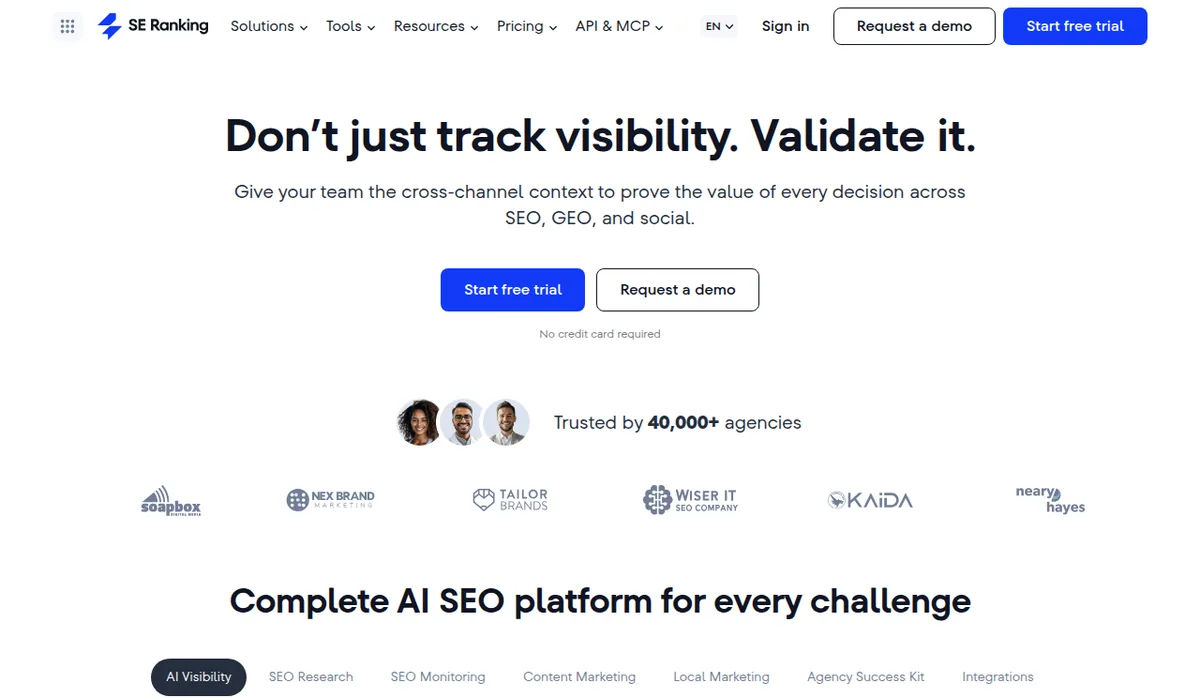
SE Ranking provides a comprehensive SEO toolset with larger tracking allowances than similarly priced rivals, making it the strongest value option for growing businesses and agencies that need full-platform capability without the enterprise price tag. Its keyword research tool, rank tracker, site auditor, backlink checker, and on-page SEO checker are all included at the Core tier, giving solo operators and small agencies the full research workflow at a cost that is easy to justify on a growing site’s budget.
Comprehensive Tool Coverage at Accessible Pricing
At $129 per month on the Core plan ($103.20 per month billed annually), SE Ranking includes 2,000 daily tracked keywords and 100 daily AI prompts. Ahrefs Lite costs the same $129 and includes 750 tracked keywords and 5 tracked AI prompts, while the Semrush SEO plan at $139 includes 500 tracked keywords. The keyword research tool provides search volume, difficulty, CPC, and SERP analysis. The rank tracker monitors daily position changes across devices and locations. The competitive research module surfaces competitor keyword strategies. For businesses that need all of these capabilities but cannot yet justify a premium platform subscription, SE Ranking fills that gap more completely than any other option on this list.
White Label for Agencies
SE Ranking’s white label options, available through the Agency Pack add-on at $69 per month on annual billing, allow agencies to present keyword research reports and rank tracking dashboards under their own brand. For boutique SEO agencies serving local business clients, this professional presentation capability adds genuine value that specialized tools without agency features cannot provide.
Keyword Grouper
SE Ranking’s built-in Keyword Grouper organizes keyword lists by semantic similarity, clustering related terms into content strategy groups automatically. This saves significant time in the content planning phase and reduces the likelihood of creating duplicate content targeting overlapping keyword sets.
Pros:
- Best price-to-feature ratio of any comprehensive SEO tool on this list
- Full keyword research, rank tracking, site auditing, and competitive analysis in one platform
- White label reporting options for agencies at competitive pricing
- 14-day free trial for genuine pre-purchase evaluation
Cons:
- Interface is less polished than Semrush or Ahrefs
- Keyword database smaller than the top-tier platforms
- AI visibility tracking is capped at 100 prompts a day on Core (250 on Growth)
- Some features feel less refined than equivalent tools in premium platforms
Quick Specs:
- Starting price: $129/month (Core), or $103.20/month billed annually
- Keyword database: Comprehensive for standard research needs
- Free option: 14-day free trial
- Best for: Growing businesses, budget-conscious agencies, businesses wanting comprehensive tools at lower cost
➡ Try SE Ranking: Best Overall Value for Growing Businesses
Get full-platform SEO capability with 2,000 tracked keywords on the Core plan
SE Ranking includes keyword research, rank tracking, site auditing, and competitive analysis from $129/mo with a 14-day free trial.
6. KWFinder by Mangools: Easiest to Use for Keyword Research
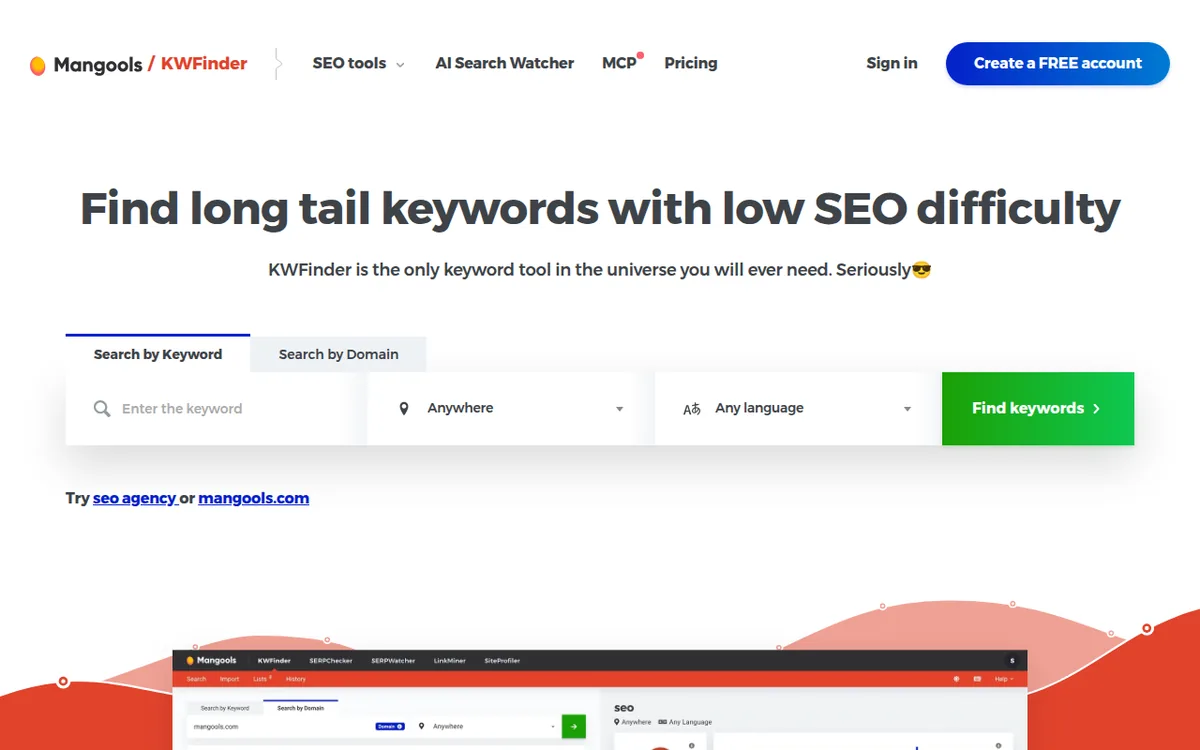
KWFinder, part of the Mangools six-tool suite, is the most beginner-friendly paid keyword research tool available. Its clean visual interface, clear difficulty scoring, and fast SERP analysis make the core keyword research workflow immediately accessible for users who are learning SEO alongside running their business. For non-technical users who find Semrush and Ahrefs visually overwhelming, KWFinder’s simplified presentation of the same fundamental data removes the learning curve while preserving the accuracy needed for actionable research.
Simple Keyword Difficulty Scoring
KWFinder’s difficulty score is one of the most readable in the market. The 0 to 100 scale is displayed with clear color coding and a straightforward label system that tells users immediately whether a keyword is easy, medium, hard, or very hard without requiring them to interpret a number on a curve. For new SEOs building their first keyword strategies, this clarity reduces the risk of targeting unrealistic terms due to misreading a difficulty metric.
Location-Specific Research
KWFinder supports keyword research across 65,000+ locations, which is particularly relevant for local businesses and regional ecommerce stores that need to understand search demand at the city or state level rather than just nationally. This location granularity is more accessible in KWFinder’s interface than in tools that require more technical configuration to surface local data.
Mangools Suite Value
KWFinder is sold as part of the Mangools suite, which includes SERPChecker for SERP analysis, SERPWatcher for rank tracking, LinkMiner for backlink research, SiteProfiler for domain authority analysis, and AI Search Watcher for AI search monitoring. The bundle provides a functional full-workflow SEO toolkit at $61 per month on the Basic plan ($37.70 per month billed annually), which is meaningful value for users who need all six capabilities without the complexity of a larger platform.
Pros:
- Most beginner-friendly interface of any paid keyword research tool on this list
- Clear difficulty scoring with color coding that is immediately interpretable
- Location-specific research across 65,000+ locations for local and regional strategies
- Mangools suite bundles six tools for a complete SEO workflow from $61/month ($37.70/month billed annually)
Cons:
- Query limits on the Basic plan constrain research volume for high-frequency users
- Database smaller than Ahrefs or Semrush, less reliable for very low-volume long-tail terms
- No standalone option: the suite must be purchased as a bundle
Quick Specs:
- Starting price: $61/month billed monthly, $37.70/month billed annually (Basic, full Mangools suite)
- Keyword database: Solid for standard and intermediate research
- Free option: Free account with 5 KWFinder lookups per 24 hours
- Best for: SEO beginners, small businesses, users who prioritize ease of use
➡ Try KWFinder: Easiest to Use for Keyword Research
The cleanest interface in keyword research, plus five bundled tools
KWFinder bundles six Mangools tools from $61/mo ($37.70/mo billed annually). Color-coded difficulty scoring makes keyword selection immediately interpretable for new SEOs.
7. Ubersuggest: Best Budget-Friendly Alternative With Lifetime Option
Neil Patel’s Ubersuggest is the most accessible paid keyword research tool in the market, with a monthly Individual plan at $29 and a lifetime purchase option at $290. For bloggers, early-stage store owners, and small businesses who need more than free tools offer but cannot yet justify $129 to $199 per month, Ubersuggest provides a functional keyword research, competitive analysis, and rank tracking workflow at a price that removes the cost barrier entirely.
Lifetime Purchase Option
Ubersuggest’s one-time $290 lifetime plan is its most distinctive competitive advantage. For users who are confident they will use a keyword research tool for at least 12 months, the lifetime option eliminates ongoing subscription costs entirely. At $29 per month, the lifetime deal pays for itself in 10 months. For small business owners who run lean operations and dislike ongoing subscriptions, this pricing model is genuinely attractive.
Feature Coverage at Budget Pricing
Ubersuggest includes keyword suggestions, SEO difficulty scores, content ideas showing what currently ranks well, basic competitor keyword and backlink data, rank tracking, and site audits. None of these are as deep or as accurate as the equivalent features in Semrush One or Ahrefs, but for validating keyword opportunities, understanding basic competitive landscapes, and tracking a growing site’s position movement, the coverage is adequate at the price point.
Accuracy Considerations
Ubersuggest’s keyword data accuracy is a legitimate concern at the lower end of the price range. Volume estimates and difficulty scores are generally less reliable than Ahrefs or Semrush, particularly for lower-volume terms where the difference between 50 and 500 monthly searches is strategically significant. For users making high-stakes content investment decisions, Ubersuggest’s data should be validated against a more accurate source before committing significant effort.
Pros:
- Lifetime purchase option at $290 eliminates ongoing subscription costs
- Low-cost plan at $29 per month, or $16 per month billed annually
- Covers keyword research, competitor analysis, rank tracking, and site audits
- Beginner-friendly interface accessible without prior SEO knowledge
Cons:
- Less accurate keyword data than premium tools, particularly for low-volume terms
- Smaller keyword database than Ahrefs or Semrush
- Feature depth lags behind mid-tier and premium competitors
Quick Specs:
- Starting price: $29/month or $290 lifetime (Individual)
- Keyword database: Adequate for basic and intermediate research
- Free option: Limited free usage
- Best for: Small businesses on tight budgets, bloggers, users wanting lifetime pricing
➡ Try Ubersuggest: Best Budget-Friendly Alternative
Lock in keyword research forever with the $290 lifetime deal
Ubersuggest’s one-time $290 plan pays for itself in 10 months and eliminates ongoing subscription costs entirely. Beginner-friendly and budget-conscious.
8. AlsoAsked: Best for Question-Based Keyword Research
AlsoAsked is a specialized tool that extracts and visualizes the question relationships from Google’s People Also Ask boxes, surfacing the specific questions people ask about topics across a visual tree structure. It does not replace a comprehensive keyword research tool but fills a specific and high-value gap: understanding the question intent landscape around a topic for content marketing, FAQ optimization, and featured snippet targeting. At $15 per month for the Basic plan, it is one of the most cost-effective specialized tools in SEO.
People Also Ask Data at Scale
Google’s People Also Ask boxes are visible on a large percentage of search results pages and represent high-intent signals about what additional context searchers need around a topic. AlsoAsked systematically extracts this data across query variations, surfacing question relationships that manual SERP browsing would take hours to map. For content marketers building comprehensive guides or FAQ sections, this question mapping is immediately actionable.
Visual Search Trees
AlsoAsked’s visual tree interface displays how questions branch from a root topic, showing which questions are closely related and which are tangentially associated. This structure helps content planners understand how comprehensively a topic needs to be covered to satisfy the full scope of searcher intent rather than just the primary query.
Featured Snippet and Voice Search Optimization
Question keywords are the most common trigger for featured snippets, which appear at position zero above all organic results. Content formatted to directly answer specific questions is the primary path to capturing these high-visibility placements. AlsoAsked provides the question map that makes this optimization systematic rather than guesswork.
Pros:
- Most affordable specialized SEO tool on this list at $15 per month
- Unique question-relationship mapping from Google’s PAA data
- Visual tree interface makes content planning from questions immediately intuitive
- Directly supports featured snippet capture, FAQ optimization, and voice search
Cons:
- No search volume data, cannot prioritize questions by demand
- Works only for question-based research, not comprehensive keyword strategy
- Better used as a supplement to a primary keyword tool than as a standalone solution
Quick Specs:
- Starting price: $15/month billed monthly, $12/month billed yearly (Basic)
- Keyword database: Question-specific from Google PAA data
- Free option: Limited free searches
- Best for: Content marketers, FAQ builders, featured snippet targeting
➡ Try AlsoAsked: Best for Question-Based Keyword Research
Map the question landscape around any topic for $15/mo
AlsoAsked extracts and visualizes Google’s People Also Ask data into question trees that drive featured snippet capture and FAQ optimization.
9. LowFruits: Best for Finding Low-Competition Keywords
LowFruits specializes in identifying keywords where the current top-ranking pages are weak, which it calls “weak spots.” It analyzes SERP composition to find keywords where forums, Quora answers, thin content, or low-authority sites are currently ranking, which signals that a well-optimized page from a site with moderate authority could displace them. For new sites and small publishers who need to prioritize realistic opportunities over aspirational targets, LowFruits surfaces the specific keywords where the ranking competition is genuinely beatable.
Weak Spot Identification
LowFruits’s core methodology evaluates the domain authority and content quality of the pages currently ranking for each keyword, flagging results pages where incumbent rankings are vulnerable to displacement. For new ecommerce stores and content sites still building authority, targeting keywords where the current top-10 is filled with weak pages is a significantly more efficient use of content creation effort than targeting keywords with strong competition regardless of difficulty score.
Focus on Realistic Opportunities
LowFruits is built around the premise that most SEO advice implicitly assumes you are competing against similarly sized sites, which is rarely true for newer or smaller operations. Its filtering prioritizes keywords that match a site’s realistic competitive capability rather than the aspirational targets that dominate most keyword recommendation outputs. For early-stage sites where every piece of content needs to earn traffic to justify further investment, this focus is directly valuable.
Pros:
- Unique weak spot identification surfaces keywords where competition is genuinely beatable
- Specifically designed for new and small sites competing against larger incumbents
- Question keyword discovery surfaces low-competition opportunities competitors miss
- Avoids the discouragement of targeting impossible keywords that many tools recommend
Cons:
- Limited to low-competition keyword discovery, not a comprehensive SEO platform
- Smaller database than full-suite tools
- Works best as a supplement to a primary keyword tool rather than a standalone solution
Quick Specs:
- Starting price: $29.90/month billed monthly, $20.75/month billed yearly (Standard)
- Keyword database: Focused on low-competition opportunities
- Free option: Limited free searches
- Best for: New websites, small publishers, bloggers building authority
➡ Try LowFruits: Best for Finding Low-Competition Keywords
Find keywords where the current top-ranking pages are genuinely beatable
LowFruits identifies SERPs where weak pages currently rank, surfacing the specific opportunities new and small sites can actually win.
10. AnswerThePublic: Best for Visual Keyword Discovery
AnswerThePublic generates visual “search cloud” maps of all the questions, prepositions, comparisons, and alphabetical variations people search around a given topic. Its visual format makes it uniquely useful for content ideation sessions and for understanding the full semantic landscape around a topic before writing. The free tier offers three searches per day, which is enough for occasional ideation work without a subscription.
Visual Search Clouds
AnswerThePublic’s most memorable feature is its visualization of keyword data as radiating spoke diagrams grouped by question type: who, what, where, when, why, how, and are. This visual format reveals the full scope of searcher intent around a topic in a single glance, which is more immediately intuitive for content planning than a long list of keyword strings. For writers and content strategists who think visually, this format accelerates topic research meaningfully.
Customer Language Discovery
One of the most undervalued uses of AnswerThePublic is not finding keywords to target but discovering how customers phrase their problems. The questions it surfaces use actual customer language rather than industry jargon, which is valuable for product descriptions, ad copy, and email marketing beyond pure SEO applications.
Pricing Consideration
AnswerThePublic’s paid plans run from $20 per month (Starter, 100 searches a month) to $99 (Growth) and $199 (Business) on monthly billing, and the higher tiers are a lot for what it delivers relative to competitors. For users who need daily or high-volume ideation research, a paid plan may be justified. For most users, the free tier’s three daily searches or occasional use alongside a primary keyword tool is more cost-effective than a standalone subscription.
Pros:
- Visual search cloud format makes topic ideation immediately accessible
- Reveals customer language patterns useful beyond SEO for copy and messaging
- Useful free tier with three searches per day for occasional research
- Multiple language support for international content planning
Cons:
- Growth plan pricing at $99 per month is high relative to the feature scope
- No search volume data, cannot prioritize keywords by demand
- Better suited as a supplement to a primary tool than a standalone research solution
Quick Specs:
- Starting price: Free (3 searches/day), $20/month (Starter), $99/month (Growth)
- Keyword database: Question and variation focused from Google autocomplete
- Free option: Yes, 3 free searches per day
- Best for: Content ideation, understanding customer language, visual learners
➡ Try AnswerThePublic: Best for Visual Keyword Discovery
11. Google Search Console: Best Free Tool for Tracking Actual Performance
Google Search Console is the only tool on this list that shows you what is actually happening with your site’s keyword rankings rather than estimating it. It reports the exact keywords your pages are receiving impressions and clicks for, your average ranking position for each, and the click-through rate each keyword generates. For any website owner doing SEO, Search Console is non-negotiable infrastructure regardless of which paid tools you also use.
Actual Performance Data
While every other tool on this list provides estimates of what might happen with a keyword, Search Console shows what is actually happening with your existing content. This distinction is critical for ongoing SEO management. The most actionable use of Search Console is identifying pages ranking in positions 11 to 20 (page 2 of results) that are close to breaking onto page 1 with modest optimization effort. These “near-miss” rankings are often the highest-ROI optimization targets on any site.
Technical Issue Identification
Beyond keyword data, Search Console surfaces technical indexing issues, mobile usability problems, Core Web Vitals performance data, and structured data errors that affect how Google crawls and ranks your pages. For ecommerce sites where product page indexing issues or site speed problems can affect hundreds of pages simultaneously, this technical visibility is essential.
Pros:
- Completely free with no usage limits
- Only tool that shows your actual keyword performance data sourced directly from Google
- Identifies technical indexing and performance issues alongside keyword data
- Integrates with Google Analytics for comprehensive traffic analysis
Cons:
- Only shows data for your own site, cannot research new keywords or competitors
- No keyword difficulty scoring or competitive analysis
- Data lags by a few days, not real-time
Quick Specs:
- Starting price: Free
- Keyword database: Your own site’s actual performance data
- Free option: Yes, fully free
- Best for: Every website owner (non-negotiable), performance tracking, technical SEO monitoring
➡ Set Up Google Search Console: Best Free Tool for Performance Tracking
12. Google Trends: Best Free Tool for Seasonal Trend Analysis
Google Trends shows the relative search interest in a keyword over time, comparing terms against each other and revealing geographic concentration of interest. It does not provide absolute search volumes but shows whether interest in a topic is rising, declining, or seasonal, which is essential context for content strategy that no other tool provides as clearly.
Seasonal Planning
For ecommerce stores, the seasonal dimension of search interest directly affects inventory planning, content calendar timing, and ad budget allocation. Google Trends surfaces not just that a term is seasonal but precisely when in the year interest peaks and by how much. This is directly useful for planning product launches, promotional content, and campaign timing around actual search demand patterns.
Rising Topics
Google Trends’s “rising searches” feature identifies terms whose search interest is increasing significantly relative to their baseline, often surfacing emerging topics before they appear with meaningful volume in standard keyword tools. For content creators and ecommerce operators who want to be early in covering emerging topics, this early signal is genuinely valuable.
Pros:
- Completely free with no usage limits
- Provides seasonal and trend data that no paid tool replicates with the same clarity
- Rising searches feature identifies emerging topics before they appear in standard tools
- Geographic interest data useful for market and product decisions
Cons:
- Shows relative interest only, not absolute search volume
- No keyword difficulty, competitive analysis, or content planning features
- Limited to trend analysis, not a standalone keyword research solution
Quick Specs:
- Starting price: Free
- Keyword database: Trend data from Google searches
- Free option: Yes, fully free
- Best for: Seasonal content planning, trend identification, validating topic trajectory
➡ Use Google Trends: Best Free Tool for Seasonal Trend Analysis
Keyword Research Tools Compared: Feature Breakdown
| Tool | Starting Price | Database Size | Difficulty Score | AI Visibility | Free Option | Best For |
|---|---|---|---|---|---|---|
| Semrush One | $199/mo (Starter) | 28B+ keywords | ✅ Advanced | ✅ Integrated toolkit | 7-day trial | SEO + AI Visibility |
| Ahrefs | $129/mo (Lite) | 28.7B keywords | ✅ Advanced | Limited (5 tracked AI prompts on Lite) | Ahrefs Free only | Data accuracy |
| Moz | $79/mo billed annually ($99 monthly) | 1.25B+ keywords | ✅ Priority Score | Included (150 tracked prompts) | Free trial | Beginners |
| Google Keyword Planner | Free | Google’s own | ❌ None | ❌ None | ✅ Yes | Free research |
| SE Ranking | $129/mo (Core) | Large | ✅ Good | Included (100 prompts/day on Core) | 14-day trial | Best value |
| KWFinder | $61/mo ($37.70 annual) | 2.5B+ keywords | ✅ Clear/simple | Included (AI Search Watcher) | Limited | Ease of use |
| Ubersuggest | $29/mo or $290 lifetime | Moderate | ✅ Basic | Included (10 AI prompts per brand) | Limited | Budget/lifetime |
| AlsoAsked | $15/mo | Questions only | ❌ None | ❌ None | Limited | Question research |
| LowFruits | $29.90/mo | Focused | ✅ Weak spot focus | ❌ None | Limited | Low-competition |
| AnswerThePublic | Free/$20/mo | Variation-focused | ❌ None | ❌ None | ✅ 3/day | Visual ideation |
| Google Search Console | Free | Your site only | ❌ None | ❌ None | ✅ Yes | Performance tracking |
| Google Trends | Free | Trend data | ❌ None | ❌ None | ✅ Yes | Seasonal trends |
How to Choose the Right Keyword Research Tool for Your Situation
Use-Case Decision Table
| Use Case | Recommended Tool |
|---|---|
| Agency or brand needing both SEO and AI visibility coverage | Semrush One |
| Experienced SEO prioritizing data accuracy and backlinks | Ahrefs |
| Beginner who wants simplified metrics and guidance | Moz or KWFinder |
| No budget, just starting out | Google Keyword Planner + Google Search Console |
| Growing business wanting comprehensive tools at lower cost | SE Ranking |
| Tight budget, want lifetime option | Ubersuggest |
| Content marketer building FAQ and featured snippet strategy | AlsoAsked |
| New or small site needing rankable opportunities | LowFruits |
| Content ideation and understanding customer language | AnswerThePublic |
| Seasonal planning and trend validation | Google Trends |
Keyword Research Process Checklist
Keyword Research Workflow: From Seed to Content Plan

[ ] Define 10-15 seed keywords describing your core topics and product categories
[ ] Expand seed keywords in your primary tool (Semrush One, Ahrefs, or SE Ranking)
[ ] Filter results: difficulty matching your site's authority, volume 100-10,000
[ ] Classify intent for each candidate: informational, commercial, or transactional
[ ] Manually Google your top 20 candidates to review SERP composition
[ ] Check if current top-10 includes weak pages (forums, thin content, low-authority sites)
[ ] Identify question variations using AlsoAsked or AnswerThePublic
[ ] Run Keyword Gap analysis against 3-5 competitors to find missed opportunities
[ ] If on Semrush One, run AI Visibility checks on the same competitor set
[ ] Check seasonal patterns in Google Trends for time-sensitive content decisions
[ ] Group related keywords into content clusters (one primary + 3-5 secondary per piece)
[ ] Prioritize by: relevance to business + achievable difficulty + intent match + commercial value
[ ] Build content calendar targeting top 10-20 priority keywords first
[ ] Set up Google Search Console to track actual performance after publishing
Cost and Feature Breakdown by Budget Level
| Budget Level | Recommended Stack | Monthly Cost | Best For |
|---|---|---|---|
| Zero budget | Google Keyword Planner + Search Console + Google Trends | $0 | Absolute beginners |
| Entry budget | KWFinder + free Google tools | $61 ($37.70 billed annually) | Small businesses, new sites |
| Growing budget | SE Ranking Core + free Google tools | $129 | Growing ecommerce, content sites |
| Serious classic SEO | Ahrefs Lite or Semrush SEO plan | $129-$139 | Established sites focused on Google rankings |
| SEO + AI Visibility | Semrush One Starter | $199 | Brands and agencies covering both Google and AI search |
| Lifetime deal | Ubersuggest lifetime + free Google tools | $290 one-time | Budget-conscious long-term users |
| Specialized add-ons | AlsoAsked + LowFruits alongside primary tool | $45 add-on | Content marketers, new sites |
Always verify current pricing directly with each provider before purchasing.
FAQ
Q1: Which keyword research tool is best for someone just starting out with SEO?
Start with the free Google tools stack: Google Keyword Planner for initial discovery, Google Search Console for performance tracking once your site has content, and Google Trends for seasonal validation. This combination costs nothing and covers the fundamentals while you learn whether SEO is generating results worth investing more in. When you are ready to invest, Ubersuggest at $29 per month, KWFinder at $61 per month, or SE Ranking at $129 per month offer the best combination of accessibility and genuine capability for early-stage sites. Jumping straight to Semrush One or Ahrefs before your site has meaningful content or traffic is paying for capabilities you cannot yet use effectively.
Q2: Is Semrush One or Ahrefs better for ecommerce keyword research?
Both are excellent, and the right choice depends on your priorities. Semrush One has the edge for brands building visibility across both Google and AI search platforms because it bundles AI Visibility tracking with classic SEO in one platform. Its Keyword Magic Tool excels at discovering new keyword opportunities at scale, and its Keyword Gap analysis is particularly useful for identifying product category terms competitors rank for that you do not. Ahrefs has the edge for Traffic Potential estimation, which gives a more realistic picture of the actual clicks a product or category page could receive, and for backlink research relevant to understanding why competitors rank where they do. For ecommerce stores running modern marketing strategies that account for AI-driven discovery, Semrush One’s integrated AI visibility coverage is the more strategic investment.
Q3: How accurate are keyword search volume numbers across different tools?
No tool provides exact search volumes. Ahrefs and Semrush are generally considered the most accurate, but they can be significantly off for lower-volume terms where the statistical sample size is smaller. The practical implication is to use volume as a relative comparison signal rather than an absolute truth: Keyword A clearly gets more searches than Keyword B is a reliable conclusion even when the exact numbers are uncertain. The more important data point for content investment decisions is often keyword difficulty and search intent rather than the specific volume figure.
Q4: How does keyword research connect to a high-ticket dropshipping business specifically?
Keyword research is the primary tool for identifying which product categories have organic search demand worth building toward. For a high-ticket dropshipping store, this means finding buying-intent terms around your product category, such as “best [product] for [use case]” and “[brand] reviews,” that indicate searchers are in the research or purchase phase. These terms are the highest-value organic traffic targets because they bring qualified buyers rather than general information seekers. Content targeting these terms, including comparison guides, product reviews, and category pages optimized for buying-intent keywords, builds organic traffic that reduces dependence on paid Google Shopping over time. The High-Ticket Dropshipping Masterclass at Ecommerce Paradise covers how keyword research integrates into the full store-building and traffic strategy, and the Done-For-You store service includes SEO-optimized content structure as part of the professional build.
Q5: What is the most cost-effective way to get started with keyword research for a new ecommerce store?
Start with the free Google stack: Keyword Planner to identify the core terms in your product category, Google Trends to understand which product variations have growing versus declining interest, and Google Search Console once your store is live to track actual performance. Supplement with three free daily searches on AnswerThePublic to understand question-based content opportunities. When you are ready to invest, SE Ranking at $129 per month provides the most tracking capacity for the price, covering keyword research, rank tracking, competitive analysis, and site auditing from a single subscription, and Ubersuggest at $29 per month is the lighter alternative. Add AlsoAsked at $15 per month when you are ready to build FAQ and buying guide content targeting featured snippets. Upgrade to Semrush One when AI visibility tracking becomes a priority for your brand strategy.
The Bottom Line on Keyword Research Tools
Semrush One is the strongest choice for serious ecommerce operators, agencies, and established content sites where modern visibility strategy needs to cover both Google rankings and AI-driven discovery in one platform. Its bundled AI Visibility Toolkit, Keyword Magic Tool, and keyword gap analysis provide the most complete picture of organic and AI visibility opportunity available in one subscription, and the Starter tier at $199 per month is the entry point for any brand serious about both halves of search. Ahrefs is the better choice for experienced SEOs who prioritize data accuracy and backlink intelligence over AI visibility coverage. SE Ranking is the right call for growing businesses and budget-conscious agencies where comprehensive classic SEO capability at lower cost is the priority.
For specific needs: Moz and KWFinder are the strongest starting points for SEO beginners who need clear guidance rather than raw data. Ubersuggest is the rational choice for users who want a lifetime deal over recurring subscriptions. AlsoAsked and LowFruits serve specific and high-value supplementary purposes, question research and low-competition discovery respectively, that complement any primary tool. AnswerThePublic earns its place for content ideation and customer language research. The free Google tools, Keyword Planner, Search Console, and Trends, belong in every stack regardless of what paid tools accompany them.
Get started with Semrush One, the top-rated SEO and AI Visibility platform for 2026. If you are building SEO into a high-ticket dropshipping business, the High-Ticket Dropshipping Masterclass at Ecommerce Paradise covers the full organic traffic strategy, and the Done-For-You store service can build your SEO-optimized store foundation professionally.
Start your keyword and AI visibility research with our top recommendation
Semrush One is the only platform that bundles classic SEO with AI Visibility tracking across ChatGPT, Google AI Overviews, Perplexity, and Gemini. The complete picture in one subscription.
Choose the right tool. Research smarter. Rank higher.
Related Articles
If you found this useful, these guides go deeper on related topics from the Ecommerce Paradise blog:
- What Is High-Ticket Dropshipping: A Comprehensive Guide for Ecommerce Entrepreneurs
- High-Ticket Dropshipping Niches List
- How to Find the Best Suppliers for High-Ticket Dropshipping
- Business Formation: The Complete Legal and Financial Foundation Checklist
- Best Shopify Themes for Conversions in 2026
- Best Email Marketing for Affiliate Marketers in 2026
- Best Web Hosting for Affiliate Marketing
- Best Affiliate Marketing Software in 2026
Disclaimer: This article is for informational purposes only. Pricing and features change frequently: always verify current details directly with each provider before committing. Ecommerce Paradise uses affiliate links for some tools listed; this does not affect recommendations.
External Resources:
- Google Search Central: Search Engine Optimization Starter Guide
- Moz: Beginner’s Guide to SEO
- Ahrefs: SEO Learning Hub
Ecommerce Paradise: Lean. Profitable. Freedom-First. 5830 E 2nd St, Ste. 7000 #715 | Casper, WY 82609 | trevor@ecommerceparadise.com | +1 307-429-0021

Trevor Fenner is an ecommerce entrepreneur and the founder of Ecommerce Paradise, a platform focused on helping entrepreneurs build and scale profitable high-ticket ecommerce and dropshipping businesses. With over a decade of hands-on experience, Trevor specializes in high-ticket dropshipping strategy, niche and product selection, supplier recruiting and onboarding, Google & Bing Shopping ads, ecommerce SEO, and systems-driven automation and scaling. Through Ecommerce Paradise, he provides free education via in-depth guides like How to Start High-Ticket Dropshipping, advanced training through the High-Ticket Dropshipping Masterclass, and fully done-for-you turnkey ecommerce services for entrepreneurs who want a faster, more hands-off path to growth. Trevor is known for emphasizing sustainable, real-world ecommerce models over hype-driven tactics, helping store owners build scalable, sellable, and location-independent brands.


