

Every product page, category description, and promotional email shapes how shoppers judge a store. A wrong price, an incorrect dimension or an unclear checkout notice can confuse a buyer and create avoidable support work. High-ticket stores feel this even more, because buyers read every line before they commit hundreds or thousands of dollars.
Most ecommerce teams publish content at a steady pace, with input from copywriters, product managers, marketers, and sometimes suppliers. Errors slip through the gaps between those people when nobody owns the review process. This guide explains how to build a proofreading and editing workflow that keeps content accurate and consistent. At Ecommerce Paradise, that process belongs alongside the operational work behind a store. The high-ticket dropshipping guide gives the wider business context.
Why Editing Needs a Defined Workflow
In many small teams, editing happens informally. A writer finishes a draft, someone glances at it, and the page goes live. As the catalog grows past a few dozen products and more people contribute copy, mistakes start reaching customers.
A defined workflow gives every piece of content the same path from draft to publication. Each stage has an owner, a checklist, and a clear handoff. Shoppers notice the outcome in small ways: product names stay consistent, measurements match the spec sheet, and the brand voice sounds the same on every page.
Search engines benefit from this consistency too. Clear structure helps readers find information, but it does not guarantee rankings or longer visits. Google’s people-first content guidance emphasizes useful, reliable information rather than content made mainly to influence rankings.
Bring In Specialist Editors for Long-Form Content
Buying guides, white papers, comparison reports, and research-based blog posts help high-ticket stores win trust from careful buyers. These assets demand skills that many ecommerce teams have little time to develop, such as source verification, logical structure, and consistent citation.
When outsourcing long-form work, check the provider’s actual scope and subject knowledge. A service described as a paper writing service may primarily serve academic customers; that does not establish experience with ecommerce policies, product specifications or commercial claims. Ask whether business copy is accepted, review a relevant sample and keep factual approval with your own product owner. Do not treat an originality report or a polished sentence as proof that a claim is correct.
Outside editors should still work inside your workflow. Share your style guide with them, give them access to product data, and route their edits through the same final review as in-house content.
The Four Stages of an Ecommerce Editing Workflow
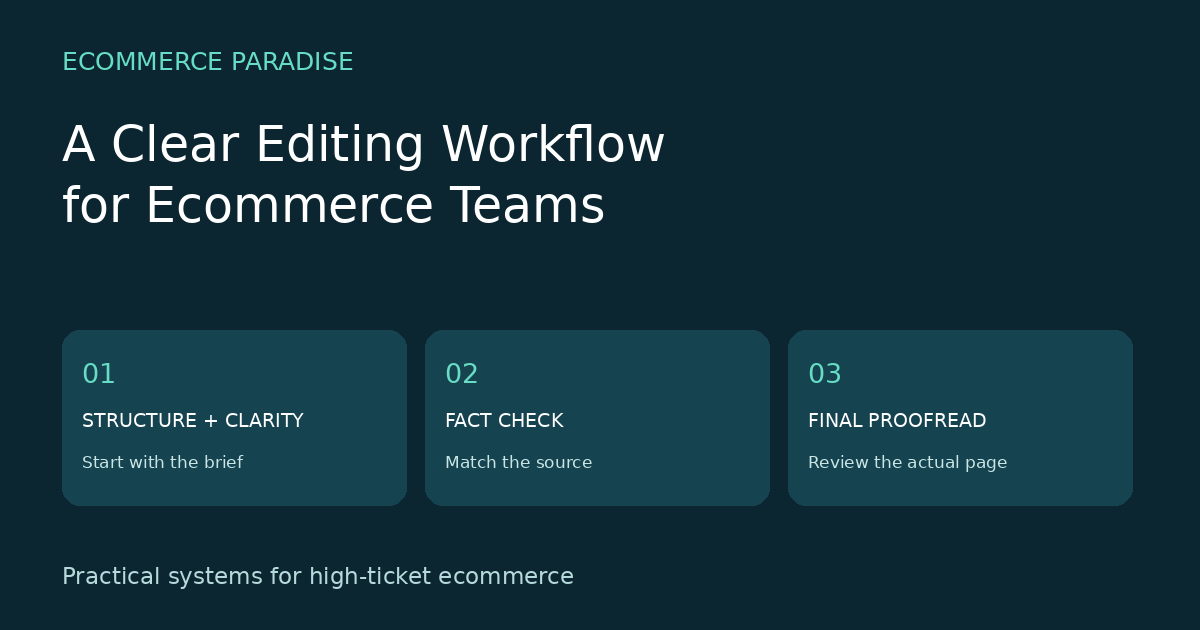
A reliable workflow moves content through four passes, from the big picture down to the smallest details.
1. Structural Edit
The first pass checks whether the page answers the questions a buyer has at this stage. The editor confirms that key benefits sit near the top and that the layout guides the reader toward the add-to-cart button. Structural changes come first because moving or cutting whole sections takes less effort before anyone polishes sentences.
2. Line Edit
Next, an editor works through the copy sentence by sentence. This pass tightens wordy phrases, removes jargon the target buyer would not recognize, and aligns the tone with the brand voice. Line editors also check that headings, bullet points, and calls to action follow the same patterns across the catalog.
3. Fact Check
Product content carries a lot of factual risk. Dimensions, weights, materials, compatibility notes, warranty terms, and shipping times all need verification against supplier data. A dedicated fact-check pass can catch mismatches before customers rely on them. For high-ticket items, this stage may also include a legal review of safety or performance claims.
4. Proofread
The final pass focuses on surface errors: spelling, punctuation, capitalization, number formatting, and broken links. Proofreading works best on the page as shoppers will see it, in a staging environment or preview mode. Issues such as truncated titles on mobile or misaligned tables often appear only in the live layout.
Reading the copy aloud, or listening to it through a text-to-speech tool, helps catch missing words and awkward rhythm that the eye tends to skip.
Assign Clear Roles
Every stage needs an owner who knows exactly what to check. In a small team, one person may cover several roles, so it helps to separate them by time. A writer who drafts copy in the morning and edits it the next day reviews it with fresh eyes.
Larger teams can split responsibilities more cleanly:
- Writer: drafts copy from the product brief and supplier data.
- Editor: handles structural and line edits.
- Product specialist: verifies specs, compatibility, and technical claims.
- Proofreader: checks the final version in staging.
- Approver: signs off and schedules the page.
Track these roles in your project management tool. A simple board with one column per stage makes bottlenecks visible at a glance.
Set a turnaround time for each stage, such as 24 hours for line edits and 48 hours for fact checks on new products. Clear deadlines keep content moving and give launch planners a realistic publication date for every page.
Build a Style Guide and Stage Checklists
A style guide removes guesswork from editing. It should cover brand voice, preferred spelling, the format for measurements and currencies, capitalization rules for product names, and words to avoid. Add examples of approved product descriptions so new writers can see the standard in practice.
Checklists turn the style guide into daily action. Create a short list for each stage of the workflow. A proofreading checklist for a product page might include:
- Product name matches the catalog entry exactly
- Price, currency, and discount display correctly
- All measurements use the same unit system
- Images have descriptive alt text
- Internal links point to live pages
- Meta title and description are accurate, readable and appropriate for the page
Keep each checklist short enough that people use it every time. Ten focused items are easier to follow under deadline pressure.
Use Tools to Support Each Stage
Software speeds up every pass in the workflow. Spelling and grammar tools can flag potential errors during drafting. Readability suggestions can help identify long sentences, but the editor should decide whether the proposed wording preserves the meaning. Similarity checks identify matching text; they do not establish originality, permission to reuse a supplier description or factual accuracy.
For collaboration, use suggestions or tracked changes and keep one approved version. In Shopify, check page visibility and previews rather than assuming a saved change is hidden. Shopify’s page-editing instructions explain those controls. A crawler can help identify broken links or missing fields, but investigate each finding before changing a large catalog.
Measure Whether the Workflow Works
A few simple metrics show whether editing improves results. Count the content errors reported by customers or support staff each month. Track return rates for products with fully edited descriptions, and watch conversion rates and time on page after major content updates.
Internal numbers matter as well. Measure how long content spends in each stage, since a stage that regularly runs late points to a staffing or process issue. Review the workflow every quarter and update the checklists based on the errors that keep coming back.
Start With a Content Brief That Names the Evidence
A writer should not have to choose between two conflicting specification sheets. Build the brief before drafting and identify the product, intended reader, purchase stage and current source of truth. Include the exact model and variant, because a feature available on one version may not apply to another.
For each factual field, name the supporting document and its date. A manufacturer specification sheet may support dimensions, while the store’s current policy supports a return window. Keep the evidence beside the claim so the next person can verify it without rebuilding the research.
Make unresolved details visible in the brief. An empty field labeled “installation requirements awaiting supplier confirmation” is better than a writer filling the gap with plausible language. Remove an unsupported claim from the publication version until the product owner can establish it.
For high-ticket products, supplier communication is part of the editing process. Request current files and an escalation contact during onboarding. The supplier sourcing walkthrough explains the relationship work that makes reliable catalog information easier to obtain.
Use a Different Review Depth for Different Changes
Correcting a spelling mistake does not need the same review as changing a safety statement. Define a few practical change types and the person responsible for each. A copy edit can move through an editor, while a new compatibility claim should return to the product specialist.
Pricing, delivery promises, warranty language and installation requirements deserve a deliberate factual check. A small wording change can alter the meaning of those promises. Compare the revised sentence with the evidence, rather than approving it solely because the text reads smoothly.
Separate content fixes from unrelated design work. If the request is to correct a measurement, avoid quietly replacing the theme, changing product variants or restructuring checkout. Keeping the scope clear makes the change easier to review and reduces the number of possible causes if something breaks.
Record why a change was made. “Updated shipping wording to match the current carrier service” is more useful than “SEO refresh.” That note helps future reviewers understand which information must remain intact during the next rewrite.
Build a Practical Review Matrix
Use a small matrix to avoid the familiar problem of everyone assuming someone else checked the facts. The writer owns completeness against the brief. The editor owns clarity and structure. The product owner verifies technical and commercial claims. The final approver checks that the approved version is the version being published.
In a one-person store, those roles can still be separate passes. Read once for meaning, once against the evidence and once in the actual layout. A break between passes can make it easier to notice an error that was invisible during drafting.
Limit who can make last-minute changes after approval. If a new paragraph is added in the publishing screen, route that paragraph through the appropriate check again. A finished checklist should describe the current version, not a draft that has already changed.
Keep access proportional to the work. An outside proofreader may need a document or a staging preview rather than an administrator account. Remove unnecessary customer details from examples and decide how outside contributors should return their edits before sharing material.
Check the Rendered Page, Including Mobile
A clean document can still produce a confusing product page. Inspect headings, tables, bullets and image captions after the text is placed in the store. Make sure the product name, model and measurement units remain consistent across the main description and the specification table.
Use headings in a logical sequence rather than choosing a heading level for its visual size. W3C’s heading guidance explains how the structure communicates relationships and supports navigation. Adjust the styling separately if a heading looks too large.
Check descriptive links and actual destinations. An anchor that says “installation instructions” should open the relevant instructions for that model, not a general supplier homepage. Verify that downloadable files still exist and that a mobile visitor can open them without a special account.
Look at the page on a narrow screen. A long model number can push a table beyond the viewport, while an image can hide the next action below a large empty area. Fix the layout problem rather than shortening an important specification until it becomes ambiguous.
Keep AI Assistance Inside the Same Approval Process
AI can help reorganize notes, suggest simpler wording and identify inconsistent terms. It can also invent a benefit, replace an exact measurement or make an unsupported claim sound confident. Treat its output as draft material that needs the same factual review as human-written copy.
Give the tool approved source text and a narrow task. For example, ask it to shorten an installation paragraph without changing measurements, conditions or exclusions. Compare the result with the source line by line before accepting the rewrite.
Do not ask a model to guess missing supplier facts or generate customer testimonials. If the brief does not establish a claim, the editing workflow should surface that gap. A fluent answer is not a substitute for a current product document.
The guide to using AI for a Shopify store covers related workflow ideas. Choose the tool after defining what the team needs to accomplish, and keep responsibility for the published information with a named person.
Run a Small Pilot Before Reviewing the Whole Catalog
Select a few pages that represent the different kinds of content your team handles. Include a simple product, a product with variants and a guide with several supporting sources. Track the work required at each stage rather than assuming every page takes the same amount of time.
Write down the errors the pilot catches. If most problems involve missing supplier data, adding another spelling checker will not solve the main bottleneck. Improve the brief and evidence collection before increasing the volume of drafts.
Use a consistent definition of an error. Separate factual corrections, broken links, formatting issues and subjective style preferences. That distinction makes the review data more useful and helps avoid treating every optional wording change as a quality failure.
Compare similar periods and products when examining return or conversion rates. A campaign, a price change or a supplier delay can affect those numbers independently of the editing process. Report what changed without claiming the workflow caused an improvement that the data cannot isolate.
Maintain the Process as the Business Changes
Your checklist should reflect the catalog you actually sell. A focused store can build specific checks around its common product questions, while a broad catalog may need different templates by category. The high-ticket niches guide is useful when considering how much product complexity a new category introduces.
Keep business details consistent in templates and reusable copy. A new writer should use the approved company name, contact route and policy links rather than creating another version from memory. The business formation guide covers the foundations behind that information.
Review the process after a supplier change, a new product category or a significant mistake. Update the relevant checklist item and show the team an example of the corrected approach. A useful process learns from specific errors rather than adding a long list of rules nobody follows.
If you need help assembling the store and its core customer information, review the done-for-you store build and launch service. Begin with one clear brief, one evidence source per claim and one accountable final approver.
Make the Final Handoff Explicit
A useful publishing handoff includes the approved draft, the product or page identifier, supporting sources and a short list of intentional changes. Name the final approver and specify whether the page should remain hidden or become visible. Include image credits or an ownership record so the publisher does not have to guess whether a graphic is safe to use.
After saving, compare the actual page with the approved version. Check the destination of every customer action, the displayed price and the variant attached to each specification. Record the live URL and the verification date so the next editor can start from a known version.
Conclusion
A proofreading and editing workflow turns content quality into a repeatable process. Clear stages, defined roles, a practical style guide, and the right tools help ecommerce teams publish faster with fewer mistakes. Start with a basic checklist and one review step, then add stages as your catalog and team grow. Shoppers will notice the care in every accurate spec, consistent product name, and clean page they read.
Related Articles
- What Is High-Ticket Dropshipping?
- High Ticket Niches List
- How to Find High-Ticket Dropshipping Suppliers
- Product Education That Reduces Buyer Hesitation
- How to Use AI for Your Shopify Store

Trevor Fenner is an ecommerce entrepreneur and world traveler from Seattle, Washington, and the founder of Ecommerce Paradise, a platform focused on helping entrepreneurs build and scale profitable high-ticket ecommerce and dropshipping businesses. With over a decade of hands-on experience, Trevor specializes in high-ticket dropshipping strategy, niche and product selection, supplier recruiting and onboarding, Google & Bing Shopping ads, ecommerce SEO, and systems-driven automation and scaling. Through Ecommerce Paradise, he provides free education via in-depth guides like How to Start High-Ticket Dropshipping, advanced training through the High-Ticket Dropshipping Masterclass, and fully done-for-you turnkey ecommerce services for entrepreneurs who want a faster, more hands-off path to growth. Trevor is known for emphasizing sustainable, real-world ecommerce models over hype-driven tactics, helping store owners build scalable, sellable, and location-independent brands.
He maintains homes in Seattle and Bali, spends most of the year overseas, and usually returns to Seattle for about a month each summer.


