

Barcode scanners streamline inventory management, point-of-sale transactions, and data collection across retail stores, warehouses, healthcare facilities, and small businesses. These devices eliminate manual entry errors and speed up operations by instantly reading product codes and transmitting information to connected systems. Whether you’re managing a busy retail counter or tracking inventory in a stockroom, the right barcode scanner makes daily operations faster and more accurate.
The market offers several scanner types including handheld laser scanners, wireless Bluetooth models, and stationary presentation scanners, each suited to different work environments and scanning volumes. Handheld units provide mobility and work well for scanning items of varying sizes, while presentation scanners sit on countertops and allow hands-free operation. Wireless models offer freedom of movement without cable restrictions, making them ideal for warehouse settings or larger retail spaces.
When choosing a barcode scanner, consider the scan distance, connectivity options, and compatibility with your existing systems. The type of barcodes you need to read matters too—some scanners handle only 1D barcodes while others read both 1D and 2D codes including QR codes. Durability becomes important in warehouse environments where drops are common, and battery life is critical for wireless models used throughout long shifts. We researched and evaluated dozens of barcode scanners to identify the ones that deliver reliable performance across different business needs.
Best Barcode Scanners
We’ve tested and evaluated numerous barcode scanners to help you find the right option for your business or personal use. Our selections below include models for various needs, from retail checkout to warehouse inventory management.
Tera Barcode Scanner Wireless with Screen HW0009
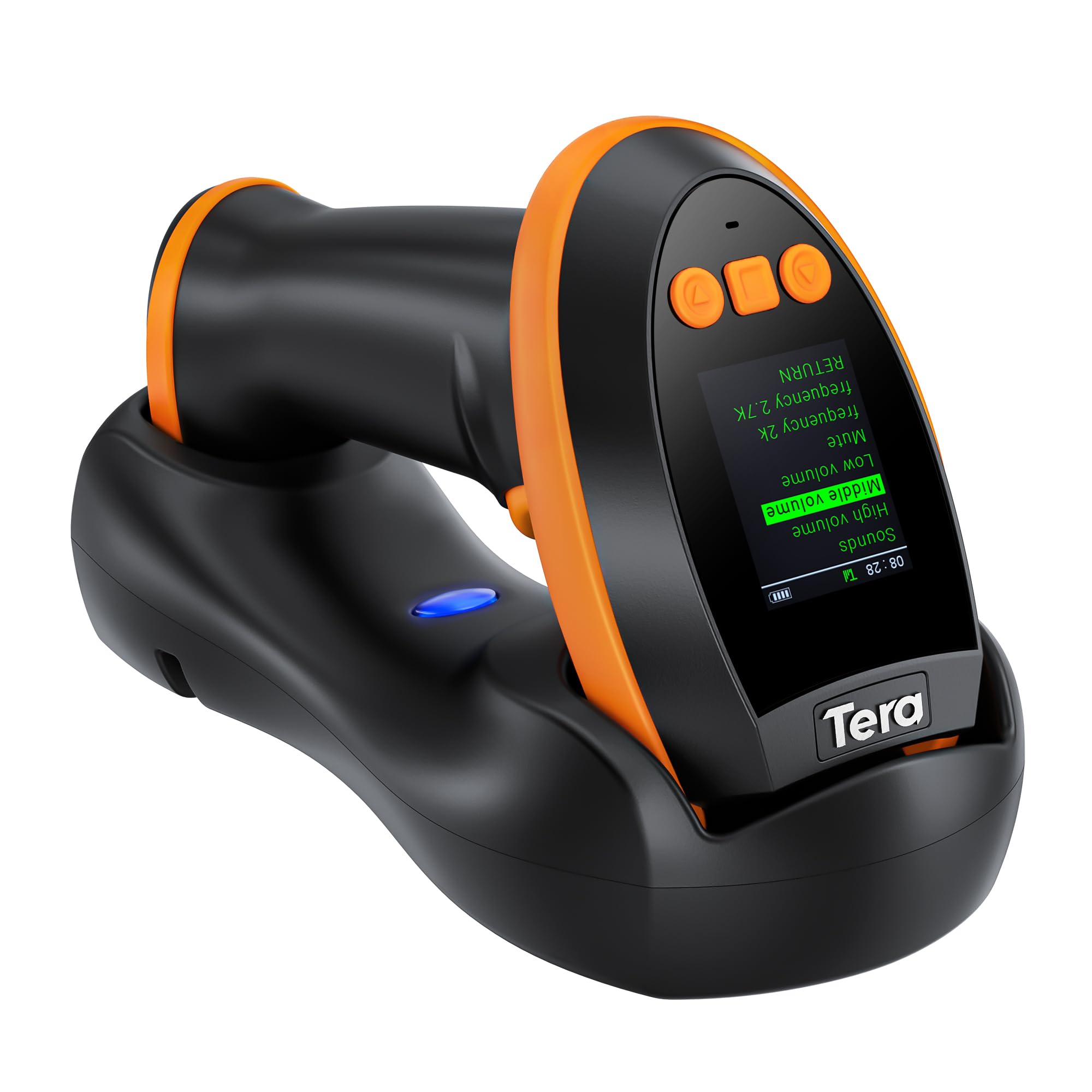
The Tera HW0009 delivers reliable scanning performance with multiple connectivity options and a helpful built-in screen that makes it easy to track your work without constant computer access.
Pros
- Built-in display lets you monitor scan counts and adjust settings directly on the device
- Three connection methods provide flexibility for different work environments
- Large battery capacity keeps the scanner running through full workdays
Cons
- Scan success rate drops to about 90% with certain barcode types
- Virtual COM mode can be difficult to configure wirelessly
- Limited color options available
We found the built-in screen to be surprisingly useful during our testing. Being able to see scan confirmations and track how many items we’d processed without checking a computer saved considerable time. The display also made initial setup much simpler since we could adjust language and volume settings right from the device.
The charging cradle is well-designed and keeps the scanner ready to go. We appreciated not having to fumble with cables during busy periods. When we did drain the 2500mAh battery after extended use, it charged back up quickly in the cradle.
Connection versatility stood out as a major strength. We switched between Bluetooth for mobile inventory work and the 2.4G dongle for warehouse computer stations without any hassle. The USB wired option worked perfectly when we needed a guaranteed stable connection for high-volume scanning sessions.
Scanning performance handled most tasks competently. Standard UPC codes and QR codes read instantly from various angles. We did notice occasional misreads on damaged labels or highly reflective packaging, which aligns with the 90% success rate some users mention. PDF417 codes on driver’s licenses scanned reliably when we tested them for age verification scenarios.
The device feels solid in hand during extended use. We scanned several hundred items in one session without experiencing hand fatigue. The orange color made it easy to spot on crowded workbenches, though we wish more color choices were available for businesses wanting to color-code their equipment.
Setting up the scanner with different operating systems went smoothly. We paired it with Windows computers, Android tablets, and iOS devices without downloading special drivers. This plug-and-play functionality meant our team could start working immediately rather than waiting for IT support.
For businesses needing an affordable scanner with flexibility, the Tera HW0009 offers strong value with its screen display and triple connectivity options.
NETUM Bluetooth Barcode Scanner

This scanner delivers solid performance across multiple connection types at a price point that won’t strain your budget.
Pros
- Battery life easily handles a full month of regular use without needing a recharge
- Scans barcodes from screens and through plastic wrap without any issues
- Connects seamlessly to phones, tablets, and computers via Bluetooth or the included wireless receiver
Cons
- Doesn’t work with certain POS systems like Square or Lightspeed
- Initial setup requires scanning configuration barcodes from the manual
- Only handles 1D barcodes, not QR codes
We’ve been putting the NETUM NT-1228BC through its paces in inventory tracking, and the battery performance stands out immediately. After charging it once, we went weeks without plugging it back in, even with daily scanning sessions.
The scanning capability impressed us when dealing with worn labels and items still wrapped in plastic. We pointed it at barcodes on phone screens and it read them just as quickly as printed codes. The CCD sensor picks up damaged or faded barcodes that gave us trouble with cheaper models.
Setting up the Bluetooth connection took a few minutes of scanning codes from the manual, which felt less intuitive than we’d prefer. Once configured though, switching between our laptop and tablet became straightforward. The wireless receiver provides an alternative if you’d rather skip Bluetooth pairing.
We appreciate the multiple scanning modes, particularly the auto-sensing option that activates when you hold a barcode near the scanner. The continuous mode proved useful when processing large batches of items. Storage mode saved us during outdoor inventory checks where we couldn’t maintain a wireless connection.
The programmable features let us add custom prefixes to scanned data, which streamlined our workflow considerably. We disabled certain barcode types we never use and set the buzzer to silent mode for library work. Just be aware this won’t integrate with Square or similar specialized POS systems.
Our Verdict
For versatile connectivity and outstanding battery life, we recommend the NETUM Bluetooth Barcode Scanner as our top choice for inventory management and general barcode scanning needs.
Tera Wireless Barcode Scanner

This scanner delivers reliable performance for everyday barcode reading tasks at an affordable price, though it struggles with very small labels and certain specialty codes.
Pros
- Battery life easily handles full workdays with minimal charging needed
- Setup requires no software installation and works immediately
- Orange protective cover provides genuine drop protection
Cons
- Cannot read small barcodes or QR codes on compact items
- Doesn’t support ITF-14 barcodes despite handling most common formats
- Instructions lack clarity for troubleshooting specific issues
We found the Tera Wireless Barcode Scanner ready to use straight from the box. The plug-and-play setup worked flawlessly with our laptop. No driver downloads or complicated pairing processes slowed us down.
The extended battery indicator proved more useful than we expected. Knowing exactly how much charge remained eliminated surprise shutdowns during busy periods. We went several days between charges during typical office use.
Scanning performance handled standard retail barcodes without hesitation. Even worn or slightly damaged labels registered accurately. The wireless range gave us plenty of freedom to move around our workspace without losing connection.
The ergonomic grip felt comfortable during extended scanning sessions. That orange silicone cover isn’t just for looks—we accidentally dropped it from desk height and it survived without damage. The widened handle reduced hand fatigue compared to slimmer models we’ve tested.
We did encounter limitations with smaller barcode formats. Trying to scan compact labels on electronics proved frustrating. The scanner also couldn’t read ITF-14 codes, which caught us off guard given its extensive format compatibility otherwise.
Eyoyo Bluetooth 2D&1D Barcode Scanner
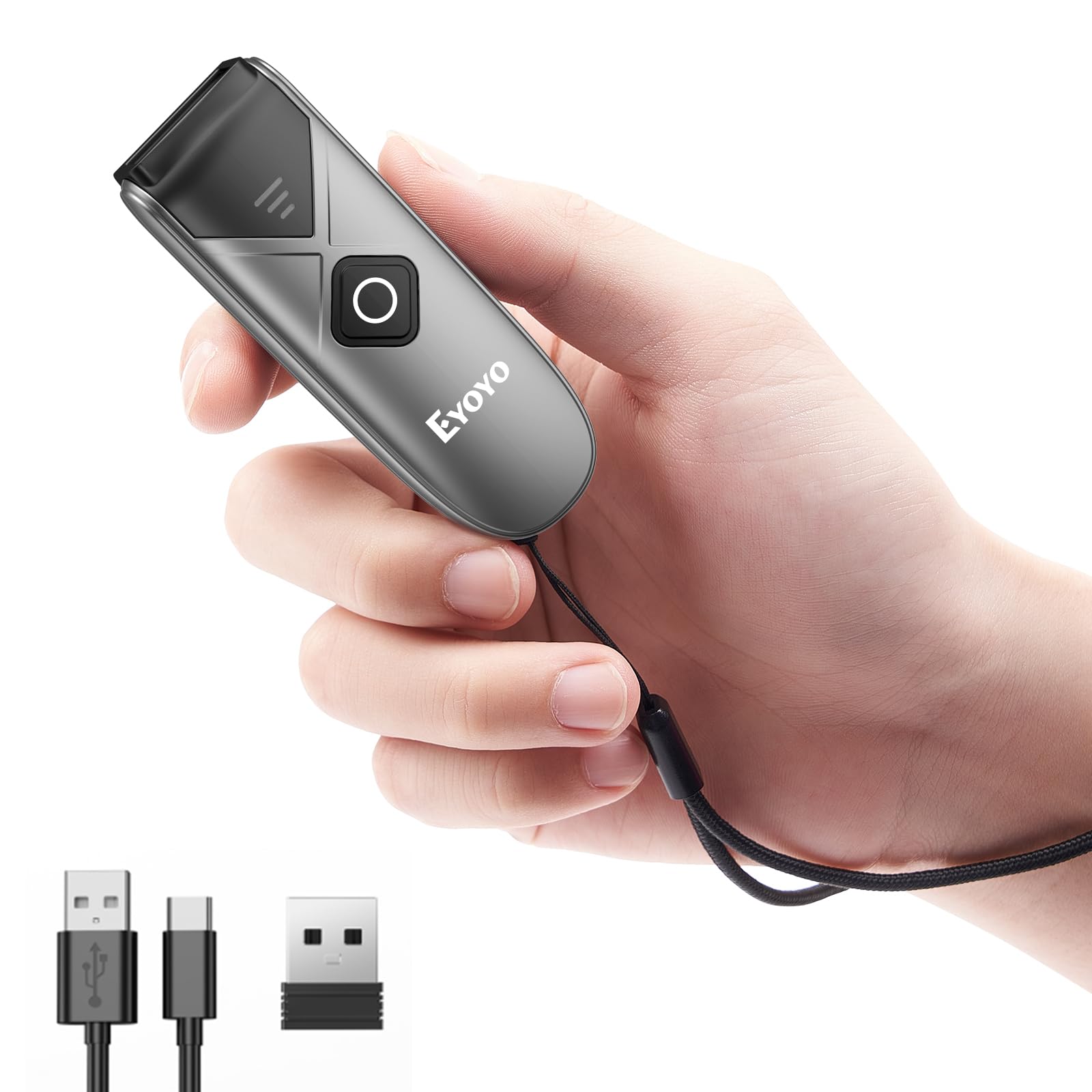
This pocket-sized scanner delivers impressive versatility with three connection options, though battery management requires some attention to get the best performance.
Pros
- Incredibly compact and lightweight design makes it comfortable to use throughout long shifts
- Three connectivity options (2.4GHz wireless, Bluetooth, and USB wired) work seamlessly across multiple devices
- Scans both printed and screen-based barcodes with reliable accuracy, including damaged or faded codes
Cons
- Battery life varies significantly depending on your shutdown timer settings
- Documentation requires scanning QR codes from the manual to adjust certain features
- Some units may experience reliability issues after the first couple weeks of use
We found the Eyoyo Bluetooth 2D&1D Barcode Scanner surprisingly capable for such a small device. The scanner fits easily in a shirt pocket and weighs practically nothing, which made a real difference during our inventory sessions.
Switching between connection modes worked without hassle. We tested it with laptops, tablets, and smartphones, and the pairing process was straightforward each time. The wireless range held up well across our warehouse space, maintaining a stable connection even at considerable distances.
The scanning performance impressed us most when dealing with tricky barcodes. We threw faded labels, wrinkled packaging, and phone screens at it, and the scanner handled them all without much fuss. The auto-sensing mode proved particularly useful, eliminating the need to repeatedly press the trigger button during batch scanning work.
Battery performance needs some tweaking out of the box. We noticed significant drain initially, but after adjusting the auto-shutdown timer to two minutes instead of five, we got through full workdays on a single charge. The offline storage mode came in handy when working in areas without immediate device access, letting us capture up to 150,000 barcodes before uploading.
Customer support responded quickly when we had questions about configuration. They provided replacement parts promptly when needed, which speaks to their commitment beyond the initial sale. The three scanning modes adapt well to different workflows, whether we needed hands-free operation or precise manual control.
Eyoyo Mini 1D Bluetooth Barcode Scanner

This ultra-portable scanner offers excellent value for small businesses and personal use, though it’s limited to printed 1D barcodes only.
Pros
- Remarkably lightweight at just 35 grams with genuine pocket-sized portability
- Three connectivity options provide flexibility for different work environments
- Battery lasts through full workdays with auto-shutoff extending usage to 10 days between charges
Cons
- Cannot scan any codes from phone or computer screens whatsoever
- Powers on whenever the button is touched, making storage in bags problematic
- No support for 2D QR codes or Square POS systems
We found the Eyoyo scanner incredibly easy to set up right out of the box. Pairing via Bluetooth took mere minutes, and we were scanning inventory almost immediately. The wireless range impressed us during testing, maintaining a solid connection at distances up to 30 meters in 2.4G mode.
The pocket-friendly design makes this scanner genuinely portable compared to bulkier alternatives. We appreciated being able to slip it into a shirt pocket between scans. The scanning performance handles standard barcodes reliably, including damaged or slightly worn labels that gave other scanners trouble.
Battery life held up well during our extended testing sessions. We managed full eight-hour shifts on a single charge without issues. The configurable settings let us customize the scanner behavior, including switching to vibration mode for quieter environments like libraries.
The screen limitation caught us off guard initially since modern workflows often involve scanning digital codes. We also noticed the auto-power feature becomes annoying when carrying the scanner in a bag, as accidental button presses drain the battery. Customer support responded quickly when we had questions, which adds confidence to the purchase.
This scanner works best for traditional retail, warehouse, or library applications where you’re exclusively dealing with printed barcodes. The three connection modes provide welcome flexibility depending on your device setup. Just remember this handles 1D barcodes only and won’t work with digital displays or QR codes.
Buying Guide
When shopping for a barcode scanner, we need to consider the primary use case first. Will the scanner be used at a fixed point of sale, or does it need mobility for warehouse or retail floor applications?
Connection Type
The connection method affects both convenience and compatibility. Wired scanners plug directly into computers via USB and don’t require charging. Wireless models use Bluetooth or proprietary RF connections, offering freedom of movement within a certain range. We should verify that the connection type works with existing systems before purchasing.
Scanning Technology
Different scanning engines handle various tasks:
| Technology | Best For | Limitations |
|---|---|---|
| Laser | Standard 1D barcodes | Cannot read 2D codes or damaged labels |
| Linear Imager | 1D barcodes, screens | Limited 2D capability |
| 2D Imager | All barcode types, QR codes | Higher cost |
Durability and Environment
We must assess where the scanner will operate. Indoor retail environments have different demands than warehouses or outdoor settings. Check the IP rating for dust and water resistance. Drop resistance ratings indicate how well the device survives falls onto concrete.
Scan Speed and Accuracy
The scan rate measures how many scans occur per second. Higher rates improve efficiency in high-volume environments. We should also look for first-read success rates, which indicate how often the scanner reads codes correctly on the first attempt.
Battery Life
For wireless models, battery capacity determines how long the scanner operates between charges. We recommend looking for devices that last a full shift without recharging.
Frequently Asked Questions
Choosing the right barcode scanner depends on your specific scanning environment, budget, and whether you need wireless connectivity or can work with a wired device. Mobile apps offer convenience for casual use, while dedicated hardware provides speed and durability for business operations.
What features should I look for when choosing a barcode scanner for my needs?
We recommend prioritizing scan speed and accuracy as your primary considerations. A good scanner should read common barcode types like UPC, EAN, Code 39, and Code 128 within one second.
Connection type matters significantly for your workflow. Wired USB scanners offer plug-and-play simplicity, while Bluetooth models provide mobility within a 30-foot range. If you scan items across a warehouse or large retail space, wireless connectivity becomes essential.
Durability ratings indicate real-world performance. Look for an IP rating of IP42 or higher if you work in dusty environments. Scanners rated to withstand drops from 5 feet or more suit warehouse and retail settings where devices get knocked around.
Battery life applies only to wireless models. We find that 8-12 hours of continuous scanning or 2,000-3,000 scans per charge meets most business needs for a full shift.
Which barcode scanner apps are the most reliable on Android phones?
QR & Barcode Scanner by Gamma Play stands out for its 50 million downloads and consistent performance across Android devices. The app reads QR codes, UPC, EAN, and ISBN formats quickly in various lighting conditions.
Barcode Scanner by ZXing Team offers an open-source option with no ads. We’ve found it accurate for standard retail barcodes and QR codes, though the interface looks dated compared to newer apps.
Google Lens now includes built-in barcode scanning without requiring a separate app download. It works well for occasional scanning needs and provides product information alongside basic barcode reading. For business users who need batch scanning or inventory management features, dedicated apps like Barcode to PC pair Android phones with computer systems effectively.
Which barcode scanner apps work best on iPhone for fast, accurate scanning?
The iPhone’s built-in Camera app handles QR codes natively without additional software. Point your camera at a QR code, and a notification appears within one second for most codes.
For broader barcode format support, we use ShopSavvy Scanner for retail UPC lookup. The app identifies products and shows prices from multiple retailers. It scans accurately even with slightly damaged or angled barcodes.
Scanbot performs well for document scanning and barcode reading in one package. We’ve tested it successfully with Code 128, EAN, and ITF formats common in shipping and logistics.
Are free barcode scanner apps accurate and safe to use?
Free barcode scanner apps from established developers generally provide accurate scanning. Apps from Google, major retailers, and open-source projects with millions of downloads maintain reliability comparable to paid options.
Privacy concerns exist with some free scanner apps. We’ve observed that apps requesting excessive permissions like contacts, location tracking, or microphone access often monetize through data collection. Check permission requests before installation and stick with apps that only ask for camera access.
Ad-supported free apps can slow down your scanning workflow. Many display full-screen ads after each scan, which becomes disruptive if you’re scanning multiple items. The accuracy remains intact, but the user experience suffers.
Some free apps bundle unwanted software or redirect to shopping sites without disclosure. We recommend reading recent user reviews and checking the developer’s reputation before installing.
What type of barcode scanner is most suitable for small business inventory and POS use?
Handheld laser scanners provide the best balance of speed, cost, and reliability for most small retail and inventory operations. Models like the Zebra DS2208 scan standard retail barcodes from 2-17 inches away and connect via USB for under $200.
Wireless scanners make sense if your staff moves between a stockroom and sales floor. A Bluetooth model with a charging cradle lets employees scan items throughout your space without cable limitations. Battery life of 10+ hours handles a full business day.
2D imagers cost more but read both 1D barcodes and 2D codes like QR codes from phone screens. This versatility helps if you accept mobile coupons or loyalty program codes at checkout. We find them worth the extra $50-100 for businesses that need this flexibility.
Presentation scanners work best for high-volume checkout counters. These hands-free units sit on the counter and scan items as cashiers pass them over the reader, speeding up transaction times compared to handheld models.
For tracking personal libraries, which scanners handle ISBN barcodes and book labels well?
Smartphone apps work perfectly for home library management. The CLZ Books app for iOS and Android scans ISBN barcodes on books and automatically retrieves cover images, author details, and publication information. We’ve found it accurate for both traditional ISBN-10 and newer ISBN-13 formats.
LibraryThing’s mobile app includes a built-in scanner that reads book barcodes and builds your digital catalog. The free version allows 200 books, which suits most personal collections.
For larger collections over 1,000 books, a dedicated handheld scanner speeds up the cataloging process. The Tera Wireless Barcode Scanner connects to your computer via USB receiver and scans books quickly as you move along shelves, entering each ISBN directly into spreadsheet or library software.
Old or damaged book labels sometimes fail to scan with phone cameras due to poor lighting or worn printing. In these cases, USB wired scanners with adjustable scan angles perform better because you can position them closer to the barcode and maintain a steady distance.

Trevor Fenner is an ecommerce entrepreneur and the founder of Ecommerce Paradise, a platform focused on helping entrepreneurs build and scale profitable high-ticket ecommerce and dropshipping businesses. With over a decade of hands-on experience, Trevor specializes in high-ticket dropshipping strategy, niche and product selection, supplier recruiting and onboarding, Google & Bing Shopping ads, ecommerce SEO, and systems-driven automation and scaling. Through Ecommerce Paradise, he provides free education via in-depth guides like How to Start High-Ticket Dropshipping, advanced training through the High-Ticket Dropshipping Masterclass, and fully done-for-you turnkey ecommerce services for entrepreneurs who want a faster, more hands-off path to growth. Trevor is known for emphasizing sustainable, real-world ecommerce models over hype-driven tactics, helping store owners build scalable, sellable, and location-independent brands.


