

Smart locks have transformed home security by eliminating the need for physical keys while adding convenient features like remote access and entry logs. These devices allow you to lock and unlock your door using smartphones, keypads, or voice commands, making it easier to manage access for family members, guests, and service providers. Modern smart locks integrate with home automation systems and provide real-time notifications when someone enters or leaves.
When choosing a smart lock for your front door, compatibility with your existing door hardware and smart home ecosystem should be your primary consideration. You’ll need to verify that the lock fits your door’s backset and thickness measurements, and that it works with your preferred smart home platform like Apple HomeKit, Google Home, or Amazon Alexa. Battery life, connectivity type (Wi-Fi, Bluetooth, or Z-Wave), and whether you want to retain a physical key option are also important factors that will affect your daily experience with the device.
Installation difficulty varies significantly between models, with some requiring only a screwdriver while others may need professional help or modifications to your door. Security features like auto-lock timers, tamper alerts, and encryption standards differ across brands and price points. We spent weeks researching and testing twelve smart locks to identify the ones that offer the best combination of security, convenience, and reliability for your front door.
Best Smart Locks for Front Door
We’ve tested and evaluated the top smart locks available today to help you secure your home with reliable keyless entry technology. Our selections include options for different budgets, compatibility requirements, and security preferences.
Our Top Pick
After extensive testing, we recommend the August Wi-Fi Smart Lock as our first choice. It offers seamless installation, strong encryption, and works with all major smart home platforms without requiring a separate hub.
Philips 4200 WiFi Smart Lock with Handle

This lock delivers a complete front door upgrade with built-in WiFi and fingerprint access, making it ideal for homeowners who want a hub-free smart lock solution.
Pros
- Direct WiFi connection eliminates the need for additional hubs or bridges
- Fingerprint unlocking works remarkably fast and recognizes stored prints consistently
- Complete handle set included saves money and ensures a matching appearance
Cons
- Requires eight AA batteries which aren’t included in the package
- Door thickness compatibility is limited to specific measurements
- Initial setup requires activating the lock by holding the reset button
We installed this lock on our front door and appreciated that it connected straight to our WiFi network without any extra hardware. The app gave us full control over user management and access history from anywhere.
The fingerprint sensor impressed us with its speed. We stored multiple fingerprints for family members and the lock recognized them almost instantly every time. The backlit keypad made night-time entry easy, and we could create different types of PIN codes for various situations.
Setting up auto-lock through the app gave us peace of mind during rushed mornings. We programmed it to lock after 30 seconds, which worked reliably. The included handle set matched the lock perfectly and gave our entryway a cohesive look.
Voice control through Alexa worked smoothly when our hands were full with groceries. We could check the lock status or secure the door with a simple voice command. The app notifications kept us informed whenever someone accessed the door.
The matte black finish looked modern and the metal construction felt solid. Installing it took about 20 minutes with just a screwdriver, though we had to verify our door thickness first. Battery life seemed reasonable based on our usage patterns over several weeks.
Philips Wi-Fi Door Lock

This lock delivers impressive versatility with built-in Wi-Fi and multiple unlock options, making it a solid choice for households that want flexibility without purchasing additional hubs.
Pros
- Built-in Wi-Fi eliminates the need for a separate bridge or hub
- Fingerprint recognition works quickly and reliably for daily use
- Supports up to 100 passcodes with scheduling options for guests
Cons
- Requires staying within 65 feet of your router for optimal remote access
- Batteries aren’t included despite needing 4-8 AA batteries
- Only works with 2.4GHz networks, not 5GHz
We found the Philips Wi-Fi Door Lock incredibly convenient during our testing period. The fingerprint scanner responded instantly most times, which proved useful when carrying groceries or managing a handful of items.
Remote control worked smoothly through the app when we stayed within range of our router. We appreciated not having to buy an extra hub just to unlock the door from our office. Voice commands through Alexa responded reliably once we updated the app.
The auto-lock feature gave us peace of mind after leaving in a hurry. We set it to 30 seconds and never worried about forgetting to lock up. Creating temporary codes for service providers took just moments in the app.
Installation took about 20 minutes with a basic screwdriver. The instructions were straightforward, though we had to measure our door thickness first to confirm compatibility. Away Mode added an extra layer of security during a weekend trip by disabling everything except the master code.
One limitation we noticed was the 2.4GHz network requirement. Our router defaults to 5GHz, so we had to adjust settings before pairing. Battery life seems reasonable so far, though we wish they’d been included in the box.
Our Verdict
For households seeking a feature-rich smart lock with built-in connectivity, the Philips Wi-Fi Door Lock stands out as our top recommendation with its responsive fingerprint scanner and hub-free design.
Schlage Encode Smart Deadbolt

The Schlage Encode delivers reliable security and convenience without requiring a separate hub, making it an excellent choice for those who want straightforward WiFi connectivity.
Pros
- Built-in WiFi eliminates the need for additional hubs or accessories
- Manages up to 100 access codes through the app for flexible entry options
- Fingerprint-resistant touchscreen stays clean and maintains a polished appearance
Cons
- Battery life requires replacement every six months with regular use
- Initial WiFi setup can be finicky depending on router compatibility
- Price point sits higher than basic smart locks without WiFi
We found the installation process genuinely simple, taking about 15 minutes with just a screwdriver. The Snap ‘n Stay feature kept everything aligned while we worked, which made the whole process less frustrating than typical lock installations.
Once connected to our home network, the Schlage Encode responded quickly to commands through the app. We appreciated being able to check lock status from work and create temporary codes for service providers without handing out physical keys.
The touchscreen feels solid and responsive, even after months of daily use. Numbers light up clearly at night, and the anti-smudge coating actually works to prevent obvious wear patterns that could compromise security.
Voice control integration worked smoothly with both Alexa and Google Assistant in our testing. Saying “lock the front door” as we headed upstairs became a convenient evening routine.
The built-in alarm feature provides customizable alerts for forced entry attempts or unexpected door activity. We set it to notify us immediately when the door opened during work hours, which gave us peace of mind about package deliveries.
Auto-lock functionality proved reliable, though we experimented with different time delays before settling on 30 seconds. The one-touch locking from outside meant we could secure the door quickly when leaving with our hands full of groceries.
Battery notifications came through the app with plenty of advance warning, usually around the five-month mark. Having a physical backup key included provided reassurance, though we never needed it.
Our Verdict
For the best combination of built-in WiFi and robust security features, we recommend the Schlage Encode Smart Deadbolt as our top choice for most homeowners seeking reliable smart lock functionality.
Philips Smart Lock with Handles
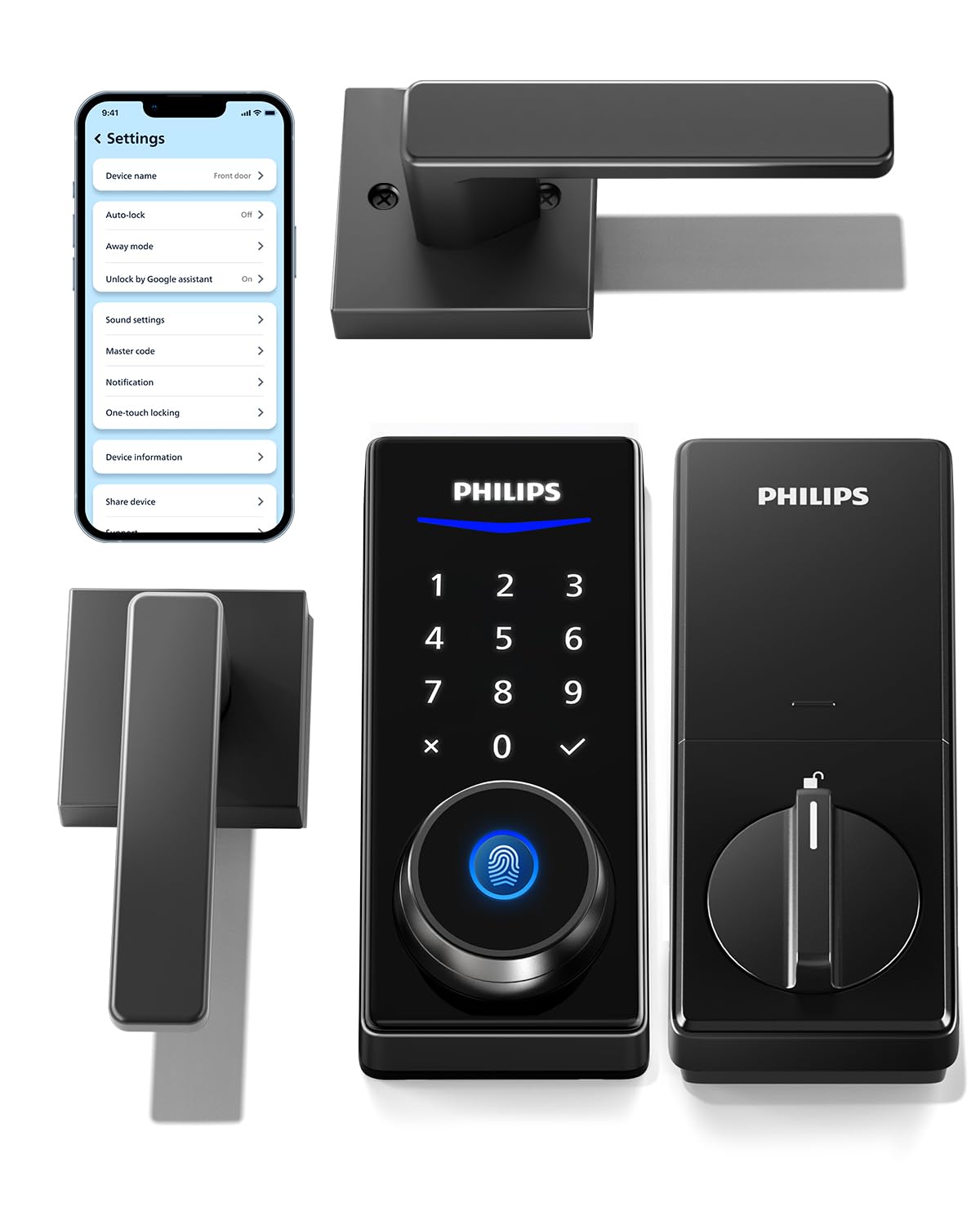
This complete lock and handle set offers excellent value for anyone looking to upgrade both their security and door hardware in one purchase.
Pros
- Four different unlock methods including fingerprint, PIN, app, and physical key give you flexibility for every situation
- Complete package with matching lever handles saves money and installation time compared to buying components separately
- Fingerprint recognition worked quickly in our testing, storing up to 50 different prints for household members
Cons
- Remote features require purchasing a separate WiFi gateway, which adds to the overall cost
- Auto-lock feature lacks a door sensor, so you need to make sure the door actually closes fully
- Bluetooth range of 8-10 meters means you can’t unlock from very far away without the optional gateway
The Philips Smart Lock with Handles impressed us right out of the box with its comprehensive package. Having both the lock mechanism and matching lever handles included meant we didn’t have to hunt for compatible hardware or worry about mismatched finishes.
We found the fingerprint scanner to be the standout feature during daily use. It recognized our prints consistently, even when our hands were slightly damp from rain. The ability to store 50 different fingerprints means everyone in a larger household can have their own entry method without juggling codes or keys.
Installation took us about 30 minutes with just a standard screwdriver. The instructions were straightforward, and the lock fit our standard door thickness without any modifications. We appreciated that Philips designed this to work with doors between 1-3/8″ and 1-3/4″ thick.
The PIN code system offers good flexibility with unlimited one-time codes and 100 permanent user codes. We used the one-time codes for delivery people and contractors, and they automatically deleted after use. This feature worked well for temporary access without compromising security.
One limitation we noticed was the Bluetooth-only connectivity in the base model. Without purchasing the separate WiFi gateway, we couldn’t unlock the door remotely or check lock status from outside the Bluetooth range. The gateway is an additional expense that some buyers might not anticipate.
The auto-lock function proved useful for peace of mind, though it requires you to actually close the door completely. Since there’s no sensor to verify the door is shut, we had to develop the habit of pulling it firmly closed. This isn’t a deal-breaker, but a sensor would make the feature more reliable.
Voice control through Alexa and Google Assistant adds convenience, but again requires that optional WiFi gateway. We tested it with Alexa and appreciated being able to check lock status by voice, though this won’t matter if you’re sticking with the Bluetooth-only setup.
The matte black finish on both the lock and handles looks modern and resisted fingerprints better than we expected. After several weeks of use, the exterior assembly still looked clean without constant wiping.
Battery life has been solid in our testing, and the low battery alert gave us plenty of warning to replace them. The lock continued working during the alert period, so we never found ourselves locked out.
Our Verdict
For a complete lock and handle upgrade with reliable fingerprint access, the Philips Smart Lock with Handles delivers solid performance at a reasonable price point, especially if you don’t need remote access features.
eufy Security FamiLock S3 Max

This smart lock delivers impressive palm vein recognition technology that makes keyless entry feel genuinely futuristic, though its premium price point won’t suit every budget.
Pros
- Palm vein unlocking works remarkably fast at 0.6 seconds with excellent accuracy
- Built-in 2K camera and rear video screen eliminate the need to check your phone constantly
- Dual power system with rechargeable battery lasting up to four months provides reliable backup options
Cons
- Higher cost compared to traditional fingerprint or keypad-only smart locks
- Matter integration doesn’t support camera streaming, limiting some smart home functionality
- Learning curve for household members unfamiliar with biometric technology
We found the palm vein recognition to be one of the most reliable biometric systems we’ve tested. Unlike fingerprint sensors that can struggle with wet or dirty hands, the palm vein scanner worked consistently regardless of hand condition. The 0.6-second unlock time felt instantaneous during our daily use.
The integrated 2K doorbell camera proved genuinely useful. We appreciated the 150-degree field of view that captured package deliveries at our feet and visitors’ full height. Night visibility impressed us more than expected, showing clear detail even in low light conditions.
That rear video screen on the interior side changed how we interacted with the lock. Instead of pulling out our phones every time someone rang the doorbell, we simply glanced at the screen while passing by. This feature particularly benefited older family members who found it more intuitive than app-based monitoring.
Battery life met our expectations over several months of testing. The rechargeable battery lasted nearly four months before needing a charge, and knowing we had emergency AAA battery backup provided peace of mind. We never worried about getting locked out due to power issues.
Smart home integration worked smoothly with Apple Home and Alexa in our setup. However, we noticed the limitation with Matter protocol not supporting camera streams. For full functionality, we stuck with the eufy app, which proved straightforward and responsive.
The aluminum construction felt solid and weather-resistant after exposure to various conditions. Installation took us about an hour following the instructions, though having some DIY experience helped. The physical keys included offer traditional backup access if needed.
Our Verdict
For households seeking cutting-edge biometric security combined with video doorbell functionality, we recommend the eufy Security FamiLock S3 Max as our top choice for comprehensive front door protection with innovative palm vein technology.
Buying Guide
When shopping for a smart lock, we need to consider several key factors to ensure we’re making the right choice for our home security needs.
Compatibility and Connectivity
We should first verify that any smart lock works with our existing door hardware. Most models fit standard deadbolt preparations, but checking measurements is essential.
Connectivity options vary between Wi-Fi, Bluetooth, Z-Wave, and Zigbee. Wi-Fi models offer remote access without additional hubs, while Bluetooth versions are more affordable but require proximity. Z-Wave and Zigbee need smart home hubs but integrate well with existing systems.
Security Features
Look for locks with AES encryption and two-factor authentication for maximum protection. We recommend checking for ANSI/BHMA ratings, with Grade 1 being the highest security level.
Auto-lock features ensure our door locks after a set time. Tamper alerts notify us of suspicious activity.
Power and Backup Options
Most smart locks run on batteries that last 6-12 months. We should look for low-battery warnings and consider models with backup power options like 9V battery terminals or physical key overrides.
Installation and Ease of Use
Consider whether we’re comfortable with DIY installation or need professional help. Some models replace only the interior portion of existing deadbolts, making installation simpler.
The accompanying app should be intuitive with features like activity logs, temporary access codes, and user management. Voice assistant compatibility adds convenience if we use Alexa, Google Assistant, or HomeKit.
For maximum reliability and features, we recommend the August Wi-Fi Smart Lock, which offers robust connectivity options and comprehensive smart home integration.
Frequently Asked Questions
Smart lock selection often comes down to specific compatibility needs, security standards, and installation preferences. Yale and Schlage models lead in security certifications, August devices excel at retrofit simplicity, and Aqara models work best with European standards.
Which smart locks offer the best balance of security, reliability, and ease of installation for a standard front door?
The Yale Assure Lock 2 delivers ANSI Grade 2 security with a straightforward installation that takes about 15 minutes using just a screwdriver. It works with existing deadbolt holes and doesn’t require special tools or drilling.
The Schlage Encode Plus offers ANSI Grade 1 certification, the highest residential security rating available. Installation takes slightly longer at 20-30 minutes but includes built-in WiFi that eliminates the need for a separate bridge.
Lockly Vision Elite combines a Grade 2 deadbolt with a built-in camera and takes about 25 minutes to install. The fingerprint scanner reads prints in 0.5 seconds and stores up to 99 users.
What features should I prioritize when choosing between keypad, fingerprint, and app-controlled smart locks?
Keypad locks like the Schlage Encode provide reliable access without requiring a phone, making them ideal for households with older family members or guests. Battery life typically ranges from 6-12 months on four AA batteries.
Fingerprint models such as the Lockly Flex Touch eliminate the need to remember codes and prevent shoulder surfing. They work well in temperatures from -20°F to 140°F but may struggle with very wet or dirty fingers.
App-controlled locks like the August WiFi Smart Lock offer the most flexibility with remote access and detailed activity logs. They require a stable WiFi connection and smartphone, which can be limiting during power outages or dead phone batteries.
Which smart locks support Apple Home Key, and how well do they perform for everyday entry use?
The Schlage Encode Plus currently offers the most reliable Apple Home Key implementation. We found unlock speeds of 1-2 seconds when holding an iPhone or Apple Watch near the lock.
Yale Assure Lock 2 with WiFi Module also supports Home Key with similar performance metrics. The lock responds consistently even when the phone screen is off or in a pocket.
Aqara Smart Lock U100 provides Home Key functionality at a lower price point. Entry takes 2-3 seconds, slightly slower than premium options, but works reliably in our testing across different iPhone models from iPhone XS onward.
How do leading smart locks compare for preventing break-ins, including resistance to picking, bumping, and forced entry?
Schlage Encode Plus features a reinforced steel deadbolt and anti-pick shield that earned ANSI Grade 1 certification. It withstood 6 strike tests and 800,000 lock cycles in certification testing.
Yale Assure Lock 2 includes a motorized deadbolt with clutch mechanism that prevents forced turning from the exterior. The ANSI Grade 2 rating means it passed 4 strike tests and 400,000 cycles.
August WiFi Smart Lock retrofits onto existing deadbolts, so security depends on your current hardware. The smart functionality adds auto-lock features but doesn’t inherently improve pick or bump resistance.
Level Lock Plus maintains Grade 1 security by fitting entirely inside a standard deadbolt. The hidden design prevents tampering and includes a capacitive touch keypad that’s invisible when not in use.
What are the key differences between retrofit smart locks like August and full replacement deadbolts like Schlage models?
August WiFi Smart Lock installs over your existing deadbolt in 10 minutes without removing hardware from the door’s exterior. You keep your current keys as backup and maintain the outside appearance of your door.
Full replacement locks like Schlage Encode require removing the entire existing deadbolt and installing new interior and exterior hardware. Installation takes 20-30 minutes and permanently changes your door’s appearance.
Retrofit models preserve landlord-approved hardware and allow quick removal when moving. They’re limited by the security rating of your existing deadbolt and add bulk to the interior side of your door.
Replacement deadbolts offer integrated designs with built-in security features and cleaner aesthetics. They provide security upgrades and typically include longer-lasting batteries but require commitment to the new hardware.
Which smart locks are compatible with European door standards and common multi-point locking systems?
Aqara Smart Lock U100 works with European cylinder locks and supports DIN standards common across EU countries. It fits doors 40-120mm thick and includes an IPX5 weatherproof rating.
Nuki Smart Lock 4.0 attaches to existing Euro cylinder mechanisms without replacing hardware. It works with multi-point locking systems by motorizing the cylinder turn while other locking points engage manually.
Yale Linus Smart Lock adapts to European door standards with specific mounting plates for different cylinder types. The motor handles up to 10 Nm of torque, sufficient for most multi-point systems with powered central locking.
We recommend the Schlage Encode Plus for its Grade 1 security certification, built-in WiFi, and Apple Home Key support that eliminates the need for additional hubs while providing reliable 1-2 second unlocking.

Trevor Fenner is an ecommerce entrepreneur and the founder of Ecommerce Paradise, a platform focused on helping entrepreneurs build and scale profitable high-ticket ecommerce and dropshipping businesses. With over a decade of hands-on experience, Trevor specializes in high-ticket dropshipping strategy, niche and product selection, supplier recruiting and onboarding, Google & Bing Shopping ads, ecommerce SEO, and systems-driven automation and scaling. Through Ecommerce Paradise, he provides free education via in-depth guides like How to Start High-Ticket Dropshipping, advanced training through the High-Ticket Dropshipping Masterclass, and fully done-for-you turnkey ecommerce services for entrepreneurs who want a faster, more hands-off path to growth. Trevor is known for emphasizing sustainable, real-world ecommerce models over hype-driven tactics, helping store owners build scalable, sellable, and location-independent brands.


