

Managing a stock portfolio without a dedicated tracking app is like running a business without any analytics. You are flying blind on performance, allocation drift, fee drag, and the news events that move your holdings. The best app to track stocks does not just show you prices, it shows you how your portfolio is positioned against your goals, alerts you to meaningful changes in the companies you own, helps you research new opportunities, and in many cases integrates directly with your brokerage so the data stays current without manual entry.
The challenge in 2026 is that the category has fragmented into several distinct types of tools. Some apps, like TradingView, are built for technical chartists who analyze price patterns and momentum. Others, like Empower, are built for big-picture financial management, showing your investments in the context of your entire net worth, cash flow, and retirement timeline. Research-first platforms like Seeking Alpha and Morningstar provide deep fundamental analysis and analyst ratings. Portfolio management tools like Snowball Analytics and Stock Rover help serious investors track returns across brokers, model future income, and evaluate holdings against custom criteria. And free aggregators like Yahoo Finance provide broad utility for investors who just need quotes, news, and basic watchlists without a subscription.
For ecommerce entrepreneurs and business owners investing business profits alongside operating a digital business, the right combination of tools typically looks like this: a free high-quality aggregator for daily monitoring and news, a portfolio tracker that pulls in all your accounts for a unified performance view, and a research tool for making more informed decisions on individual positions. You do not need to pay for all three categories, there are excellent free options in each, but understanding what each type of tool does and where it fits determines whether your investment tracking actually supports better decisions or just adds another dashboard to ignore.
This guide covers the 11 best stock tracking apps and platforms in 2026, across every major category: portfolio tracking, technical charting, fundamental research, watchlist management, and all-in-one financial monitoring. Each recommendation was evaluated on data quality, platform usability, mobile app quality, free tier usefulness, pricing, and fit for the specific use case it serves best.
Apps covered in this guide:
- TradingView: Best for technical analysis and charting across all asset classes
- Empower: Best free all-in-one financial dashboard and portfolio tracker
- Seeking Alpha: Best for fundamental research, analyst ratings, and investment news
- Yahoo Finance: Best free real-time data and news aggregator
- Morningstar: Best for mutual fund and ETF research with professional-grade analysis
- Stock Rover: Best for fundamental screening and deep portfolio analysis
- Snowball Analytics: Best for dividend investors tracking income and portfolio distributions
- Koyfin: Best Bloomberg Terminal alternative for macro and equity data
- Simply Wall St: Best for visual portfolio analysis and stock reports
- Finviz: Best free stock screener for finding investment ideas quickly
- TradeZella: Best for active traders who want a dedicated trading journal, replay, and backtesting
What Is a Stock Tracking App and Why Does It Matter?
A stock tracking app is a software platform that monitors the prices, performance, and related data of stocks, ETFs, mutual funds, and other securities. At the most basic level, stock tracking apps display real-time or delayed price quotes and allow users to create watchlists of securities they want to monitor. At the most sophisticated level, they aggregate portfolio data from multiple brokerage accounts, calculate detailed performance metrics (time-weighted return, internal rate of return, alpha, beta, Sharpe ratio), provide fundamental and technical research tools, and deliver news and analysis relevant to holdings.
The distinction between a stock tracking app and a brokerage app is important: tracking apps are for monitoring, research, and analysis; brokerage apps are for executing trades. Most serious investors use both, a brokerage for execution and one or more tracking tools for the analytical work that informs decisions. The best tracking apps connect directly to your brokerage accounts via secure read-only API connections, automatically pulling in transactions and current valuations without requiring manual data entry.
For a business owner or entrepreneur investing business profits, the most practically important features are: multi-account aggregation (pulling in your Fidelity IRA, Schwab taxable account, and Robinhood account in one view), performance tracking against a benchmark (are your returns ahead of or behind the S&P 500?), and asset allocation analysis (is your portfolio still aligned with your intended risk level after market movements have shifted the proportions?). These capabilities are available for free through platforms like Empower, making comprehensive portfolio tracking genuinely accessible without any subscription cost.
What to Look For in a Stock Tracking App
Data Quality and Update Frequency
Real-time data matters for active traders and significantly less for long-term passive investors. Most free platforms provide data with a 15-minute delay, more than adequate for a long-term investor checking performance weekly. Active day traders need real-time streaming quotes, which are typically available on paid tiers or through the brokerage platform itself. Verify whether the data source is institutional-grade (providers like S&P Global or NASDAQ-licensed feeds) or lower-quality aggregated data, which can contain errors that affect portfolio valuations and research quality.
Portfolio Integration and Multi-Account Aggregation
The most valuable feature for most investors is the ability to connect all brokerage accounts to a single view. Look for platforms that use secure read-only connections (typically via Plaid or direct broker API integrations) and automatically sync transactions and valuations. Manual entry is always available as a fallback but creates an ongoing maintenance burden. Verify that the platform supports your specific brokerages before committing, coverage varies significantly across providers, with some platforms covering only major U.S. brokers and others supporting hundreds of international institutions.
Research Depth vs. Simplicity
Stock tracking apps exist on a spectrum from purely functional (prices, P&L, allocation charts) to deeply analytical (fundamental data, earnings estimates, analyst ratings, screening tools). Match the research depth to your actual usage: a passive index fund investor who checks performance quarterly needs a completely different tool than an active stock picker who evaluates individual companies before buying. Over-specifying on research tools creates subscription costs for features you will never use.
Mobile App Quality
For a location-independent entrepreneur managing accounts while traveling in Southeast Asia or anywhere else, mobile app quality is non-negotiable. Look for apps with full watchlist and portfolio functionality on mobile, offline access for basic views, and push notifications for significant price movements or news events in your holdings.
Cost vs. Free Tier Value
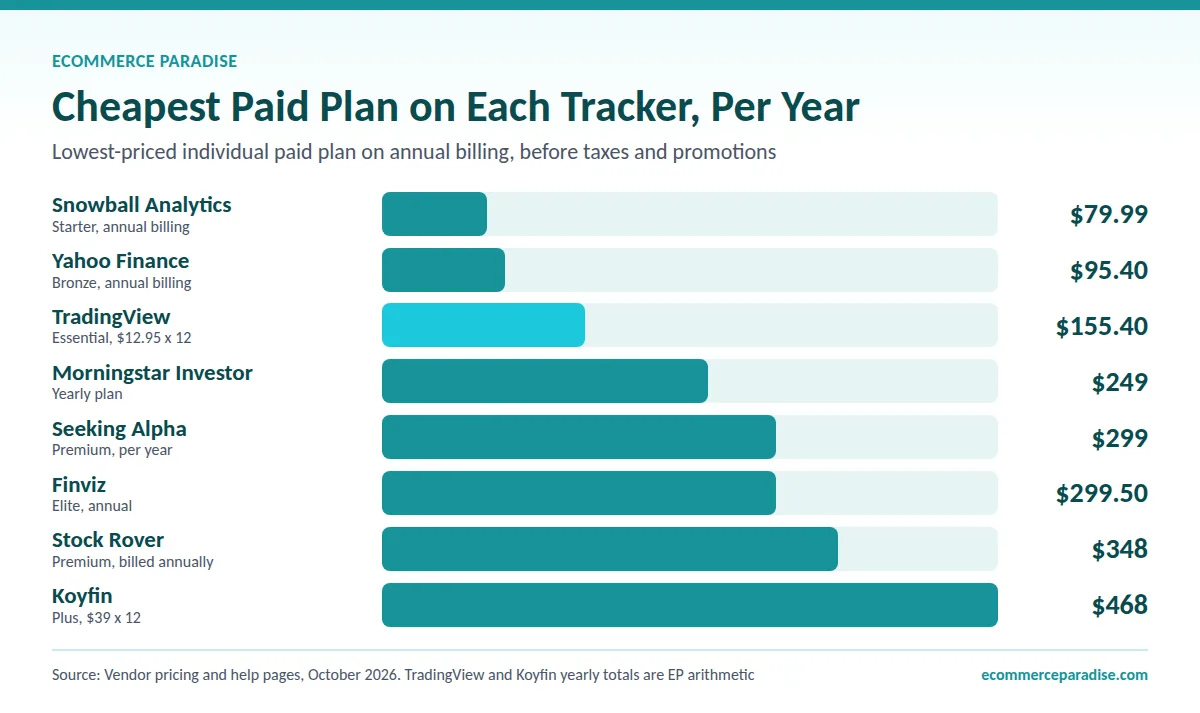
Many of the best stock tracking platforms have meaningful free tiers, Empower’s entire portfolio tracking suite is free, Yahoo Finance provides extensive free data, and Finviz’s core screening functionality is free. Before paying for any stock tracking subscription, evaluate whether the free tier covers your actual use case. The paid tiers of Seeking Alpha ($299/year), Morningstar ($249/year), and TradingView ($12.95-$199.95/month on annual billing) provide significant incremental value for active investors, but the marginal value depends entirely on how actively you use the specific premium features.
The Best Stock Tracker Apps in 2026
1. TradingView: Best for Technical Analysis and Charting Across All Asset Classes
TradingView is the most widely used charting and technical analysis platform in the world, with over 100 million users and widely rated among the best charting tools available to retail investors. It provides real-time interactive charts for stocks, ETFs, forex, cryptocurrencies, commodities, futures, and indices, all accessible in a unified interface with over 400 built-in technical indicators, up to 21 chart types, 110+ drawing tools, and a Pine Script programming environment for creating custom indicators and strategies. For any investor who makes decisions based on price action, momentum, or technical patterns, TradingView is the definitive tool.
Charting Depth and Community
TradingView’s “Supercharts” feature provides institutional-grade charting with multiple panes, overlaid indicators, drawing tools, and customizable chart templates. The active TradingView community publishes millions of public chart ideas and shared scripts, allowing investors to access and apply strategies developed by other traders without needing to build their own. Automated alerts can be configured on price levels, indicator conditions, or custom script triggers, sending notifications via browser, email, or webhook integrations.
Multi-Asset Coverage
TradingView covers every major asset class from a single interface, a significant advantage for investors who track stocks alongside crypto positions, forex exposure, or commodity prices. The integrated news feed aggregates real-time headlines relevant to the assets on your charts. For investors managing a portfolio that spans traditional and alternative assets, this unified view eliminates the need for separate tracking tools per asset class.
Pricing
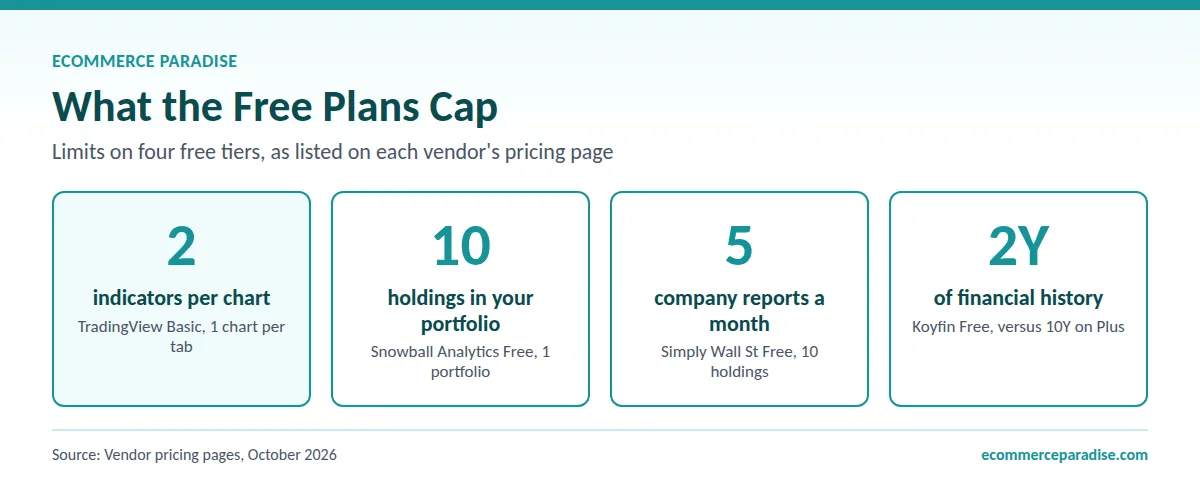
TradingView offers a meaningful free tier with basic charting, but Basic caps you at 2 indicators per chart and 1 chart per tab. Paid plans start at Essential, listed at a special price of $12.95 per month on annual billing (about $155 a year) as of October 2026, with 5 indicators per chart. Plus is $29.95, Premium is $59.95, and Ultimate is $199.95 per month, all billed annually. The Essential plan covers most retail investor needs. Active traders and those wanting real-time data on international exchanges typically upgrade to the Plus or Premium tier.
Pros:
- 100M+ users, the most widely used charting platform globally
- 400+ built-in technical indicators and custom Pine Script environment
- Multi-asset: stocks, ETFs, forex, crypto, commodities, futures in one interface
- Community-published strategies, chart ideas, and shared indicators
- Paper trading for testing strategies without real capital at risk
- Available on desktop browser, iOS, and Android with full mobile charting
Cons:
- Free tier limited in indicator count and data depth, active users need paid plan
- Primarily a charting and technical tool, limited fundamental research compared to Seeking Alpha or Morningstar
- Real-time data on international exchanges requires higher paid tiers
- Can feel overwhelming for investors who do not use technical analysis
Quick-reference specs:
- Pricing: Free tier; paid plans from $12.95/month (annual billing, October 2026)
- Asset Coverage: Stocks, ETFs, forex, crypto, futures, commodities
- Indicators: 400+
- Mobile: Yes, full charting on iOS and Android
- Community: Yes, public scripts, ideas, strategies
- Best For: Technical traders, chartists, multi-asset investors
➡ Start charting on TradingView
2. Empower: Best Free All-in-One Financial Dashboard and Portfolio Tracker
Empower (formerly Personal Capital) is the most comprehensive free financial tracking platform available, combining portfolio performance tracking with complete personal finance monitoring, bank accounts, investment accounts, retirement accounts, credit cards, loans, and net worth, in a single dashboard. Its investment tracking is genuinely powerful for a free tool: it connects to over 20 account types, calculates time-weighted return and allocation analysis, runs a fee analyzer that identifies how fund expense ratios are eroding long-term portfolio value, and provides a retirement planner that models whether your current savings rate will sustain your retirement goals. For a business owner who wants a single view of all personal finances alongside business cash flow, Empower provides more comprehensive insight than any dedicated stock tracking app at any price.
Investment Checkup and Fee Analyzer
Empower’s Investment Checkup analyzes your portfolio on measures including asset allocation, risk assessment, and diversification, comparing your actual allocation against a recommended target based on your stated goals and risk tolerance. The Fee Analyzer is a standout feature that projects how your current fund expense ratios will compound to erode portfolio value over your investment horizon, a concrete demonstration of why minimizing fund costs matters over decades, presented in dollar terms rather than percentages. Both tools are completely free.
Net Worth and Cash Flow Tracking
Unlike standalone portfolio trackers, Empower aggregates all financial accounts, investment, bank, retirement, credit, and loans, into a unified net worth dashboard. You see how business profits flowing into a bank account relate to the investment portfolio they will eventually fund, and how both relate to liabilities. For entrepreneurs managing both a business and personal finances, this integrated view provides context that a standalone stock tracker cannot.
The Trade-Off: Sales Calls from Wealth Management
Empower monetizes its free platform through its Wealth Management advisory service, which requires a minimum $100,000 investment and charges 0.89% a year on balances up to $999,999 (per Empower’s May 2026 advisory brochure). Private Client, for $1 million and up, is tiered from 0.79% and only drops to 0.49% on assets above $10 million. Free users will receive periodic outreach from the wealth management team. This is worth knowing upfront, the platform provides substantial free value, but it is not a purely neutral tool. If you are not interested in Empower’s advisory services, the outreach can be easily managed.
Pros:
- Completely free, most comprehensive free portfolio tracking available
- Connects 20+ account types including banks, brokerages, retirement, credit, and loans
- Investment Checkup analyzes portfolio allocation, risk, and diversification
- Fee Analyzer projects long-term cost of fund expense ratios in dollar terms
- Retirement planner models savings trajectory against retirement goals
- Net worth tracking integrates investment performance with complete financial picture
Cons:
- Sales outreach from Wealth Management team for free users
- Investment research tools are limited, not a substitute for Seeking Alpha or Morningstar for stock selection
- Some users find brokerage linking occasionally requires re-authentication
- Wealth Management minimum ($100K) and fees are significant if you opt in
Quick-reference specs:
- Pricing: Free (Wealth Management 0.89% AUM fee from $100K, 0.79%-0.49% tiered at $1M+)
- Account Integration: Banks, brokerages, retirement, credit, loans
- Portfolio Analysis: Allocation, risk, fees, performance
- Mobile: Yes, iOS and Android
- Best For: Investors and business owners wanting a free all-in-one financial dashboard
➡ Track your entire financial picture free with Empower
3. Seeking Alpha: Best for Fundamental Research, Analyst Ratings, and Investment News
Seeking Alpha is the most widely used independent investment research platform, attracting over 20 million monthly visitors and publishing over 1,000 original research articles per week from a network of contributing analysts alongside its own editorial team. Its proprietary Quant Rating system scores stocks on 125+ factors covering momentum, valuation, earnings revisions, and profitability, generating algorithmic buy/hold/sell signals. Seeking Alpha publishes a track record it says shows its “Strong Buy” selections beating the S&P 500, but those are the company’s own figures and past results do not guarantee future returns. For a research-driven investor who makes individual stock decisions and wants multiple analytical perspectives beyond what a brokerage platform provides, Seeking Alpha is the most comprehensive single research subscription available.
Quant Ratings and Alpha Picks
Seeking Alpha’s Quant Ratings use algorithmic analysis of over 125 financial metrics to generate objective stock scores, removing the subjectivity of individual analyst opinions. The ratings are updated daily and give you a consistent screen for stock ideas rather than relying on one analyst’s opinion. Alpha Picks, a separate service listed at $499/year, delivers two new stock picks each month chosen by Seeking Alpha’s quant team. Seeking Alpha says it tracks the picks against the S&P 500 since the July 2022 launch, but treat that as the company’s own marketing figure, not an independent result.
Community Research and Article Volume
Seeking Alpha’s community model aggregates research from professional analysts, experienced investors, and independent contributors, producing coverage of companies and sectors that institutional research desks ignore. For small-cap investors or those interested in niche industries underserved by Wall Street coverage, the community research depth is a genuine edge over platforms limited to institutional analyst ratings.
Pricing
Seeking Alpha’s free tier provides basic access to limited articles. Seeking Alpha Premium is $299 per year at list price as of October 2026, and discounted first-year offers come and go, so check the current terms before you subscribe. At this price, Premium provides unlimited article access, full Quant Ratings, portfolio alerts with integrated news, earnings calendars, and advanced screeners. Alpha Picks is an additional $499 per year for the stock recommendation service.
Pros:
- 1,000+ original research articles per week, unmatched content volume
- Quant Ratings: algorithmic stock scoring on 125+ factors updated daily
- Portfolio integration alerts you to news and ratings changes in your holdings
- Earnings transcripts, press releases, and analyst coverage aggregated per stock
- Dividend grades add structured analysis for income investors
- Free basic tier lets you read limited articles before paying
Cons:
- Variable contributor quality, some articles are promotional or low-insight
- Premium pricing ($299/year) requires meaningful usage to justify
- Mobile app less functional than web platform for some research features
- Limited international stock coverage compared to global platforms
Quick-reference specs:
- Pricing: Free basic; Premium $299/year; Alpha Picks $499/year
- Coverage: U.S. stocks primarily; some international
- Quant Ratings: 125+ factors, daily updates
- Article Volume: 1,000+ per week
- Mobile: Yes, iOS and Android
- Best For: Research-driven stock pickers wanting fundamental analysis, Quant Ratings, and community perspectives
➡ Try Seeking Alpha Premium
4. Yahoo Finance: Best Free Real-Time Data and News Aggregator
Yahoo Finance is the most widely used free financial data platform in the world, providing real-time quotes, financial news aggregation, basic charting, customizable watchlists, earnings calendars, and financial statement data for millions of securities with no account required and no mandatory subscription. For an investor who needs reliable free access to market data and news without the depth of a paid research platform, Yahoo Finance covers the vast majority of daily monitoring use cases. Its unrestricted watchlist functionality, real-time quote data for major U.S. exchanges, and aggregated news feed from major financial publications make it the most useful free starting point in the category.
Free Tier Breadth
Yahoo Finance’s free tier provides significantly more than most competitors offer without a subscription: unlimited watchlists with hundreds of stocks per list, real-time quotes for U.S. markets, financial statements (income statement, balance sheet, cash flow), basic charting, analyst consensus ratings, earnings calendars, and a message board community that has existed since the late 1990s. For a casual long-term investor checking prices and catching up on market news a few times per week, the free tier covers everything required without paying for any subscription.
Yahoo Finance Premium
Yahoo Finance’s premium tiers start with Bronze at $7.95 per month ($95.40 on a yearly plan) and run up to Gold at $39.95 per month, and the higher tiers add Morningstar ratings, advanced screeners, and premium news from the Financial Times and MT Newswires. The value proposition of Yahoo Finance Premium is moderate, Morningstar’s own platform provides deeper fund research at a comparable price, and Seeking Alpha provides more comprehensive stock research. The free tier is the real value story for Yahoo Finance.
Limitations
Yahoo Finance’s charting tools are significantly inferior to TradingView for technical analysis. Its fundamental research depth is below Seeking Alpha and Morningstar. The free interface includes advertising. For investors who primarily need price quotes, watchlists, and news aggregation, these limitations are irrelevant. For active researchers or technical traders, Yahoo Finance works better as a quick-check complement to more specialized tools.
Pros:
- Completely free for core functionality, quotes, watchlists, charts, financials, news
- No account required for basic access, fastest starting point in the category
- Unrestricted watchlists with real-time U.S. exchange data
- Financial statements, earnings calendars, analyst consensus
- Iconic community message boards for any stock or ETF
- Available as mobile app on iOS and Android
Cons:
- Charting tools significantly inferior to TradingView
- Research depth below Seeking Alpha and Morningstar
- Free interface includes advertising
- Premium tiers moderate value relative to alternatives at similar price points
Quick-reference specs:
- Pricing: Free (most features); Premium $7.95-$39.95/month
- Coverage: Global, stocks, ETFs, mutual funds, crypto, futures, forex
- Watchlists: Unlimited, no account required for basic
- Mobile: Yes, iOS and Android
- Best For: Investors wanting free comprehensive market data and news aggregation
➡ Start tracking your stocks free on Yahoo Finance
5. Morningstar: Best for Mutual Fund and ETF Research with Professional-Grade Analysis
Morningstar is the most respected name in independent investment research, with over 150 proprietary analysts covering 620,000+ investment offerings including stocks, mutual funds, ETFs, bonds, and closed-end funds. Its stock star rating system, 1 to 5 stars based on current price versus the firm’s fair value estimate, has become an industry standard referenced by financial advisors and sophisticated investors worldwide. For any investor whose portfolio includes mutual funds or ETFs, Morningstar provides depth of fund analysis (expense ratios, category comparisons, Morningstar Style Box, manager tenure, portfolio holdings) that no other retail tool matches. The Economic Moat framework, Morningstar’s proprietary assessment of a company’s competitive advantage, is one of the most useful qualitative evaluation tools available in retail investing.
Fund Research Superiority
Morningstar was built around mutual fund research and remains the definitive resource for fund analysis. Every fund covered includes NAV, investment style classification, expense ratio, yield, turnover, historical performance versus category peers, and detailed portfolio holdings analysis. The Morningstar Style Box visually places funds on a value/blend/growth spectrum by market cap, giving investors instant clarity on portfolio positioning. For an investor building a retirement portfolio through index funds and ETFs, the ability to compare funds head-to-head across standardized metrics in one interface is genuinely valuable.
Economic Moat and Fair Value Estimates
For individual stock analysis, Morningstar’s two most differentiating features are its Economic Moat ratings (Wide, Narrow, or None, reflecting the durability of a company’s competitive advantage) and its analyst-driven fair value estimates. When Morningstar rates a stock as 5 stars, it means the company’s current price is significantly below the analyst team’s fair value estimate. That is an analyst opinion about valuation, not a promise of above-average returns. These fundamental quality assessments provide a framework for long-term investors that complements the quantitative signals available on Seeking Alpha.
Pricing
Morningstar Investor is $249 per year ($20.75 a month) or $34.95 if you pay monthly, as of October 2026, with a 7-day free trial. Significant functionality is available on the free tier, including basic stock and fund data, news, and the Market Barometer showing category-level performance.
Pros:
- Most respected independent research brand, 150+ proprietary analysts
- Superior mutual fund and ETF analysis, expense ratios, style, holdings, peer comparisons
- Economic Moat framework provides qualitative competitive assessment
- Fair value estimates create context for stock valuation relative to analyst view
- Market Barometer shows category-level market performance at a glance
- Trusted by financial advisors, same data as professional research tools
Cons:
- Portfolio tracker requires manual entry to show performance data, auto-linked accounts show positions but not returns
- Less timely content volume than Seeking Alpha, smaller analyst team
- Premium pricing ($249/year) requires active research usage to justify
- Stock coverage narrower than broader platforms for smaller companies
Quick-reference specs:
- Pricing: Free basic; Morningstar Investor $249/year ($34.95 monthly)
- Fund Coverage: 620,000+ investment offerings
- Analyst Team: 150+ proprietary analysts
- Mobile: Yes, iOS and Android
- Best For: Fund-focused investors, long-term value investors, financial advisor-style fundamental research
➡ Access Morningstar’s professional investment research
6. Stock Rover: Best for Fundamental Screening and Deep Portfolio Analysis
Stock Rover is a comprehensive research and portfolio management platform purpose-built for fundamental investors who want institutional-depth data on individual stocks, ETFs, and mutual funds without paying institutional prices. It provides up to 20 years of historical fundamentals per company on the higher plans (5 years on Premium), a fully customizable stock screener with hundreds of fundamental and technical criteria, brokerage account integration for portfolio tracking and analysis, Monte Carlo simulation tools for modeling future performance scenarios, and dividend income projection tools. For a serious individual investor who does their own fundamental analysis before buying individual stocks, Stock Rover provides a depth of analytical infrastructure available nowhere else at its price tier.
Screener Depth
Stock Rover’s screener allows filtering on hundreds of criteria spanning valuation metrics (P/E, P/B, EV/EBITDA), quality metrics (return on equity, profit margins, debt ratios), growth metrics (revenue growth, earnings growth, analyst estimates), and technical signals, all customizable and combinable into complex multi-factor screens. Pre-built screening strategies are available as starting points. The screener outputs a ranked list of securities meeting your criteria, each linked to a comprehensive research profile.
Dividend and Income Tracking
Stock Rover’s dividend tracking tools are among the most detailed available to retail investors: per-holding dividend yield, historical dividend growth rate, payout ratio, dividend safety score, projected forward income, and a calendar of upcoming dividend payments. For income-oriented investors building a dividend portfolio alongside business income, this level of dividend transparency is operationally useful rather than merely informative.
Pricing
Stock Rover offers a free tier with limited screeners and holdings. As of October 2026, paid plans start with Premium at $29 per month billed annually ($348 a year), then Premium Plus at $49, Ultimate at $79, and Ultimate Pro at $149 per month on annual billing. Monthly billing costs more, and the higher plans add longer history, more screeners, and real-time quotes. All paid plans include portfolio integration.
Pros:
- Up to 20 years of historical fundamentals per company on higher plans
- Hundreds of screening criteria across fundamental, technical, and growth factors
- Monte Carlo simulation models future portfolio performance scenarios
- Dividend income projection and dividend safety scoring
- Brokerage integration for portfolio performance tracking
- Most affordable path to institutional-depth fundamental data for retail investors
Cons:
- Interface is less modern than newer platforms, steeper learning curve
- Stock watchlist creation limited on lower-tier plans
- Primarily a research and analysis tool, limited news and commentary
- Mobile app limited compared to full web experience
Quick-reference specs:
- Pricing: Free basic; $29-$149/month (paid tiers, annual billing)
- Historical Data: 5 to 20 years of fundamentals, depending on plan
- Screener Criteria: Hundreds of fundamental, technical, and growth factors
- Dividend Tools: Yield, growth rate, safety score, income projection
- Mobile: Limited
- Best For: Fundamental investors who screen for stock ideas and want deep financial data with dividend tracking
➡ Access deep fundamental stock research with Stock Rover
7. Snowball Analytics: Best for Dividend Investors Tracking Portfolio Income
Snowball Analytics is an investment portfolio tracker with an exceptional focus on dividend income tracking, making it the most operationally useful tool for investors who have built or are building a portfolio designed to generate regular cash flow from dividends. After linking brokerage accounts through automatic connections, Snowball imports complete portfolio data including stocks, ETFs, mutual funds, REITs, and precious metals, and generates detailed dividend analytics: monthly income distributions, annual payout projections, cumulative dividend received over time, yield on cost, and dividend safety ratings for individual holdings. The dashboard visibility into projected future dividend income is the feature that most clearly differentiates Snowball from general portfolio trackers.
Dividend-Focused Dashboard
Snowball’s dashboard shows your portfolio’s current dividend yield, projected annual income, upcoming dividend payment calendar, and a projection chart of future dividend income growth at your current contribution and reinvestment rate. For an ecommerce entrepreneur building a dividend income portfolio alongside business income, with the goal of eventually having passive investment income cover personal expenses, Snowball makes the progress toward that goal visible and concrete rather than theoretical.
Multi-Currency and Global Coverage
Snowball Analytics tracks portfolios in over 30 currencies and supports international exchange-listed securities, making it particularly useful for investors who hold international positions or who manage accounts across multiple countries. The ability to track a diversified global portfolio in a single currency view is a meaningful advantage over U.S.-centric trackers.
Pricing
Snowball Analytics offers a free tier limited to one portfolio and ten holdings. As of October 2026, paid plans start with Starter at $79.99 per year, which gives you one portfolio with unlimited holdings and brokerage linking. The Investor plan adds up to ten portfolios and is $149.99 per year (about $12.50 a month). The free tier is practically useful for testing but requires a subscription for meaningful portfolio tracking.
Pros:
- Best dividend tracking of any portfolio tool, monthly income, annual payout, yield on cost
- Upcoming dividend payment calendar and forward income projections
- Supports 30+ currencies for international portfolio tracking
- Brokerage account linking imports transactions automatically
- Portfolio rebalancing tools and asset allocation analysis
- Clean, intuitive interface without a steep learning curve
Cons:
- Free tier limited to 1 portfolio and 10 holdings, subscription required for real use
- Feature depth may feel excessive for non-dividend investors
- Less comprehensive screener and research tools than Stock Rover or Seeking Alpha
- No direct trading execution
Quick-reference specs:
- Pricing: Free (limited); $79.99-$149.99/year (Starter and Investor)
- Dividend Tools: Income calendar, annual payout, yield on cost, safety ratings
- Currency Support: 30+ currencies
- Integration: Auto-linked brokerage accounts
- Mobile: Yes
- Best For: Dividend investors who want detailed income tracking and future income projections
➡ Track your dividend portfolio income with Snowball Analytics
8. Koyfin: Best Bloomberg Terminal Alternative for Macro and Equity Data
Koyfin is a professional-grade web-based financial analytics platform that provides Bloomberg Terminal-quality market data and analytical tools at a fraction of Bloomberg’s $25,000+ annual cost. It offers highly customizable dashboards with drag-and-drop data frames, comprehensive coverage of stocks, ETFs, bonds, and macroeconomic indicators, interactive charts, financial statement data with analyst estimates, and earnings call transcripts, all in a single platform designed for sophisticated investors who think analytically about markets and macro. For a serious investor who wants institutional-quality data infrastructure without the institutional price, Koyfin is the clearest path.
Customizable Analytical Dashboards
Koyfin’s defining feature is its dashboard customization: users build personalized workspaces by dragging and dropping any combination of charts, tables, financial data, news feeds, and economic indicator views into a layout that matches their specific analytical workflow. A macro-oriented investor can display GDP growth charts alongside equity sector performance and yield curve data. A fundamental stock picker can build a dashboard showing financial ratios, earnings estimate revisions, and price performance for a watchlist. The flexibility is closer to a Bloomberg-style terminal than to a consumer investment app.
Macro and Economic Data Coverage
Koyfin includes extensive macroeconomic data coverage, global GDP, inflation, employment, interest rates, central bank policy, and more, displayed in interactive, comparable charts that allow overlay analysis across countries and time periods. For investors who manage their portfolio with an awareness of macro context (interest rate direction, currency trends, global growth), Koyfin’s macro tools provide depth unavailable in consumer-focused tracking apps.
Pricing
Koyfin offers a free tier with substantial functionality. The free plan gives you 2 years of financials and 1 year of estimates. As of October 2026, Plus is $39 per month on annual billing (about $468 a year) with 10 years of financials and estimates, and Premium is $79 per month. Advisor and team plans cost more. The free tier is fine for casual research; the paid tiers are most valuable for professional-grade research workflows.
Pros:
- Bloomberg Terminal-quality data at a fraction of the cost
- Fully customizable drag-and-drop dashboard workspace
- Comprehensive macro and economic data alongside equity research
- Earnings transcripts, analyst estimates, and financial statement data
- Generous free tier with substantial functionality
Cons:
- Mobile app is a lighter companion to the web platform, so deeper analysis is a desktop job
- No direct brokerage integration for portfolio tracking
- Steeper learning curve than consumer-focused apps
- Most valuable for sophisticated investors comfortable with financial data analysis
Quick-reference specs:
- Pricing: Free tier; paid plans from $39/month (Plus) and $79/month (Premium), annual billing
- Coverage: Stocks, ETFs, bonds, macro indicators globally
- Data Type: Financials, estimates, transcripts, macro, charts
- Mobile: Web browser only (no native app)
- Best For: Sophisticated investors and analysts wanting Bloomberg-quality data at accessible prices
➡ Build your analytical workspace on Koyfin
9. Simply Wall St: Best for Visual Portfolio Analysis and Stock Reports
Simply Wall St takes a uniquely visual approach to stock analysis, using infographic-style reports, snowflake charts, and visual risk indicators to communicate company fundamentals in a format that does not require reading dense financial statements or interpreting tables of numbers. Every company on the platform has a proprietary report showing a snowflake visualization of its health across five dimensions: valuation, future performance, past performance, financial health, and dividends. For investors who are not financial statement analysts but want meaningful company assessment beyond a simple price chart, Simply Wall St makes fundamental analysis accessible without requiring accounting expertise.
Snowflake Reports and Visual Risk Indicators
The Simply Wall St snowflake chart gives each stock a visual score in five dimensions, immediately communicating where a company is strong and where it has weaknesses. Clicking into any dimension reveals the underlying data and a plain-language explanation of what it means. For new investors learning to evaluate companies beyond price-to-earnings ratios, the visual framework provides a structured introduction to multi-dimensional fundamental assessment.
Global Coverage
Simply Wall St supports over 2,000 brokerages worldwide for portfolio linking and covers stocks, ETFs, and funds across global exchanges, broader international coverage than most U.S.-centric platforms. For investors holding positions in European, Asian, or emerging market equities alongside U.S. stocks, this global scope makes Simply Wall St more comprehensively useful than domestic-focused alternatives.
Pricing
Simply Wall St offers a free plan limited to 5 company reports a month and 10 holdings in one portfolio. The paid plans are Premium (30 reports a month) and Unlimited, so check the plans page for current prices before you subscribe.
Pros:
- Unique visual snowflake reports make fundamental analysis accessible without financial expertise
- Global coverage, 2,000+ brokers worldwide, international exchange support
- Portfolio linking and integrated watchlist across global holdings
- Plain-language explanations accompanying all data points
- Accessible entry price for full feature access
Cons:
- No mutual fund support, stocks and ETFs only
- Visual approach may feel oversimplified for experienced quantitative investors
- Research depth below Seeking Alpha or Morningstar for active stock pickers
- Mobile app covers core features but some analysis requires desktop
Quick-reference specs:
- Pricing: Free (5 reports a month); Premium and Unlimited paid plans
- Coverage: Global stocks and ETFs; no mutual funds
- Visual Analysis: Snowflake reports in 5 dimensions
- Global Brokers: 2,000+
- Mobile: Yes
- Best For: Visual learners, new investors wanting accessible company analysis, investors with global holdings
➡ Analyze your portfolio visually with Simply Wall St
10. Finviz: Best Free Stock Screener for Finding Investment Ideas Quickly
Finviz is one of the most widely used free stock screening tools available, providing a powerful visual screener with dozens of fundamental, technical, and descriptive filters alongside a heat map visualization of market performance by sector and industry. The screener allows filtering the entire U.S. stock market by hundreds of criteria, P/E ratio, market cap, dividend yield, revenue growth, short interest, analyst rating, industry, country of incorporation, and more, returning a ranked, filtered list that can be exported or browsed with one-click access to individual stock research pages. For investors who generate investment ideas through screening rather than following recommendations, Finviz provides remarkable free functionality.
Visual Market Heat Map
Finviz’s market heat map is one of its most-used features: a color-coded grid showing S&P 500 performance by sector and industry in real time, with tile size representing market cap. The visual allows instant assessment of which sectors are outperforming or underperforming on any given day, and which individual companies are leading or lagging within their sector. The heat map is used by market commentators, traders, and analysts as a quick macro orientation tool and is available entirely free.
Screener Power at Zero Cost
Finviz’s free screener covers U.S. stocks only (a significant limitation for international investors) and provides delayed data on the free tier, but the breadth of filter criteria and the speed of results make it the most practically useful free screener available. Finviz Elite ($39.50/month or $299.50/year as of October 2026) adds real-time quotes, custom screener alerts, and correlation analysis for active traders who need live data.
Pros:
- Powerful free screener with hundreds of fundamental and technical filters
- Visual market heat map for instant sector and industry performance view
- Fast, clean interface, results in seconds
- Stock research pages include charts, analyst ratings, news, and financial summaries
- Elite tier adds real-time data and alerts at competitive pricing
Cons:
- U.S. stocks only, no international coverage
- No mobile app, desktop and web only
- Free tier uses delayed data, real-time requires Elite subscription
- Portfolio tracking and account integration not available
Quick-reference specs:
- Pricing: Free (most features, delayed data); Elite $39.50/month or $299.50/year
- Coverage: U.S. stocks only
- Screener Filters: Hundreds of fundamental, technical, and descriptive criteria
- Heat Map: Yes, sector/industry market performance visualization
- Mobile: No
- Best For: Investors generating stock ideas through fundamental and technical screening
➡ Screen for your next investment idea on Finviz
11. TradeZella: Best for Traders Who Want to Journal, Review, and Improve Their Execution
TradeZella is trading journal software that automatically logs your trades, turns them into performance analytics, and helps you find the habits behind your wins and losses. Most stock tracking apps show what you own and how it is performing. TradeZella focuses on how you trade: which setups make money, which days and instruments hurt you, and whether you are following your own rules.
It supports stocks, options, futures, forex, and crypto, and connects to more than 500 brokers and prop firms, so trades can flow in without manual entry. For active traders who need a dedicated journal, it is a better fit than a broad portfolio tracker.
Automated Journaling and Performance Reports
TradeZella imports trades through broker auto-sync, CSV upload, or manual entry, then builds a journal record for each trade with its chart, result, and notes. The reports break performance down by day, strategy, and instrument, with metrics such as win rate, R-multiple, and trade expectancy. A calendar view and equity curve help you spot where your account is leaking money, and Zella AI lets you ask questions about your own trading data in plain language.
Playbooks, Replay, and Backtesting
Playbooks let you define the rules for each strategy once, then measure imported trades against them. Trade Replay lets you review a trade bar by bar with your executions plotted on the chart. Essential includes 10 replays per month, while Pro and Ultra include unlimited replay. Automated backtesting starts with Pro, which includes 10 sessions a month, while Ultra includes 100.
Pricing
TradeZella has no free plan. As of October 2026, Essential is $35 per month or $315 per year and covers one connected account, 10 strategies, automated journaling, and 10 trade replays per month. Pro is $59 per month or $531 per year and adds up to 50 connected accounts, unlimited replay, 1,500 monthly Zella AI credits, and 10 automated backtesting sessions a month. Ultra is $99 per month or $891 per year with unlimited accounts, 3,000 monthly AI credits, and 100 automated backtesting sessions a month.
Pros:
- Automatic journaling with broker sync across 500+ brokers and platforms
- Detailed performance reports covering win rate, R-multiple, and expectancy
- Playbooks that measure every trade against your own strategy rules
- Trade replay and backtesting built into the same platform as the journal
- Covers stocks, options, futures, forex, and crypto in one place
- Rated 4.8 on Trustpilot and used by 100,000+ traders
Cons:
- No free plan, so access starts at $35 per month
- Essential is limited to one account and 10 trade replays per month
- Built for active traders, so it adds little for long-term buy-and-hold investors
- Web-based only, with no native mobile app
Quick-reference specs:
- Pricing: No free plan. Essential $35/month, Pro $59/month, Ultra $99/month. Annual billing starts at $315/year, October 2026.
- Asset Coverage: Stocks, options, futures, forex, crypto
- Broker Integrations: 500+ with auto-sync, plus CSV and manual import
- Key Tools: Automated journal, playbooks, trade replay, backtesting, Zella AI
- Mobile: Web-based
- Best For: Active traders who want to analyze their performance and improve consistency
➡ Start journaling your trades with TradeZella
Stock Tracking Apps Compared: Quick-Reference Table
| Platform | Free Tier | Paid Pricing | Portfolio Tracking | Best For |
|---|---|---|---|---|
| TradingView | Yes (limited) | $12.95-$199.95/mo (annual billing) | Manual | Technical analysis, charting |
| Empower | Yes Full | Free (advisory optional) | Yes Auto-linked | All-in-one financial dashboard |
| Seeking Alpha | Yes (limited) | $299/year | Yes Auto-linked | Fundamental research, Quant Ratings |
| Yahoo Finance | Yes Full | $7.95-$39.95/mo | Yes Manual/linked | Free data and news aggregation |
| Morningstar | Yes (limited) | $249/year | Manual (no perf.) | Fund and ETF research |
| Stock Rover | Yes (limited) | $29-$149/mo (annual billing) | Yes Auto-linked | Fundamental screening, dividends |
| Snowball Analytics | Yes (10 holdings) | $79.99-$149.99/year | Yes Auto-linked | Dividend income tracking |
| Koyfin | Yes (generous) | $39-$79/mo (annual billing) | Manual | Macro and institutional-grade data |
| Simply Wall St | Yes (limited) | Premium and Unlimited (see plans page) | Yes Linked | Visual stock analysis, global |
| Finviz | Yes Full (delayed) | $39.50/mo or $299.50/year | No | Stock screening, heat map |
| TradeZella | No | $35-$99/mo ($315-$891/year) | Trade journal, not a portfolio aggregator | Active traders improving execution |
How to Choose the Right Stock Tracking App for Your Situation
Use-Case Decision Table
| Investor Type | Primary Tool | Secondary Tool |
|---|---|---|
| Complete beginner, want free all-in-one overview | Empower | Yahoo Finance |
| Passive index fund investor, just want to track returns | Empower | None needed |
| Active stock picker, research before buying | Seeking Alpha | Morningstar |
| Technical trader, decisions based on charts | TradingView | Finviz |
| Fund-focused investor, ETFs and mutual funds | Morningstar | Empower |
| Dividend income investor | Snowball Analytics | Stock Rover |
| Screening for investment ideas | Finviz | Stock Rover |
| Macro-aware investor, sophisticated analysis | Koyfin | TradingView |
| Global investor, international holdings | Simply Wall St | Koyfin |
| Want the most research per dollar spent | Seeking Alpha | Empower (free) |
Stock Tracking App Setup Checklist
SETTING UP YOUR STOCK TRACKING SYSTEM:

[ ] Start with a free all-in-one tracker (Empower or Yahoo Finance) before
    paying for any subscription, assess your actual usage needs first
[ ] Connect all brokerage accounts to one portfolio tracker so you see total
    performance across Fidelity, Schwab, Robinhood, etc. in one view
[ ] Set up watchlists for companies you are researching, track them before
    buying to observe price behavior and news flow
[ ] Enable price alerts for your major holdings at meaningful support/
    resistance levels or percentage move thresholds
[ ] Configure news alerts for companies you own, earnings reports, analyst
    rating changes, and management news move prices significantly
[ ] Add your portfolio to Empower's Investment Checkup to get a free
    allocation and fee analysis, fund expense ratios compound against you
[ ] If you own mutual funds or ETFs: run them through Morningstar to verify
    expense ratios and style classification match your intended allocation
[ ] If you generate stock ideas through screening: set up a Finviz screen
    matching your criteria and save it for regular review
[ ] Before paying for Seeking Alpha Premium or Morningstar Investor: use their
    free tiers for 2-4 weeks to assess whether you actually use the features
[ ] For dividend investors: set up Snowball Analytics to make projected
    future income visible, it changes how you think about position sizing
[ ] Establish a regular portfolio review cadence: monthly for overall
    performance, quarterly for allocation rebalancing assessment
Stock Tracking Tool Cost Comparison
| Tool Combination | Annual Cost | Best For |
|---|---|---|
| Empower + Yahoo Finance | $0 | Most investors, free and comprehensive |
| Empower + Finviz + TradingView Essential | ~$155 | Active investors who screen and chart |
| Seeking Alpha Premium + Empower | ~$299 | Research-driven stock pickers |
| Seeking Alpha + Morningstar Investor | ~$548 | Institutional-depth research on stocks and funds |
| TradingView Plus + Finviz Elite + Empower | ~$660 | Active technical traders with screening workflow |
| Koyfin Plus + TradingView Essential | ~$625 | Sophisticated macro-aware investors |
Frequently Asked Questions
Q1: Do I need to pay for a stock tracking app?
No, the free options available in 2026 are genuinely excellent. Empower provides comprehensive portfolio tracking, net worth analysis, fee analysis, and retirement planning entirely free. Yahoo Finance provides real-time quotes, unlimited watchlists, financial statements, and news aggregation at no cost. Finviz provides a powerful stock screener with hundreds of filters for free. You can build a fully functional investment monitoring and research workflow without paying for any subscription. The paid tiers of Seeking Alpha, Morningstar, TradingView, and Stock Rover add meaningful incremental value, but only if you actively use the specific features they provide. Start free, identify what you actually need, then evaluate paid subscriptions.
Q2: Is it safe to link my brokerage accounts to third-party tracking apps?
Yes, when the platform uses read-only connections through established integration providers. Empower, Snowball Analytics, Seeking Alpha, and other major platforms use secure read-only API connections, typically through Plaid or direct broker integrations, that allow the tracking app to see your account data but cannot execute trades or withdraw funds. The connection is strictly one-directional for data retrieval. That said, you are providing access to sensitive financial data, so verify that any platform you connect to uses industry-standard security (encryption, two-factor authentication, SOC 2 compliance) before linking accounts.
Q3: What is the best free stock tracking app for a complete beginner?
Yahoo Finance requires no account, has no learning curve, and provides real-time prices, news, and basic watchlists immediately. Empower is the step up for anyone with existing brokerage accounts who wants to see total portfolio performance in one place, connecting your accounts provides immediate visibility into allocation, performance against benchmark, and fee drag, all for free. Most beginners benefit from using both: Yahoo Finance for daily price monitoring and news, and Empower for quarterly portfolio review and financial planning.
Q4: Can I track stocks while traveling internationally?
Yes, every platform on this list is accessible via web browser from any country with internet access, and all except Finviz have dedicated mobile apps. TradingView’s mobile app provides full chart functionality globally. Seeking Alpha’s mobile app syncs portfolio alerts across devices. Empower’s mobile app provides full portfolio and net worth tracking. For a digital nomad traveling in Southeast Asia managing a U.S. investment portfolio, these tools work identically from Bali or Bangkok as from Boston.
Q5: How does tracking investments connect to building long-term wealth as an entrepreneur?
The most powerful use of stock tracking tools for an ecommerce entrepreneur is not finding the next hot stock, it is maintaining the discipline to invest consistently and to see clearly whether your investing behavior is aligned with your long-term goals. Empower’s retirement planner shows concretely whether your current savings rate will generate your target retirement income. The fee analyzer shows how much your fund choices are costing you in compounding wealth over 20 years. Snowball Analytics shows the trajectory of passive income your dividend portfolio will generate. These tools make abstract long-term goals concrete and visible, which changes behavior. The business generates the capital, the tracking tools maintain the discipline to deploy it effectively. If you are building the business side of the equation, the High-Ticket Dropshipping Masterclass covers the complete system for generating consistent business income that can be invested. The done-for-you store service builds the store so the income engine is operating while you focus on building the investment side.
Q6: What is the best stock market tracking app for most investors?
For most long-term investors, Empower is the best place to start, because it tracks your whole portfolio, net worth and fees for free. Pair it with Yahoo Finance for free daily prices and news, and only add a paid tool like Seeking Alpha, Morningstar or TradingView when you will actively use its research or charting.
The Bottom Line on Stock Tracking Apps in 2026
Most investors need fewer stock tracking tools than they think. For the majority of long-term investors, including ecommerce entrepreneurs investing business profits into a diversified portfolio, the right setup starts with Empower for free, all-in-one portfolio tracking and financial planning. Add Yahoo Finance for free daily prices and news, and that combination covers monitoring, performance tracking, allocation analysis, and news without spending a dollar.
The paid upgrades make sense in specific situations. Seeking Alpha is worth it if you actively research and pick individual stocks. Morningstar fits if your portfolio centers on mutual funds or ETFs and you want analyst-grade fund comparison.
TradingView makes sense if you use technical analysis to time entries and exits. Dividend investors building an income portfolio and wanting to track projected income trajectory should look at Snowball Analytics.
And if you think analytically about macro context and want Bloomberg-quality data at a retail price, Koyfin is the clear choice.
Start with the free tools, invest consistently, and add paid research subscriptions only when your portfolio size and activity level make the analysis genuinely useful rather than intellectually interesting.
➡ Track your entire financial picture free with Empower
Monitor everything. Understand your numbers. Build wealth alongside your business.
Disclaimer: This article is for informational purposes only and does not constitute investment, financial, or tax advice. All investing involves risk, including the possible loss of principal. Platform pricing and features change frequently, verify current details with each provider before subscribing. Ecommerce Paradise uses affiliate links for some providers listed; this does not affect recommendations.
Tracking your portfolio is only useful if you have real income funding it. Inside the Ecommerce Paradise Academy you get the full course library on building and scaling the high-ticket dropshipping business that generates the capital you’re tracking, active member discussion, and direct access to me. Start with a 7 day free trial, then $9/month or $49/year. Join the Academy →
Related Reading on Ecommerce Paradise
For more on building a lean, profitable business you can fund and scale, explore Ecommerce Paradise and these guides:
- What Is High-Ticket Dropshipping?
- Best High-Ticket Dropshipping Niches
- How to Find the Best Suppliers for High-Ticket Dropshipping
- Business Formation Guide for High-Ticket Dropshipping
External Resources:
- StockAnalysis.com: Best Portfolio Trackers 2026
- Rob Berger: Best Investment Tracking Apps
- ZipDo: Top 10 Best Stock Market Tracking Software 2026
Ecommerce Paradise. Lean. Profitable. Freedom-First. 5830 E 2nd St, Ste. 7000 #715 | Casper, WY 82609 | trevor@ecommerceparadise.com | +1 307-429-0021

Trevor Fenner is an ecommerce entrepreneur and the founder of Ecommerce Paradise, a platform focused on helping entrepreneurs build and scale profitable high-ticket ecommerce and dropshipping businesses. With over a decade of hands-on experience, Trevor specializes in high-ticket dropshipping strategy, niche and product selection, supplier recruiting and onboarding, Google & Bing Shopping ads, ecommerce SEO, and systems-driven automation and scaling. Through Ecommerce Paradise, he provides free education via in-depth guides like How to Start High-Ticket Dropshipping, advanced training through the High-Ticket Dropshipping Masterclass, and fully done-for-you turnkey ecommerce services for entrepreneurs who want a faster, more hands-off path to growth. Trevor is known for emphasizing sustainable, real-world ecommerce models over hype-driven tactics, helping store owners build scalable, sellable, and location-independent brands.


