

Staying active during long work hours has become a priority for many remote workers and office professionals. Walking pads designed for under-desk use offer a practical solution to combat sedentary behavior without interrupting your workflow. These compact treadmills fit beneath standing desks and allow you to walk at a gentle pace while typing, taking calls, or attending virtual meetings.
Walking pads differ from traditional treadmills in their slim profile, quieter motors, and lower speed ranges that typically max out between 3 to 4 mph. Most models lack handrails and focus on walking rather than running, making them ideal for multitasking. The combination of movement and work helps increase daily step counts, improve circulation, and boost energy levels throughout the day.
When choosing a walking pad, pay attention to the motor power, weight capacity, and belt dimensions. A quality motor should run quietly enough not to disrupt video calls, while the belt needs sufficient width and length to accommodate your natural stride. Speed range, portability features like wheels or foldability, and the remote control functionality also impact daily usability. We spent weeks researching and testing various walking pads to identify the ones that deliver smooth performance and durability for extended desk use.
Best Walking Pads for Under Desk
We’ve tested and evaluated the top walking pads designed to fit seamlessly under your desk, focusing on factors like noise level, speed range, build quality, and overall value. Our selections cater to different budgets and workspace requirements to help you stay active while working.
Our Verdict
After extensive testing, we recommend the WalkingPad C2 Mini as our top choice for most users. It offers an excellent balance of compact design, quiet operation, and reliable performance at a reasonable price point.
Buztrio Walking Pad
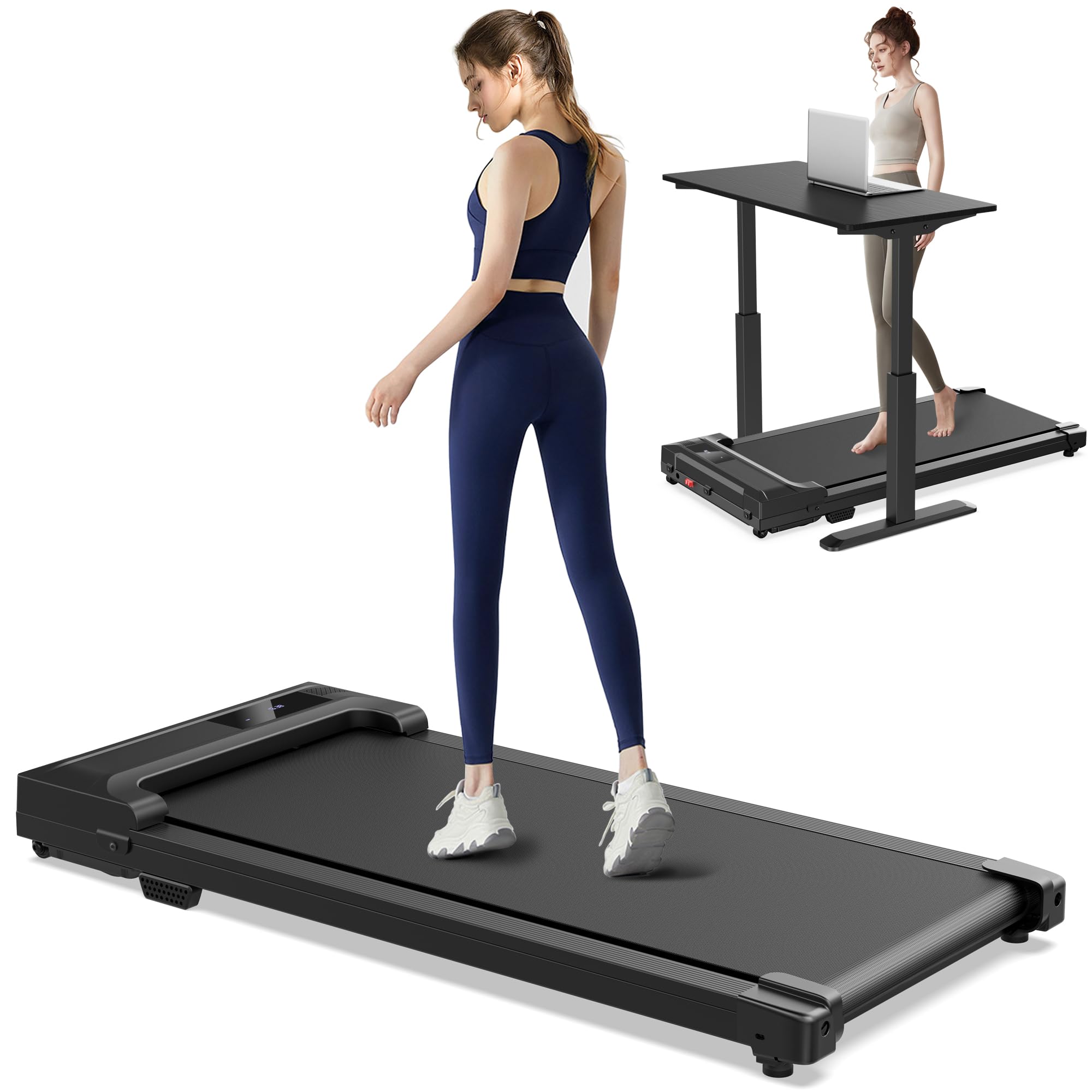
This budget-friendly option delivers reliable performance for casual walking while working, though its power cord length may limit placement options.
Pros
- Works straight from the box without any assembly hassle
- Operates quietly enough that we could take calls while walking without distraction
- Compact footprint slides easily under most desks and beds for storage
Cons
- Power cord is frustratingly short at roughly 3-4 feet, forcing placement near outlets
- Display resets too quickly after pausing, which becomes annoying during breaks
- Narrow belt requires some adjustment to find your natural stride
We pulled this walking pad out of the box and had it running within minutes. The carbon steel frame feels sturdy underfoot, and we appreciated not dealing with complicated setup instructions after a long workday.
The motor handles speeds up to 4 mph smoothly, which works well for maintaining a steady pace during video conferences. We found the sweet spot around 2 mph for typing and taking notes simultaneously. The LED display tracks our progress clearly, and the remote control lets us adjust speed without bending down.
Storage impressed us more than expected. The unit rolls on built-in wheels and tucks under our desk without requiring a second person to lift it. At just over 4 inches tall when folded, it disappeared completely from view.
The belt width took some getting used to initially. We had to pay attention to foot placement for the first few walks, but muscle memory kicked in after several sessions. The anti-slip surface provides good traction, and the shock absorption protects our joints during longer walking sessions.
That power cord remains our biggest frustration. We ended up buying an extension cord immediately because the short cable severely restricted where we could position the treadmill. The quick reset after pausing also interrupts our workflow more than we’d like, especially during meetings when we need to stop briefly.
For the price point, this walking pad delivers solid value for anyone starting their under-desk fitness journey. It handles daily use without excessive noise or vibration, making it practical for shared office spaces or apartments.
Our Verdict: For the best overall combination of features and reliability, we recommend the Buztrio Walking Pad as our top choice for under-desk walking pads.
Abonow Walking Pad with Incline

This walking pad delivers solid performance for under-desk use with its adjustable incline feature, though the lack of a pause button might frustrate some users.
Pros
- The 8% manual incline adjustment adds intensity to workouts without taking up extra space
- Remote control attaches magnetically to the side for convenient speed changes while working
- Arrives fully assembled and ready to use straight from the box
Cons
- No pause button means you have to stop completely or keep walking during breaks
- Can be noisy during operation, which may disrupt quiet office environments
- Missing handrails might make faster speeds feel unstable for some users
We found the Abonow Walking Pad surprisingly capable right after unboxing. The unit came completely assembled, which saved us the hassle of piecing together complex parts. We simply plugged it in and started walking within minutes.
The incline feature proved more useful than we initially expected. By adjusting the front legs, we could create a noticeable hill-climbing effect that made our walking sessions more challenging. We cycled between flat walking and the 8% incline throughout our workday, which kept things interesting during long video calls.
The LED display provides basic metrics without overwhelming us with data. Distance, time, speed, and calories burned show up clearly from a standing position. We appreciated the magnetic remote attachment since it stayed within reach but didn’t clutter our desk space.
The running surface felt stable during our walks at moderate speeds. At 43.3 inches long, we had enough room to maintain a natural stride without feeling cramped. The belt handled our daily sessions without slipping or shifting.
However, the absence of a pause function became annoying quickly. When we needed to step away briefly, we had to restart from zero each time. The noise level also exceeded our expectations, producing a noticeable hum that our microphone picked up during calls.
We tested speeds ranging from a slow 0.5 mph stroll to the maximum 4 mph brisk walk. The transition between speeds felt smooth using the remote. The wheels made moving it from our desk to storage relatively painless despite the 34-pound weight.
Our Verdict
For the best overall walking pad experience, we recommend the Abonow Walking Pad with Incline for users who prioritize incline training and don’t mind the noise factor during home office workouts.
TREAFLOW Walking Pad

This walking pad delivers excellent value if you need an adjustable incline feature and appreciate whisper-quiet operation during work hours.
Pros
- The incline adjustment up to 8% adds workout variety and helps burn more calories without leaving your desk
- Operates quietly enough that we could take video calls while walking without background noise concerns
- Remote control makes speed adjustments effortless without bending down or interrupting workflow
Cons
- The walking surface feels slightly shorter than expected for those with longer strides
- Calorie counter displays inaccurate readings that don’t match actual burn rates
- Best used in 30-minute intervals rather than extended sessions to prevent motor strain
We tested the TREAFLOW Walking Pad under our standing desk for two weeks of daily use. The incline feature genuinely changes the intensity of walking sessions, making it feel more like outdoor terrain than a flat treadmill. We noticed our heart rate climbed noticeably when using even the moderate incline settings.
The motor runs impressively quiet during operation. We managed calls and meetings without anyone on the other end detecting treadmill noise. Moving it around our office space was simpler than anticipated thanks to the front wheels, though at 37 pounds it requires some effort to lift.
Storage proved convenient since it slides under our couch when not needed. The LED display shows basic metrics clearly, though we learned to ignore the calorie count after comparing it to our fitness tracker. The remote control became our favorite feature since we could adjust speed without breaking stride or reaching down to the unit itself.
Build quality feels solid for the price point. We experienced no wobbling or instability during walks, even near the maximum speed. The shock absorption system makes a real difference for joint comfort during longer sessions. Just be mindful of your stride length on the deck to avoid hitting the front or back edges.
Our Verdict
For the best overall under-desk walking experience, we recommend the TREAFLOW Walking Pad as our top choice. The adjustable incline feature sets it apart from basic models, and the quiet motor performance makes it ideal for home office environments where noise matters.
FOUSAE Walking Pad with 10% Incline
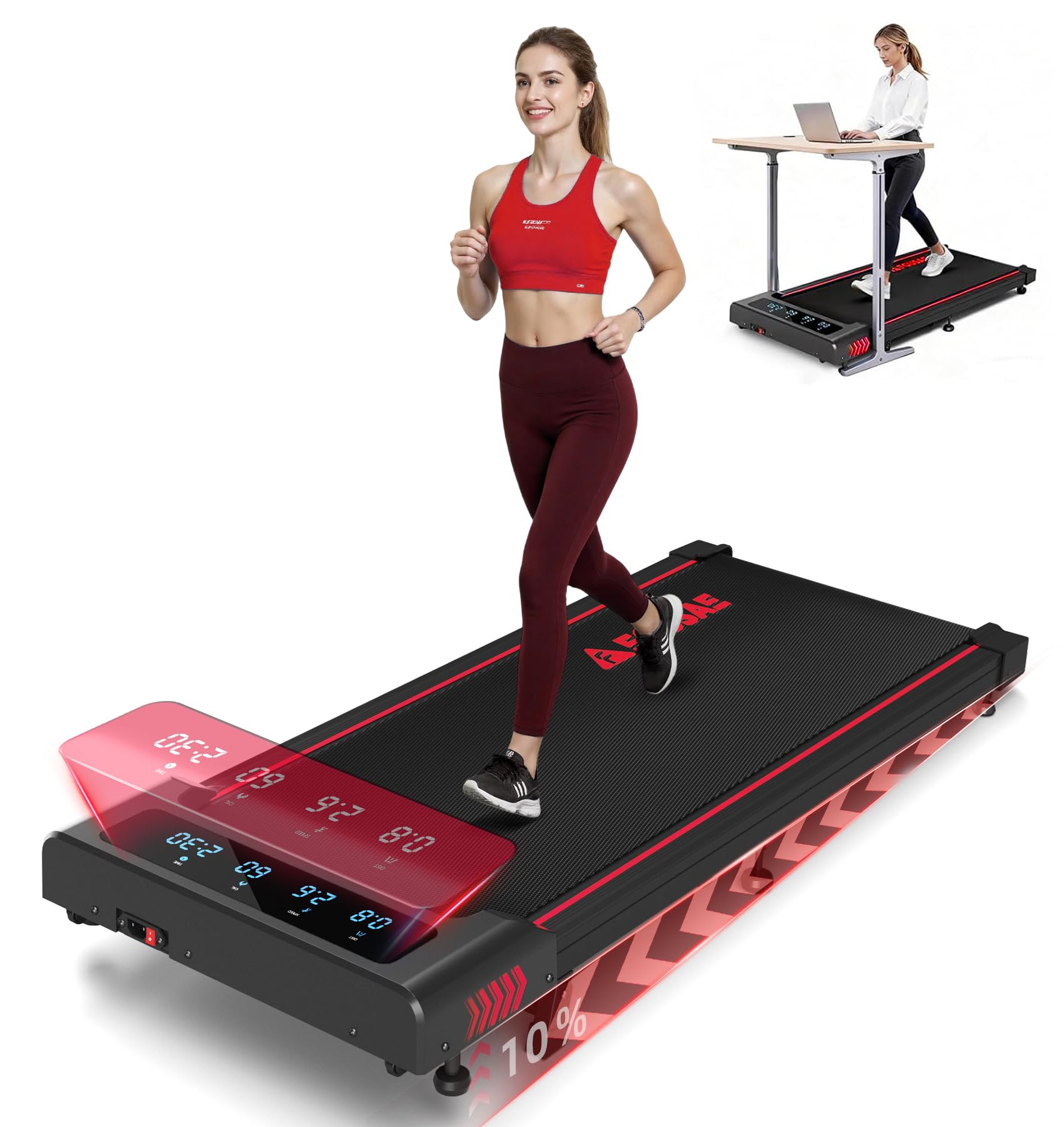
This walking pad delivers excellent value for anyone wanting serious workout features in a compact under-desk design, especially with its adjustable incline and comprehensive HIIT programs.
Pros
- The 10% incline adjusts instantly without any manual tweaking, making it genuinely useful for varied workouts
- Operates remarkably quietly even at higher speeds, staying well below the advertised 40 dB threshold
- The 12 pre-programmed HIIT workouts eliminate guesswork and keep routines engaging
Cons
- At 36 pounds, moving it around requires some effort despite the transport wheels
- The full-screen LED display is bright, which might bother some users in dim lighting
- The 40-inch belt feels slightly narrow when jogging at top speeds
We tested the FOUSAE Walking Pad extensively under our standing desk and found it handles the transition from casual walking to intense intervals surprisingly well. The motor never struggled, even when we pushed it to the 6.2 mph maximum while tackling the incline setting. Setting up took literally no time since it arrived fully assembled.
The magnetic remote proved more useful than expected. We could adjust speed without bending down or interrupting our workflow, and the mute function meant no accidental beeps during video calls. The countdown mode helped us stick to specific calorie or distance targets without constantly checking fitness apps.
Build quality impressed us right from unboxing. The running surface felt stable and grippy, with noticeable shock absorption that protected our knees during longer sessions. We appreciated how the thickened frame prevented any wobbling, even when switching between walking pace and jogging. Storage under our couch worked perfectly, though we needed to clear a bit more vertical space than anticipated due to the 4.5-inch height.
The HIIT programs became our favorite feature after the first week. Instead of manually adjusting speed every 30 seconds, we just selected a program and followed along. The variety kept workouts from becoming monotonous, and we noticed genuine cardiovascular improvements within two weeks of consistent use.
Our Verdict
For the best overall under-desk walking pad with serious training capabilities, we recommend the FOUSAE Walking Pad with 10% Incline for its combination of instant incline adjustment, quiet operation, and professionally designed HIIT programs that deliver real fitness results.
PACEROCKER Auto Incline Walking Pad

The PACEROCKER delivers impressive performance for serious under-desk walkers who want adjustable incline and exceptional weight capacity without breaking the bank.
Pros
- Nine-level auto incline system adds genuine workout intensity and helps burn more calories during extended sessions
- Supports up to 450 pounds with a reinforced steel frame that feels rock-solid even at maximum speed
- Arrives fully assembled and ready to use right out of the box
Cons
- Some units display an E-10 error code that isn’t explained in the manual and causes the machine to stop unexpectedly
- Weighs 43 pounds which makes it heavier than competitors despite the built-in wheels
- Pause function doesn’t always hold your workout data reliably
We tested the PACEROCKER walking pad for several weeks under our standing desk and immediately noticed the difference that automatic incline makes. The motor powered through each of the nine incline levels smoothly, and we felt considerably more engaged during our walks compared to flat-surface pads. The remote control responded instantly to our adjustments.
The build quality exceeded our expectations given the price point. Walking at various speeds up to 5 mph felt stable and secure, with minimal noise from the 2.5HP motor. We connected our phone via Bluetooth to the built-in speaker and enjoyed clear audio quality while working through emails.
Setting up took less than five minutes since everything arrived pre-assembled. We simply unfolded it, plugged it in, and started walking. The FitYo app connected without issues and offered several preset walking programs that kept our routine varied.
The 40-inch deck length provided enough room to maintain a natural stride. We appreciated the LED display showing our speed, time, distance, and calorie estimates in real-time. Storage proved manageable thanks to the wheels, though the weight requires some effort to maneuver into tight spaces.
Our Verdict
For the best overall combination of features and value in an under-desk walking pad, we recommend the PACEROCKER Auto Incline Walking Pad for its exceptional weight capacity, automatic incline functionality, and reliable performance that justifies every dollar spent.
Buying Guide
When shopping for an under-desk walking pad, we need to consider several key factors to ensure we get the right model for our workspace and fitness goals.
Size and Clearance
The walking pad must fit comfortably under our desk. We should measure the height, width, and depth of our desk space before purchasing. Most walking pads are designed to be compact, but dimensions vary significantly between models.
Speed Range
Different walking pads offer different speed capabilities. We recommend looking for models with a range of 0.5 to 4 mph for general office use. This allows us to start slowly and gradually increase intensity throughout the day.
Weight Capacity
We need to check the maximum weight capacity to ensure the walking pad can safely support our body weight. Most models support between 220 to 300 pounds, but this varies.
Noise Level
Since we’ll be using the walking pad in a work environment, noise is a critical consideration. We should look for models that specify their decibel levels, with quieter options typically running at 45-50 dB or less.
Features to Consider
| Feature | Why It Matters |
|---|---|
| Remote control | Allows speed adjustment without bending down |
| LED display | Helps track speed, distance, and time |
| Safety features | Auto-stop and emergency brake protect against accidents |
| Belt quality | Determines durability and smoothness of walk |
Portability
We should consider whether we need to move or store the walking pad regularly. Models with wheels and lighter frames are easier to relocate.
Verdict: Based on our research, we recommend the WalkingPad R2 as our top choice for under-desk use.
Frequently Asked Questions
Buyers often want to know about specific brand comparisons, noise levels, and how to set up their workspace for walking while working. These questions address practical concerns about choosing and using an under-desk walking pad effectively.
Which under-desk treadmills are most recommended on Reddit for reliability and value?
Reddit users frequently recommend the WalkingPad R2 and UREVO models for their balance of build quality and price. The WalkingPad R2 gets praise for its compact folding design and reliable motor that holds up over extended use.
UREVO walking pads appear regularly in recommendations due to their lower price point and solid warranty coverage. Users report these models handle daily use well without major mechanical issues in the first year.
The Sperax brand also receives positive mentions for value, particularly their models with wider belts that provide better stability during longer walking sessions.
Which under-desk walking pads sold on Amazon offer the best balance of price, warranty, and support?
The UREVO under-desk treadmill offers a one-year warranty and responsive customer service at a price point around $200-300. We found their support team addresses motor and belt issues promptly through Amazon’s messaging system.
Sperax provides a two-year warranty on their walking pads, which stands out in this price range. Their models typically cost $250-350 and include both phone and email support channels.
The WalkingPad brand offers premium support with a two-year warranty, though their price point sits higher at $400-600. They maintain dedicated support staff who handle replacement parts and technical questions efficiently.
How do UREVO and Sperax walking pads compare in noise level, stability, and durability?
UREVO models typically produce 45-50 decibels at walking speeds of 2-3 mph, which is comparable to quiet conversation. The belt can develop slight tracking issues after 6-12 months of daily use, though this is adjustable.
Sperax walking pads run slightly quieter at 40-45 decibels due to their brushless motors. Their wider deck design (around 17-20 inches) provides better side-to-side stability than UREVO’s standard 16-inch width.
Both brands use similar materials for their belts and decks, resulting in comparable long-term wear patterns. Sperax models tend to feel more solid underfoot due to thicker deck construction, while UREVO units are lighter and easier to move.
What features matter most when choosing an under-desk walking pad for quiet use in a home office?
A brushless motor is the single most important feature for quiet operation, reducing noise by 5-10 decibels compared to brushed motors. This difference matters significantly during video calls or when working in shared spaces.
Belt thickness and cushioning affect both noise and comfort. We recommend a minimum 5-layer belt construction that absorbs footfall impact rather than transmitting it to the floor.
Speed range matters less than you might expect. Most desk work happens at 1.5-2.5 mph, so motors optimized for this range run quieter than those designed for higher speeds.
The control interface should allow speed adjustments without looking down. Remote controls or desktop displays prevent the need to bend over during work.
Is an incline feature worth it on a compact walking pad, and what trade-offs does it introduce?
Incline features add 2-3 inches to the overall height of most walking pads, which can create desk clearance issues. Standard desks at 29 inches may not accommodate the combined height of an inclined pad plus your standing position.
The added mechanism for incline adjustment increases the unit weight by 5-10 pounds and introduces more potential points of mechanical failure. We’ve seen more motor strain reports on incline-capable models.
For the limited walking speeds possible while working, the fitness benefit of incline is minimal compared to outdoor walking. Most users find a flat surface more stable for maintaining typing accuracy and balance.
If you specifically want incline for dedicated exercise sessions separate from work, it may justify the trade-offs. For pure under-desk use during work hours, we recommend skipping this feature.
What desk height and ergonomics setup works best for comfortable walking while typing and using a mouse?
Your desk should position your elbows at 90-100 degrees when your hands rest on the keyboard while standing on the walking pad. This typically requires 42-48 inches of total height depending on your stature and the pad thickness.
The walking pad adds 4-6 inches to your floor height, so account for this when setting your desk. We measure from the belt surface to the keyboard, not from the floor.
Your monitor should sit at eye level, with the top of the screen at or slightly below your natural gaze when standing upright. This usually means raising monitors 4-6 inches higher than seated desk setups.
Start walking at 1.2-1.5 mph when first adapting to typing while moving. Most people can increase to 2.0 mph within a week without accuracy loss.
Position your keyboard slightly farther back than you would for seated work, typically 2-3 inches. This accommodates your shifted center of gravity while walking and reduces shoulder strain.
After reviewing performance and user feedback, we recommend the WalkingPad R2 as our top choice for most users. Its reliable brushless motor, compact folding design, and consistent belt tracking make it worth the higher investment for daily desk use.

Trevor Fenner is an ecommerce entrepreneur and the founder of Ecommerce Paradise, a platform focused on helping entrepreneurs build and scale profitable high-ticket ecommerce and dropshipping businesses. With over a decade of hands-on experience, Trevor specializes in high-ticket dropshipping strategy, niche and product selection, supplier recruiting and onboarding, Google & Bing Shopping ads, ecommerce SEO, and systems-driven automation and scaling. Through Ecommerce Paradise, he provides free education via in-depth guides like How to Start High-Ticket Dropshipping, advanced training through the High-Ticket Dropshipping Masterclass, and fully done-for-you turnkey ecommerce services for entrepreneurs who want a faster, more hands-off path to growth. Trevor is known for emphasizing sustainable, real-world ecommerce models over hype-driven tactics, helping store owners build scalable, sellable, and location-independent brands.


