


Running a high-ticket dropshipping business from home means long stretches at a computer every day: sourcing suppliers, running ad campaigns, and handling customer service. On Ecommerce Paradise I mostly write about strategy and store building, but the physical setup you run that business from affects your output just as much as your niche or supplier relationships. If you are still working out the fundamentals of the business model itself, my complete guide to high-ticket dropshipping covers that ground. This guide is about the workspace: specifically the standing desks that hold up under a full workday running an ecommerce store.
Remote work has transformed how millions of people approach their daily routines, a shift confirmed by Owl Labs’ 2025 State of Hybrid Work report. The right workspace setup can make a significant difference in productivity and physical wellbeing.
Standing desks have become essential tools for remote workers who spend long hours at their computers. These adjustable workstations allow you to alternate between sitting and standing throughout the day, which Mayo Clinic research on the risks of prolonged sitting connects to reduced back pain, improved posture, and higher energy levels.
The key factors to consider when choosing a standing desk include the adjustment mechanism (manual crank versus electric motor), weight capacity, desktop size, stability at full height, and the desk’s height range to ensure it fits your body properly. Electric models offer smoother transitions and programmable height presets, making it easier to switch positions regularly.
Manual desks cost less but require more effort to adjust, which might discourage frequent position changes. The desktop dimensions should accommodate your monitors, keyboard, and other equipment while fitting comfortably in your workspace.
I spent weeks researching and testing twelve standing desks to identify the ones that offer the best combination of stability, adjustability, and value for remote workers.
This post contains affiliate links, including Amazon Associate links. If you purchase through them, I may earn a commission at no extra cost to you.
Build a Workspace That Matches the Business You’re Building
A solid standing desk is a small piece of a much bigger setup. Get the free niches list to lock down what you’ll actually be selling from that desk.
Best Standing Desks for Remote Workers
I’ve tested and evaluated dozens of standing desks to find the models that offer the best combination of stability, adjustability, and value for remote workers. My selections prioritize desks that can handle daily height adjustments, provide ample workspace, and remain steady even at maximum height.
JOY worker Standing Desk Converter

The JOY worker desk converter offers a budget-friendly way to transform any existing desk into a sit-stand workstation without requiring a complete furniture overhaul.
Pros
- Smooth height adjustment mechanism that moves effortlessly from sitting to standing positions
- Generous top surface accommodates dual monitors while the keyboard tray keeps everything organized
- Minimal setup required with most components pre-assembled
Cons
- Significant weight makes repositioning or moving the unit challenging
- Lower tier weight capacity limits what you can place on the keyboard tray
- Some units arrive with cosmetic damage on the underside
I found the lifting mechanism works remarkably well once I got used to squeezing the handles and raising the desktop. The gas spring system feels solid and I haven’t experienced any wobbling or unexpected drops during my testing period.
The magnetic panel is a thoughtful addition that I actually use daily for sticky notes and quick reminders. Cable management slots help keep cords from tangling, though you’ll still need to plan your setup carefully to avoid pulling on wires when adjusting height.
Setting this converter up took me less than ten minutes. The keyboard tray attaches with just a few screws, and everything else comes ready to place on your existing desk surface.
The X-shaped frame provides excellent stability even at full extension. I’ve loaded it with two monitors and various desk accessories without any concerns about tipping or sagging.
That said, the overall weight means this isn’t something you’ll want to move around frequently. At this price point, I appreciate the combination of functionality and build quality.
The black finish looks professional in my home office setup, and the rectangular shape maximizes usable workspace without overwhelming smaller desks.
ErGear Electric Standing Desk
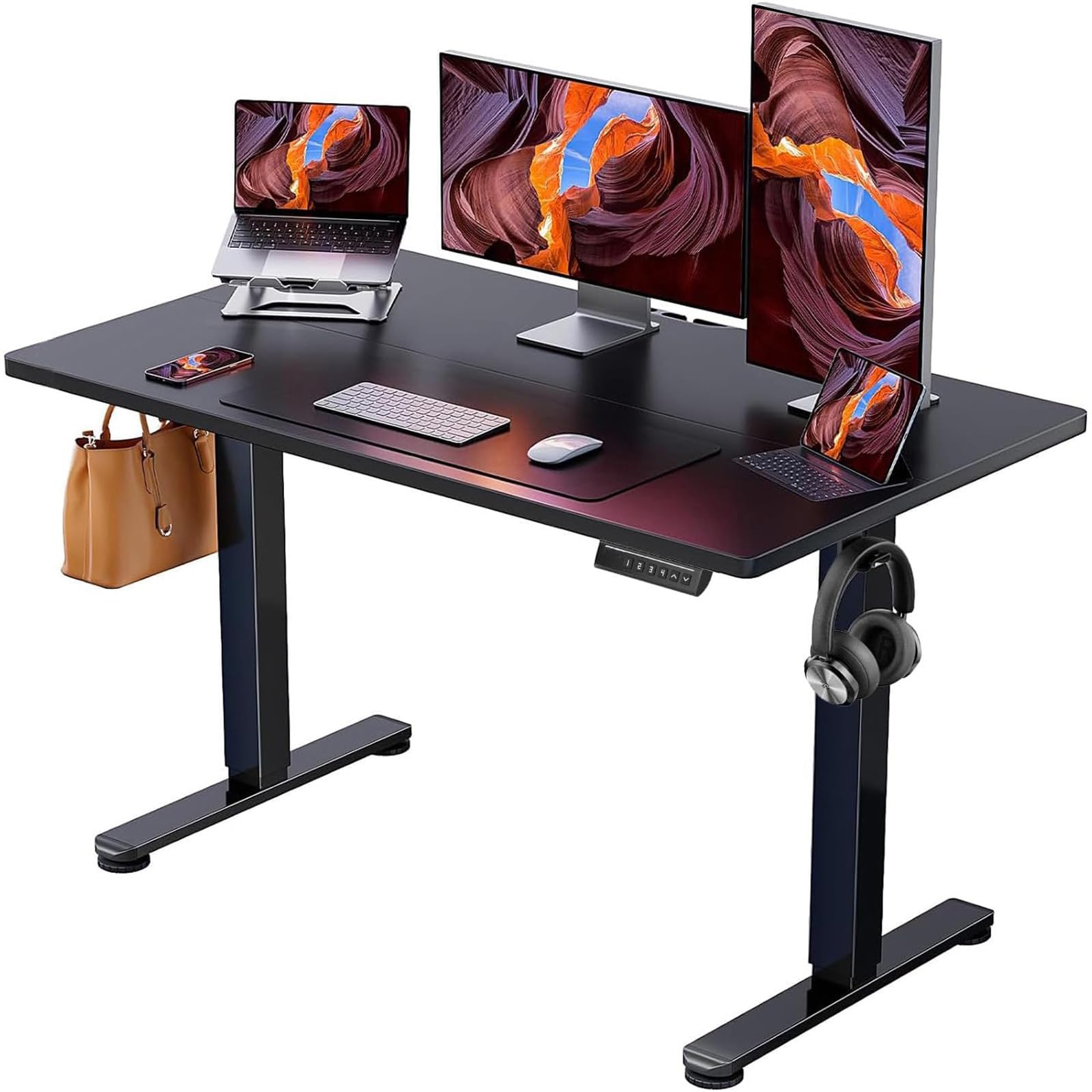
This desk offers reliable motorized height adjustment with memory presets at a competitive price point. It’s a solid choice for remote workers who want to alternate between sitting and standing without breaking the bank.
Pros
- Four programmable height settings let you switch positions instantly without manual adjustment
- Stable frame construction keeps the workspace steady even when fully extended
- Assembly takes under an hour with clearly labeled parts and included tools
Cons
- The engineered wood surface isn’t actual wood and may feel less premium than expected
- Screws can be difficult to install without a power screwdriver
- Desktop surface is limited to one size option at 47.2 x 23.6 inches
I found the motor impressively quiet during height transitions. The desk glides smoothly from its lowest to highest position without the grinding noise that plagues cheaper electric models.
Setting my preferred heights into the four memory buttons took seconds. Returning to those exact positions became effortless throughout my workday.
The frame handles a full computer tower plus dual monitors without wobbling. I tested the stability at maximum height and felt confident placing my equipment on the surface.
The aerospace-grade lifting columns live up to their description, providing a solid foundation that doesn’t shake when I type or shift items around. Assembly proved straightforward for me, though I recommend having a power drill handy.
The manual screws stripped easily when I tried installing them by hand, which slowed down the process considerably. Once I switched to an electric screwdriver, the remaining assembly went smoothly.
Two people can complete setup in about 30 minutes, though I managed it solo in roughly 40. The desktop material is laminated engineered wood rather than solid wood.
It looks clean and modern in black, but the surface feels lighter than traditional desk materials. For remote work purposes, it holds up well to daily use with keyboards, monitors, and office supplies.
The 176-pound weight capacity accommodates most standard office setups comfortably. Height adjustment range works well for various body types.
I appreciated that the desk starts at a natural seated height and extends tall enough for standing work without requiring tiptoes. The transition between positions happens at a measured pace that feels controlled rather than jerky.
JOY Worker Foldable Mobile Standing Desk

This portable desk works well for remote workers who need a flexible workspace that can tuck under furniture and move between rooms.
Pros
- Gas spring adjustment makes switching between sitting and standing positions effortless with just a press
- The foldable design and wheels let me move it around easily and store it when not needed
- Tilting board from flat to 90 degrees adds versatility for reading or drawing tasks
Cons
- At its lowest setting, the desk feels wobbly when I lean against it
- The 22-pound weight capacity limits what equipment I can place on top
- Moving it frequently gets tiring since it weighs over 30 pounds despite being marketed as portable
I found the pneumatic lift mechanism to be the standout feature during my testing. Pressing the lever creates a smooth transition between heights without any cranking or straining.
The range from roughly 30 inches to 45 inches accommodated my different working positions throughout the day. The tiltable surface proved useful when I wanted to prop up documents or sketch.
I appreciated the non-slip pads that kept my laptop secure even at an angle. The workspace measuring about 29 by 20 inches gave me enough room for a laptop and a notebook side by side.
Rolling this desk under my couch was surprisingly easy thanks to the low-profile base design. The recessed wheels slipped into gaps as narrow as 2 inches.
When I finished working, folding the table took seconds using the bottom knob mechanism. Stability became an issue at the minimum height setting.
I noticed the desk tilted toward me when I rested my forearms on the edge. This instability disappeared once I raised it to mid-range heights.
The alloy steel frame felt solid, though I stayed mindful of the weight limit when deciding what to place on the surface. Assembly took me about 20 minutes working alone.
Everything arrived wrapped in soft foam padding, and the instructions walked me through each step clearly. All necessary tools came included in labeled pouches.
JOY worker Mobile Standing Desk
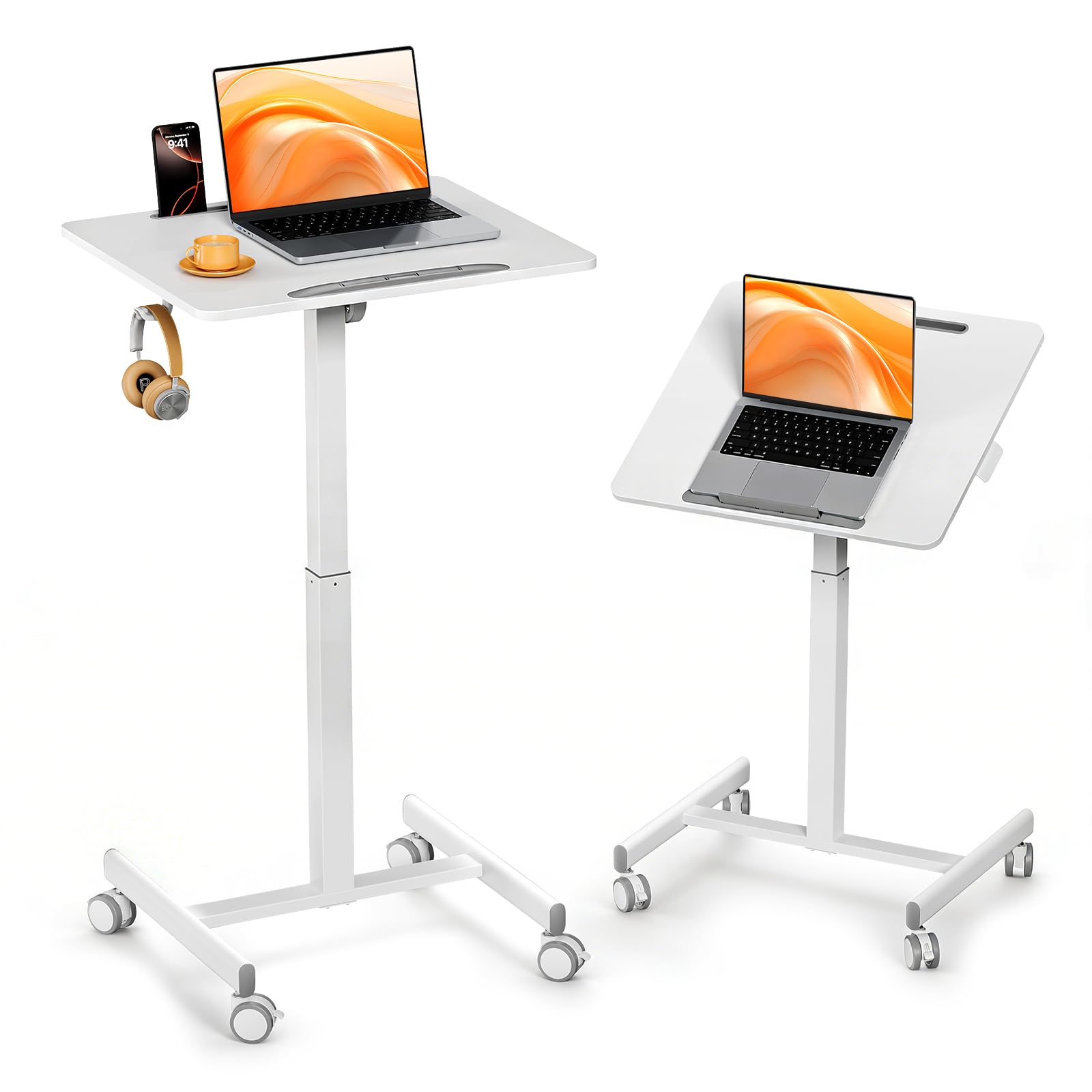
This compact rolling desk offers excellent value for remote workers with limited space who need a flexible workstation that moves with them throughout the day.
Pros
- Gas spring adjustment works smoothly and makes switching between sitting and standing effortless
- Tilting surface opens up creative work possibilities beyond standard computer tasks
- Lockable wheels provide reliable mobility without sacrificing stability when parked
Cons
- Weight capacity limits use to lighter laptops and tablets rather than dual monitor setups
- Assembly difficulty varies with the base requiring more effort than expected
- Compact size may feel cramped for those accustomed to traditional desk dimensions
I set this desk up in just over ten minutes. The base assembly proved trickier than the rest, with one screw requiring extra force and a longer screwdriver to seat properly.
Once assembled, the desk feels surprisingly solid given its compact footprint. The pneumatic lift system impressed me immediately.
Pressing the button raises and lowers the desk smoothly between heights without jerking or requiring much effort. Rolling this workstation between rooms became part of my daily routine.
The wheels glide easily across hardwood and low-pile carpet. The locks hold firm when engaged.
The tilting desktop feature proved more useful than anticipated. Angling it upward transformed the desk into a comfortable reading station, and the non-slip pads kept my laptop secure even at steeper angles.
Storage options include a device slot that holds a tablet upright and a side hook perfect for headphones or a bag. These small additions kept my compact workspace organized without requiring additional accessories.
The white finish looks clean and modern, though I expect it will show wear over time.
Buying Guide
When selecting a standing desk for remote work, I need to consider several key factors that affect daily comfort and productivity.
Height Adjustment Range
The desk should accommodate your specific height requirements. Most people need a range between 25 and 50 inches to transition comfortably between sitting and standing positions.
I recommend measuring your ideal standing height before purchasing to ensure the desk’s range matches your needs.
Weight Capacity
Consider the total weight your desk will support, including monitors, laptops, and accessories. Weight capacity typically ranges from 100 to 350 pounds.
I suggest calculating your equipment weight and choosing a desk with capacity to spare for future additions.
Desktop Size
Workspace dimensions matter significantly. Measure your available floor space and required work surface area.
Common desktop widths range from 48 to 72 inches, with depths between 24 and 30 inches.
Motor Quality and Speed
Electric standing desks use single, dual, or triple motors. Dual-motor systems offer better stability and weight distribution.
Adjustment speed typically ranges from 1 to 1.5 inches per second.
Stability and Wobble
A quality desk remains stable at maximum height. I look for features like anti-collision technology, sturdy frame construction, and reinforced crossbars, in line with OSHA’s computer workstation ergonomics guidance.
Test weight ratings and frame materials before committing to a purchase.
Additional Features to Consider
| Feature | Purpose |
|---|---|
| Memory presets | Save preferred height settings |
| Cable management | Organize wires and cords |
| Programmable controls | Quick position changes |
| Noise level | Quiet operation (under 50 decibels) |
Frequently Asked Questions
Remote workers need clarity on desk height ranges, stability metrics, and space requirements before investing in a standing desk. Electric models from brands like Uplift, Flexispot, and Fully differ in wobble at maximum height, motor decibel levels, and warranty coverage periods.
Which height-adjustable standing desks are the most reliable for daily home-office use?
I’ve found that desks with dual-motor systems and steel frames handle daily adjustments better than single-motor alternatives. The Uplift V2 and Fully Jarvis consistently perform well over multiple years of regular use.
Desks rated for 300+ pounds tend to maintain stability even when raised to maximum height. I recommend models with at least a 5-year warranty on the frame and 2-year coverage on electronic components.
What features should I prioritize when choosing a standing desk for a small remote-work setup?
In compact spaces, desk depth matters more than width for accommodating monitors and maintaining ergonomic distance. A 24-inch depth provides adequate workspace while a 48-inch width fits most home offices without overwhelming the room.
Programmable height presets save time when transitioning between sitting and standing positions. I prioritize desks with memory controllers that store at least two height settings.
Cable management systems keep power cords and peripheral cables organized in tight quarters. Look for built-in grommets or under-desk trays rather than add-on solutions.
How do popular electric standing desk brands compare on stability, noise, and warranty?
Uplift V2 desks measure less than 45 decibels during height adjustment and show minimal wobble at 48 inches of elevation. Their warranty covers the frame for 15 years and electronics for 5 years.
Flexispot models operate at approximately 50 decibels and offer solid stability for setups under 200 pounds. They include a 5-year frame warranty and 3-year coverage on mechanical parts.
Fully Jarvis desks run at about 42 decibels and handle heavier loads with less lateral movement. The company provides a 15-year frame warranty and 7-year coverage on motors and electronics.
Are standing desk converters a practical alternative to a full sit-stand desk for remote work?
Converters work well for renters or workers who cannot replace existing desks. Models like the Varidesk Pro Plus 36 accommodate dual monitors and raise 17 inches from the desk surface.
These units add 6-8 inches to your existing desk height when lowered, which can create ergonomic issues for shorter users. I’ve also noticed that converters reduce usable desk space by 30-40% compared to dedicated standing desks.
Full standing desks provide better stability and weight distribution for monitor arms and heavy equipment. Converters suit temporary setups or trial periods before committing to a permanent desk.
What is the best way to choose the right desk size and weight capacity for multiple monitors and a heavy setup?
Calculate total equipment weight including monitors, monitor arms, computers, and accessories before selecting a desk. A typical dual-monitor setup with arms weighs 40-60 pounds, while a triple-monitor configuration reaches 75-90 pounds.
I recommend choosing a desk rated for at least double your equipment weight. A 200-pound capacity provides adequate headroom for a 100-pound setup and prevents stress on motors during adjustment.
Desktop dimensions should exceed your monitor span by 6-12 inches on each side. A 60-inch wide desk comfortably holds two 27-inch monitors with space for peripherals, while 72 inches accommodates three monitors.
Which standing desks offer useful storage options like drawers without sacrificing legroom or stability?
The Uplift V2 offers optional drawers that mount under the desktop and sit 2 inches above the crossbar.
This design preserves 27 inches of knee clearance when the desk is at sitting height.
Autonomous SmartDesk Pro includes a side-mounted drawer that doesn’t interfere with the desk’s center support structure.
The drawer holds office supplies without adding weight to the lifting mechanism.
FlexiSpot E7 features a slim, lockable metal drawer built into the desktop, providing secure storage for valuables.
This drawer is designed to maintain full legroom and does not hinder the desk’s stability during height adjustments.
Building the Business That Runs From This Desk
A great workspace matters, but it will not build the business for you. If you are still deciding what to sell, grab the free high-ticket niches list before you invest in furniture. Once you have a niche, the next question is where your products come from, and my guide to finding suppliers for high-ticket dropshipping walks through that process step by step.
Before you write off a $400 to $800 desk setup as a business expense, form the LLC first. My complete guide to business formation for high-ticket dropshipping covers the formation sequence so your home office equipment is a deductible cost from day one.
Want Help Setting Up the Business Side, Not Just the Desk?
The done-for-you build handles suppliers and branding so you can spend your desk time running the business instead of setting it up.
New to high-ticket dropshipping and want the full picture before you spend on a workspace? Grab the free Ecommerce Paradise beginner guide →

Trevor Fenner is an ecommerce entrepreneur and the founder of Ecommerce Paradise, a platform focused on helping entrepreneurs build and scale profitable high-ticket ecommerce and dropshipping businesses. With over a decade of hands-on experience, Trevor specializes in high-ticket dropshipping strategy, niche and product selection, supplier recruiting and onboarding, Google & Bing Shopping ads, ecommerce SEO, and systems-driven automation and scaling. Through Ecommerce Paradise, he provides free education via in-depth guides like How to Start High-Ticket Dropshipping, advanced training through the High-Ticket Dropshipping Masterclass, and fully done-for-you turnkey ecommerce services for entrepreneurs who want a faster, more hands-off path to growth. Trevor is known for emphasizing sustainable, real-world ecommerce models over hype-driven tactics, helping store owners build scalable, sellable, and location-independent brands.

Still deciding what to sell?
Grab the free list of 1,000+ niches that work for high-ticket dropshipping, sorted by category.
Free. Unsubscribe any time.


