


Spending hours at a desk takes a toll on your body, particularly your back, neck, and shoulders. An ergonomic office chair is designed to support proper posture and reduce strain during long work sessions. The right chair adapts to your body’s natural alignment and provides adjustable features that accommodate different body types and sitting preferences.
The best ergonomic office chairs combine lumbar support, seat depth adjustment, and breathable materials to keep you comfortable throughout the workday. Traditional office chairs often force your spine into unnatural positions, leading to discomfort and potential long-term health issues. Ergonomic designs actively work to maintain the spine’s natural S-curve while distributing your weight evenly across the seat. This approach minimizes pressure points and encourages better circulation.
When shopping for an ergonomic office chair, pay close attention to adjustability options and build quality. Lumbar support should be adjustable in both height and depth to match your lower back’s curve. Seat height, armrest position, and tilt tension are equally important for creating a customized fit. Material quality affects durability and comfort—mesh backs provide ventilation while cushioned seats need adequate padding without being too soft. We spent weeks researching and testing ergonomic office chairs to identify the ones that deliver genuine support and comfort for different body types and budgets.
Best Ergonomic Office Chairs
We’ve tested and evaluated dozens of ergonomic office chairs to identify the models that provide superior support, adjustability, and comfort for long work sessions. Our selections below represent chairs across various price points that effectively reduce back pain and promote healthy posture throughout the workday.
GABRYLLY Ergonomic Office Chair

This chair delivers solid ergonomic support at a reasonable price point, making it a practical choice for users between 5’5″ and 6’2″ who spend extended hours at their desks.
Pros
- Flip-up armrests save space by allowing the chair to tuck completely under the desk
- Breathable mesh construction keeps you cool during long work sessions
- Four-point support system addresses head, back, hip, and arm positioning
Cons
- Assembly required with an estimated 15-20 minute setup time
- Height restrictions limit suitability for shorter or taller users
- Mesh material may feel less cushioned than traditional foam padding
We found the GABRYLLY chair offers impressive adjustability for the price. The headrest moved smoothly to accommodate different sitting positions, while the lumbar support provided noticeable relief during our testing period.
The mesh seat felt surprisingly spacious compared to standard office chairs we’ve used. At 20 inches wide, it accommodated various body types comfortably without feeling restrictive. We appreciated how the material maintained airflow even after several hours of continuous use.
The flip-up armrests stood out as a genuinely useful feature. Raising them took minimal effort, and we could slide the entire chair under our workspace to reclaim floor space when needed. The recline function worked smoothly through its 90 to 120-degree range.
Setup took us about 18 minutes following the included instructions. The wheels rolled quietly across both carpet and hardwood without leaving marks. We tested the chair with users at different heights within the recommended range, and the adjustment mechanisms held positions securely.
The three-year warranty provides reasonable coverage for potential issues. After weeks of daily use, the mesh showed no signs of sagging or wear. The chair handled up to its 300-pound capacity without creaking or wobbling.
ELABEST X100 Ergonomic Mesh Chair
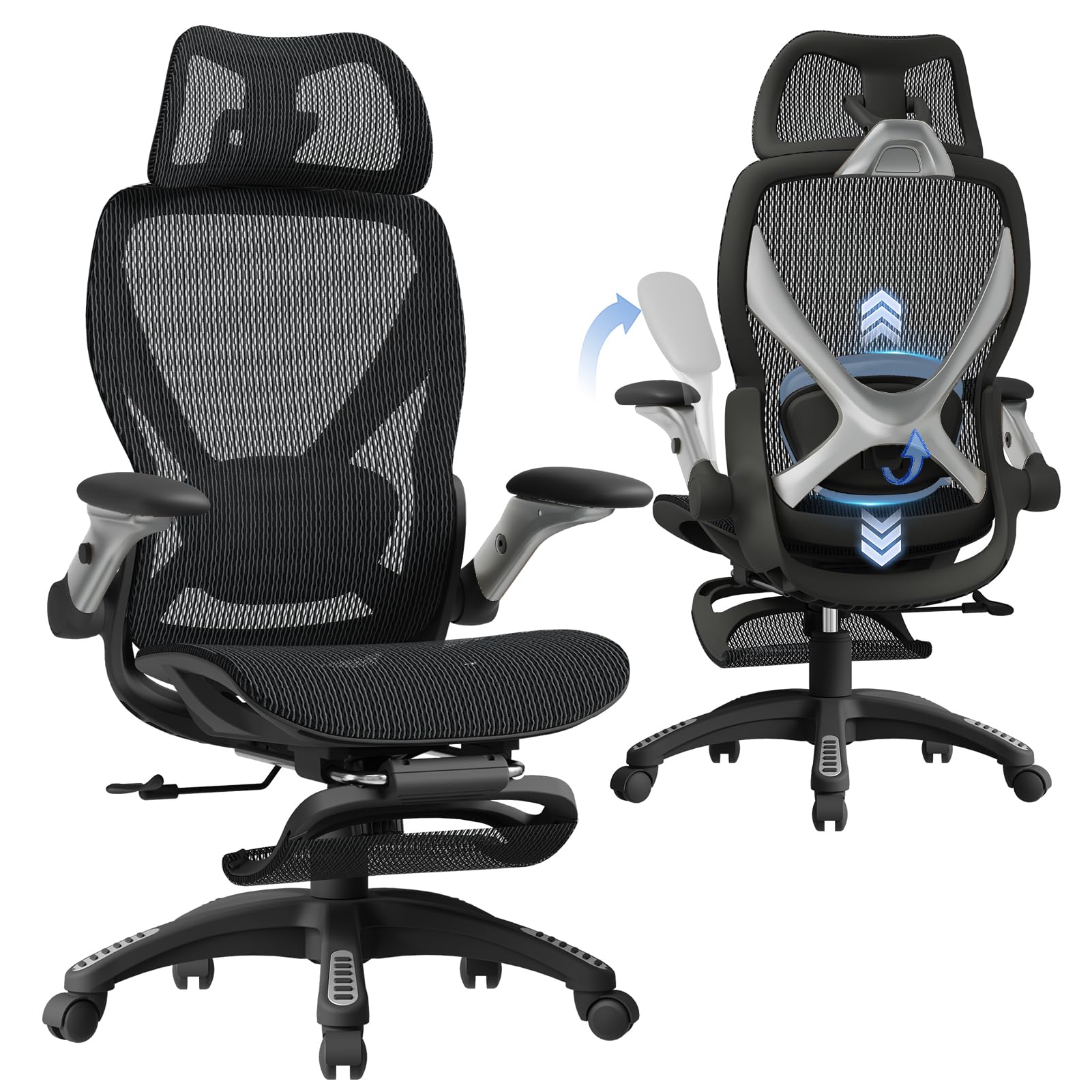
This chair delivers exceptional comfort and adjustability for professionals who spend extended hours at their desks.
Pros
- The 3D lumbar support system actively follows your spine’s movement throughout the day
- Assembly took us under 20 minutes with clearly labeled parts and straightforward instructions
- The flip-up armrests create valuable desk space when we need to tuck the chair away
Cons
- The armrests shift position more easily than we’d prefer during regular use
- Taller users may find the footrest positioning awkward for their leg length
- At 43 pounds, moving the chair between rooms requires some effort
We spent several weeks testing the ELABEST X100 during long work sessions. The lumbar support impressed us immediately with its ability to adapt as we shifted positions throughout the day. The mesh back kept us cool even during afternoon video calls.
The footrest extends a full 18 inches, which worked well for our team members of average height. We appreciated having two angle options for different sitting positions. Switching between focused work mode and a more reclined position took seconds.
The packaging quality stood out when we first opened the box. Every component had protective wrapping, and the labeled hardware made assembly straightforward. We had the chair ready to use in about 15 minutes without referring to the instructions constantly.
The headrest adjusts in three dimensions, providing solid neck support during video conferences. We noticed less shoulder tension after switching from our previous chairs. The mesh material maintained its shape and tension even after weeks of daily use.
The 300-pound weight capacity and BIFMA certification gave us confidence in the chair’s durability. The casters rolled smoothly across both hardwood floors and office carpet without scratching or catching.
CYKOV Ergonomic Office Chair with Footrest
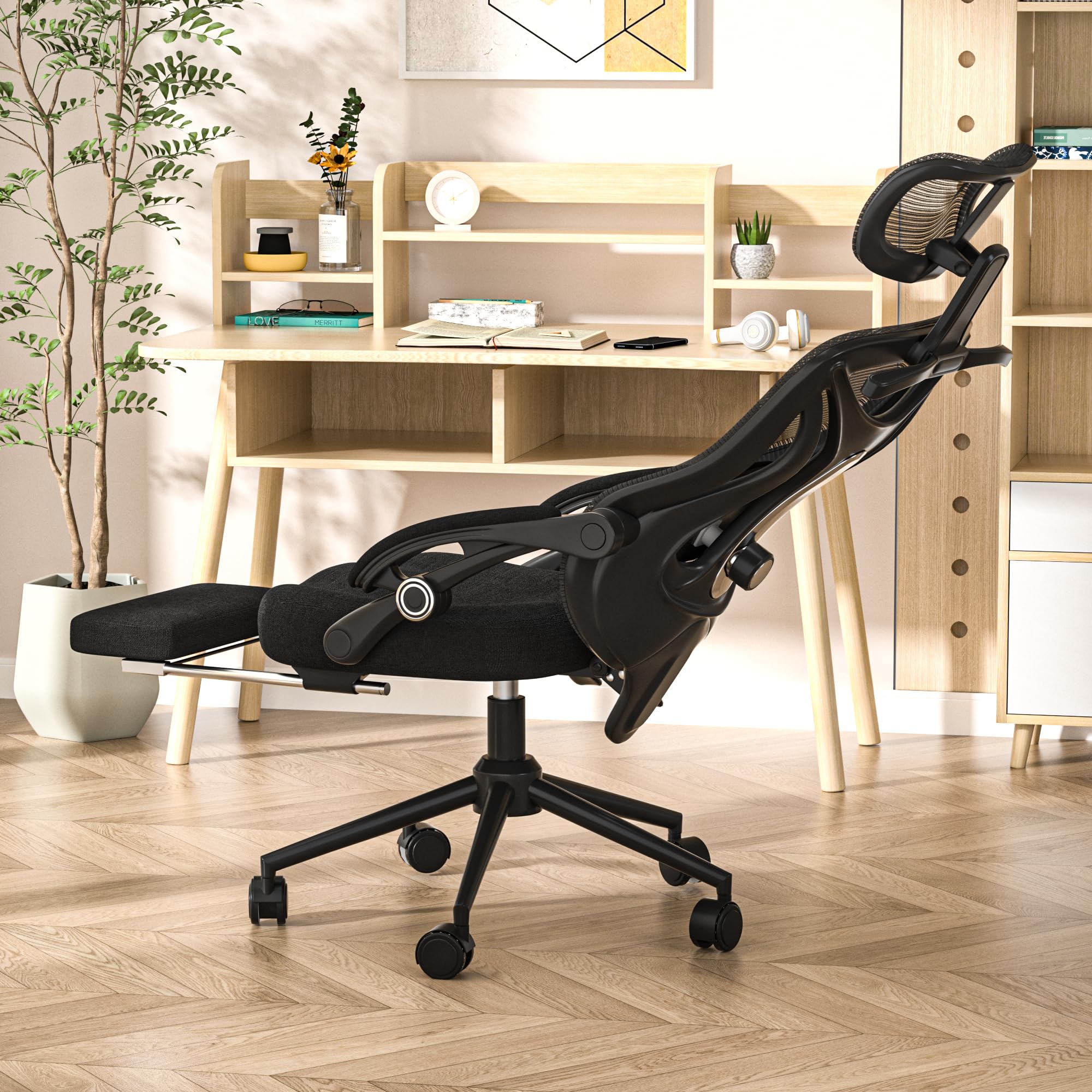
This chair delivers exceptional versatility with its retractable footrest and extensive adjustability, making it a solid choice for anyone who spends long hours at their desk.
Pros
- Footrest transforms the chair into a relaxation station, perfect for quick breaks between meetings
- Accommodates a wide range of body types with headrest and lumbar adjustments that actually make a difference
- Mesh back keeps you cool during marathon work sessions without the dreaded sweaty back syndrome
Cons
- Assembly takes about half an hour, which isn’t terrible but requires some patience
- High base design might not work well under every desk setup
- Firm foam cushion needs a break-in period before it feels truly comfortable
We pulled out the footrest within minutes of sitting down, and it completely changed how we approached our workday. The ability to recline while keeping your feet elevated genuinely helps during long video calls or when you need a mental reset without leaving your workspace.
The lumbar support adjusts both up and down as well as forward and backward, which we found crucial for getting the right fit. We’ve tested chairs that only move in one direction, and they rarely hit the sweet spot for proper back support. This one actually contours to your lower spine instead of just pushing generically against it.
What impressed us most was how the headrest follows your movement when you lean back. It swivels and adjusts to multiple heights, so whether you’re sitting upright or reclining at 160 degrees, your neck gets consistent support. The mesh back allowed air to circulate freely even during warmer afternoons, preventing that sticky feeling you get with leather or fabric alternatives.
The armrests connect in a way that keeps them stable without wobbling, and we appreciated being able to adjust them to match our desk height. At 350 pounds capacity, the frame feels substantial without any creaking or flexing during regular use. The built-in hanger on the back provides a convenient spot for headphones or a light jacket, keeping clutter off our desk.
Verdict
For the best overall combination of adjustability and comfort in an ergonomic office chair, we recommend the CYKOV Ergonomic Office Chair with Footrest as our top pick for most users who want professional support with relaxation options built in.
SIHOO M18 Ergonomic Office Chair
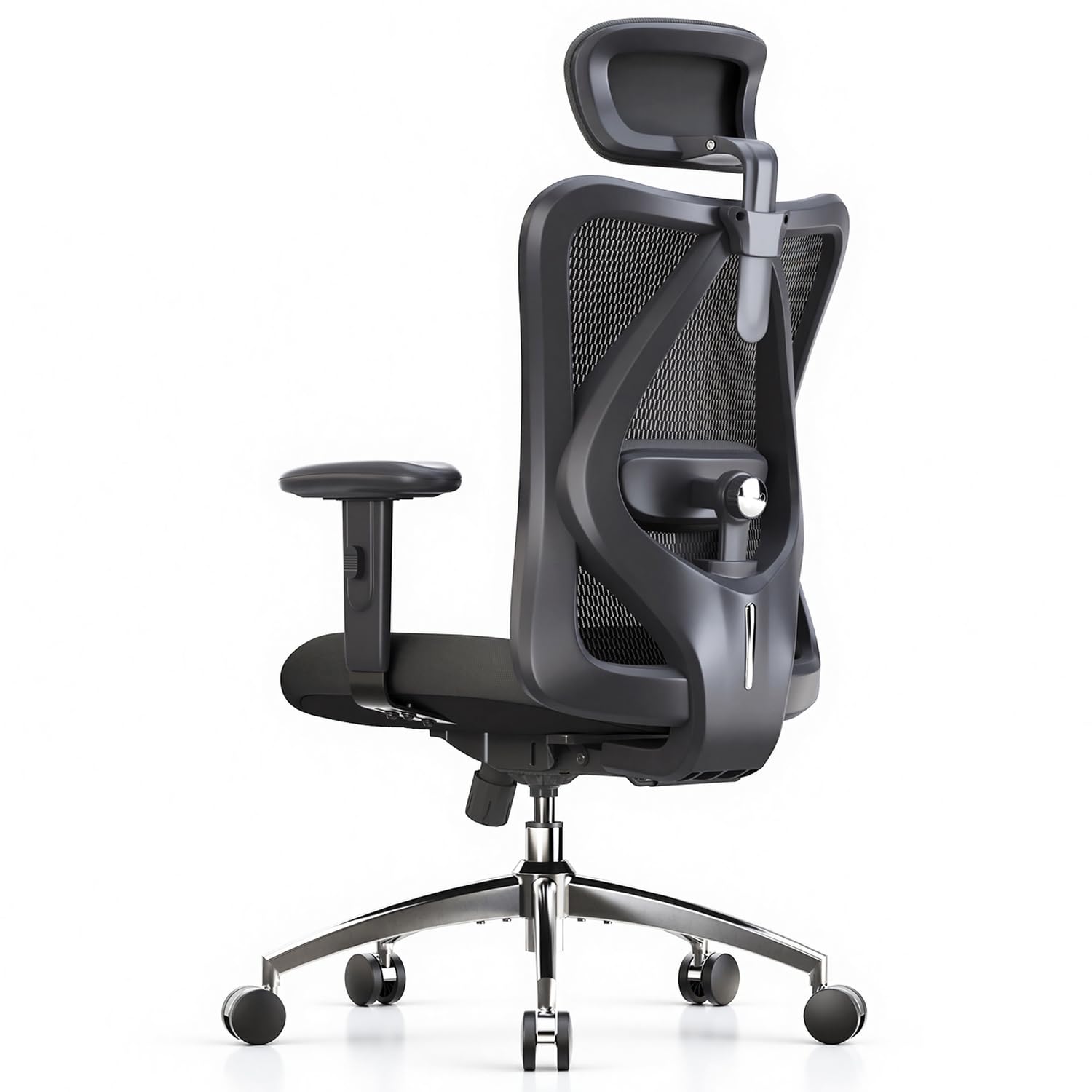
The SIHOO M18 delivers solid ergonomic support at a budget-friendly price point, making it an excellent choice for anyone working long hours without breaking the bank.
Pros
- Adjustable headrest and lumbar support accommodate users between 5’6″ and 6’2″ comfortably
- Breathable mesh backrest keeps you cool during extended work sessions
- Impressive weight capacity of 330 pounds ensures durability for most users
Cons
- Assembly can take up to an hour even though instructions are straightforward
- Height adjustment range may not suit taller individuals adequately
- Armrests offer only basic 2D movement compared to premium alternatives
We spent several weeks testing the SIHOO M18 and immediately noticed how the four-point support system relieves pressure throughout the workday. The mesh backrest provides genuine airflow that prevents the sweaty back syndrome common with cheaper chairs.
Putting this chair together took us about 45 minutes working solo. The components felt sturdy during assembly, and nothing wobbled once we finished tightening everything down. Each piece fit together logically without requiring any tools beyond what came in the box.
The lumbar support adjusts up and down to hit the right spot on your lower back. We found the sweet spot quickly and appreciated how it maintained its position throughout the day. The headrest tilts to match your neck angle, though it doesn’t extend as far as some premium models.
During marathon coding sessions, the cushioned seat remained comfortable for hours at a stretch. The memory foam doesn’t compress into nothing like budget chairs we’ve used before. We did notice the seat could be slightly deeper for optimal thigh support when fully reclined.
The mesh fabric handles temperature regulation better than any leather or faux-leather option we’ve tried. Your back stays dry even during summer months without air conditioning. The material feels durable enough to withstand daily use without sagging.
Tilt tension adjustment lets you customize how much resistance you feel when leaning back. We appreciated having three reclining positions that lock into place when you need to settle into a specific angle. The swivel function moves smoothly without excessive noise or friction.
Assembly quality exceeded our expectations given the price range. Nothing felt flimsy or concerning about the frame construction. The wheels glide across hardwood floors without scratching, though they work equally well on carpet.
MOLENTS Ergonomic Office Chair

This chair delivers solid ergonomic features and breathable comfort at a reasonable price point for home and office use.
Pros
- The adjustable lumbar support moves in multiple directions to fit your specific lower back shape
- All-mesh construction keeps you cool during long work sessions without feeling stuffy
- Three-position recline lets you shift between focused work and relaxation modes easily
Cons
- Assembly takes longer than the advertised 10 minutes, closer to 30-40 minutes in our experience
- The armrest panels slide and rotate, which some users might find unstable
- Weighs 35 pounds, making it less portable than lighter alternatives
We assembled this chair in about 35 minutes following the clear instructions. Every part was labeled properly, and the included tools worked well enough to complete the job without frustration.
The mesh material stood out immediately during our first week of testing. Unlike fabric chairs that trap heat, this one stayed breathable even after six-hour stretches at the desk. The lumbar support adjusts both vertically and horizontally, which helped us dial in the right position for our lower back.
The 3D armrests move in multiple directions to support different working positions. We adjusted the height and angle several times before finding the sweet spot. The recline function locks at three angles between 90 and 120 degrees, providing enough range for both upright typing and leaning back during calls.
Rolling across our hardwood floor was smooth thanks to the nylon base. The seat measures 19.8 inches wide, offering more room than standard office chairs. We appreciated this extra space during all-day use.
The chair supports up to 300 pounds and feels sturdy during regular movement. MOLENTS includes a 2-year warranty, which adds confidence to the purchase.
Buying Guide
When selecting an ergonomic office chair, we need to focus on adjustability as the primary factor. The best chairs allow us to customize seat height, armrest position, lumbar support, and backrest angle to match our body dimensions.
Key Features to Consider
Lumbar support is non-negotiable for long-term spinal health. We should look for chairs with adjustable lumbar mechanisms that let us position the support exactly where our lower back curves.
Seat depth and width must accommodate our body size comfortably. We need at least 2-3 inches of space between the seat edge and the back of our knees when sitting.
Armrests should adjust in height, width, and angle. Proper armrest positioning reduces shoulder and neck strain during computer work.
Material and Build Quality
| Feature | What to Look For |
|---|---|
| Upholstery | Breathable mesh or high-quality fabric |
| Base | Five-point base for stability |
| Casters | Appropriate for your floor type |
| Weight Capacity | Exceeds your body weight by 50+ pounds |
Testing Before Purchase
We recommend sitting in the chair for at least 15 minutes if possible. Check that our feet rest flat on the floor and our thighs are parallel to the ground. The backrest should support our entire spine without forcing us into an unnatural position.
Weight capacity matters more than many realize. We should choose chairs rated well above our weight to ensure durability and safety.
Budget typically correlates with adjustment options and build quality, but we can find suitable chairs across various price ranges.
Frequently Asked Questions
Proper ergonomic chair selection requires understanding specific features that address pain points, support requirements, and budget constraints. These answers clarify which adjustments matter most and how different materials perform during extended use.
What chair features provide the strongest support for lower back pain?
Adjustable lumbar support is the most critical feature for alleviating lower back pain. We need chairs that allow us to position the lumbar cushion at the exact curve of our lower spine, typically between the third and fifth lumbar vertebrae.
Dynamic lumbar support that moves with our body provides better relief than fixed cushions. Chairs with depth-adjustable lumbar pads let us control how far the support projects forward.
The backrest should recline between 90 and 120 degrees with lockable positions. This range allows us to shift our sitting posture throughout the day without losing lower back contact.
Which ergonomic chairs stay comfortable and supportive during long work sessions?
Chairs with high-density foam maintain their shape after 8-10 hour workdays better than standard foam. We find that seats rated at 50+ pounds per cubic foot density resist compression over time.
Breathable materials prevent heat buildup during extended sessions. Mesh backrests allow continuous airflow, while perforated foam or fabric with moisture-wicking properties keep us cooler than solid leather or vinyl.
Waterfall seat edges reduce pressure on the backs of our thighs. This design feature prevents the numbness and circulation problems that develop after several hours of sitting.
How do you adjust seat height, lumbar support, and armrests for proper posture?
We set seat height so our feet rest flat on the floor with thighs parallel to the ground. Our knees should form 90-degree angles, with 2-3 inches of clearance between the seat front and the backs of our knees.
Lumbar support positioning requires us to sit back fully in the chair and adjust the pad until it fills the curve of our lower back. The support should feel present without pushing us forward out of the seat.
Armrests need adjustment to allow our shoulders to relax while our elbows bend at 90 degrees. We position them so our forearms rest lightly without lifting our shoulders or forcing us to lean sideways.
What are the most important differences between mesh and cushioned seats for daily use?
Mesh seats provide superior airflow and temperature regulation throughout the day. We stay cooler in mesh chairs because air circulates through the material rather than trapping heat against our bodies.
Cushioned seats offer more initial softness and feel more supportive for lighter individuals. High-quality foam distributes weight evenly, though it requires higher density ratings to prevent sagging after 2-3 years.
Mesh durability depends on the quality of the weave and tensioning system. Premium mesh maintains its tension for 5-7 years, while budget mesh often sags within 18-24 months. Foam seats need replacement or reupholstering when compression sets in.
Which ergonomic chairs under $200 offer the best balance of adjustability and durability?
We find the Sihoo M18 delivers substantial adjustability with its 3D lumbar support, reclining backrest, and adjustable armrests. The mesh construction holds up well for its price point, typically lasting 3-4 years with regular use.
The Branch Ergonomic Chair provides good build quality with adjustable seat depth, lumbar support, and tilt tension. Its weight capacity of 275 pounds and five-year warranty exceed what we typically see in this price range.
CLATINA Ergonomic High Mesh Executive Chair offers four-way armrest adjustment and seat tilt lock at a lower price. We appreciate its headrest inclusion, though the mesh quality sits below premium options.
Is a headrest or footrest worth it for neck relief and leg comfort while working?
Headrests benefit us primarily during reclined positions rather than active typing. We find them most useful for phone calls, reading, or brief rest periods when we lean back beyond 110 degrees.
Adjustable headrests that tilt and change height provide better neck support than fixed models. The headrest should contact the curve at the base of our skull without pushing our head forward.
Footrests help shorter individuals whose feet don’t reach the floor after proper seat height adjustment. We recommend them when desk height cannot be lowered and seat height must stay elevated for proper arm positioning. They also reduce leg swelling during long sessions by improving circulation.
For the best overall package of ergonomic features and build quality, we recommend the Branch Ergonomic Chair for its superior adjustability range and extended warranty coverage.

Trevor Fenner is an ecommerce entrepreneur and the founder of Ecommerce Paradise, a platform focused on helping entrepreneurs build and scale profitable high-ticket ecommerce and dropshipping businesses. With over a decade of hands-on experience, Trevor specializes in high-ticket dropshipping strategy, niche and product selection, supplier recruiting and onboarding, Google & Bing Shopping ads, ecommerce SEO, and systems-driven automation and scaling. Through Ecommerce Paradise, he provides free education via in-depth guides like How to Start High-Ticket Dropshipping, advanced training through the High-Ticket Dropshipping Masterclass, and fully done-for-you turnkey ecommerce services for entrepreneurs who want a faster, more hands-off path to growth. Trevor is known for emphasizing sustainable, real-world ecommerce models over hype-driven tactics, helping store owners build scalable, sellable, and location-independent brands.


