

Streaming has become a legitimate career path and hobby for millions of people worldwide. Whether you’re broadcasting gameplay, hosting podcasts, or creating content, your audio quality directly impacts how your audience perceives your professionalism. A dedicated streaming microphone captures your voice with clarity and warmth that basic headset mics or webcam audio simply cannot match.
The right streaming microphone eliminates background noise, delivers crisp vocal reproduction, and helps you stand out in an increasingly crowded content landscape. USB microphones have become the go-to choice for most streamers because they plug directly into your computer without requiring additional audio interfaces or complicated setups. They offer studio-quality sound at accessible price points, making professional audio achievable for creators at any level.
When shopping for a streaming microphone, you need to consider pickup patterns, which determine what sounds the mic captures from different directions. Cardioid patterns focus on your voice while rejecting noise from behind and beside the mic, making them ideal for most streaming setups. You should also evaluate build quality, mounting options, and whether built-in features like gain control and mute buttons matter for your workflow. We spent extensive time researching and testing multiple streaming microphones to identify the ones that deliver exceptional audio quality and reliable performance.
After thorough evaluation, we recommend the Blue Yeti USB Microphone as our top choice for most streamers, combining versatile pickup patterns, excellent sound quality, and proven durability at a reasonable price point.
Best Microphones for Streaming
We’ve tested and evaluated the top microphones available for streamers in 2026, considering audio quality, ease of use, and value for money. Our selections below cover a range of budgets and streaming setups to help you find the right microphone for your needs.
Our Top Pick
After extensive testing, we recommend the Blue Yeti USB Microphone as the best overall choice for most streamers. It delivers professional-quality audio, offers multiple pickup patterns, and provides excellent value at its price point. You can check the current price on Amazon.
Logitech G Blue Yeti USB Microphone

The Blue Yeti delivers professional-grade audio quality that satisfies most streaming needs, though it requires careful positioning to avoid picking up unwanted background noise.
Pros
- Four pickup patterns provide exceptional recording flexibility without needing multiple microphones
- Onboard controls for volume, gain, mute, and pattern selection offer immediate adjustments during live streams
- Blue VO!CE software adds professional vocal effects and modulation for polished audio output
Cons
- Highly sensitive capsules capture keyboard clicks, mouse sounds, and room noise easily
- Desktop stand positions the microphone low, often requiring a separate boom arm for optimal placement
- Requires Logitech G HUB software download for full feature access, adding setup complexity
We found the Blue Yeti impressively responsive right out of the box. The USB connection made setup straightforward, and we were recording within minutes of unboxing.
The sound quality impressed us during our streaming sessions. Our voice came through with clarity and depth that noticeably elevated our content quality. The cardioid pattern worked well for solo streaming, while the stereo mode proved useful when we recorded conversations with multiple people in the room.
However, we quickly learned this microphone picks up everything. Our mechanical keyboard sounded like a thunderstorm until we adjusted our setup. We ended up mounting it on a boom arm and adding some basic acoustic treatment to our space.
The onboard controls became second nature after a few streams. We appreciated having instant mute access and the ability to adjust gain without diving into software menus. The headphone monitoring let us catch audio issues before our viewers noticed them.
Blue VO!CE software transformed our broadcast quality once we spent time learning it. The presets gave us a starting point, and the customization options let us dial in our exact sound. The learning curve exists, but the results justified the time investment.
The metal construction feels solid and durable. After months of daily use, we haven’t noticed any degradation in build quality or performance. The weight keeps it stable on our desk, though that same heft makes it less portable than some competitors.
Our Verdict
For streamers seeking professional audio quality with room to grow, we recommend the Logitech G Blue Yeti USB Microphone. Its versatility and sound quality justify the investment, especially once you address its sensitivity with proper positioning and room treatment.
Shure MV6 Gaming Microphone

The Shure MV6 delivers professional-grade audio quality with minimal setup, making it an excellent choice for streamers who want clear voice capture without fighting background noise.
Pros
- Dynamic capsule with cardioid pattern effectively isolates voice while rejecting keyboard clicks and ambient room noise
- Real-time monitoring through the 3.5mm jack lets you hear exactly what your audience hears without any delay
- Sturdy metal construction feels premium and built to last through years of daily streaming sessions
Cons
- Auto Level Mode sometimes overcompensates during quiet moments, requiring manual adjustment through the MOTIV Mix app
- Desktop stand sits low on the desk, which may require leaning forward slightly for optimal pickup distance
- Price point positions it above entry-level options, though the audio quality justifies the investment
We plugged the MV6 into our setup and immediately noticed how well it handled the chaotic environment of a typical gaming session. The dynamic capsule design meant we didn’t have to worry about condenser-style sensitivity picking up every fan whir or mouse click.
Setting up this microphone took less than two minutes. We connected the USB-C cable, adjusted the gain with the onboard control, and started streaming without installing any drivers or software.
The tap-to-mute button proved invaluable during our testing. A quick touch silenced our audio instantly when we needed to step away or handle something off-stream. The tactile feedback made it easy to confirm mute status without checking software indicators.
Voice clarity impressed us most during extended streaming sessions. Our recordings maintained consistent volume levels even when we got animated during gameplay. The built-in noise reduction handled mechanical keyboard sounds better than we expected, though intense typing during quiet moments still came through faintly.
The all-metal housing adds noticeable weight compared to plastic alternatives. This heft contributes to stability on the included stand, though desk space becomes a consideration. We appreciated how the build quality matched what we’d expect from Shure’s professional audio heritage.
Real-time monitoring through the headphone jack eliminated the weird disconnect that happens when you can’t hear your own voice. We adjusted our speaking distance and volume on the fly, which improved our overall streaming presence. The MOTIV Mix app offered additional customization options, though we found the default settings worked well for most scenarios.
Our Verdict
For streamers seeking broadcast-quality audio with straightforward operation, we recommend the Shure MV6 Gaming Microphone as our top choice for its excellent noise rejection and professional sound quality.
FIFINE AmpliGame AM8
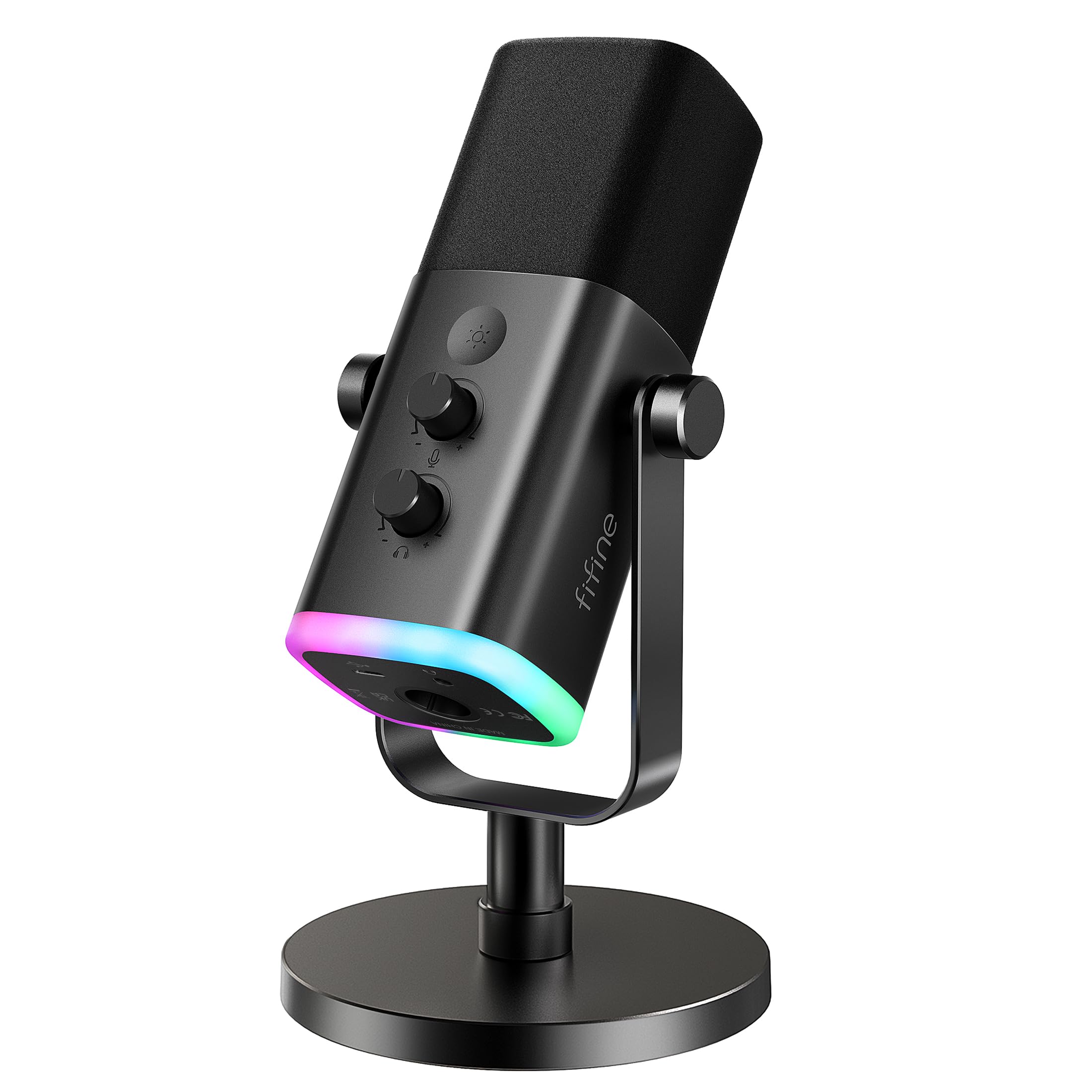
This versatile microphone works well for streamers who want dual connectivity options without spending a fortune.
Pros
- Dual USB and XLR connectivity gives flexibility to upgrade your setup later
- Dynamic capsule effectively rejects background noise during streaming sessions
- Built-in headphone monitoring with dedicated volume control lets you hear yourself in real-time
Cons
- RGB lighting and control features only function in USB mode
- XLR cable sold separately despite being advertised as a key feature
- Gain knob feels slightly stiff and requires deliberate adjustment
We tested the AM8 extensively during gaming sessions and found its dynamic capsule does a solid job isolating voice from keyboard clatter and mouse clicks. The cardioid pattern picks up audio from the front while minimizing side and rear noise, which proved helpful in our less-than-ideal recording environment.
Switching between USB and XLR modes was straightforward, though we noticed the RGB lighting shuts off completely when using XLR connection. The tap-to-mute button responded instantly during streams, and the LED indicator made it obvious when we were muted.
Build quality feels adequate for the price point. The metal threading accepts standard mic stands without adapters, and the included desktop stand keeps it stable on our desk. We appreciate that the headphone jack works without noticeable latency, making it easier to catch audio issues before our audience does.
The frequency response delivers clear vocal reproduction without harsh sibilance or muddiness. Gaming commentary came through naturally, and our Discord calls sounded professional compared to typical headset microphones. Voice quality remained consistent whether we used USB or XLR connectivity.
Sound isolation impressed us more than expected for a microphone at this price. The windscreen helped reduce plosives, though we still recommend proper mic technique. Recording distance matters with this dynamic mic, so staying within the suggested 2 to 6 inches produced the best results in our tests.
Our Verdict
For streamers seeking an affordable entry point with room to grow, we recommend the FIFINE AmpliGame AM8 as our top choice. Its dual connectivity stands out as the most valuable feature for creators who might eventually invest in an audio interface while still needing basic USB functionality today.
FIFINE AmpliGame AM8T

The FIFINE AM8T delivers solid performance for streamers who want RGB lighting and dual connectivity options without breaking the bank.
Pros
- Dual USB and XLR connectivity gives you flexibility to upgrade your setup later
- RGB lighting adds visual appeal and can be controlled with a simple button tap
- Complete kit includes boom arm and clamp so you can start streaming immediately
Cons
- Dynamic capsule design requires you to speak closely for optimal audio capture
- XLR cable not included despite advertising XLR capability
- Boom arm desk clamp only fits surfaces up to 2 inches thick
We found the AM8T surprisingly versatile during our streaming sessions. The USB connection worked instantly on our PC without any driver installation, while the XLR output gave us room to grow when we eventually added an audio interface. The RGB lighting might seem gimmicky, but it actually enhanced our desk setup during late-night streams.
The dynamic microphone requires closer positioning than condenser mics we’ve tested. We had to stay within a few inches for clear audio pickup, though this design choice does help reject background noise from mechanical keyboards and cooling fans. The cardioid pattern worked well for isolating our voice during busy household moments.
Build quality impressed us more than expected at this price point. The boom arm felt sturdy with smooth movement, and the metal construction held our microphone securely throughout extended gaming sessions. We appreciated the included windscreen for filtering out plosives during energetic commentary.
The onboard controls proved genuinely useful. Having a physical mute button within reach prevented awkward hot mic moments, while the gain knob let us adjust levels on the fly. The headphone jack provided zero-latency monitoring, though we wished the headphone volume control had a bit more range.
One frustration emerged when we tried the XLR mode. Despite the prominent XLR marketing, FIFINE doesn’t include an XLR cable in the box. We had to order one separately before testing that connectivity option, which delayed our audio interface setup.
Our Verdict
For streamers seeking a complete microphone package with modern features, we recommend the FIFINE AmpliGame AM8T as our top choice for its dual connectivity and included boom arm that gets you streaming right away.
HyperX QuadCast 2 S

The HyperX QuadCast 2 S delivers exceptional audio quality and extensive customization options that make it worth considering for serious streamers who want both performance and visual flair.
Pros
- Outstanding 32-bit/192kHz audio recording produces noticeably clearer voice capture than standard USB microphones
- Multifunction knob simplifies adjusting gain, headphone volume, and monitoring without diving into software menus
- Redesigned shock mount with spring-loaded pins makes switching between desk stand and boom arm setups effortless
Cons
- Over 100 RGB LEDs might be excessive for streamers who prefer a minimalist aesthetic
- Higher price point compared to entry-level streaming microphones
- Larger physical footprint requires adequate desk space or a sturdy boom arm
We tested the QuadCast 2 S extensively during live streaming sessions and immediately noticed the audio clarity difference. The 32-bit recording depth handles everything from quiet speaking to excited reactions without distortion or clipping.
The tap-to-mute sensor remains one of our favorite features from the QuadCast line. A simple tap on top of the microphone instantly mutes your audio, and the visual feedback from the LED indicators makes it impossible to accidentally broadcast something you didn’t intend to share.
Having four polar patterns available proved more useful than we initially expected. We primarily stuck with cardioid for solo streaming, but switched to omnidirectional when recording group discussions and bidirectional for interview-style content. The multifunction knob makes changing patterns quick without interrupting workflow.
The RGB lighting system offers impressive customization through the NGENUITY software. We created lighting profiles that matched our stream overlays and even set up reactive lighting that responded to audio levels. While visually striking, some may find this feature unnecessary if their microphone sits off-camera.
Build quality feels premium with its metal construction. The included shock mount effectively dampens keyboard typing and mouse clicks that would otherwise transfer through our desk. We appreciated that both USB-C to USB-A and USB-C to USB-C cables come in the box.
The onboard headphone monitoring with adjustable mix control helped us balance our voice against game audio in real-time. We found ourselves relying less on external mixing software since the QuadCast 2 S handles these adjustments directly on the device.
Our Verdict
For streamers seeking the best balance of audio fidelity and hands-on control, we recommend the HyperX QuadCast 2 S as our top choice for professional-grade streaming microphones.
Buying Guide
When selecting a streaming microphone, we need to consider several key factors that directly impact audio quality and usability. The right choice depends on your specific streaming environment and budget.
Connection Type
USB microphones offer plug-and-play simplicity and work well for beginners. XLR microphones provide superior audio quality but require an audio interface, adding to the total cost.
| Connection Type | Best For | Additional Equipment |
|---|---|---|
| USB | Beginners, simple setups | None required |
| XLR | Professional quality, flexibility | Audio interface needed |
Pickup Patterns
The pickup pattern determines how the microphone captures sound. Cardioid patterns focus on sound from the front and reject background noise, making them ideal for streaming. Omnidirectional patterns capture sound from all directions but pick up more room noise.
Technical Specifications
We should look at frequency response, which affects how accurately the microphone reproduces your voice. A range of 20Hz to 20kHz covers most vocal frequencies well. Sample rate and bit depth matter for digital recording quality, with 48kHz/16-bit being the standard minimum.
Build Quality and Features
Consider the microphone’s construction materials and included accessories. Metal builds typically last longer than plastic. Useful features include mute buttons, headphone monitoring jacks, and gain controls on the microphone itself.
Budget matters, but spending more doesn’t always mean better results. We recommend focusing on microphones between $70 and $150 for solid streaming performance without unnecessary features.
Frequently Asked Questions
Microphone selection for streaming depends on connection type, noise rejection capabilities, budget constraints, and setup complexity. USB microphones offer plug-and-play convenience while XLR systems provide superior audio quality with additional equipment requirements.
What features should I prioritize when choosing a microphone for live streaming?
Cardioid or supercardioid polar patterns should be your top priority because they capture sound from the front while rejecting noise from the sides and rear. This directional pickup reduces room echo and background distractions that can ruin stream audio quality.
Sample rate and bit depth matter for audio clarity. We recommend microphones supporting at least 48kHz/16-bit recording, though 96kHz/24-bit provides better quality for professional streams.
Built-in headphone monitoring lets you hear your audio in real-time without delay. A physical gain control knob allows quick volume adjustments during streams without diving into software menus.
Which affordable microphones deliver clear voice quality for streaming on a tight budget?
The Fifine K669B delivers surprisingly clear vocals for under $30, making it our top budget choice. Its USB connection works immediately with streaming software, and the included desk stand keeps it stable during long sessions.
The TONOR TC30 offers another solid option in the budget category with a cardioid pattern that focuses on your voice. It includes a shock mount to reduce vibrations from desk bumps or keyboard typing.
For slightly more investment, we’ve found the Audio-Technica ATR2100x-USB provides both USB and XLR outputs. This dual connectivity means you can upgrade to an audio interface later without replacing the microphone.
How can I reduce background noise and keyboard clicks when streaming with a microphone?
Position your microphone 6 to 8 inches from your mouth and point the rejection zone toward your keyboard. Most cardioid microphones pick up the least sound from their rear and sides, so proper orientation cuts mechanical keyboard noise significantly.
A shock mount isolates the microphone from vibrations traveling through your desk. Keyboard presses create low-frequency rumbles that travel through surfaces, and shock mounts absorb these before they reach the microphone capsule.
Enable noise suppression in your streaming software like OBS Studio or Streamlabs. These filters remove constant background sounds like PC fans or air conditioning, though they work best when your primary audio is already 10-15 decibels louder than ambient noise.
We recommend a noise gate to mute your microphone when you’re not speaking. Set the threshold just below your normal speaking volume so it opens when you talk but closes during silent moments.
Should I choose a USB or XLR microphone for streaming, and what are the trade-offs?
USB microphones connect directly to your computer and include built-in analog-to-digital converters. They require no additional equipment and work within seconds of plugging them in, making them ideal for streamers who want simplicity.
XLR microphones need an audio interface or mixer to connect to your computer. This adds $100 to $200 to your setup cost but provides cleaner audio with less electronic interference and more headroom for loud sources.
We find XLR systems offer better upgrade paths because you can swap microphones or interfaces independently. USB microphones lock you into their built-in preamps and converters, which you cannot improve without replacing the entire unit.
Power delivery differs between the two formats. USB provides sufficient power for condenser microphones through the cable, while XLR systems deliver phantom power through interfaces, typically offering more consistent voltage.
What microphone setup works best for beginners, including placement and basic settings?
Mount your microphone on a boom arm positioned slightly above mouth level, angled down toward your lips. This placement captures your voice clearly while keeping the microphone out of your webcam frame.
Set your gain so your voice peaks between -12 and -6 dB in your streaming software. This leaves headroom for louder moments without distortion while maintaining clear audio that doesn’t require listeners to max their volume.
We advise starting with flat EQ settings and no compression until you understand their effects. Most modern streaming microphones sound good without processing, and adding filters you don’t understand often makes audio worse.
Keep your microphone 4 to 8 inches from your mouth. Closer distances create a bass-heavy “proximity effect” and pick up mouth sounds, while greater distances capture more room noise and require higher gain.
Is a wireless microphone a reliable option for streaming, and what latency or interference issues should I expect?
Digital wireless systems designed for content creation typically introduce 3 to 8 milliseconds of latency. This delay is imperceptible for streaming since your camera video already has similar latency, keeping audio and video synchronized.
The Rode Wireless GO II operates on the 2.4GHz frequency band, which can experience interference from Wi-Fi routers and Bluetooth devices. We’ve tested this system and found it stable when the receiver stays within 10 feet of the transmitter with clear line of sight.
Budget wireless systems under $100 often use analog transmission that adds noticeable hiss and reduced frequency response. These compromises make them unsuitable for streaming where audio quality directly impacts viewer retention.
Battery life requires monitoring during long streams. Most wireless systems run 5 to 8 hours on a charge, so you’ll need to recharge between streams or keep spare batteries ready.
For serious streaming setups, we recommend the Rode Wireless GO II because its dual-channel recording and built-in recording backup prevent audio loss if the wireless connection drops momentarily.

Trevor Fenner is an ecommerce entrepreneur and the founder of Ecommerce Paradise, a platform focused on helping entrepreneurs build and scale profitable high-ticket ecommerce and dropshipping businesses. With over a decade of hands-on experience, Trevor specializes in high-ticket dropshipping strategy, niche and product selection, supplier recruiting and onboarding, Google & Bing Shopping ads, ecommerce SEO, and systems-driven automation and scaling. Through Ecommerce Paradise, he provides free education via in-depth guides like How to Start High-Ticket Dropshipping, advanced training through the High-Ticket Dropshipping Masterclass, and fully done-for-you turnkey ecommerce services for entrepreneurs who want a faster, more hands-off path to growth. Trevor is known for emphasizing sustainable, real-world ecommerce models over hype-driven tactics, helping store owners build scalable, sellable, and location-independent brands.


