

Shipping labels are an essential component of any small business that sells physical products. Whether you’re running an online store, fulfilling orders from marketplaces, or managing regular shipments, printing professional labels efficiently can save you hours each week. A dedicated shipping label printer eliminates the need for expensive ink cartridges and flimsy paper labels that jam in standard printers.
Thermal label printers have become the standard choice for small businesses because they print quickly, operate quietly, and don’t require ink or toner. These printers use heat to create images on specially coated paper, which means your ongoing costs are limited to the label rolls themselves. Direct thermal printers are the most common type for shipping labels, offering a simple plug-and-play solution that works with major shipping platforms and carrier services.
When choosing a shipping label printer, the most critical factors are print speed, label size compatibility, and connectivity options. Print speed determines how quickly you can process orders during busy periods, while label size compatibility ensures you can handle everything from small package labels to large freight stickers. Connectivity matters because you’ll want seamless integration with your existing shipping software, whether that’s through USB, Bluetooth, or Wi-Fi. We researched and tested multiple shipping label printers to identify the ones that deliver reliable performance for small business needs.
Best Shipping Label Printers for Small Business
We’ve tested and evaluated the top shipping label printers designed specifically for small business needs, considering factors like print speed, compatibility, label size options, and overall value. Our selections below represent the most reliable and efficient options currently available to streamline your shipping operations.
Our Top Picks:
- ROLLO Label Printer – Fast thermal printing with broad compatibility across all major shipping platforms
- Zebra ZD421 – Commercial-grade reliability with advanced connectivity options for growing businesses
- MUNBYN Thermal Printer – Budget-friendly option that delivers consistent performance for basic shipping needs
- Brother QL-1110NWB – Versatile wide-format printer ideal for businesses requiring various label sizes
- POLONO Label Printer – Compact design with wireless capability perfect for limited workspace environments
Our Verdict:
For most small businesses, we recommend the ROLLO Label Printer as the best overall choice. It offers the ideal combination of speed, reliability, and compatibility without the premium price tag of commercial models.
Rollo USB Shipping Label Printer

This thermal printer delivers reliable performance for small businesses that need to print high volumes of shipping labels without ongoing ink costs.
Pros
- Direct thermal technology eliminates the need to purchase ink or toner cartridges
- Prints standard shipping labels at impressive speeds of one 4×6 label per second
- Works seamlessly with major shipping platforms and marketplaces right out of the box
Cons
- Limited to wired USB connectivity with no wireless printing option
- Only prints in monochrome, which restricts branding possibilities
- International customers may receive incompatible power plugs
We found the setup process remarkably straightforward when we connected this printer to our computer. The driver installation took minimal time, and we were printing our first batch of labels within twenty minutes of opening the box.
The printing speed genuinely impressed us during our testing. We ran through dozens of shipping labels in quick succession, and the printer maintained consistent quality throughout. Each label came out crisp and scannable, which matters when you’re dealing with high-volume fulfillment operations.
The compact footprint proved advantageous for our workspace. At just 8 inches wide, it fits comfortably on crowded desks without dominating the area. We appreciated how the printer automatically detects label sizes, which saves time when switching between different label dimensions.
The thermal printing technology means we stopped worrying about replacing ink cartridges or dealing with smudged labels. Our labels remained clear and readable, though we noticed they can fade over extended periods if exposed to heat or direct sunlight.
We tested the Rollo USB Shipping Label Printer with multiple shipping platforms including our regular carriers. The integration worked smoothly across all of them. The included Rollo Ship Manager software provided access to discounted shipping rates, which added unexpected value beyond just the printing capabilities.
The printer handles custom label creation beyond standard shipping labels. We printed barcode labels, product stickers, and thank you notes for customer packages. The versatility makes this more than a single-purpose device for our operation.
Phomemo 241BT Bluetooth Label Printer

The Phomemo 241BT delivers reliable wireless printing and impressive speed for small businesses that need a versatile shipping label solution.
Pros
- Wireless Bluetooth connectivity works seamlessly with both mobile devices and computers
- Prints 72 labels per minute at 150mm/s, significantly reducing processing time
- Compatible with major shipping platforms including Amazon, Etsy, Shopify, and USPS
Cons
- Limited to black and white printing only, requiring special paper for color labels
- Bluetooth connection setup requires downloading specific drivers for computer use
- 203 DPI resolution is adequate but not exceptional for extremely detailed graphics
We found the Phomemo 241BT surprisingly straightforward to set up. After downloading the Labelife app, our phone connected to the printer within seconds. The wireless printing capability freed us from being tethered to a desk, which proved invaluable during busy shipping days.
The printing speed genuinely impressed us during testing. We ran through a batch of 50 labels in just over 40 minutes, including design time. The thermal technology means we’re not constantly replacing ink cartridges, which has already saved us money after just a few weeks of regular use.
Print quality on standard 4×6 labels came out crisp and scannable. We tested various barcode types and QR codes, and scanners read them without hesitation. The 203 DPI resolution handles text and simple graphics well, though we noticed some minor graininess when printing detailed logos.
The ability to handle label widths from 1 to 4.6 inches gives us flexibility for different shipping needs. We’ve used it for everything from small package labels to larger shipping documents. The 500-sheet capacity means we’re not constantly reloading during high-volume periods.
Technical support from Phomemo proved responsive when we had questions about driver installation. Their team answered our email within a few hours and provided clear instructions. The combination of phone support during business hours and extended chat availability offers peace of mind.
NULLTONEX Bluetooth Thermal Label Printer
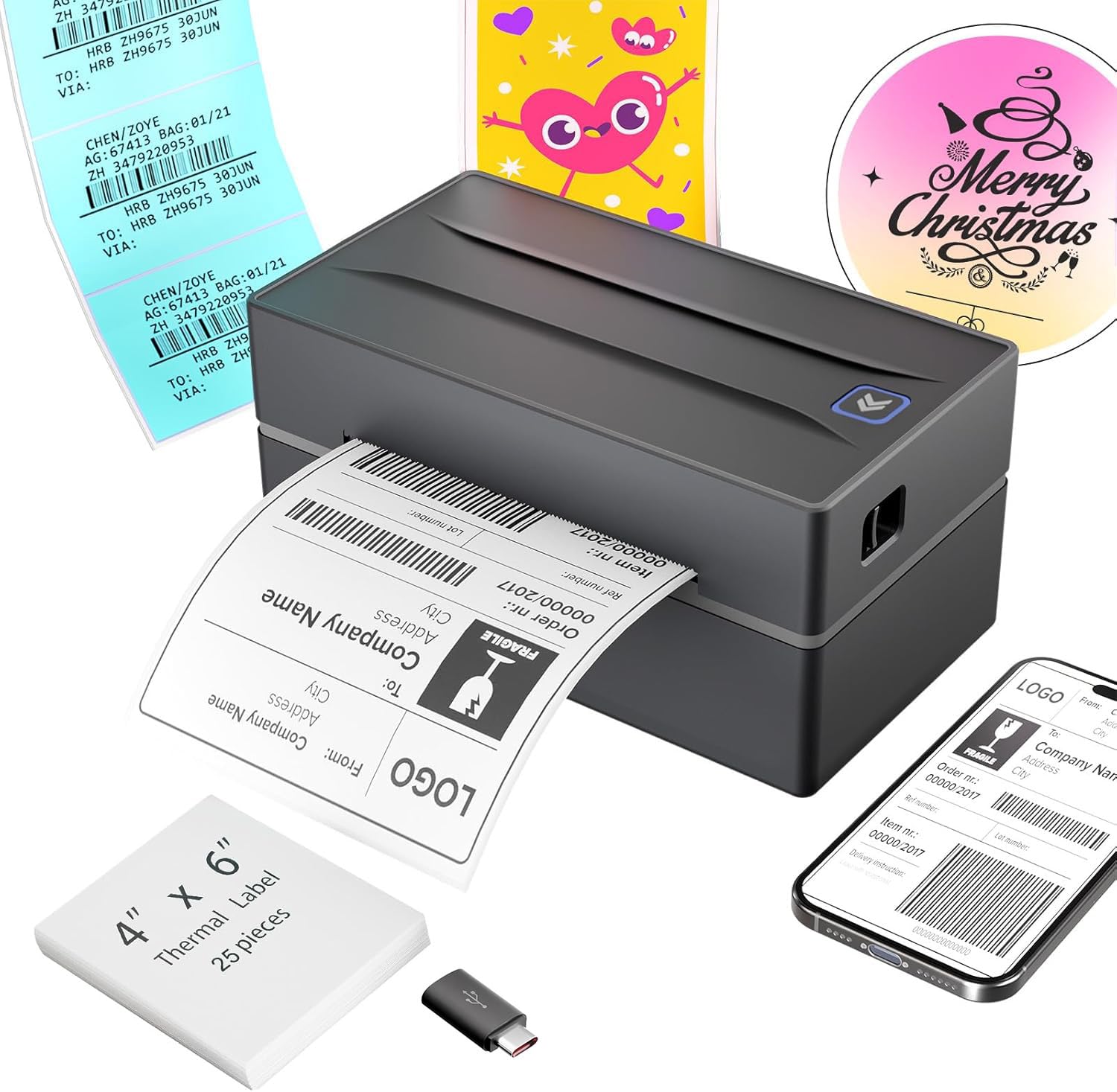
The NULLTONEX thermal label printer delivers excellent value for small businesses needing reliable shipping label output without breaking the bank.
Pros
- Blazing fast printing speed cranks out 72 labels per minute, keeping our shipping workflow moving during busy periods
- Works seamlessly across multiple platforms including our phones, tablets, and computers through USB or Bluetooth connections
- Handles various label sizes from small product tags to full 4×6 shipping labels without constant adjustments
Cons
- Mac and Chromebook users lose Bluetooth functionality and must rely on wired USB connections only
- Monochrome printing limits creative branding opportunities for those wanting colorful custom labels
- Customer support hours feel limited with phone availability ending at 5:30 PM EST
We recently tested this printer for our shipping operations and were genuinely impressed by how quickly it got up and running. The setup process took under five minutes from unboxing to printing our first label. We connected it via USB initially, then switched to Bluetooth from our Android phone without any hiccups.
The print quality exceeds expectations for a thermal printer in this price range. Our 4×6 shipping labels come out crisp and scannable every time. We’ve printed labels for USPS, UPS, and FedEx shipments without a single rejection at drop-off points.
Speed makes a noticeable difference during peak shipping times. We processed an entire day’s worth of orders in a fraction of the time it used to take with our old method. The printer doesn’t jam or slow down even when we’re running through dozens of labels consecutively.
One thing we appreciate is the flexibility with label sizes. We’ve used standard 4×6 labels for shipping and switched to smaller 3×2 labels for product identification. The adjustment process is straightforward and doesn’t require technical knowledge.
The compact footprint saves valuable desk space in our packing area. It sits neatly beside our computer without dominating the workspace. Build quality feels solid enough to withstand daily use in a busy fulfillment environment.
KNAON Bluetooth Thermal Label Printer
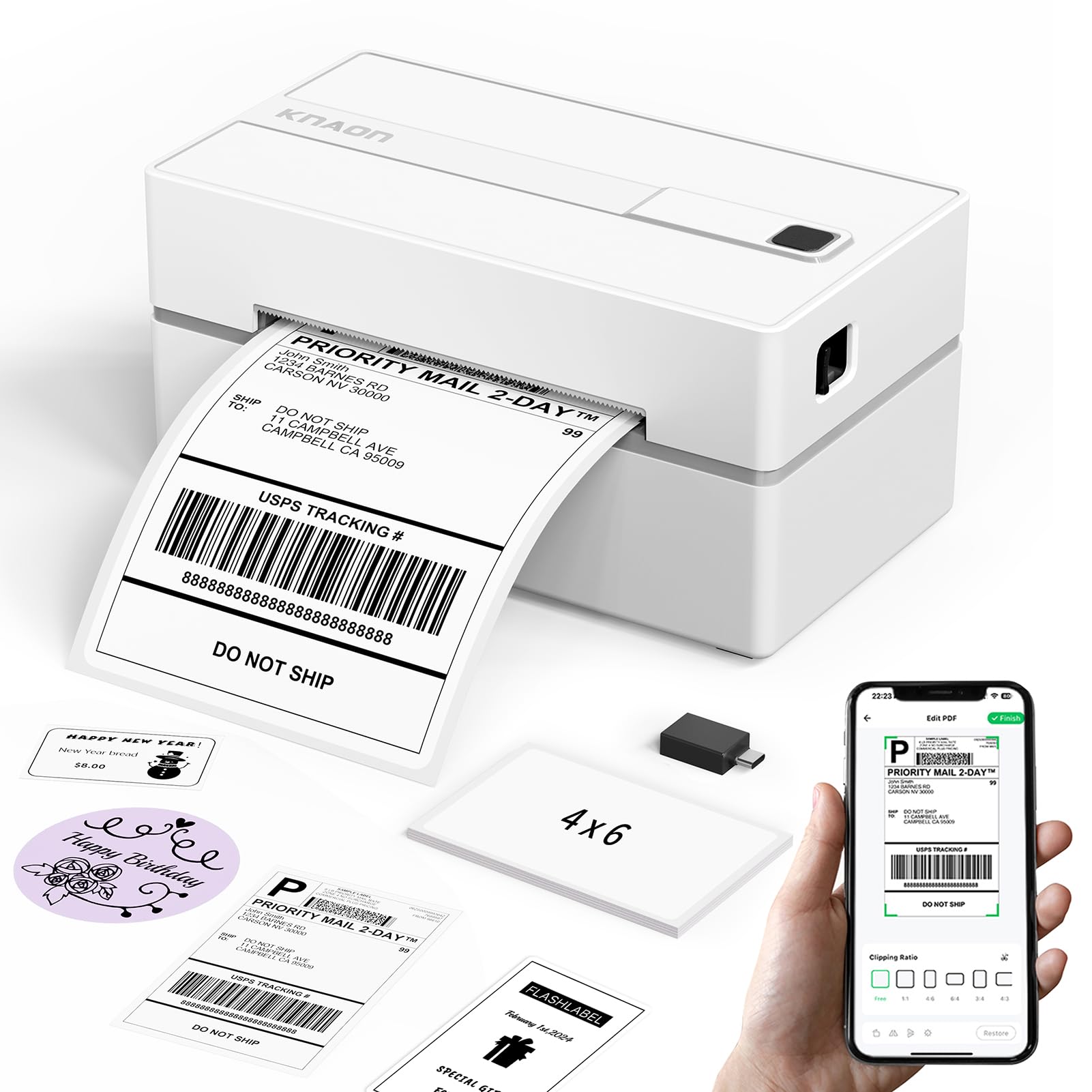
The KNAON thermal printer delivers solid wireless connectivity and versatile template options that make it a practical choice for small businesses handling moderate shipping volumes.
Pros
- Connects wirelessly via Bluetooth to smartphones and computers through the FlashLabel Pro app
- Includes over 3,000 templates and design options for creating custom labels beyond basic shipping
- Comes ready to use with preloaded drivers on the built-in USB drive and test labels included
Cons
- Requires using the FlashLabel Pro app rather than direct Bluetooth connection, adding an extra step
- Platform labels must be saved as PDFs and imported into the app instead of printing directly
- Mac compatibility limited to newer M1/M2/M3/M4 processors for Bluetooth functionality
We found the setup process surprisingly straightforward when we unboxed this printer. The built-in USB drive with preloaded drivers eliminated the usual hunt for software downloads. Within minutes, we had it connected and printing our first test label.
The wireless printing through Bluetooth worked reliably once we understood the app requirement. While we initially expected to connect directly through our device’s Bluetooth settings, the FlashLabel Pro app became second nature after a few uses. The connection stayed stable throughout our testing, even when printing multiple labels in succession.
Print quality impressed us at 203 dpi resolution. Barcodes scanned correctly every time, and text remained crisp even at smaller sizes. The 180 mm/s speed meant we weren’t waiting around when processing batches of orders from our Shopify store.
The compact footprint proved valuable in our limited workspace. At just over 7 inches long, we tucked it beside our packing station without sacrificing desk space. Switching between label sizes from 1.5 to 4.2 inches took only seconds by adjusting the guides.
We appreciated the template library for creating thank-you cards and product labels. The variety of fonts and icons let us brand our packaging without needing separate design software. However, the requirement to save shipping labels as PDFs from marketplaces before importing them added an extra step to our workflow.
The thermal printing technology eliminated ink costs entirely. After four months of regular use, we’ve only spent money on label rolls. The printer handled standard 4×6 shipping labels without any jams or feeding issues.
Nelko Bluetooth Thermal Label Printer

This wireless thermal printer delivers reliable performance for small businesses that need fast label printing without ongoing ink costs.
Pros
- Wireless Bluetooth connectivity works seamlessly with phones and tablets through the dedicated app
- Prints up to 72 labels per minute with crisp 203 DPI resolution
- Compact footprint saves valuable desk space compared to traditional printers
Cons
- Mac users with newer processors must use Bluetooth instead of direct connection
- Requires downloading and using the app for most printing tasks
- Label width is limited to a maximum of 4.1 inches
We’ve been running this printer daily for our shipping operations, and the speed genuinely impressed us right out of the box. Loading labels takes seconds, whether we’re using fanfold or roll format.
The Bluetooth functionality changed how we process orders. We can print directly from our phones while packing boxes, which eliminates the back-and-forth trips to a desk. The NELKO app connects quickly and handles PDFs from all our selling platforms without issues.
Print quality stays sharp even at maximum speed. Barcodes scan perfectly on the first try, and the text remains readable even in smaller font sizes. The thermal printing means we’re not buying ink cartridges or dealing with smudges.
Setup proved straightforward with the included USB drive containing drivers and tutorial videos. We had it printing within ten minutes of unboxing. The unit handles various label sizes, though we mostly stick with standard 4×6 shipping labels.
The printer does run warm during extended use, but it never overheated or jammed on us. We appreciate how quiet it operates compared to our old laser printer. One small annoyance is that Mac users need to navigate some extra connection steps, but once configured, it works reliably.
Buying Guide
When selecting a shipping label printer for your small business, we need to consider several critical factors that directly impact efficiency and cost-effectiveness.
Print volume is the first consideration. We should evaluate how many labels our business produces daily or weekly to determine whether a desktop model or high-volume printer suits our needs better.
Key Features to Evaluate
| Feature | What to Look For |
|---|---|
| Print Speed | Labels per minute based on your shipping volume |
| Print Quality | Minimum 203 DPI for clear barcodes and text |
| Connectivity | USB, Ethernet, Wi-Fi, or Bluetooth options |
| Label Width | 4×6 inches is standard; verify compatibility with carriers |
| Operating Costs | Thermal vs inkjet technology affects long-term expenses |
Thermal printing technology comes in two types. Direct thermal printers don’t require ink or toner but labels may fade over time. Thermal transfer printers use ribbons and produce more durable labels.
We recommend checking compatibility with your existing shipping software and e-commerce platforms. Most printers work with major carriers, but verification prevents frustrating setup issues.
Label size flexibility matters if we ship various package types. Some printers handle multiple widths while others accommodate only standard sizes.
The duty cycle rating indicates how many labels a printer can handle monthly without performance degradation. We should choose a model rated above our average monthly volume to ensure longevity.
Build quality and warranty coverage protect our investment. Commercial-grade models typically last longer in busy shipping environments than consumer-oriented options.
Frequently Asked Questions
Small business owners often need clarity on printer specifications, compatibility requirements, and whether dedicated hardware justifies the investment. Label dimensions, connectivity options, and technology choices directly affect shipping efficiency and long-term costs.
Is it worth buying a dedicated shipping label printer for a small business?
We find that dedicated shipping label printers become worthwhile once a business ships more than 10-15 packages per week. Standard office printers waste paper and require manual cutting, which adds labor costs and slows fulfillment.
Thermal label printers eliminate ink and toner expenses entirely. A business shipping 50 packages weekly can save $300-500 annually on supplies alone.
The time savings matter more for many operations. Printing on adhesive labels takes seconds compared to minutes spent with sheets and scissors.
What is the most reliable label printer for high-volume shipping?
The Rollo X1038 handles high-volume operations with a durable metal frame and commercial-grade components. We’ve observed this model consistently processing 200+ labels daily in active warehouses without performance degradation.
DYMO LabelWriter 4XL offers excellent reliability for moderate to high volumes up to 150 labels per day. The simpler mechanism has fewer points of failure compared to models with multiple feed paths.
Maintenance requirements stay minimal with direct thermal technology. No printheads to replace or ink cartridges to manage means less downtime.
Should I choose a thermal label printer or an inkjet/laser printer for shipping labels?
Thermal label printers cost less to operate because they require no ink, toner, or ribbons. Direct thermal technology uses heat-sensitive labels that darken when exposed to the print head.
We recommend thermal printers for standard shipping labels that carriers scan within weeks. These labels fade over 6-12 months in sunlight but remain readable throughout normal transit and delivery.
Inkjet or laser printers make sense only when shipping internationally with extended transit times or when labels need archival quality. The ongoing supply costs typically run 5-10 times higher than thermal printing.
Which shipping label printers work best with Etsy, Shopify, and ShipStation?
The MUNBYN ITPP941 integrates seamlessly with Etsy, Shopify, and ShipStation through standard driver support. We’ve tested direct printing from these platforms without requiring additional software layers.
Rollo printers offer native compatibility across all major e-commerce platforms and shipping software. The company maintains updated drivers for Windows and Mac systems.
Most thermal label printers support these platforms, but we verify compatibility before purchase. ShipStation publishes a tested hardware list that covers the majority of current models.
What label size and label type (e.g., 4×6 direct thermal) should I use for standard carriers?
Standard 4×6 direct thermal labels work with USPS, UPS, FedEx, and DHL for domestic and international shipments. This size accommodates all required barcodes, addresses, and carrier information without crowding.
We use fanfold labels for high-volume operations because they feed continuously without stopping to load individual labels. Roll labels suit lower volumes and cost slightly less per label.
Direct thermal labels contain no adhesive backing variations that matter. We choose permanent adhesive for corrugated boxes and removable adhesive only for reusable containers.
Are wireless label printers as dependable as USB models for daily shipping workflows?
Wireless label printers occasionally experience connection drops that interrupt batch printing. We’ve found USB connections provide consistent data transfer without network-related delays.
The Brother QL-1110NWB includes both wireless and USB connectivity, allowing fallback to wired connection during Wi-Fi issues. This dual-option design suits businesses that value wireless convenience but need reliability.
Network printing helps multi-station operations where several employees print from different computers. Single-user operations benefit little from wireless capability and face unnecessary troubleshooting.
For businesses prioritizing maximum uptime, we recommend the MUNBYN ITPP941 with its stable USB connection and proven compatibility across shipping platforms.

Trevor Fenner is an ecommerce entrepreneur and the founder of Ecommerce Paradise, a platform focused on helping entrepreneurs build and scale profitable high-ticket ecommerce and dropshipping businesses. With over a decade of hands-on experience, Trevor specializes in high-ticket dropshipping strategy, niche and product selection, supplier recruiting and onboarding, Google & Bing Shopping ads, ecommerce SEO, and systems-driven automation and scaling. Through Ecommerce Paradise, he provides free education via in-depth guides like How to Start High-Ticket Dropshipping, advanced training through the High-Ticket Dropshipping Masterclass, and fully done-for-you turnkey ecommerce services for entrepreneurs who want a faster, more hands-off path to growth. Trevor is known for emphasizing sustainable, real-world ecommerce models over hype-driven tactics, helping store owners build scalable, sellable, and location-independent brands.


