

Pinterest affiliate marketing is simple to describe: you publish Pins, a Pinner clicks one, buys something through your tracked link, and the company pays you a commission. You will read plenty of advice that says you can skip the blog and skip the email list. That is partly true, and the part that is not true is what gets accounts limited and months of work wasted.
I have been in ecommerce for 15+ years, and at Ecommerce Paradise I mostly teach high-ticket dropshipping, where you own the store and the customer. Affiliate marketing is a different model. You earn a commission for sending buyers to someone else’s offer, so you carry no inventory, but you also own no customers and the company can change the terms. If the store model is what you are after, start with my guide on what high-ticket dropshipping is.
This guide is for a beginner who wants commissions from Pinterest and would like to start without a blog or a list. It covers what Pinterest actually allows, how to choose a niche and programs, how to make and publish Pins, and what to build behind them. Everything is based on the rules and pages I could open and read in October 2026, and I flag what I could not confirm. You will not find income screenshots here, because I have none to show you.
What’s in This Guide
- What Pinterest affiliate marketing is and how you get paid
- Three ways to do it
- Does Pinterest allow affiliate links in 2026?
- Can you really earn without a blog or email list?
- Step 1: Set up your Pinterest account
- Step 2: Pick a niche and products worth promoting
- Step 3: Find and join affiliate programs
- Step 4: Research your Pin keywords
- Step 5: Design Pins that earn clicks
- Step 6: Write the title, description and link
- Step 7: Boards and a posting rhythm
- Step 8: What to put behind your Pins
- Track results and decide what to change
- What you can realistically earn
- Taxes and record keeping
- Mistakes that cost people accounts and months
- A 30-day plan to your first Pins
- Is it worth it in 2026?
What Pinterest Affiliate Marketing Is and How You Get Paid
An affiliate link is a web address that carries your ID. When someone clicks it and buys, the company’s tracking records that you sent them, and you earn a commission, usually a percentage of the sale or a flat amount per sale or lead. On Pinterest, the link sits on a Pin, which is an image or video that people find through search and save to boards.
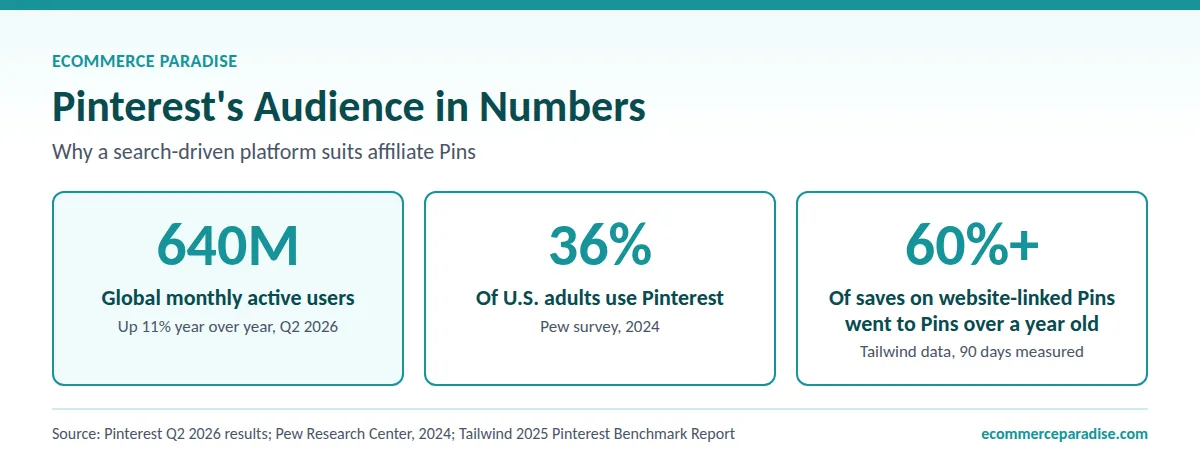
Pinterest behaves more like a search engine than a feed. People type what they want to plan or buy, such as a kitchen layout, a gift, a garden, a trip, and browse results. That matters for you because a good Pin can keep getting seen after you publish it, instead of vanishing in a day. Tailwind, a Pinterest scheduling tool, reports in its 2025 Pinterest benchmark report that over 60% of saves on Pins linking to websites, in the 90 days it measured, were on Pins more than a year old. That is a vendor’s dataset, not a promise, but it fits how a search-driven platform works.
The audience is large. Pinterest’s second quarter 2026 earnings release reports global monthly active users up 11% year over year to 640 million, which you can read in the company’s results announcement. In the U.S., the Pew Research Center social media fact sheet shows 36% of adults saying they use Pinterest in its 2024 survey, and the 2025 row for Pinterest was blank on the page I read.
One more distinction before we go on. Some businesses run their own affiliate program and use Pinterest to recruit or promote. This guide is about the other side: you are the affiliate, promoting someone else’s product and earning a cut.
Three Ways to Do It
Almost every Pinterest affiliate setup is a version of one of these three. The table compares what each needs and where it breaks, with no tools or prices involved.
| Approach | What you need to start | Biggest risk | Best fit |
|---|---|---|---|
| Direct affiliate link on the Pin | A free business account and an approved affiliate program | Thin content, blocked links, no audience you own | A short test of one niche |
| Pin to a free page you control, with an email sign-up | A simple landing page and one useful freebie | Extra setup, and email rules to follow | Building something you keep if rules change |
| Pin to your own review or guide page on a site | A small site and time to write honest reviews | Slowest start of the three | A long-term asset you fully control |
My view, which you can disagree with: test with the first, move to the second as soon as a topic shows clicks, and consider the third only when one topic proves itself. The rest of this guide is built in that order.
Does Pinterest Allow Affiliate Links in 2026?
Yes, with conditions. Pinterest’s Commercial and Branded Content Guidelines (the page shows “Last updated: April 2025”) include a section called Affiliate Guidelines. It says affiliate links help creators measure the impact of their work and get paid, then warns that affiliate programs are a target for spammers.
What the Affiliate Guidelines require
The rules come down to a short list. Follow Pinterest’s paid partnership guidelines. In general, operate only one Pinterest account and make it your authentic presence. Keep affiliate content original so it adds unique value for Pinners, and be open about the commercial nature of your content and how your links behave.
The page then lists prohibited behavior: using fake accounts to create or save your affiliate links, asking other users to save your affiliate Pins in a quid pro quo, and asking others to create Pins with links that include your affiliate identifier. It also says that creating affiliate Pins repetitively or in large volumes falls under the spam policy and that links should be used in moderation. Pinterest’s creator-facing page on affiliate links adds that some URL shortener services are not supported and that if your Pin’s link is blocked you can edit it.
What the spam rules add
Pinterest’s Community Guidelines (last updated May 2026 on the version I read) cover the same ground from the spam side. They say not to create or save content that is repetitive, deceptive or irrelevant in an attempt to make money. They also say not to link to websites that are unsafe, deceptive, untrustworthy or unoriginal, and they name “stuffing” irrelevant keywords and unapproved automation as tactics to avoid.
One idea in there is worth remembering: Pinners should be able to reasonably anticipate where your link will take them, and links that bounce people through excessive or deceptive hops may be blocked. If your Pin promises a checklist and the click lands on a sales page, you are breaking the spirit of that rule.
What changes on November 12, 2026
The Community Guidelines page carries a notice that an updated version takes effect November 12, 2026, with a preview page. The preview keeps the “no surprises” language and adds a line that a website should give Pinners a reasonable expectation of where the link leads, so the direction is more link transparency, not less. The Affiliate Guidelines page showed no update notice when I read it.
Pinterest’s Merchant Guidelines carry the same effective date. The current version I read says merchants must not be affiliate marketers, so do not count on Pinterest’s merchant tools as a route for affiliate links. Re-read all three pages after November 12, because policy pages change without much warning.
Disclosure: Pinterest and the FTC
Pinterest’s Paid Partnership section says to disclose the commercial nature of your content with a label such as #ad or its paid partnership tool. The FTC’s Disclosures 101 for Social Media Influencers explains the legal side in plain language. It says a “material connection” includes a financial relationship, that tags, likes and pins can be endorsements, and that the disclosure should be placed so it is hard to miss.
The same page says a disclosure on a profile page alone is likely to be missed, prefers words like “ad” and “sponsored,” and warns against vague terms like “collab.” The FTC’s separate endorsement guides Q&A goes further on affiliate links specifically. It says the closer the disclosure is to your recommendation the better, that “affiliate link” alone may not tell consumers you get paid, and that “paid link” next to the link is considered adequate.
Here is a practical wrinkle I would not skip. Pinterest’s product specs page says Pin descriptions do not appear when a Pin is viewed in the home feed or search feed. So a disclosure that lives only in the description may never be seen by the person deciding whether to click. I would put a plain disclosure at the start of the description, use Pinterest’s paid partnership label where you can, and repeat the disclosure at the top of whatever page the click lands on.
U.S. law applies when it is reasonably foreseeable that your post will affect U.S. consumers. I travel worldwide and serve many U.S. readers. Disclosure requirements matter across borders. This is general information, not legal advice.
Program rules sit on top of Pinterest’s rules
Each affiliate program also has its own terms, and breaking them can cost you commissions or your account. As one example, Amazon’s Associates Operating Agreement (last updated October 15, 2025 on the page I read) says the program covers social media user-generated content, requires its special tagged links, and requires you to state “As an Amazon Associate I earn from qualifying purchases.” Read each program’s terms for where you may promote, what disclosure wording it wants, and whether it allows link shorteners.
Can You Really Earn Without a Blog or Email List?
You can start without either. Pinterest announced in May 2023 that all Pins would include the ability to link to anywhere, which TechCrunch reported when Idea Pins and standard Pins merged into one format. So a business account and an approved affiliate program are enough to publish your first Pin with a direct link.
The catches are real, though. First, the originality rule: a stock photo with a raw affiliate link does not add unique value for Pinners, which is exactly what the guidelines say they do not want. Second, you own nothing. If Pinterest changes its rules, as it is doing on November 12, 2026, or blocks a link, you have no way to reach the people who already saw your Pins.
The middle path is to send Pin traffic to a page you control. That can be a free landing page that offers something useful and collects an email address, or a simple page that explains your recommendation before the visitor clicks through. You do not need a full blog for that, and you do not need a list on day one, but you do need somewhere to send people that is not a bare affiliate link.
Step 1: Set Up Your Pinterest Account
Start with a business account. Pinterest’s help center says it is free and gives you the Business Hub and Pinterest Analytics. You can create a new one from a desktop (the help page says new business accounts can only be created from a desktop device), or convert a personal account in Settings under Account management. A converted account keeps its Pins and followers, and you can switch back later.
Remember the one-account rule from the Affiliate Guidelines. Pick the account that will be your authentic presence and build there, instead of spreading the same Pins across several.
Business accounts also unlock scheduling and Pinterest Trends, which I use below. Describe your topic in the profile in plain words a searcher would use, not a slogan. You may see advice to claim your website, but Pinterest says you must own the domain and be able to edit its source code, so skip that if you are starting with a direct link and no site.
Step 2: Pick a Niche and Products Worth Promoting
The niche decision matters more than the Pin design. A mediocre Pin in a topic people search for will outperform a beautiful Pin in a topic nobody plans around. Here is the checklist I would run.
Five tests for a niche
- Can you show it? Pinterest is visual, so rooms, outfits, recipes, gear, gardens and before-and-after ideas fit better than abstract services.
- Do people search for it before they buy? Planning-style topics suit a search-driven platform.
- Is it evergreen or seasonal? If seasonal, find out when interest starts to build.
- Can you explain the product in your own words? The FTC says you cannot talk about your experience with a product you have not tried, so choose something you can learn properly.
- Is the category allowed? Pinterest’s commercial content rules say you cannot promote or sell tobacco, marijuana, firearms or weapons, and prescription-only medications, and some email platforms bar whole affiliate categories.
Use Pinterest Trends to check demand
Pinterest Trends is the research tool I would open first. Pinterest’s help page describes it as a historic view of up to two years of top search, save and shopping trends, and says you can compare up to four keywords on one graph. You need to be logged in to a business account. Use it to find topics where interest builds before a season, then publish ahead of that curve.
Price point and commission
A commission is usually a percentage, so a pricier product pays more per order, though fewer people buy. For categories where buyers spend real money, my high-ticket niches list is a useful place to look, because the same home, outdoor and hobby categories can work for affiliate offers. Higher price also means buyers research longer, so check the program’s cookie window before you commit to an expensive niche.
Not Sure Which Niche Deserves Your First 30 Days?
Get my free niches list, pick three that fit your interests, and run them through Pinterest Trends before you design a single Pin. Ten minutes of checking can save a month of posting into a topic nobody is searching for.
Step 3: Find and Join Affiliate Programs
Pinterest is not a party to affiliate agreements, so you join a program or network separately. Pinterest’s creator-facing page on affiliate links names Rakuten, LTK, ShopStyle and Amazon Associates US as its listed partners (the page is dated June 2025, so confirm the current list). Beyond those, many brands run their own program and mention it in their website footer or help pages.
Before you apply, check these things, because they decide whether a program is worth your Pins:
- Who approves you, and do they accept promotion on social platforms like Pinterest?
- What is the commission, and is it per sale, per lead, or recurring?
- How long does the tracking window last after a click? This varies by program, so read it for each one.
- What is the payout threshold, and how and when are you paid?
- What disclosure wording does the program require?
- Does it allow link shorteners or redirects, and does it restrict certain traffic types?
- Does the product page you would link to look trustworthy, load quickly, and match your Pin?
I could not verify every program’s terms for this article, and they differ, so read each one yourself before you publish. If you want a list of programs to compare, my guide to the highest paying affiliate programs breaks down real per-conversion economics. Pinterest’s own page says to link to the shop’s product detail page, and to match your Pin’s title and description to that page.
Step 4: Research Your Pin Keywords
Pinterest works like a search engine, so write titles and descriptions the way a person would type the search. Name the topic, the use case and the audience in plain language. “Small balcony herb garden ideas” tells Pinterest and the Pinner more than “Garden inspo.”
Here is a simple process. Type your topic into Pinterest search and note the suggestions that appear. Check the same phrases in Pinterest Trends to see which rise and which fade. Then write down five to ten phrases per page you plan to promote, each describing a different angle on the same product.
Do not stuff keywords. The Community Guidelines list stuffing irrelevant keywords as an unscrupulous tactic, and a Pin that reads like a keyword list also reads badly to people. Use the related topics field with specific, accurate topics rather than every popular word you can think of.
Step 5: Design Pins That Earn Clicks
Size and format
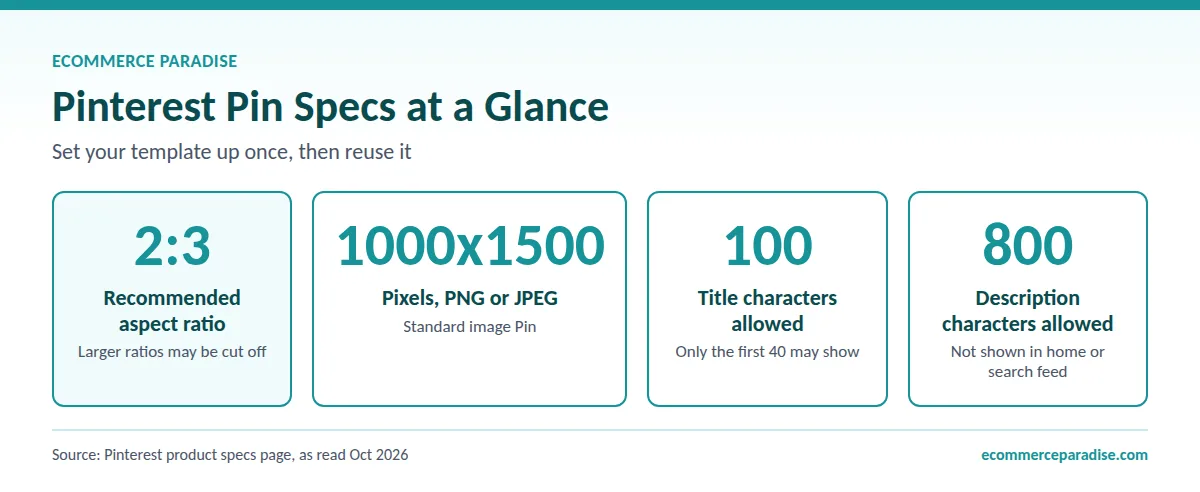
Pinterest’s product specs page recommends a 2:3 aspect ratio, or 1000 by 1500 pixels, as a PNG or JPEG, and warns that larger ratios may be cut off in feeds. That page covers standard image Pins that run as ads or earn organic impressions. Titles can run up to 100 characters, but only the first 40 may show, so put the keyword first. Descriptions can run up to 800 characters.
You will still read about Idea Pins. As noted above, Pinterest merged Idea Pins and standard Pins into one format in 2023, so today you simply create a Pin that is an image or a video. A video Pin, per the same specs page, can be square or vertical, with vertical 2:3, 4:5 or 9:16 recommended.
What makes a Pin worth clicking
You do not need design skills, but you do need a consistent look. I would build one template with a clear headline, one strong image and your name small at the bottom, then reuse it across topics. Canva has a free plan and Pinterest-sized layouts, and that is enough for a first batch.
A few rules of thumb from how people use Pinterest. Make the text readable on a phone. Give each Pin one idea. Make sure the image matches what the click delivers, because the “no surprises” principle applies to your visuals as much as your link. And do not just reuse the merchant’s photos without checking the program’s terms on image use.
Make several Pins per page
You can promote the same page with more than one Pin, using a different image and a different keyword angle each time. That is not the same as posting the same Pin over and over, which collides with the repetition rule. Pinterest’s help page says you can upload up to 10 images or videos at a time, with each creating its own Pin, so batching is easy.
Step 6: Write the Title, Description and Link
For each Pin you fill in a title, description, link, board, and up to 10 related topics. You can also add alt text to explain what is in the image, which helps people who use screen readers. Use this order of work:
- Paste your tracked link as the Pin’s destination, and click it yourself to confirm it lands on the page you expect.
- Write a title that leads with the keyword and says what the Pinner gets.
- Write a description in plain sentences, with the disclosure first, such as “Ad: I earn a commission if you buy through this link.”
- Add alt text, choose the right board, and add accurate related topics.
- Schedule or publish.
Avoid shortener services, since Pinterest says some are not supported and the Community Guidelines say abused shorteners may be blocked. Use the link your program gives you, or a redirect on a domain you control if the program allows it. If a Pin’s link is blocked, edit it. Check your links every so often, because merchants retire product pages and a dead link is a wasted Pin.
Step 7: Boards and a Posting Rhythm
Pinterest describes boards as collections for your Pins. You can create one from your profile or while saving a Pin, and you can keep a board secret. Pinterest does not publish a board strategy, so what follows is my own working approach, not a Pinterest rule.
I would start with a handful of focused boards, each named for what a person would search for, plus a secret board for drafts. Put each Pin on the board that matches its topic. Give each board a plain description with the same search phrases you found in Step 4.
On rhythm, I could not find a daily Pin limit published by Pinterest. One scheduling vendor, Tailwind, suggests 5 to 15 Pins a day in its quick-start guide, but the Affiliate Guidelines warn against creating affiliate Pins repetitively or in large volumes, so I would not copy a volume number without reading that rule first. My rule of thumb for a beginner is a modest, steady cadence of distinct Pins, with a different image and headline for each angle, and no auto-posting bots Pinterest has not approved.
Business accounts can schedule Pins up to 30 days ahead, but Pinterest’s help page says you set each Pin’s date one at a time and can have up to 10 Pins scheduled at once. So scheduling is a small convenience for a weekly work session, not a month of autopilot. If you also run a store, the playbook changes because you own the product pages. I cover that in my guide to using Pinterest to get traffic for a high-ticket dropshipping store.
Step 8: What to Put Behind Your Pins
Disclosure: I may earn a commission if you sign up through my Kit or Systeme.io links, at no extra cost to you.
This is the step most people skip, and it is where the “no blog, no list” advice falls apart. A Pin that sends every click to a bare affiliate link gives you no audience, no data beyond clicks, and no protection if the link is blocked. A small page of your own fixes all three.
Three things worth putting behind a Pin
The first is a short page that explains your pick: who the product is for, who should skip it, what you would check before buying, and your disclosure at the top. The second is a free, useful thing in exchange for an email address, such as a checklist, a buying guide, or a template that matches the Pin. The third is a short welcome email that delivers it, followed by a few helpful emails with one relevant recommendation each.
Keep it small. One Pin topic, one page, one freebie. You can add more once something works.
Choosing a tool, briefly
Any landing page and email tool works. I would pick one with a free plan, because you are testing. Kit is the one I would look at first if you plan to write emails: its pricing page, as I read it, lists a free plan with unlimited landing pages, forms and email broadcasts, with automated sequences on the paid Creator plan. The page is inconsistent about subscriber limits and the Creator price, so confirm both at signup.
There is a catch to know before you build a “link-only” list. Kit’s help article on affiliate marketing says you need your own business or content outside of affiliate marketing, and that affiliate links are fine when they are clearly labeled and sprinkled into your own content, with a rough guideline of 70 to 80 percent your own content and 20 to 30 percent affiliate. It says affiliate-only emails are not a fit, and that it does not allow affiliate links for education, loans, online pharmacies or “get rich quick” software. Whatever platform you use, read its affiliate policy first, because a suspended account can cost you the list.
Email law basics
If you collect addresses, you are sending commercial email. The FTC’s CAN-SPAM compliance guide says your message must identify itself as an ad, include your valid physical postal address, and give a clear way to opt out. It also says you must honor an opt-out request within 10 business days and cannot sell or transfer the addresses of people who opted out.
Track Results and Decide What to Change
Pinterest Analytics is available with a business account. Its help page defines the core numbers: impressions are how often your Pins appeared on screen, saves are how often people saved them to a board, Pin clicks open the Pin up close, and outbound clicks are actions that lead people to a destination off Pinterest. Outbound clicks are the number to watch most, because they are the people who actually headed toward your offer.
Pinterest cannot tell you about sales, though. For that you need your affiliate program’s dashboard, where clicks and commissions show up. Put the two side by side each week.
How to read the numbers
Many impressions and few outbound clicks usually means the image or title does not promise a reason to click. Many clicks and no sales usually means a mismatch between the Pin and the page, a weak offer, or a program with a short tracking window. Few impressions across the board usually means the keywords are too narrow, the topic is not searched, or the account is new.
Give each Pin time before you judge it. Look at the topics that produced outbound clicks, keep the ones that work, and retire the rest. If one topic keeps working, that is the point to build the page and list behind it, or a small site on a domain you own.
What You Can Realistically Earn
Nobody can give you an honest typical number, and Pinterest does not publish payouts per Pin or per account. Income depends on the offer, your niche, the quality of your pages, and your patience. Be skeptical of any guide that gives you a monthly figure without showing the inputs.
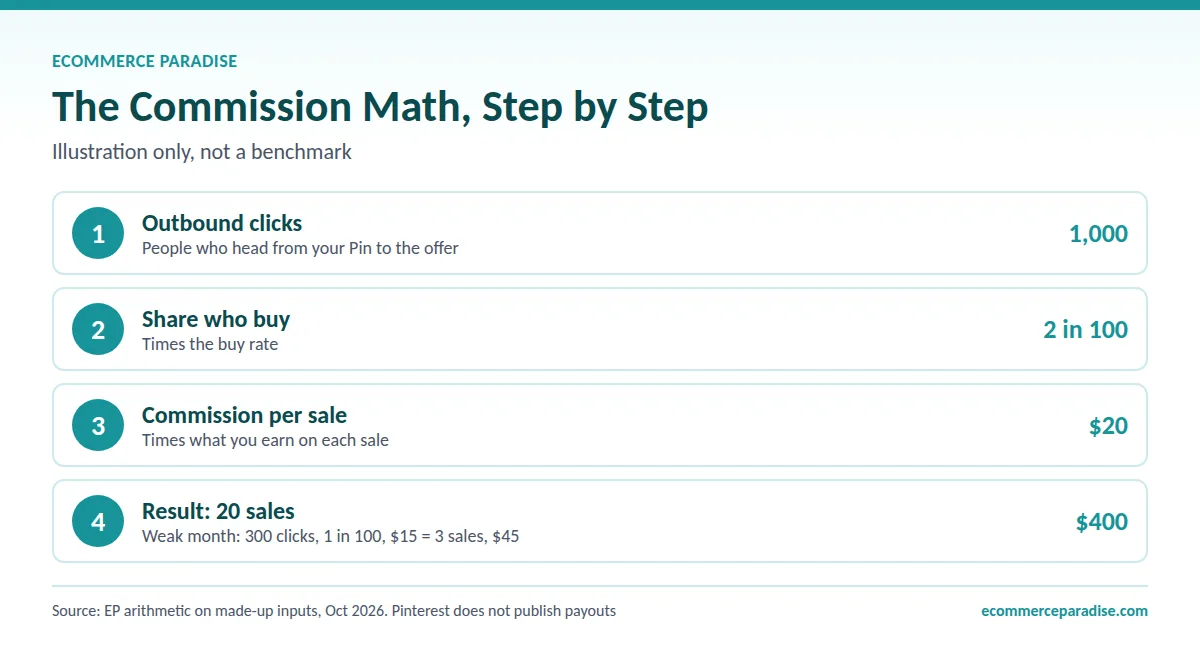
What you can do is use the formula and your own numbers. Commission income is outbound clicks, times the share of those who buy, times the commission per sale. As a made-up illustration only: 1,000 outbound clicks in a month, 2 in 100 buying, and a $20 commission would be 20 sales and $400. A weaker month of 300 clicks, 1 in 100 buying and a $15 commission would be 3 sales and $45. These are my arithmetic, not benchmarks, and your numbers can be lower or higher.
The honest timeline is months, not weeks. If you want a deeper reality check, my breakdown of whether you can make $100 a day with affiliate marketing walks through the math and the timeline. If you want to look at the higher-ticket end of this model, my high-ticket affiliate marketing guide for beginners covers it.
Wondering If You Would Rather Own the Customer?
My free mini course explains the high-ticket store model: a store you own, suppliers who ship the product, and customers you can email. It needs a different skill set from affiliate work, so watch it and see which fits you better.
Taxes and Record Keeping
If affiliate commissions become real money, treat it like a business from the start. The IRS says in its Topic 554 that you usually must pay self-employment tax if you had net earnings from self-employment of $400 or more, and that the amount subject to the tax is generally 92.35% of net earnings. You can read the details in the IRS page on self-employment tax. This is general information, not personalized tax or legal advice, and I am not a licensed advisor or CPA, so ask one how it applies to you.
Keep a simple record of every commission payment and every expense, and open a separate bank account once the money is more than pocket change. When you are ready to decide on an LLC, an EIN and business banking, my guide to business formation for dropshipping covers the steps, and most of it applies to a solo affiliate business too.
Mistakes That Cost People Accounts and Months
These are the ones I would watch for, based on the rules above and the usual ways beginners stall.
- Running several accounts to multiply reach. The Affiliate Guidelines say to operate one account in general.
- Posting the same Pin over and over, or in large volumes, which the guidelines tie to the spam policy.
- Skipping disclosure, or hiding it where nobody reads. That creates both a Pinterest problem and an FTC problem.
- Linking to a page that does not match the Pin, which breaks the “no surprises” principle.
- Using stock images with a raw link and nothing original around it.
- Using a link shortener Pinterest does not support, then not noticing the link was blocked.
- Promoting a product you have not looked into and cannot explain. The FTC says you cannot talk about experience you do not have.
- Never reading the affiliate program’s terms on where and how you may promote.
- Building a list of affiliate-only emails on a platform that does not allow it.
- Judging a Pin after a week, or quitting before you have enough data to know.
A 30-Day Plan to Your First Pins
Week 1: Foundation
Create your business account, pick one narrow topic, and check it in Pinterest Trends. Choose one or two offers you would use yourself, read each program’s terms, and decide on a free lead magnet.
Week 2: Page and design
Build the landing page and a welcome email, with your postal address and unsubscribe link. Systeme.io is an alternative to Kit if you want the page, a funnel and a simple blog in one place, and its pricing page lists a free plan with 2,000 contacts, 3 funnels and 1 blog. Then make a template at 1000 by 1500 pixels and design a first batch of Pins.
Week 3: Publish and read the numbers
Publish your Pins gradually, using the business account’s scheduler if you prefer to batch your work. Watch outbound clicks and compare them with clicks in your affiliate dashboard.
Week 4: Improve and decide
Look at which Pin topics produced outbound clicks and which landing page visitors joined your list. Use your own numbers: if 500 people click through in a month and 100 join your list, that is a 20 percent opt-in rate (my arithmetic, not a benchmark). Double down on the topics that work, retire the rest, and write down what you learned.
Is Pinterest Affiliate Marketing Worth It in 2026?
The audience is there and the entry cost is low. Whether you earn depends on the offer, the quality of your pages, and your patience. I would do this if you are willing to build a small page, disclose clearly, and publish for a few months before judging results. I would skip it if you want fast money, if you will not disclose, or if you plan to rely on raw affiliate links with no content around them.
My recommendation is the middle path: Pins to a free page that collects emails, one niche at a time, and nothing in your Pins or pages that you could not stand behind. If you decide you would rather own the business than rent someone else’s offer, my guide on finding suppliers for high-ticket dropshipping shows what the other side looks like.
If you want a second opinion on which route fits you, ask about coaching.
Frequently Asked Questions
Are affiliate links allowed on Pinterest in 2026?
Yes. Pinterest’s Commercial and Branded Content Guidelines include Affiliate Guidelines that allow affiliate links with conditions: one authentic account, original content that adds unique value, transparency about the commercial nature of your content, and moderate use. Updated Community Guidelines take effect November 12, 2026 (the Affiliate Guidelines page showed no update notice when I read it), so re-read the rules after that date.
Do I need a blog, website or email list to start?
No, you can start with a free business account and a direct link to an approved offer. I would still send traffic to a page you control, because originality and “no surprises” are part of Pinterest’s rules, and a list gives you something you own if a link is blocked or the rules change.
Do I have to disclose affiliate links on my Pins?
Yes. Pinterest’s rules point to its paid partnership disclosure, and the FTC says a financial relationship with a brand must be disclosed clearly and close to the endorsement. Use plain words like “ad” or “paid link,” put the disclosure at the start of the description, and repeat it on your landing page rather than relying on a profile page alone.
How much can I earn, and how long does it take?
There is no honest typical figure, and Pinterest does not publish payouts. Your income is outbound clicks, times the share who buy, times the commission per sale, so test with your own numbers and expect months, not weeks.
Can I use Amazon affiliate links on Pinterest?
Pinterest’s affiliate-link page lists Amazon Associates US among its partners, and Amazon’s Operating Agreement (last updated October 15, 2025 on the page I read) covers social media user-generated content and requires its special tagged links and the statement “As an Amazon Associate I earn from qualifying purchases.” I did not verify the program’s other policies, such as qualifying-sales requirements, so read them before you post.
Want to Own the Store Instead of Chasing Commissions?
My team builds a high-ticket dropshipping store and lines up suppliers, so you own the customer relationship, the product pages and the traffic you build on Pinterest. Prefer to learn it yourself? Ask about coaching.
Related Articles
If you found this useful, these guides go deeper on related topics:
- How to Use Pinterest to Get Free Traffic and High-Ticket Sales for Your Dropshipping Store
- Can You Make $100 a Day With Affiliate Marketing? The Realistic Math and Timeline for 2026
- Highest Paying Affiliate Programs in 2026: Top 12 Programs Ranked by Real Per-Conversion Commissions and Recurring Economics
- High-Ticket Affiliate Marketing for Beginners: The Practical 2026 Guide to Going From Zero to Real Income
- Affiliate Marketing for Digital Nomads: Build a Location-Free Income

Trevor Fenner is an ecommerce entrepreneur and world traveler from Seattle, Washington, and the founder of Ecommerce Paradise, a platform focused on helping entrepreneurs build and scale profitable high-ticket ecommerce and dropshipping businesses. With over a decade of hands-on experience, Trevor specializes in high-ticket dropshipping strategy, niche and product selection, supplier recruiting and onboarding, Google & Bing Shopping ads, ecommerce SEO, and systems-driven automation and scaling. Through Ecommerce Paradise, he provides free education via in-depth guides like How to Start High-Ticket Dropshipping, advanced training through the High-Ticket Dropshipping Masterclass, and fully done-for-you turnkey ecommerce services for entrepreneurs who want a faster, more hands-off path to growth. Trevor is known for emphasizing sustainable, real-world ecommerce models over hype-driven tactics, helping store owners build scalable, sellable, and location-independent brands.
He maintains homes in Seattle and Bali, spends most of the year overseas, and usually returns to Seattle for about a month each summer.


