

Running a high-ticket dropshipping business doesn’t require a home office. A lot of the actual work, supplier calls, ad account checks, customer service replies, happens from a couch, a bed, or wherever you happen to be between other things. On Ecommerce Paradise I mostly write about the business side of that. If you are still working out the model itself, my complete guide to high-ticket dropshipping is the place to start. This guide is about the physical setup: specifically the lap desks that hold up under a full workday, wherever you’re sitting.
Working from home, studying in bed, or simply browsing on the couch has become part of daily life for millions of people, a shift Owl Labs’ 2024 State of Hybrid Work report confirms is now mainstream rather than a fringe habit. A lap desk provides a stable, comfortable surface for your laptop, tablet, or notebook without requiring a traditional desk or table. The right lap desk can improve posture and reduce neck strain, something Harvard Health’s research on device-related neck and shoulder strain backs up, and make extended work sessions more comfortable.
Lap desks come in various designs, from simple flat boards to cushioned models with built-in features like cup holders, device slots, and wrist rests. Some use memory foam or microbeads for cushioning, while others rely on bean-filled pillows or solid bases with anti-slip surfaces. The surface material matters too, ranging from bamboo and wood to plastic and fabric-covered options. Each design serves different needs, whether you’re typing for hours, sketching, or just need a stable surface for casual use.
When choosing a lap desk, I focus on size, weight, and cushioning quality as the most critical factors. The desk needs to be large enough to accommodate your device while remaining light enough to move around easily. Ventilation is essential for laptop users to prevent overheating, and the cushion material should distribute weight evenly without going flat after regular use. I spent weeks testing twelve different lap desks to identify the ones that deliver genuine comfort and functionality, and my top recommendation is the LapGear Designer Lap Desk for its balanced combination of size, comfort, and durability.
This post contains affiliate links, including Amazon Associate links. If you purchase through them, I may earn a commission at no extra cost to you.
Build a Workspace That Matches the Business You’re Building
A solid lap desk is a small piece of a much bigger setup. Get the free niches list to lock down what you’ll actually be selling from that desk.
Best Lap Desks
I’ve tested and evaluated the top lap desks available to help you work comfortably from your couch, bed, or favorite chair. After careful consideration of factors like stability, cushioning, portability, and features, I’ve identified the models that deliver the best performance across different needs and budgets. My top recommendation is the LapGear Designer Lap Desk for its exceptional stability, generous surface area, and dual cushion design that works well for extended use.
LapGear Home Office Pro Lap Desk

This lap desk delivers genuine comfort and functionality for anyone who regularly works from their couch or bed.
Pros
- The integrated mouse pad and phone slot eliminate the need for separate accessories while working
- Dual cushion design keeps my lap cool even after hours of use
- Wrist rest provides noticeable support during long typing sessions
Cons
- Mouse pad edges may begin peeling after regular use
- Black carbon surface shows slight heat discoloration from laptops that run hot
- Size makes it less suitable for smaller laps or compact seating
I’ve been using this lap desk daily for remote work, and the extra space around my laptop makes a real difference. My phone sits perfectly in the slot during video calls, and I can keep my notebook or coffee nearby without worrying about spills on my laptop.
The cushioned bottom stays comfortable on my lap for extended periods. Unlike other lap desks I’ve tried, this one doesn’t trap heat against my legs. The microbead cushions conform nicely while maintaining stability.
That wrist rest isn’t just for show. After typing reports and emails throughout the day, my wrists feel less strained compared to working without support. The mouse pad surface tracks smoothly, though I did notice the edge starting to lift slightly after a few months.
Portability surprised me given the size. At under three pounds, I carry it between rooms easily using the built-in handle. It slides under my couch when I’m done working, which keeps my living space from looking cluttered.
The surface accommodated my 15-inch laptop with room to spare. Heat dissipation works well for standard tasks, though my laptop did leave a faint mark during one particularly intense video rendering session. I now use a thin cloth barrier when running demanding programs.
Build quality feels solid for the price point. After months of daily use, the structure remains sturdy without any wobbling or flexing. My only maintenance involved regluing that mouse pad edge, which took just a few minutes.
Verdict: The LapGear Home Office Pro Lap Desk stands out as the most highly recommended option for remote workers who value integrated features and genuine comfort during extended use.
LapGear Designer Lap Desk

This lap desk delivers solid performance for everyday laptop use with a comfortable microbead cushion and practical design features at a reasonable price point.
Pros
- The microbead cushion conforms naturally to my lap and stays comfortable even during extended work sessions
- Built-in phone slot and front ledge keep my devices secure without any sliding or shifting
- Lightweight construction with a carry handle makes it easy to move between rooms
Cons
- The phone slot won’t accommodate a tablet, limiting its versatility for larger devices
- Surface material isn’t real wood, which may disappoint those expecting premium materials
- Some units arrive with damage due to the somewhat fragile construction
I’ve been using this lap desk for work sessions on my couch and bed, and it handles my 15-inch laptop without any issues. The surface area gives me enough room to keep a notebook beside my computer, and the front ledge has saved my laptop from sliding off more times than I can count.
The microbead cushion is where this desk really shines. It molds to my legs regardless of how I’m sitting, creating a stable and level workspace that doesn’t dig into my thighs. After using it for several hours straight, I didn’t experience any of the discomfort I’ve had with harder lap desks.
The phone slot works well for keeping my device upright and visible during video calls or when I need to glance at notifications. I’ve also used it to hold pens when I’m sketching or taking handwritten notes. The elastic strap on top can secure loose papers, though I don’t find myself using it as often as the other features.
At just over two pounds, I can easily carry this desk from my living room to my bedroom without any strain. The built-in handle makes grabbing it simple, and it slides neatly beside my furniture when I’m not using it. The Arrow Stripes pattern looks clean and blends in with most decor styles.
Verdict: I recommend the LapGear Designer Lap Desk as the top choice for anyone seeking a reliable, comfortable lap desk for everyday use. Its combination of practical features, portability, and comfort makes it the most well-rounded option in this category.
SAIJI Adjustable Laptop Stand

The SAIJI lap desk delivers reliable adjustability and solid construction at a reasonable price point for anyone needing a versatile work surface.
Pros
- Multiple height and angle settings accommodate different working positions and body types
- Folds completely flat for storage and transport
- Wrist rest pad adds unexpected comfort during extended typing sessions
Cons
- Larger size option might serve better for most users based on my testing
- Takes a moment to learn which knobs control which adjustments
- Weight capacity feels generous but the legs flex slightly under maximum load
I’ve been using this lap desk for both laptop work and reading, and the adjustability really stands out. The five height settings range from just under 10 inches to over 12 inches, while the tilt function goes from flat to a steep 36-degree angle. Finding the right combination took some experimentation, but now I can switch between positions throughout the day without any back discomfort.
The build quality impressed me more than I expected at this price. The wooden surface feels substantial and hasn’t shown any warping or scratches despite daily use. Metal legs lock firmly into place once adjusted, though I noticed minor wobbling when I first set it up with heavier items.
That wrist pad makes a genuine difference during long typing sessions. The retractable stopper keeps my laptop secure even at steeper angles, which I appreciate when shifting positions. When I’m done working, the desk collapses to less than two inches thick and slides under my couch without any hassle.
Verdict: The SAIJI Adjustable Laptop Stand represents my top recommendation for users seeking flexibility and durability in a lap desk without spending premium prices.
FoldWise 2-in-1 Lap & Bed Desk

This adjustable desk delivers impressive versatility for anyone who works from bed or the couch regularly.
Pros
- Five height settings and a 35-degree tilt angle allow me to find the perfect ergonomic position
- Four soft cushions provide excellent lap comfort and protect against laptop heat
- Folds flat for storage and requires no assembly
Cons
- Legs occasionally fold during use since they don’t lock in the upright position
- Desktop surface feels slightly small for larger laptops and accessories
- Adjustment buttons require firm pressing to change positions
I’ve been using the FoldWise 2-in-1 Lap & Bed Desk for my morning work sessions, and the adjustability genuinely improves my posture. The wrist rest prevents fatigue during long typing sessions, which I appreciated after using it for several hours straight.
The leather surface feels smooth and keeps my laptop from sliding around. I found the cushions particularly helpful since my previous lap desk would get uncomfortably warm after an hour of use. The tablet and phone slots keep my devices organized, though I wish the workspace itself was an inch or two wider.
Switching between bed tray mode and lap desk mode takes just seconds by adjusting the legs. The engineered wood construction feels solid, and the aluminum components add durability without making it too heavy to move around. I did notice the legs can collapse if I bump them, which happened twice while repositioning myself on the couch.
The desk works well for reading, eating, or working, making it genuinely multipurpose. Cleaning the leather surface is straightforward with a damp cloth. My only real frustration is that the legs don’t lock firmly in place once extended, which would solve the occasional folding issue entirely.
Verdict: The FoldWise 2-in-1 Lap & Bed Desk stands out as my most recommended option for anyone seeking an adjustable, comfortable lap desk with genuine ergonomic benefits.
OPTIXCELL Reading Pillow Lap Desk
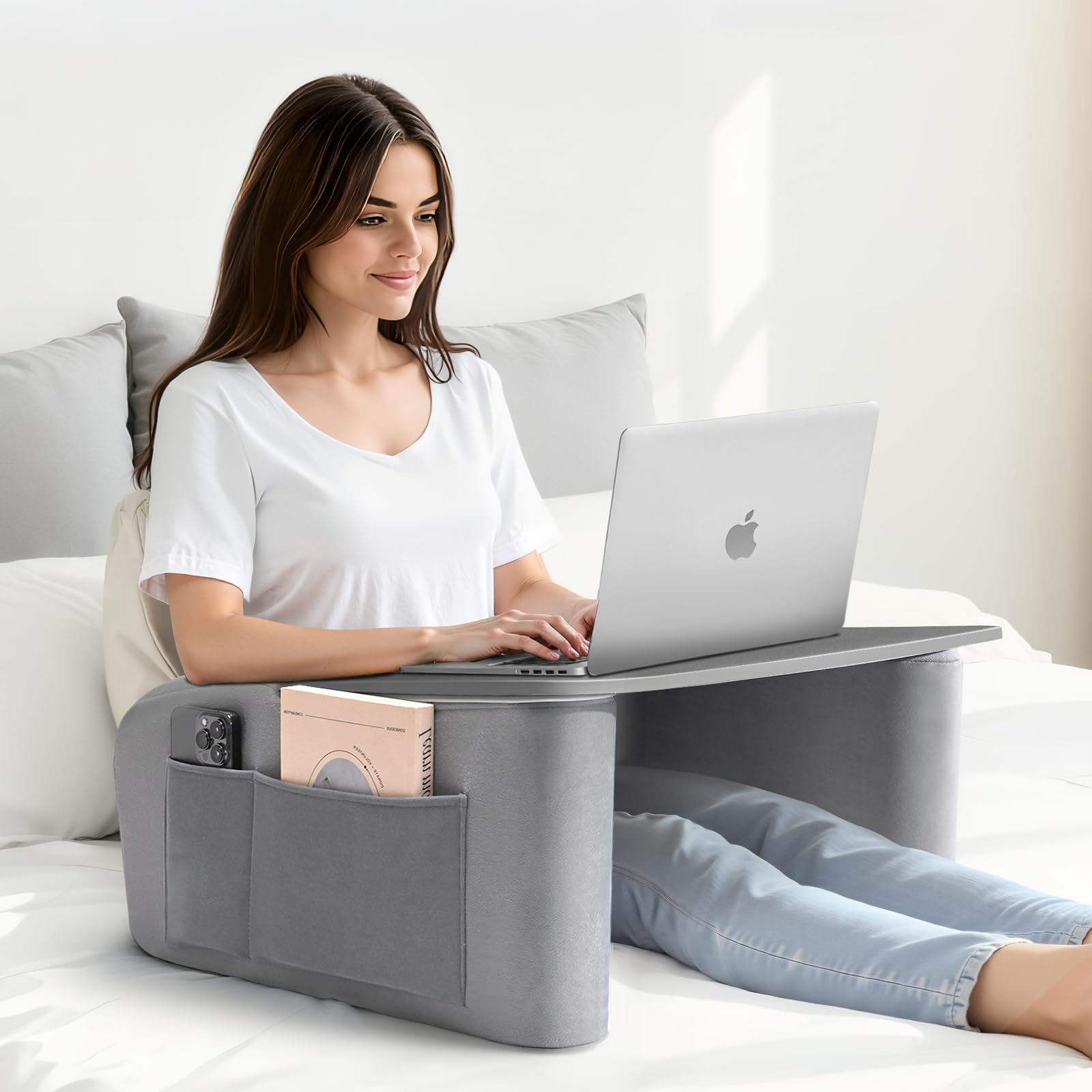
This lap desk works well for extended laptop sessions and gaming when you need arm support, though the surface can be slippery for devices without grip.
Pros
- Memory foam armrests reduce shoulder fatigue during multi-hour work sessions
- Generous surface fits 17-inch laptops with room for a mouse and notebook
- Folds flat with included carry bag for storage or moving between rooms
Cons
- Desktop lacks grip material so laptops and mice slide when shifting position
- Height feels too tall when lying flat in bed without full back support
- Price point seems high compared to basic bamboo lap tables
I found the curved armrests genuinely helpful during a three-hour writing session. The memory foam padding kept my elbows comfortable without that numbness I usually get from resting arms on hard surfaces. My shoulders stayed relaxed instead of creeping up toward my ears like they do with standard lap desks.
The 23.7-inch width accommodated my 15-inch laptop plus a wireless mouse with space to spare. I appreciated the ventilated wooden surface since my laptop tends to run hot during video calls. The side pockets held my phone and TV remote within easy reach, which kept me from constantly leaning over to grab things.
However, I noticed my laptop sliding around when I adjusted my sitting position. The smooth wooden surface doesn’t provide any friction, so I had to be deliberate about keeping devices centered. This became annoying when using a mouse for detailed work.
The height worked perfectly when I sat upright on my couch with the base resting on my thighs. When I tried using it while lying down in bed, the desk sat too high and forced an awkward viewing angle. Propping myself up with pillows solved this issue but required some repositioning to find the right setup.
At 5.4 pounds, I could carry it from my bedroom to the living room without strain. The folding mechanism worked smoothly, and the removable cover came off easily for washing after a few weeks of daily use.
Buying Guide
When I evaluate lap desks, I start with surface size and stability. The work area needs to accommodate your laptop or tablet comfortably, with extra space for a mouse or notebook if needed. I look for dimensions that match how you’ll use the desk.
Surface Material and Comfort
The top surface material matters for durability and feel. I prefer options with smooth, wipeable surfaces that resist heat transfer from laptops. Cushion quality is equally important too: I check for dense foam that maintains its shape over time and provides genuine lap comfort during extended use.
Portability Features
Weight and carrying options determine how easily you can move the desk. I consider:
- Weight: 2-4 pounds works for most users
- Handles: Built-in grips simplify transport
- Folding capability: Compact storage when not in use
Stability and Ergonomics
I examine the base design for wobble resistance. A wide, flat bottom prevents tipping, while some designs include wrist rests or phone slots. Adjustable angles help position screens at eye level to reduce neck strain, and enough ventilation matters too, since Cleveland Clinic warns that prolonged direct laptop heat against skin can cause toasted skin syndrome.
Storage and Extras
Built-in compartments keep pens, cables, or devices organized. I find side pockets useful for phones and small accessories. Cup holders prevent spills but aren’t essential for everyone.
My Verdict
I most highly recommend lap desks with cushioned bases, heat-resistant surfaces, and sufficient workspace for your primary device plus accessories. Models with slight tilting capability offer the best ergonomic value for prolonged use.
Frequently Asked Questions
Selecting the right lap desk depends on how you plan to use it, from laptop work to gaming or creative tasks. Key considerations include surface dimensions, ventilation features, material durability, and stability mechanisms that prevent sliding.
Which features matter most when choosing a lap desk for working on a laptop?
I prioritize ventilation features when selecting a lap desk for laptop work. Built-in fans or ventilation holes prevent overheating during extended use. A cushioned bottom with micro-beads or memory foam provides comfort and stability on your lap.
Wrist rests reduce strain during typing sessions. I look for desks with cable management solutions to keep charging cords organized. Adjustable height or angle settings allow me to position the screen at eye level, reducing neck strain.
How do you pick the right lap desk size for your laptop and mouse use?
I measure my laptop’s width and add at least 6-8 inches to accommodate a mouse pad area. A 23-inch wide surface works well for most 15-17 inch laptops with mouse space. Smaller 13-inch laptops can work on 17-20 inch desks if you don’t need extra peripheral space.
I check the depth to ensure my wrists rest comfortably in front of the keyboard. A depth of 12-14 inches provides adequate support without extending too far on my lap.
What makes a lap desk comfortable and stable for using in bed?
A dual-cushion design with firm center support and soft outer edges distributes weight evenly across my legs. I find that micro-bead filling conforms better to body contours than solid foam when sitting in bed. Anti-slip bottom surfaces with rubber or silicone grips prevent the desk from sliding on bedding.
Low-profile designs under 3 inches tall work better in bed than taller laptop stands. I prefer desks with slight edges or raised lips to prevent items from rolling off when I adjust my position.
Which lap desk designs work best for a recliner without tipping or sliding?
I choose lap desks with wider bases that extend beyond the working surface for better weight distribution in reclined positions. Contoured or curved bottom surfaces match the angle of reclined legs better than flat designs. Weighted bases or heavier materials like bamboo provide more stability than lightweight plastic.
Non-slip bottom coatings are essential for preventing forward sliding when the chair reclines. I avoid desks with built-in tilt mechanisms when using a recliner, as the chair’s angle already provides the necessary screen positioning.
What should you look for in a lap desk for gaming sessions with a mouse and headset?
I need a surface width of at least 24 inches to accommodate both keyboard and mouse with full range of motion. Hard surfaces like wood or high-pressure laminate provide better mouse tracking than soft fabric-covered tops. Built-in mouse pads with smooth textures ensure consistent cursor control.
Cable management clips or channels keep headset and mouse cords from tangling during gameplay. I prefer desks with additional weight capacity ratings above 15 pounds to support gaming laptops and peripherals. Ventilation becomes critical during extended gaming sessions that generate more heat.
Which materials and surface finishes are best for writing or drawing on a lap desk?
Smooth wood surfaces like bamboo or oak provide the firmest base for writing and drawing without paper shifting. I find that laminate finishes work well but can feel slippery, so I prefer ones with slight texture. MDF with wood veneer offers a solid writing surface at lower cost than solid wood.
Plastic surfaces tend to flex under writing pressure unless they’re at least 0.5 inches thick. I avoid fabric or padded tops for writing tasks since they lack the rigidity needed for clean penmanship. Matte finishes reduce glare when drawing or reviewing documents compared to glossy surfaces.
My Verdict: I recommend the LapGear Home Office Pro Lap Desk as the most versatile option for laptop work, writing, and general use across different seating positions.
Building the Business That Runs From This Desk
A comfortable lap desk matters, but it will not build the business for you. If you are still deciding what to sell, grab the free high-ticket niches list before you invest in gear. Once you have a niche, the next question is where your products come from, and my guide to finding suppliers for high-ticket dropshipping walks through that process step by step.
Before you write off a lap desk and the rest of your home setup as a business expense, form the LLC first. My complete guide to business formation for high-ticket dropshipping covers the formation sequence so your equipment is a deductible cost from day one.
Want Help Setting Up the Business Side, Not Just the Desk?
The done-for-you build handles suppliers and branding so you can spend your couch time running the business instead of setting it up.
New to high-ticket dropshipping and want the full picture before you spend on a workspace? Grab the free Ecommerce Paradise beginner guide →

Trevor Fenner is an ecommerce entrepreneur and the founder of Ecommerce Paradise, a platform focused on helping entrepreneurs build and scale profitable high-ticket ecommerce and dropshipping businesses. With over a decade of hands-on experience, Trevor specializes in high-ticket dropshipping strategy, niche and product selection, supplier recruiting and onboarding, Google & Bing Shopping ads, ecommerce SEO, and systems-driven automation and scaling. Through Ecommerce Paradise, he provides free education via in-depth guides like How to Start High-Ticket Dropshipping, advanced training through the High-Ticket Dropshipping Masterclass, and fully done-for-you turnkey ecommerce services for entrepreneurs who want a faster, more hands-off path to growth. Trevor is known for emphasizing sustainable, real-world ecommerce models over hype-driven tactics, helping store owners build scalable, sellable, and location-independent brands.


