


Working from home has become a standard practice for millions of professionals, and having the right setup can make a significant difference in productivity and comfort. A laptop table designed for home use offers flexibility that traditional desks can’t match, allowing you to work from your couch, bed, or favorite chair while maintaining proper posture and device stability. These portable surfaces transform any space into a functional workspace.
The best laptop tables combine adjustable height settings, sturdy construction, and sufficient surface area to accommodate your laptop plus essential accessories like a mouse or notebook. Material choice matters considerably when selecting a laptop table. Options range from lightweight aluminum frames with particle board tops to solid bamboo or engineered wood constructions. Weight affects portability, while build quality determines how well the table handles daily use and supports your equipment without wobbling.
Surface dimensions and adjustability features are equally critical factors in your decision. A table that’s too small won’t accommodate your workflow, while one that lacks tilt or height adjustment options may force you into uncomfortable positions during extended work sessions. We spent considerable time researching and testing multiple laptop tables to identify the ones that deliver the best combination of stability, adjustability, and value for remote workers.
Best Laptop Tables for Working from Home
We tested dozens of laptop tables to find the most stable, comfortable, and versatile options for remote workers. Our top picks include adjustable models, portable designs, and sturdy solutions that accommodate various working positions and spaces.
Our Top Pick
After extensive testing, we recommend the Avantree Neetto Adjustable Laptop Bed Table as our top choice for most people. It offers excellent stability, multiple angle adjustments, and a built-in drawer for organizing accessories.
SAIJI Laptop Lap Desk

This lap desk delivers a premium work surface with excellent multi-device support that makes it ideal for anyone who needs to manage a laptop, tablet, and phone simultaneously while working from the couch or bed.
Pros
- The leather surface works brilliantly as a built-in mouse pad with accurate tracking and easy cleanup
- Holds multiple devices securely including a 15.6-inch external monitor in the adjustable holder
- Lightweight at 3.5 pounds with a carry handle that makes moving between rooms effortless
Cons
- The side storage compartment takes some effort to open and close smoothly
- Firm cushioning doesn’t conform much to your lap over time
- Takes up significant space when not in use despite the hanging option
We found the surface area genuinely spacious when setting up our 17-inch laptop alongside a wireless mouse. The 21.3 by 13-inch desktop gave us plenty of room to work without feeling cramped.
The leather-like PVC material impressed us right away. We could move our mouse directly on the surface without any pad, and the tracking stayed precise throughout our work sessions. When we accidentally spilled coffee during a video call, it wiped clean instantly without leaving a mark.
That adjustable phone and tablet holder proved more versatile than expected. We propped up our tablet for reference documents while working on the laptop, and the silicone grip kept everything steady. The slot even held a portable monitor securely, which transformed our couch into a legitimate dual-screen workstation.
The wrist rest made extended typing sessions noticeably more comfortable. Our wrists stayed supported whether we positioned ourselves on the left or right side of the desk. The knee cushion distributed weight evenly, though it stayed quite firm even after hours of use.
We appreciated how portable this desk turned out to be. The fabric handle made it simple to carry from the living room to the bedroom, and at under four pounds, it never felt like a burden. Storage proved straightforward since we could hang it on a wall hook when not needed.
Our Verdict: For the best overall combination of workspace and portability, we recommend the SAIJI Laptop Lap Desk as our top choice for anyone working from home who values multi-device support and a premium surface that handles daily use without showing wear.
BUYIFY Foldable Laptop Bed Desk
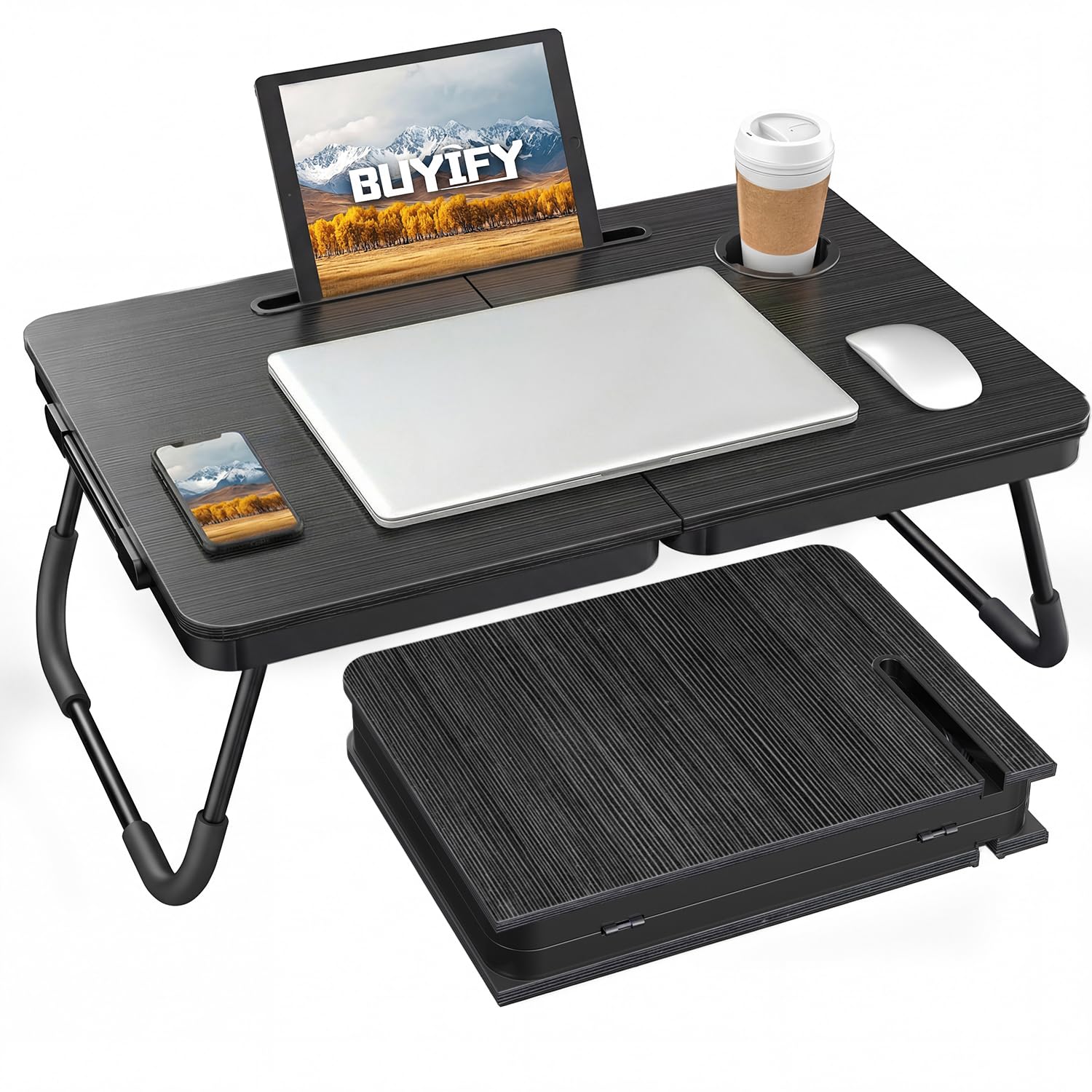
This generously sized laptop table works well for those who need a stable work surface that folds away when not needed.
Pros
- Folds completely flat with a handle for easy transport and storage
- Built-in cup holder and tablet groove keep drinks and devices secure
- Sturdy construction that doesn’t wobble or collapse during use
Cons
- Large footprint may feel too big for smaller sofas or tight spaces
- Wood surface can arrive with cosmetic scratches
- Size might be awkward for some lap-based positions
We found the BUYIFY laptop desk impressively stable during our testing. The legs lock firmly in place without any assembly required, and we never experienced any unexpected folding while working.
The surface offers plenty of room for a laptop with space left over for a notebook or mouse. We appreciated having the cup holder within reach, which prevented any spills during long work sessions. The tablet slot held our devices at a comfortable viewing angle.
Storage turned out to be more convenient than expected. When folded, it resembles a briefcase and slides under most beds or next to furniture without taking up much floor space. The handle makes moving it between rooms straightforward.
The size does require consideration before purchasing. At over 23 inches long, we noticed it extends beyond the edges of standard couch cushions. This works fine on beds or larger seating areas but felt oversized in compact spaces.
Build quality impressed us overall, though the wood finish showed minor imperfections out of the box. The desk handles daily use well and supports laptops without any flexing or instability concerns.
Our Verdict
For our top recommendation, we suggest the BUYIFY Foldable Laptop Bed Desk as a solid choice for home workers who need a reliable surface that stores easily between uses.
EYdoter Laptop Desk for Bed

The EYdoter laptop desk works well for basic tasks in bed or on the couch, though it sacrifices some stability for its lightweight portability.
Pros
- Split desktop design allows one side to angle while the other stays flat for mouse use
- Completely foldable with no assembly needed, making storage and transport simple
- Versatile enough for laptop work, meals, crafts, or reading across different settings
Cons
- Legs lack a locking mechanism and feel unstable under pressure
- Construction feels flimsy and can collapse if bumped or handled roughly
- Size works best for solo use rather than larger setups or sharing space
We found the split desktop design genuinely useful during our testing. Having the left side tilt for better screen viewing while keeping the right side flat for a mouse solved a common problem with traditional lap desks. The built-in cup holder proved more practical than expected, keeping drinks secure while we worked.
Setup couldn’t be simpler since we just pulled out the legs and started using it immediately. When finished, the whole thing folded flat enough to slide behind furniture or into a car trunk. We appreciated this convenience for moving between rooms or taking it to different locations.
The stability issues became apparent quickly, though. We had to be careful not to lean too hard on the surface or shift our weight suddenly. The legs don’t lock into position, which means they can fold unexpectedly if you’re not mindful. This works fine for lighter laptops and simple tasks but felt precarious with heavier equipment or when eating.
The 22-inch width accommodates most laptops comfortably, though larger 17-inch models might feel cramped. We used it successfully for watching shows, light typing, and having snacks without major issues. Just don’t expect it to handle demanding scenarios like heavy writing sessions or supporting multiple items at once.
Our Verdict: For a reliable laptop table solution, we recommend the EYdoter Laptop Desk for Bed if you prioritize portability and basic functionality over maximum stability.
LapGear Home Office Pro Lap Desk
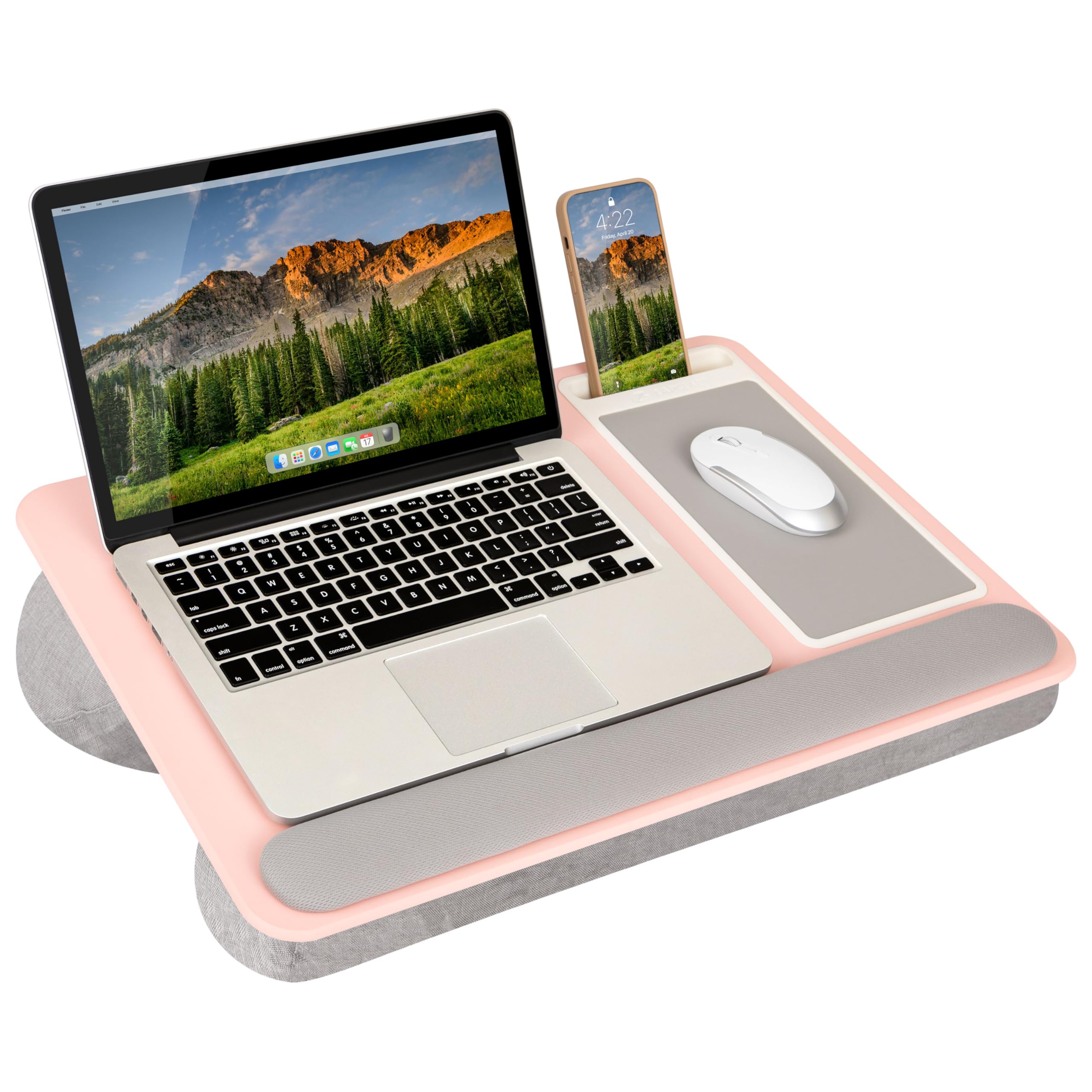
This lap desk delivers exceptional comfort and functionality for remote workers who need a reliable surface away from their traditional desk setup.
Pros
- Generous workspace accommodates laptops up to 15.6 inches with room for accessories and includes an integrated mouse pad
- Dual bolster cushion design keeps your lap cool during long work sessions while providing stable support
- Built-in wrist rest, phone slot, and lightweight construction at 2.8 pounds make it genuinely portable
Cons
- The mouse pad may start peeling after initial use and require adhesive to secure
- Heat from laptops can cause slight discoloration on the surface over time
- Limited to smaller laptops despite marketing claims about fitting larger models
We found the LapGear Home Office Pro to be remarkably practical for daily remote work. The cushioned base distributes weight evenly across your lap without creating that uncomfortable heated feeling you get from direct laptop contact.
The wrist rest proved genuinely useful during typing sessions. It’s positioned at just the right height to reduce strain during extended email writing or document editing. The phone slot keeps your device upright for video calls, which eliminated our need to prop phones against random objects.
Working from the couch became significantly more productive with this setup. The rigid surface prevented the laptop wobble that typically happens when balancing devices on soft furniture. The integrated mouse pad tracked movements accurately enough for standard office tasks.
Storage couldn’t be simpler thanks to the carry handle. We slide it beside furniture or under the bed without any hassle. The blush pink color adds a pleasant aesthetic touch compared to typical black office accessories.
The durability has held up well through months of regular use. Minor heat marks appeared after particularly long sessions, but they didn’t affect functionality. The cushion material maintained its shape without flattening out like cheaper foam alternatives tend to do.
Verdict
For comprehensive remote work functionality, we recommend the LapGear Home Office Pro Lap Desk as our top choice for anyone seeking comfort and features in a portable workspace solution.
Alentar Large-Size Portable Laptop Rolling Desk
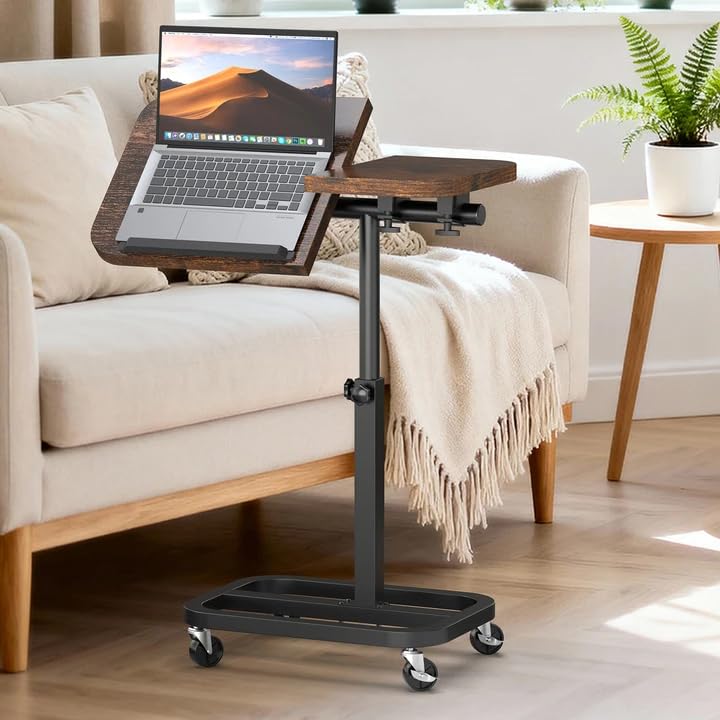
This height-adjustable rolling desk works well for those who need mobility and flexibility, though it has some stability concerns that may affect certain use cases.
Pros
- The generous work surface comfortably accommodates a laptop plus accessories without feeling cramped
- Smooth-rolling casters make repositioning effortless, and the height adjustment mechanism works without issues
- Assembly took us minimal time with no tools required
Cons
- The desk support tubing rotates on itself, causing unwanted tilting during regular use
- Won’t fit over many couches or loungers despite being marketed as an overbed table
- The brown finish, while decent looking, doesn’t feel particularly premium
We found the Alentar rolling desk offered a spacious workspace that handled our laptop, mouse, and notebook without crowding. The 25-inch wide surface gave us room to spread out, which we appreciated during longer work sessions.
The mobility aspect impressed us right away. Rolling this desk from room to room required almost no effort, and the casters glided quietly across both hardwood and carpet. Height adjustments between sitting and standing positions worked smoothly, though we noticed the two support tubes didn’t lock together as firmly as we expected.
That rotating issue became apparent during our first full day of use. The larger desk piece tilted back and forth because the tubes moved relative to each other, which got annoying when we were typing. We had to be mindful about where we placed weight on the surface.
The tilt feature worked as intended, and the lip prevented our laptop from sliding off when angled. However, we couldn’t use this desk over our couch like we’d planned. The base didn’t fit under the furniture properly, limiting its versatility.
Our Verdict
For our top recommendation, we suggest the Alentar Large-Size Portable Laptop Rolling Desk for those who primarily need a mobile workspace they can move between rooms rather than an actual overbed table.
Buying Guide
When shopping for a laptop table, we need to consider several key factors that will impact our daily comfort and productivity while working from home.
Size and Surface Area
The work surface should accommodate our laptop plus any additional items we use regularly. We need to measure our laptop and consider whether we’ll need space for a mouse, notebook, or phone.
Most tables range from 20 to 36 inches in width. Smaller surfaces work well for minimal setups, while larger ones suit those who spread out their work materials.
Adjustability Features
Height adjustment is critical for proper ergonomics. Look for tables that offer a range matching our seating preferences, whether we work from a couch, bed, or chair.
Tilt functionality helps reduce neck strain and screen glare. Some tables offer multi-angle positioning for the laptop surface.
Build Quality and Stability
The material determines durability and weight capacity. Common options include:
| Material | Pros | Cons |
|---|---|---|
| Wood/MDF | Sturdy, attractive | Heavier |
| Aluminum | Lightweight, durable | More expensive |
| Plastic | Affordable, portable | Less stable |
We should verify the weight capacity matches our equipment needs.
Portability
Consider whether we’ll move the table between rooms. Folding designs store easily and transport conveniently. Weight matters if we plan to carry it frequently.
Additional Features
Useful extras include built-in cooling fans, cup holders, and cable management slots. We should prioritize features that match our specific workflow needs rather than choosing tables with unnecessary additions.
Our Top Pick: The SAIJI Adjustable Laptop Bed Table offers excellent versatility with its height and angle adjustments, making it ideal for various working positions.
Frequently Asked Questions
Choosing the right laptop table involves understanding comfort features, setup types, dimensions, stability requirements, material considerations, and useful accessories.
What features should I look for in a laptop table to stay comfortable during long work sessions?
Adjustable height mechanisms allow us to switch between sitting and standing positions throughout the day. Tables with tilting surfaces help reduce neck strain by positioning the screen at eye level.
Ventilation slots or mesh surfaces prevent laptop overheating during extended use. Padding on wrist rests and edges reduces pressure points that develop during typing.
Curved or contoured edges improve ergonomics by fitting naturally against our body. Anti-slip surfaces keep laptops and mice from sliding during use.
Which type of setup is better for posture: a lap desk, a bed desk, or a standing laptop table?
Standing laptop tables encourage better spinal alignment by allowing us to work at full height with proper monitor positioning. These tables work best when the screen sits at or slightly below eye level and the keyboard positions at elbow height.
Bed desks with adjustable legs keep our spine neutral while working from bed, though they require careful height adjustment to avoid hunching. Lap desks provide the least postural support since they force us to look downward and round our shoulders.
Standing tables offer the most flexibility for posture changes. Bed desks work for short sessions when adjusted correctly.
How do I choose the right size and height for a laptop table in a small home office space?
We measure the available floor space and compare it against the table’s base footprint, leaving at least 6 inches of clearance on each side for stability. Compact tables with bases smaller than 20×16 inches fit tight spaces while maintaining balance.
Height range matters more than fixed height. Tables adjusting from 24 to 34 inches accommodate both seated desk work and standing positions.
Surface dimensions between 20×12 and 24×16 inches provide enough room for a 15-inch laptop plus a mouse. Folding designs let us collapse the table to 3-4 inches thick for storage.
Are adjustable laptop tables stable enough for typing and using a mouse for extended periods?
Tables with locking mechanisms at each height increment prevent wobbling during typing. We look for models with at least 3 locking positions and metal adjustment joints rather than plastic.
Base weight and design affect stability more than surface size. Tables with cross-braced bases or weighted platforms over 8 pounds resist tipping when we type forcefully.
Testing involves pressing down on the surface corners with moderate force. Movement exceeding 1/4 inch indicates insufficient stability for mouse work.
What materials and build quality details matter most for durability and heat management?
Aluminum and steel frames outlast plastic components by 3-5 years under daily use. We check that adjustment joints use metal hardware rather than plastic clips that crack over time.
MDF and particle board surfaces warp when exposed to heat, while bamboo and solid wood maintain shape longer. Mesh or perforated metal surfaces provide the best heat dissipation for laptops running intensive tasks.
Edge finishing prevents splintering on wood surfaces and sharp corners on metal tables. Powder-coated finishes resist scratches better than paint.
Which accessories are worth prioritizing on a laptop table, such as wrist rests, device ledges, or built-in storage?
Device ledges or lips prevent laptops from sliding off tilted surfaces, especially important when the angle exceeds 15 degrees. These raised edges should measure at least 0.5 inches high.
Attached wrist rests reduce strain during typing sessions longer than 2 hours. We prefer padded rests over hard plastic versions.
Cup holders and phone slots keep drinks and devices within reach without cluttering the work surface. Built-in mouse pads eliminate the need for separate accessories. Storage compartments for pens and cables reduce desk clutter but add weight to portable tables.
Based on our testing, we recommend the HUANUO Adjustable Lap Desk for its combination of stability, heat ventilation, and wrist comfort features that handle extended work sessions.

Trevor Fenner is an ecommerce entrepreneur and the founder of Ecommerce Paradise, a platform focused on helping entrepreneurs build and scale profitable high-ticket ecommerce and dropshipping businesses. With over a decade of hands-on experience, Trevor specializes in high-ticket dropshipping strategy, niche and product selection, supplier recruiting and onboarding, Google & Bing Shopping ads, ecommerce SEO, and systems-driven automation and scaling. Through Ecommerce Paradise, he provides free education via in-depth guides like How to Start High-Ticket Dropshipping, advanced training through the High-Ticket Dropshipping Masterclass, and fully done-for-you turnkey ecommerce services for entrepreneurs who want a faster, more hands-off path to growth. Trevor is known for emphasizing sustainable, real-world ecommerce models over hype-driven tactics, helping store owners build scalable, sellable, and location-independent brands.

Still deciding what to sell?
Grab the free list of 1,000+ niches that work for high-ticket dropshipping, sorted by category.
Free. Unsubscribe any time.


