

The best VoIP service for most store owners in 2026 is the one that gives you a real business number, rings on your phone and laptop, and costs about $15 per person per month without surprises. After that the choices split fast: some services are built for one person, some for a team with a shared inbox, and some for a full office with desk phones. Which one is right depends on how many people will pick up the phone and whether you text customers.
At Ecommerce Paradise I teach people to build stores around expensive products, and a phone number matters more in that model than most people expect. A visible phone number is part of how a store looks like a real business when a buyer is about to spend $2,000 or more, and my guide to high-ticket dropshipping treats that kind of trust as part of the model. I run the business from Bali, so a number that works on a laptop and a cell phone is a requirement for me, not a nice extra.
One warning before the list. I did not run these services through my own side-by-side test for this post. The prices, limits and features below come from each company’s pricing pages as I read them on October 7, 2026, plus PCMag and TechRadar reviews, and I flag it wherever sources disagree. Confirm every number on the signup page before you pay.
Disclosure: I may earn a commission if you sign up through my Dialpad or Nextiva links, at no extra cost to you. It does not change the ranking below, and I say where each of them is the wrong fit.
| VoIP service | Best for | Entry price (annual billing, per user per month) | Trial | Biggest catch |
|---|---|---|---|---|
| Dialpad | A solo owner who wants AI call transcription | $15 Standard ($27 on monthly billing) | 14 days, per the pricing page | Standard is one person per office, Pro needs 3 seats, texting is US and Canada only and billed per SMS |
| RingCentral | Growing teams that need integrations | $20 Core (per PCMag, August 2026) | 14 days, up to 20 lines | Base prices are not shown on the static pricing page |
| Nextiva | Phone plus customer messaging on one platform | $15 Core, $25 Engage | Demo listed, trial terms not shown on the page | Annual price needs a 12-month term for 1 to 100 employees |
| Quo (formerly OpenPhone) | Small teams sharing numbers and texts | $15 Starter ($19 monthly) | 7 days | Call summaries and phone menus start on Business at $23 |
| Zoom Phone | Teams already living in Zoom | $15 US and Canada Unlimited (per PCMag) | Trial button on Zoom’s page, length not stated | Pricing page did not load and sources say $15 or $16 |
| Ooma Office | Desk phones and simple setup | $19.95 Essentials (per PCMag) | No trial listed on the pricing page | No AI features, 10-person conference limit on Essentials |
| Grasshopper | One owner who wants one clean number | From $14 billed annually | 7 days, no card | International calls not included, texting has separate fees |
| 8×8 | Cheap calling-only seats | $15 X1 (per PCMag) | Not confirmed | Texting and video start on the $25 X2 plan |
Get a Business Number With AI Call Transcripts for About $15 a Month
Dialpad Connect Standard is listed at $15 per user per month on annual billing for one person, with unlimited US and Canada calling and real-time call transcription included, and the pricing page advertises a 14-day free trial. My link opens Dialpad’s signup so you can see the current terms before you commit.
How I Evaluated These VoIP Services
I looked at what a small store actually needs from a VoIP service: what one seat costs, whether you can start with a single user, what texting and international calling cost, and how much of the useful stuff is locked behind a higher plan. I also looked at how the service handles the two things most roundups skip, which are 911 calling and moving your existing number over.
My sources were each company’s own pricing pages where they loaded, plus two outside reviews. One is PCMag’s best business VoIP services list, updated August 2026. The other is TechRadar’s best VoIP provider roundup, last updated December 2025. Several vendor pages build their prices in the browser, so I read the underlying page data for Dialpad and Grasshopper and the rendered text for Nextiva and Quo. Where a vendor page would not load for me, I say so and use PCMag’s published figures instead.
All prices below are list prices per user per month before taxes, fees and add-ons, and “annual billing” means you commit for a year. Monthly billing usually costs more, sometimes a lot more.
The Short Answer: Best VoIP Service by Situation
If you are one person who wants a business number with call transcription, start with Dialpad Standard. If you have a small team that wants shared numbers and a shared text inbox, look at Quo first, because Dialpad adds a 3-seat minimum once a second person joins. If you are growing toward 10 or more people and need deep integrations, RingCentral is the safer long-term bet, and PCMag agrees by naming it a top pick.
If you want phone, texting and customer messaging in one platform and your team is under 100 people, Nextiva is worth a demo. If your team already runs on Zoom, Zoom Phone is the cheap add-on. Ooma Office fits people who still want desk phones, Grasshopper fits a solo owner who wants simplicity, and 8×8 fits a team that only needs calling.
The 8 Best VoIP Services Ranked for Store Owners
My ranking weights flexibility for a small store: can you start with one seat, how much AI is included, and how many fees hide in the fine print. PCMag ranks them differently, with RingCentral first, because it weighs features for larger teams more heavily. Both views are useful.
1. Dialpad: Best for a Solo Owner Who Wants AI Transcripts
Dialpad Standard: Dialpad’s pricing page lists Connect Standard at $15 per user per month on annual billing and $27 on monthly billing. That plan includes unlimited calling within your country, the US and Canada, plus SMS, MMS, team messaging and real-time call transcription, and the page advertises a 14-day free trial of Connect. If you want to see how the plan works for a store, Dialpad’s signup is where I would start.
Dialpad Pro: PCMag’s review of Dialpad Connect (published August 2025) praises the interface and AI features and calls the performance reliable in its tests. It also says the seat limits on some plans keep Dialpad from competing with the top alternatives, and its August 2026 roundup rates Dialpad 3.5 stars. The limits show up on the page too: Pro costs $25 per user per month on annual billing ($35 monthly) but requires at least 3 seats, so the real floor is $75 a month.
The seat rules matter before you add a helper. Dialpad’s pricing page data lists a seat minimum of 1 and an office maximum of 1 for Standard, and a minimum of 3 and a maximum of 10 for Pro, which matches PCMag’s description of Standard as a one-person plan. A second person therefore means Pro, and the page footnote says set up fees apply, so ask what they are. My full Dialpad review goes deeper on features.
The catches are texting and international calling. Dialpad’s page says SMS is only available in the United States and Canada and is charged per SMS, and calls outside your country, the US and Canada are billed at international rates. If most of your customers are overseas, that matters.
2. RingCentral: Best for Teams That Will Keep Growing
RingCentral Core: RingCentral is the pick I would make for a team that expects to hit 10 or more people. PCMag’s August 2026 review of RingEX gives it 4.5 stars, praises the AI call summaries and the integrations, and lists Core at $20 per user per month on annual billing, Advanced at $25 and Ultra at $35. RingCentral’s own page says you can save up to 33% by paying annually, but the base prices are filled in by the page after it loads, so I could not read them directly.
RingCentral’s page lists a 14-day free trial for new subscribers that supports up to 20 phone lines, and says SMS is not available during the trial. It also says you get unlimited calling within the US and Canada, while other international calls need a calling plan or bundle. PCMag adds that Core includes 25 SMS messages per person per month, which is thin if texting is your main channel.
The downside is that you pay for a lot you may not use. For a solo owner, Dialpad or Quo gets you the same basics for less. My list of RingCentral alternatives covers the cheaper routes.
3. Nextiva: Best When You Want Phone and Customer Messaging Together
Nextiva’s current pricing page lists Core at $15 per user per month, Engage at $25 and Scale at $75, with a note that annual small business pricing needs a paid term of 12 months or longer for companies with 1 to 100 employees. Beside the $15 Core price the page shows $23 with a “Save 35%” tag, and beside Engage’s $25 it shows $50 with “Save 50%”. Those percentages match annual versus monthly math, so I read $23 and $50 as the monthly-billing prices, though the page does not label them. If you want to see which plan fits, Nextiva’s plans page has the current numbers and a demo.
Core includes voice, video meetings, team chat, 100 texts per user per month and a mobile app. Engage adds a toll-free number with up to 2,000 free minutes, 500 texts per user and live chat, which is the plan that makes sense if your customers call a 1-800 number. The page also advertises up to 12 months free for people who switch, marked with an asterisk, and I could not see the fine print. It lists a demo rather than a free trial, although PCMag’s 2025 review mentioned a 14-day trial, so ask Nextiva what is offered now.
Sources conflict on Nextiva’s pricing. PCMag’s April 2025 review of NextivaONE listed Core at $15 but described a separate Nextiva Core at $30 and Engage at $40, and it rated the product 3.0 stars, citing limited AI and video problems in testing. That review predates the current lineup, so treat the older numbers as history.
4. Quo: Best for Small Teams That Share Numbers and Texts
Quo Business: Quo Starter: Quo, which used to be called OpenPhone, lists three plans on its pricing page. Starter is $15 per user per month billed yearly ($19 monthly), Business is $23 yearly ($33 monthly) and Scale is $35 yearly ($47 monthly). Every plan includes one new or ported local or toll-free number per user, calling and messaging to US and Canadian numbers under a fair usage policy, and voicemail transcripts.
Call summaries, group calling, phone menus, analytics and auto call recording start on Business. That means a store that wants an automated menu (“press 1 for sales”) pays $23 per user a month, not $15. Quo lists a 7-day free trial, and its page says plans include 1,000 free credits for its AI agent, with paid credit tiers above that.
Quo fits an owner plus a VA or sales rep who need to see the same conversations. It is a weaker fit if you need desk phones or heavy international calling. I list its closest rivals in my Quo alternatives guide.
5. Zoom Phone: Best If Your Team Already Uses Zoom
Zoom Phone Regional Unlimited: PCMag rates Zoom Phone 4.0 stars, calls it seriously inexpensive and says it performed reliably in testing. It recommends the US and Canada Regional Unlimited plan at $15 per user per month on annual billing, with metered calling plans starting at $10 per user per month plus per-minute charges. PCMag also notes that Zoom’s sentiment-style insights, such as who talked the most or asked the most questions on a call, cost extra.
PCMag’s own pieces disagree on the price: its Dialpad review says $15, while its RingCentral review says $16, and a third-party pricing guide I checked also lists $16. Zoom’s pricing page builds its numbers in the browser and did not load for me, so treat $15 to $16 as the range and confirm the figure on the plan page before you buy. Zoom’s product page has a “Start with free trial” button but does not state a length, and the third-party guide says no trial exists, so I could not confirm trial terms. Because Zoom Phone shares an interface with Zoom Workplace, it is the easiest add-on if your team already lives in Zoom meetings.
6. Ooma Office: Best for Desk Phones and a Simple Setup
PCMag lists Ooma Office Essentials at $19.95 per user per month, with unlimited calling to Canada, Mexico, Puerto Rico and the US, call blocking, extensions, a virtual receptionist and virtual faxing. Higher plans start at $24.95 and add video conferencing and voicemail transcription, and you need the top Pro Plus plan to connect integrations. Ooma’s own pricing page, which I could read through a page-reader tool, confirms $19.95 for Essentials, $24.95 for Pro and $29.95 for Pro Plus.
Ooma does not offer AI features, which PCMag says is deliberate to keep the product simple. PCMag calls it easy to learn, with a good set of features for a reasonable price, and rates it 3.5 stars. Ooma’s pricing page says no contract is needed but does not mention a free trial. It is a good fit if you want physical phones on a desk and have no use for call summaries.
7. Grasshopper: Best for One Owner Who Wants One Clean Number
Grasshopper‘s pricing page says plans start at $14 a month billed annually, and its page data lists True Solo at $14, Solo Plus at $25 and Small Business at $55. It offers a 7-day free trial with no credit card required and unlimited calling minutes. Grasshopper prices by plan rather than per seat, so the math is different from the other services here.
Read the fine print before you sign up. Grasshopper’s FAQ says international calls are not included in the unlimited minutes and are billed per minute, and the plan table lists business texting with a $19.50 one-time registration fee and a $1.50 per month messaging fee. TechRadar also lists Grasshopper in its roundup as a fit for smaller firms. For a solo owner who mostly takes calls, it is a clean option, and for a team that texts a lot, the fees add up.
8. 8×8: Best for Cheap Calling-Only Seats
PCMag lists 8×8 Work at $15 per user per month for the X1 plan, which is the one to get if you only need calling, and $25 for X2, which adds faxing, texting and video meetings. It rates the service 4.0 stars and says it performed reliably in testing. TechRadar calls 8×8 its most affordable pick.
The catch is that 8×8’s pricing page was blocked for me, so I could not read it directly, and PCMag’s X1 and X2 figures date back to its February 2025 review and were repeated in its 2026 roundup. At least one competitor comparison says 8×8 no longer publishes standard per-user prices, so treat $15 as a starting point. PCMag also notes that the most advanced AI features cost extra. If your needs are only calls, 8×8 can be the cheapest route, but get a written quote for the features you want.
Services I Left Off the Main List
Four other services are worth knowing about. Vonage Business Communications is rated 4.0 by PCMag, which lists a Mobile plan at $13.99 per user per month with unlimited domestic calling, SMS and MMS and a virtual receptionist. Intermedia Unite, also rated 4.5 by PCMag, starts at $27.99 per user per month and includes unlimited domestic and international calling.
Microsoft Teams Phone makes sense mainly if you already run on Microsoft 365, and PCMag says its administrative complexity and high costs are downsides for small businesses. Zoho Voice has a free tier with 250 outgoing minutes for one user, according to PCMag. I did not rank any of these because they either cost more per seat than my small-store picks or serve a narrower need.
What You Will Really Pay: Annual Cost Scenarios
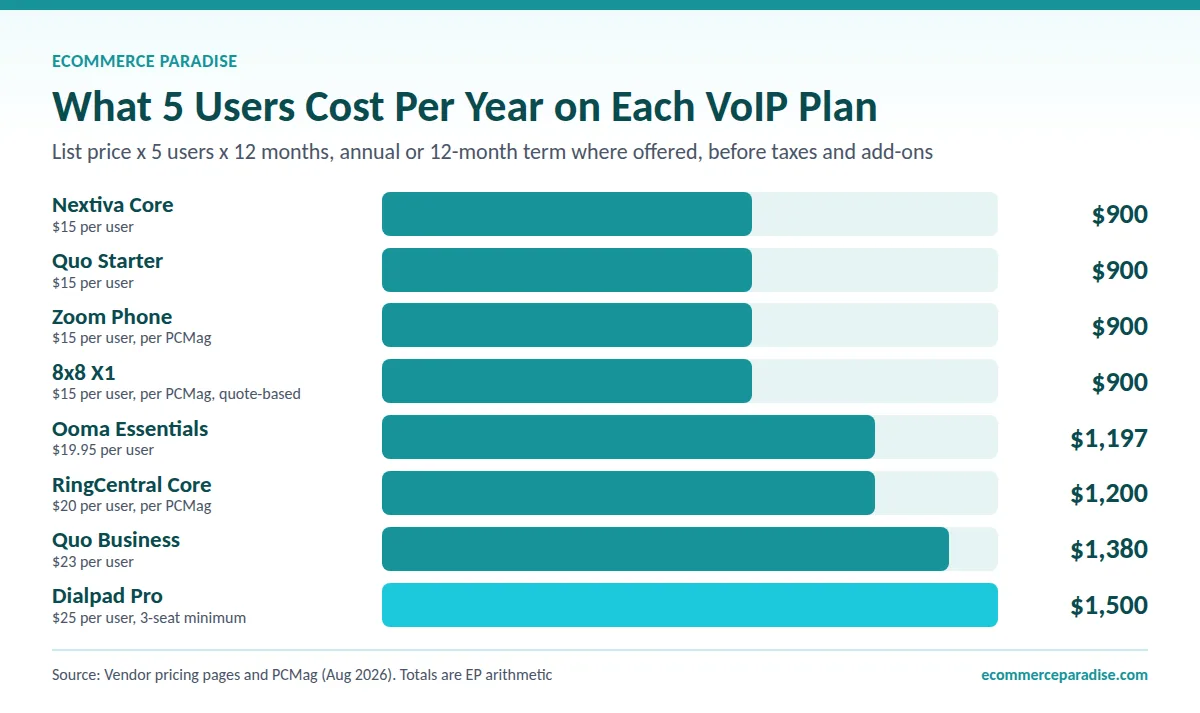
Here is my own arithmetic using the list prices above, annual billing, per year, before taxes, fees and add-ons. Treat it as a floor, not a quote.
| Service and plan | 1 user | 2 users | 5 users |
|---|---|---|---|
| Dialpad Standard ($15, one person only) | $180 | Not offered | Not offered |
| Dialpad Pro ($25, 3-seat minimum) | $900 | $900 | $1,500 |
| Nextiva Core ($15) | $180 | $360 | $900 |
| Quo Starter ($15) | $180 | $360 | $900 |
| Quo Business ($23) | $276 | $552 | $1,380 |
| RingCentral Core ($20, per PCMag) | $240 | $480 | $1,200 |
| Ooma Essentials ($19.95, per PCMag) | $239.40 | $478.80 | $1,197 |
| Zoom Phone Regional Unlimited ($15, per PCMag) | $180 | $360 | $900 |
| 8×8 X1 ($15, per PCMag) | $180 | $360 | $900 |
Dialpad Standard covers one person, so a second user means Pro, and the 3-seat minimum makes it $900 a year ($25 times 3 times 12) even for two people. Five users on Pro is $25 times 5 times 12, or $1,500 a year. Monthly billing also changes the math: one Dialpad Standard seat is $324 a year on monthly billing versus $180 on annual, and one Quo Business seat is $396 versus $276.
Nextiva’s monthly-billing price is not labeled. Its current page shows $23 next to the $15 Core price and $50 next to Engage’s $25, while PCMag’s 2025 review said the Core price doubles on monthly billing, so ask for the exact monthly rate. The main point is that a $15 plan is rarely your whole bill once you add a toll-free number, texting and taxes.
Not Sure You Want a Per-Seat Bill? Ask for the Whole Quote First
Nextiva lists Core at $15, Engage at $25 and Scale at $75 per user per month, with 100 or 500 texts per user on the first two and a toll-free number with up to 2,000 free minutes on Engage. My link opens Nextiva’s site, where you can request a demo and get the full price in writing.
E911: The VoIP Catch Nobody Mentions
This section is general information, not legal or telecom advice, and I am not a licensed professional. 911 on a VoIP line works differently from a landline, and the FCC spells out the limits. Its VoIP and 911 service guide says interconnected VoIP providers must obtain your physical location before activating service and give you easy ways to update it if it changes.
That matters for anyone who moves or travels. If your account has your old address on it, a 911 call may not point to where you actually are, so update the registered location any time you change where you work. The FCC also says VoIP service may not work during a power outage or when your internet connection fails, and suggests a backup power supply, a traditional line or a wireless phone.
The FCC also requires providers to obtain an acknowledgement from customers that they understand the limitations of their 911 service. So read the acknowledgement screen at signup and do not click through it. If you are adding desk phones in an office, the FCC’s multi-line telephone system rules say systems must let people dial 911 without a prefix like 9 and must notify a central location when a 911 call is made.
The FCC page says those rules apply to systems first sold, leased or installed after February 16, 2020, but it does not spell out how they apply to hosted or cloud systems. For that reason I would ask any provider directly how its product handles 911 calls and test the routing before you rely on it.
Number Porting: Keep Your Number Without Downtime
If you already have a business number on a mobile carrier or an old provider, you can usually bring it with you, and the FCC’s number porting guide explains your rights. It says your old company cannot refuse to port your number even if you owe a balance or a termination fee. It also says simple ports, which generally involve one line, should be processed in one business day.
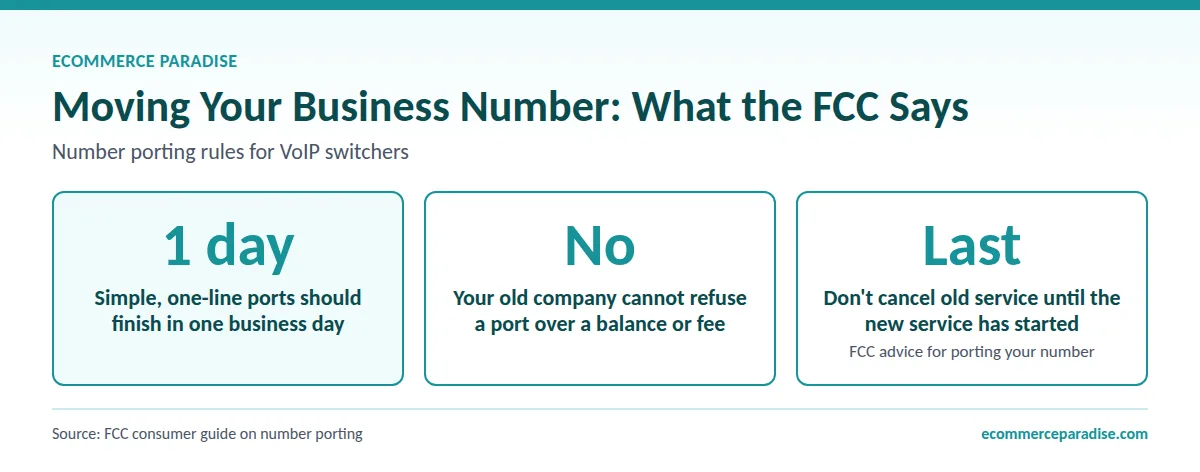
The FCC’s advice is not to cancel your old service before the new service is set up, because cancelling first can lose the number. It also tells you to review your contract for early termination fees you may still owe. In practice, I would sign up for the new service, start the port, and cancel the old plan only after the number is live on the new one.
Check whether the service you pick includes porting. Quo’s pricing page says each plan includes one new or ported number per user, and Dialpad’s pricing page has number porting in its plan details. Porting also matters if your number is already on supplier applications, which I cover in my guide on getting a business phone number suppliers will accept.
Texting, International Calls and Other Fine Print
Texting is where VoIP bills grow. Dialpad charges per SMS and only in the US and Canada, Grasshopper lists a one-time registration fee and a monthly messaging fee, and RingCentral’s page says SMS is not available in its trial. Nextiva includes 100 texts per user on Core and 500 on Engage, and Quo includes messaging to US and Canadian numbers under a fair usage policy.
US carriers also expect business texts sent from standard local numbers to be registered, a process commonly called A2P 10DLC. Messaging providers document it as a carrier requirement, and registration can add a setup fee and a wait, so build a few days into your plan.
International calling is the other trap. Dialpad covers calls within your country, the US and Canada, Grasshopper excludes international calls, and Intermedia lists unlimited domestic and international calling at $27.99. If you sell to customers outside North America, price those minutes before you commit.
Protect Your Phone Account Before You Add Customers
A VoIP account is another login that can be hijacked, and a stolen business line can be used to run up charges or impersonate you. The FTC’s cybersecurity guidance for small businesses says to require multi-factor authentication and strong passwords, and to make vendors take steps beyond a password. Turn on two-factor sign-in for your phone admin account on day one.
Put the account under the same business entity as the rest of your store so the bills, taxes and ownership line up. That is part of why I wrote the business formation guide for high-ticket dropshipping.
How to Choose: A Five-Step Decision Path
Here is how I would pick, in order.
- Count the people who will answer calls today and in 12 months, because seat minimums decide the real price.
- Decide whether you text customers, and price the texting fees before the plan fee.
- Check where your customers are, since calling outside the US and Canada often costs extra.
- Confirm how the service handles 911 and number porting, and get the answers in writing.
- Start with a free trial and make real calls from your phone and laptop before you pay for a year.
A business phone also matters on the supplier side. My guide to finding suppliers for high-ticket dropshipping lists a business phone as part of getting supplier-ready, so set the number up before you send applications.
If you are still choosing what to sell, my high-ticket niches list is the better first step. The phone number can wait until you have a niche.
My free mini course is the quickest place to start. If you want one-on-one help deciding, my coaching is where I walk people through that kind of decision.
My Verdict: Which VoIP Service Should You Pick?
For a solo owner, I would start with Dialpad Standard on annual billing and use the free trial to test call quality. For an owner with one helper, Dialpad’s 3-seat Pro minimum makes it a poor fit on price, so run the Quo trial for a week and keep it if your helper actually uses the shared inbox. For anyone planning a larger team, RingCentral is the safer long-term choice, even though it costs more per seat.
If you want one platform for calls, texting, toll-free minutes and customer messaging, ask for the full quote from Nextiva and compare it with the cheaper options. Zoom Phone, Ooma Office, Grasshopper and 8×8 each win in a narrow case, and I name those cases above.
Nobody needs all eight. Pick one, port your number carefully, update your 911 location, and judge it by whether you actually answer more calls.
Pick One Service and Make 10 Real Test Calls This Week
Dialpad’s Standard plan lists $15 per user per month on annual billing for one person, monthly billing is $27 if you want to start flexible, and the pricing page advertises a 14-day free trial. My link opens Dialpad’s signup, so you can compare both options before you pay for a year.
Frequently Asked Questions
What is the best VoIP service for a small business in 2026?
It depends on team size. For one person I would start with Dialpad Standard, for a small team that shares texts I would look at Quo, and PCMag names RingCentral, Intermedia Unite and Zoom Phone as its Editors’ Choice business VoIP services. Confirm current prices on each signup page before you pay.
How much does a VoIP service cost per month?
Entry plans in this list run about $14 to $20 per user per month on annual billing, based on the pricing pages and PCMag figures I checked in October 2026. Monthly billing, texting fees, toll-free numbers and taxes can raise the bill.
Can I keep my existing phone number with a VoIP service?
Usually yes. The FCC says your old company cannot refuse to port your number even if you owe a balance, and simple ports should be processed in one business day. Do not cancel the old service until the new one is active.
Does VoIP work for 911 calls?
Yes, but with limits. The FCC says VoIP providers must collect your physical location, give you a way to update it and get your acknowledgement of the limitations, and that service may not work during a power or internet outage. Update your address whenever you move and keep a backup phone.
Do I need a separate business phone if I already have a cell phone?
Not always. Most of these services run as an app on the cell phone you already have, which gives you a separate business number, call routing and voicemail transcripts without a second device. That is the main reason many store owners pick VoIP over adding a mobile line.
Want a Store Built So Your Phone Is Ringing With Real Buyers?
My team builds the store and lines up the supplier relationships, so the number you set up is attached to a business that is ready to take orders.
Related Articles
If you found this useful, these guides go deeper on related topics:
- Best Small Business Phone Systems in 2026: Complete Buying Guide
- Best Virtual Phone Number Services for Business in 2026
- RingCentral Alternatives 2026: 7 Options for Small Stores and Teams
- Dialpad Alternatives 2026: 6 Business Phone Systems Compared on What They Really Cost
- Best Toll-Free Number Services in 2026: 7 Providers Compared

Trevor Fenner is an ecommerce entrepreneur and world traveler from Seattle, Washington, and the founder of Ecommerce Paradise, a platform focused on helping entrepreneurs build and scale profitable high-ticket ecommerce and dropshipping businesses. With over a decade of hands-on experience, Trevor specializes in high-ticket dropshipping strategy, niche and product selection, supplier recruiting and onboarding, Google & Bing Shopping ads, ecommerce SEO, and systems-driven automation and scaling. Through Ecommerce Paradise, he provides free education via in-depth guides like How to Start High-Ticket Dropshipping, advanced training through the High-Ticket Dropshipping Masterclass, and fully done-for-you turnkey ecommerce services for entrepreneurs who want a faster, more hands-off path to growth. Trevor is known for emphasizing sustainable, real-world ecommerce models over hype-driven tactics, helping store owners build scalable, sellable, and location-independent brands.
He maintains homes in Seattle and Bali, spends most of the year overseas, and usually returns to Seattle for about a month each summer.


