


Quick answer: You can earn affiliate commissions on YouTube without being in the YouTube Partner Program. You need a channel, access to YouTube’s advanced features so your links are clickable, an affiliate program that accepts you, and a clear disclosure in the video and the description. The Partner Program is a separate paycheck (ad revenue) that starts at 1,000 subscribers plus 4,000 watch hours, and YouTube’s own Shopping affiliate program does require Partner Program membership.
Affiliate marketing on YouTube sounds easy: make a video about a product, put a link under it, and get paid when someone buys. The easy part ends about there. YouTube has its own rules, the FTC has its own rules, and the math of commissions decides whether a channel earns coffee money or a real second income.
I run Ecommerce Paradise, and I have been building online stores since 2010. The people I work with are mostly learning high-ticket dropshipping, but plenty of them ask whether they should start with videos and affiliate links first, so I went through the official rules to write this guide for 2026.
Everything below comes from YouTube Help, the FTC, the IRS and a few other sources I opened in October 2026. Where sources disagree, I say so, and I only give a number when I can point to where it came from. I have not run a YouTube affiliate channel as a business, so this is research and operator judgment, not a story about my own channel.
One plain note before we start. This is general information, not legal, tax or financial advice, and I am not an attorney, CPA or licensed advisor. Take disclosure and tax questions to a professional.
What’s in This Guide
- How affiliate marketing on YouTube works
- Affiliate income vs the YouTube Partner Program
- Set up your channel first
- Pick a topic before you pick a program
- How to choose and join affiliate programs
- The YouTube Shopping affiliate program
- FTC disclosure and YouTube’s paid promotion rules
- The videos to make first (and a review script)
- Where to put your links
- Find topics, titles and thumbnails that get searched
- Ten mistakes to avoid
- What you can realistically earn
- Taxes and business setup
- A 90-day plan
- Own your audience with email
- Where this fits and what to do next
- Frequently asked questions
How Affiliate Marketing on YouTube Works
Affiliate marketing means a company pays you a commission when someone buys, or signs up, through a special tracking link that belongs to you. On YouTube, you make a video that helps a viewer decide something, and the link sits in the description, a pinned comment or a product tag. If the viewer buys within the program’s tracking window, you earn.
The loop has five steps. You pick a topic, join one or more affiliate programs for products in that topic, make a video that solves a real question, place your link where viewers will find it, and tell viewers plainly that you earn from it. Every section of this guide is one of those steps in more detail.
The first thing to understand is that a channel can have several different paychecks, and they follow different rules. Mixing them up is the most common beginner mistake, so here is the map.
| Income stream | What you need to start | Who pays you | Main catch |
|---|---|---|---|
| YouTube ad revenue (Partner Program) | 1,000 subscribers plus 4,000 qualified watch hours in 12 months, or 1,000 subscribers plus 10 million qualified Shorts views in 90 days | YouTube, which pays 55% of net ad revenue on long-form videos | Slow to reach, and the rate per 1,000 views swings by niche |
| Memberships and Super Chat | 500 subscribers, 3 public uploads in 90 days, and 3,000 watch hours or 3 million Shorts views, in eligible countries | YouTube, which pays 70% of net revenue | Needs an audience that already likes you |
| YouTube Shopping affiliate | Partner Program membership, a channel based in a listed country, and a channel that is not music or Made for Kids | The brand sets the commission, YouTube tracks it and pays through AdSense | Limited countries and products, and a long wait for payment |
| Affiliate links to outside programs | Advanced features access so links are clickable, and approval from each program | The program pays you per qualifying sale or signup | Disclosure rules apply from the very first link |
| Sponsorships | An audience a brand wants to reach | The brand pays you directly | Must be labeled as paid promotion |
For most beginners, outside affiliate programs are the only row you can start on this month. The rest are either slower or depend on numbers you do not have yet, which is why I would treat everything else as a bonus that arrives later.
Affiliate Income vs the YouTube Partner Program
The YouTube Partner Program, or YPP, is YouTube paying you for ads and fan features on your videos. Affiliate income is a company paying you a commission when a viewer buys through your link, and YouTube is not involved unless you use its own Shopping affiliate program. You can have one without the other.
What the Partner Program requires
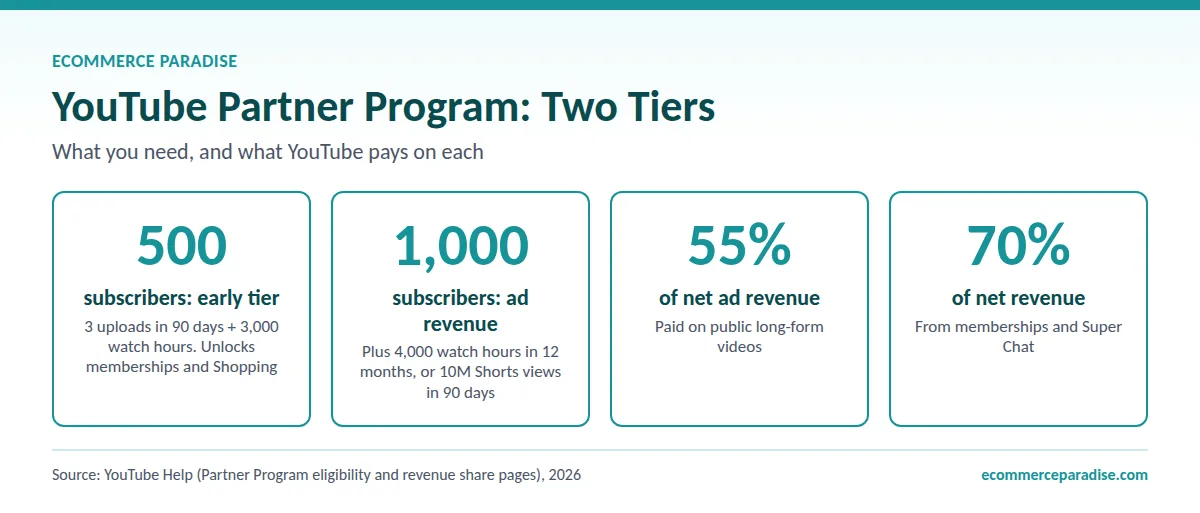
YouTube’s YPP eligibility page lists the baseline: follow the channel monetization policies, live in a country or region where YPP is available, have no active Community Guidelines strikes, turn on 2-Step Verification, have access to advanced features, and link an AdSense for YouTube account. Then you need 1,000 subscribers and either 4,000 qualified public watch hours in the last 12 months or 10 million qualified public Shorts views in the last 90 days.
Not everything counts. YouTube says watch hours from private, unlisted or deleted videos, ad campaigns and Shorts do not count toward the 4,000 hours.
The earlier 500-subscriber tier
There is an earlier tier. YouTube’s page on the expanded Partner Program lists 500 subscribers, 3 valid public uploads in the last 90 days, and either 3,000 qualified watch hours in 12 months or 3 million Shorts views in 90 days. It applies to channels in a long list of eligible countries and regions, and it unlocks memberships, Super Chat, Super Stickers, Super Thanks, gifts and Shopping.
Ad revenue sharing still waits for the 1,000-subscriber thresholds above. On the money side, YouTube’s revenue share page says partners get 55% of net revenue from ads on public long-form videos, 45% of the revenue allocated to them from the Shorts pool, and 70% from memberships and Super Chat, each after you accept the matching module in YouTube Studio.
How the approval process works
You apply in YouTube Studio under Earn, accept the base terms and link an AdSense account. YouTube reviews the whole channel against its policies, so meeting the numbers does not guarantee approval, and the page says a review typically takes about a month, sometimes longer.
If the first application is rejected, you can appeal within 21 days or keep uploading and reapply after 30 days. After a repeat rejection, or a previous reapplication, the wait is 90 days. YouTube may also remove monetization from channels with no uploads or Posts activity for 6 months or more, and updated YPP terms start February 1, 2027, so accept them in YouTube Studio by January 31, 2027, to keep monetizing fully.
Why affiliate income does not need the Partner Program
Nothing in those requirements stops you from putting affiliate links under a video on day one. YouTube’s external links policy says affiliate content does not violate its Terms of Use, with one warning: excessively posting affiliate content in dedicated accounts can violate its spam policy.
The practical gate is clickability. YouTube’s advanced features page lists clickable links in long-form descriptions and posts as an advanced feature. Active creators with enough channel history usually get it automatically, and you can unlock it sooner by verifying your identity with a valid ID or a video, although the page says that option is not available to every creator. Phone verification alone unlocks intermediate features, not advanced ones.
Set Up Your Channel First
You do not need a fancy channel to start, but a few setup steps save you trouble later. Do them in the first week, before your first upload.
Start with account security and verification. Turn on 2-Step Verification, because the Partner Program requires it anyway. Then work toward advanced features access, because without it your description links will not be clickable and custom thumbnails need a verified account.
Next, make the channel say what it is for. A one-sentence channel description, a clear name and a banner that names the topic tell new viewers why to stay. Use the channel profile links for your main resources, since YouTube allows up to 14 of them on the channel page.
Finally, decide on a single topic for the first ten videos. Channels that jump between unrelated subjects give new viewers nothing to hold on to. That brings us to the choice that matters most.
Pick a Topic Before You Pick a Program
A common mistake is doing the order backward. People join a program first and then try to make videos about whatever it pays for. Start with a topic where you can show something real on screen, where viewers are about to spend money, and where you will not run out of ideas in a year.
I use three tests. Can I show the product or the result on camera? Are people comparing options before they buy, so a video helps them decide? Could I name 30 video ideas right now without strain? A topic that fails any of the three gets harder to keep going after the first month.
My high-ticket niches list is a good hunting ground, because every niche on it is a category where shoppers research before they spend serious money. If you want a free starting point, my free niches list is a good place to brainstorm.
The commission side differs by vertical, and my guide to the best high-ticket affiliate niches shows how.
Niche changes your ad income too
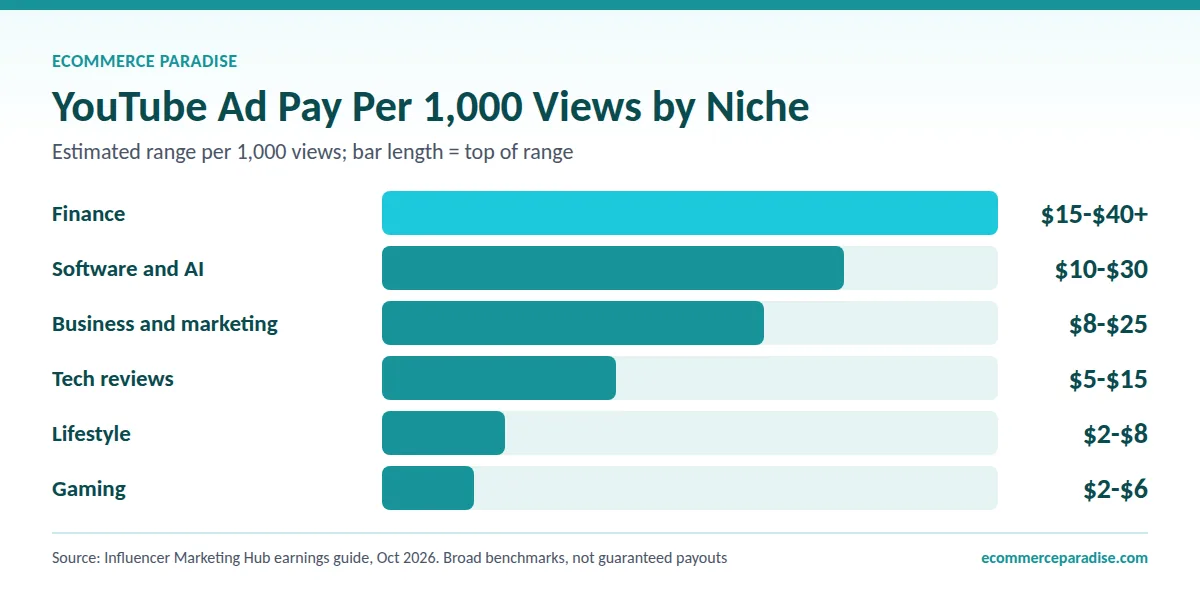
Influencer Marketing Hub’s October 2026 earnings guide estimates revenue per 1,000 views at $15 to $40 plus for finance, $10 to $30 for software and AI, $8 to $25 for business and marketing, $5 to $15 for tech reviews, $2 to $8 for lifestyle and $2 to $6 for gaming. Treat those as rough guides. The same page calls them broad benchmarks, not guaranteed payouts, and it contradicts itself on a few other figures.
Commission depends on price as much as niche
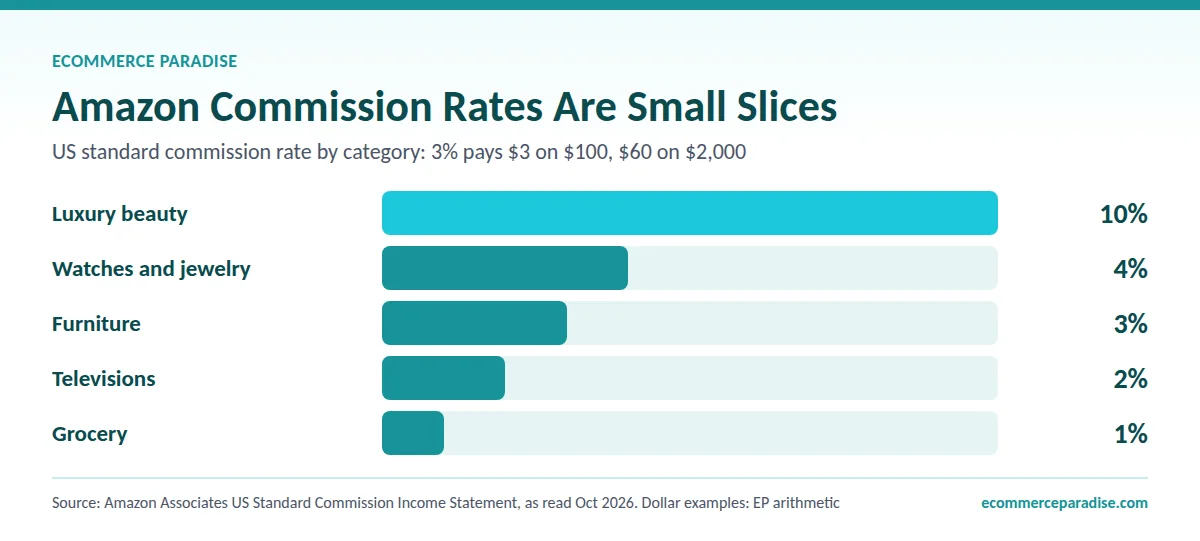
Affiliate commission is a separate lever. Amazon’s published US standard commission table, as I read it in October 2026, pays 3% on furniture, 2% on televisions, 4% on watches and jewelry, 1% on grocery and 10% on luxury beauty. A 3% commission on a $100 item is $3, while 3% on a $2,000 item is $60 (my arithmetic), which is the core reason I steer people toward higher-priced products. My guide on high-ticket affiliate marketing explains how that model works.
How to Choose and Join Affiliate Programs
Programs fall into a few families. Marketplaces pay a published percentage by category, software and subscription companies often pay a bounty or a recurring share, and brand programs pay a percentage or a flat amount on their own products. YouTube’s own Shopping affiliate program, covered in the next section, is another family. None is best for everyone. The best one is whichever matches the products you will actually talk about.
Seven terms to read before you apply
- How you are paid: a percentage, a flat amount per signup, or a recurring share. Recurring commissions add up over time, while one-time bounties favor volume.
- The tracking window: how long after the click a purchase still counts. Amazon’s policies, for example, define a 24-hour session that starts at the click.
- The payout minimum and method: some programs pay once you pass a threshold, so a small channel can wait a long time for its first payout.
- Returns and refunds: commissions are usually reversed if the customer sends the item back. YouTube’s Shopping program says so explicitly.
- Where you may promote: read what counts as an approved site or channel. Amazon’s operating agreement, for instance, defines a site to include social media user-generated content.
- Disclosure terms: many programs require wording of their own. Amazon requires the statement “As an Amazon Associate I earn from qualifying purchases.”
- Restrictions: some programs limit paid ads, discount codes or how you describe the product, so read that section before you film anything.
I cannot tell you any one program’s approval bar, and anyone who claims a universal rule is guessing. What I can tell you is to keep a note of what you agreed to when you joined, because the terms bind you for as long as you promote.
Where to find programs
There are three practical places to look. Many brands list an affiliate or partner page in their website footer. Affiliate networks and marketplaces, such as Impact, CJ, Awin and PartnerStack, list many brands in one place. And inside YouTube Studio, the Affiliate Hub lists sellers and commission percentages for the Shopping program.
Start with the products you already use or plan to review anyway. Join two or three programs, not twenty. A new channel with forty affiliate relationships spends more time on paperwork than on videos.
Getting approved
Approval depends on the program, and some approve almost anyone with a public presence while others review each applicant. Apply as the channel you actually have, describe plainly how you will promote the product, and do not claim an audience you do not have. If a program rejects you, read the reason, make a few more videos and apply again later.
Always promote what you would recommend with no commission attached. A channel that recommends everything with a link gets ignored fast, and an honest “skip this one” video often earns more trust than ten praise videos.
The YouTube Shopping Affiliate Program
This is YouTube’s own affiliate system, and it works differently from outside programs. You tag products from participating brands in your videos and Shorts, viewers can shop from the video, and YouTube tracks the sale. It is worth understanding even if you cannot join yet, because it is YouTube’s built-in option and the rules differ from outside programs.
Who can join
Per YouTube’s Shopping affiliate program page, your channel must be in the YouTube Partner Program, meet the Partner Program subscriber threshold and be based in one of the listed countries. The page lists Argentina, Brazil, India, Indonesia, Japan, Korea, Malaysia, Mexico, the Philippines, Singapore, Taiwan, Thailand, the United States and Vietnam. It excludes music channels, Official Artist Channels and channels tied to music partners, and the channel cannot be set as Made for Kids or have a significant number of Made for Kids videos.
Now the conflict. YouTube’s separate Shopping on YouTube page lists a slightly different country set, and neither Help page gives a subscriber number. YouTube’s creator page for Shopping says at least 500 subscribers, which fits the expanded Partner Program tier, while third-party guides quote 10,000 and even 15,000 subscribers, and I could not match those numbers to any YouTube page. Check the Earn tab in YouTube Studio, which is the only place that tells you whether your channel qualifies today.
How to join and tag products
The path is short: open YouTube Studio, choose Earn, find Programs, click Join Now and accept the Shopping affiliate terms. After that you can browse offers in Earn, then Shopping, then Explore affiliate offers, where you can see seller commission percentages, request samples and sort sellers.
YouTube’s help page on tagging products says you can tag up to 60 products per video or Short. On long videos, viewers see a Shopping button, and on Shorts the first product in your list appears as a sticker. You can add product timestamps on a computer, and each one must be 15 to 60 seconds.
Rules that can cost you your tags
The same page sets guidelines. Products must be easy to identify, featured prominently, mentioned in the video or text, related to the content and used as intended. Spam tagging, many unrelated products and misleading tags are not allowed, and repeated problems can cost you access to the program.
You also cannot tag products on content that is made for kids, has a copyright claim, or is limited or ineligible for monetization. Sponsored content must follow the branded content policy, and YouTube tells creators to include its paid product placement and endorsement disclosures.
How and when you get paid
Each brand or retailer sets the commission rate and attribution window for each product, and the rate shows on the offer. Commissions are paid through AdSense for YouTube within 60 to 120 days after the purchase, and they are reversed if the customer returns the product. The purchase itself happens on the retailer’s site.
The page also says that, for now, 100% of commissions from affiliate merchants go to creators, and that this is temporary and may decrease with at least 30 days’ notice. That is a fact worth knowing, but I would not build a business case on a rate YouTube has said may change.
FTC Disclosure and YouTube’s Paid Promotion Rules
If you earn from a link, you have a material connection to the seller, and the FTC expects viewers to be told. The FTC’s Endorsement Guides Q&A answers a question that matches this situation almost exactly: a YouTube reviewer with affiliate links in the description. The answer is that you should disclose the affiliate relationship both in the videos and in the description near the links.
Why the description alone is not enough
A related Q&A on the same FTC page says a description disclosure is not enough on its own, because consumers can easily miss disclosures in the video description. A disclosure has the best chance of being clear if it is in the video itself, and the FTC’s Disclosures 101 for influencers adds that spoken and on-screen disclosures are more likely to be noticed. It also says a disclosure should not hide behind a “more” click, and that you should not rely only on a platform’s built-in tool.
What words to use
The FTC says “affiliate link” by itself may not be understood by consumers, and a “buy now” button is not a disclosure. A “paid link” right next to an affiliate link should be an adequate disclosure, and “commissionable link” is probably not clear. Plain language wins.
Here is how I would apply it. Say one sentence near the start of the video, such as “Links below are affiliate links, so I earn a commission if you buy through them, at no extra cost to you.” Repeat it right before you recommend a specific product, and put the same sentence above your first link in the description.
What YouTube adds
YouTube adds its own layer. Its paid promotion page tells you to turn on the paid promotion setting when a video includes branded content, sponsorships, endorsements or other commercial relationships, and the label appears at the beginning of the video. The page says you and your partners are responsible for following applicable laws, and it points to the FTC for US rules.
The page I read does not name affiliate links. So if a brand pays you or sends free product, use the label, and for plain affiliate links the FTC duty applies either way. Menus change, so check the upload screen when you publish.
Honest content is part of the rule
The FTC’s influencer guide also says not to describe a product you have not tried, and not to call a product great if you were paid to promote it and found it poor. In plain terms, you cannot review something you never used. If you have not used the product, say so and make a different kind of video, such as a comparison of published specs.
YouTube’s channel monetization policies add a content rule. Since July 2025 the former repetitious content policy is called inauthentic content, and it covers mass-produced or repetitive content that looks made from a template. A channel of near-identical product videos can run into that, so vary what each video teaches.
The Videos to Make First (and a Review Script)
I do not have conversion data by format, and I will not invent any. What follows is how I would sequence videos based on how buyers behave: they compare, they look for proof, and they want to see the thing working.
Reviews and “is it worth it” videos
These catch people close to a purchase, since the search itself is a question about whether to spend money. Cover who it is for, who should skip it, the real price, and what you did not like. A review with no downside gets read as an ad.
Comparisons and alternatives
“Product A vs Product B” and “best alternatives to X” attract viewers who have narrowed the field. Show a short table on screen and give a clear pick for each type of buyer. These are also the videos where a link to each option makes sense.
Tutorials and walkthroughs
A video that teaches a task with a tool on screen builds trust, and the link sits naturally under “the tool I used.” This works especially well for software, because viewers see the result before they ever click.
“Best for” roundups
A list such as “best gear for a small home gym” can rank for broad searches and mention several products at different price points. Keep the list short enough that each pick gets a real reason. Fifteen products with a sentence each tells viewers nothing.
Shorts
Shorts can bring in new viewers, but remember the link rules. YouTube says URLs in Shorts comments and descriptions are not clickable, while the Related Video link is clickable. A Short is best used as a trailer that points to the full video where your links live, and Shopping product tags are the exception because the sticker is clickable.
A review script that earns trust
This is the structure I would use for a product review, adjusted to fit your style. It also lines up with what the FTC asks for.
- The problem (first 15 seconds): name the question the viewer typed into search, not your name or your intro music.
- The disclosure: one plain sentence that links below are affiliate links and you earn if viewers buy.
- Who it is for and who should skip it: say this before you show features, because it is the part viewers trust most.
- The demo: show the product working, with the screen or the real item in frame.
- The downsides: at least two real ones, including the price if it is high.
- Alternatives: one or two options for people the product does not fit.
- The verdict and the pointer: a clear recommendation, then tell viewers where the link is, such as the first line of the description.
If you need an editor, my roundup of the best video editing software compares eight options by price and use. Clear audio and a screen recording that stays readable will do more for you than a studio.
Where to Put Your Links
Placement decides how many people ever see the link. On long-form videos, URLs in descriptions and comments are clickable, according to YouTube’s page on sharing links, as long as your channel has advanced features access. Use both spots, because they serve different viewers.
The description
Put your disclosure sentence and your main link in the first lines, since the rest is hidden behind a “more” click. That also lines up with the FTC’s warning against disclosures that require a click. Below that, add chapters and a short list of the products you mentioned, each with its own link and a few words about what it is.
The pinned comment
A pinned comment keeps one link at the top of the conversation, which helps viewers who skip the description. I would use it for the single most important recommendation from the video, plus the same disclosure sentence. Edit it later if the offer changes.
The channel page and short links
Your channel profile can show up to 14 links, so keep your best resource and your email signup there. If you use a short or branded link, use one that sits on a domain you control or a tracking tool you trust, and use a separate link per video so you can see which videos produce clicks. YouTube’s external links policy also covers verbally pointing viewers to a site, and says it may remove a link it cannot verify as safe, so keep every link boring and trustworthy.
Find Topics, Titles and Thumbnails That Get Searched
Pick topics people already search for. Three free sources are enough for your first ten videos. YouTube’s own search box shows autocomplete suggestions as you type. Your competitors’ comment sections show what viewers still wonder about. And in YouTube Studio, the Trends tab under Analytics shows top searches from your audience and “content gaps,” which YouTube defines as topics where viewers cannot find enough quality results.
That last tool has limits. The Trends tab is limited to certain countries, languages and devices, and YouTube says it started rolling out an updated Studio experience in July 2026, so it may look different when you open it.
For titles, lead with the buyer’s question, put the product name early, and make the title match what the video delivers. YouTube Help recommends 16:9 thumbnails at 3840 by 2160 pixels with a minimum width of 640 pixels, and the page says you need a verified account to upload your own thumbnail. Design for a phone-sized preview, where tiny text disappears. You can see the numbers on YouTube’s thumbnail help page.
Disclosure: I may earn a commission if you sign up through my TubeBuddy or Kit links, at no extra cost to you.
If you later want a dedicated keyword research tool inside YouTube, TubeBuddy is one option. On its pricing page I read Keyword Explorer listed under its Pro, Legend and Enterprise plans, a license tied to one channel and a 30-day refund policy. The prices did not display as text when I opened the page, so confirm the cost at checkout, and skip it entirely if the free methods above are enough for now. My roundup of YouTube SEO tools compares the alternatives, and the free methods above come first.
Ten Mistakes to Avoid
- Waiting for the Partner Program. Affiliate links do not need it, so start publishing and learning now.
- Skipping disclosure. A description-only disclosure is not enough, so say it out loud in the video.
- Picking a program before a topic. The topic decides which products you can talk about for years.
- Promoting products you have not used. The FTC says not to describe a product you have not tried.
- Making only praise videos. Reviews with no downside read as ads and lose trust.
- Joining too many programs. Two or three that fit your topic beat twenty you never use.
- Posting near-identical videos. Template-looking repetitive content can be ineligible for monetization.
- Ignoring the program terms. Returns, payout minimums and promotion rules decide what you actually keep.
- Relying on one platform. YouTube can change a policy or limit a channel, and an email list is yours.
- Believing income screenshots. A number with no source, sample size or year is marketing.
What You Can Realistically Earn
There is no trustworthy public number for what a typical YouTube affiliate earns. YouTube’s own creator page for Shopping carries creator testimonials, and at least one is labelled “Results not typical.” Be wary of any income breakdown that does not name a source, sample size and year, and do not build a plan on one. What I can give you is the structure of the math.
Start with ad income. Using Influencer Marketing Hub’s per-1,000-view estimates, a video with 5,000 views at the lifestyle range of $2 to $8 per 1,000 earns $10 to $40, while the same views at the software range of $10 to $30 earn $50 to $150 (my arithmetic). Those are small numbers, which is why I treat ads as a bonus and affiliate or product income as the main event.
Now the affiliate side. The table below uses assumptions I made up for illustration: 5,000 monthly views on one video, 2% of viewers clicking your link, and 5% of those clickers buying. That is 100 clicks and 5 sales. These are not benchmarks, and high-ticket purchases usually convert lower, so read the table as a lesson in commission size, not a forecast.
| Commission example | Per sale | Monthly from 5 sales |
|---|---|---|
| 3% of a $100 product | $3 | $15 |
| 3% of a $2,000 product | $60 | $300 |
| Hypothetical $30 flat software commission | $30 | $150 |
| Hypothetical $300 flat commission | $300 | $1,500 |
If the buying rate drops from 5% to 1%, every figure falls to a fifth. The real conclusion is that income comes from many useful videos stacked over time, plus an email list and offers of your own. Also remember the payment delay: YouTube’s Shopping program pays 60 to 120 days after the purchase, and other programs have their own payout minimums.
Want More Than a Small Slice of Each Sale?
With affiliate links you earn a commission. With a high-ticket store you keep the margin between your price and the dealer cost. The free mini course shows how that model works before you spend anything.
Taxes and Business Setup
Once money starts arriving, it is business income. The IRS’s business income page says a sole proprietor files Schedule C to report business income and expenses. The self-employment tax page says you usually must pay self-employment tax if you had net earnings from self-employment of $400 or more. The rate is 12.4% for Social Security plus 2.9% for Medicare. Whether your channel counts as self-employment is a question for your CPA.
The IRS’s estimated taxes page adds that if you are in business for yourself you generally need to make estimated tax payments, usually when you expect to owe $1,000 or more at filing. Programs with long payment delays, like the Shopping program, make record keeping matter, so ask your CPA which year each payment counts in.
Keep business money separate from personal money from the start. When channel income grows, my business formation guide covers the LLC, EIN and business bank account order, which makes bookkeeping and tax time cleaner.
There is one more path to think about. With affiliate links, someone else holds the inventory and handles support, but you also keep a small slice. If a channel starts moving real volume in one product category and you want the full margin, selling the products yourself is the next step, and my supplier sourcing guide explains how to find dealers and negotiate terms.
A 90-Day Plan
This is my suggested pacing, not a benchmark, and reaching Partner Program thresholds can take longer. The goal of the first 90 days is not income. It is to publish enough videos to learn what your audience wants.
Days 1 to 14: set up and choose
Choose one topic and write down 20 video ideas. Join two or three programs whose terms you have read. Turn on 2-Step Verification, start the advanced features verification, write your disclosure sentence and save it where you can paste it.
Days 15 to 60: publish on a schedule you can keep
Publish weekly if you can, starting with reviews and comparisons. Research each topic before filming, say your disclosure in the video, add it to the description and pin one link in the comments. Keep the notes on which video types you enjoy making, because you will make a lot of them.
Days 61 to 90: study the data and double down
Open YouTube Studio analytics and see which videos earn views and clicks, then make more like them. Add an email signup, and check the Earn tab to see which programs you have unlocked. If a Shopping affiliate offer is open to you, tag a few products and watch the reports. Then decide what to do next: keep going, narrow the topic, or add a second revenue stream.
Want a Second Pair of Eyes on Your Plan?
Private coaching is built around high-ticket dropshipping, so it fits if you want to turn video traffic into your own store. Bring your niche and your questions, and we work through the next steps together.
Own Your Audience With Email
A channel is rented land. YouTube can change a policy, turn off monetization after a violation, or bury your videos, and you cannot take your subscribers with you. An email list is the one audience you can contact directly, and it is where I would send viewers who want more than a video.
Give people a reason to join: a checklist, a comparison sheet or a short email course that matches the video topic. Put the signup link in the description and the pinned comment, and mention it out loud in the video. When you send affiliate offers by email, the same FTC rules apply, so put the disclosure next to the link, not in a footer nobody reads.
If you want a tool for this, Kit is an email platform aimed at creators. Its pricing page lists a Free plan with unlimited landing pages, forms and broadcasts, plus the ability to sell digital products, although the subscriber cap is stated inconsistently on the page (both 10,000 and 1,000 appear), so confirm it when you sign up. My autoresponder comparison compares eight platforms if you want to look at the field.
Where This Fits and What to Do Next
YouTube affiliate marketing is worth doing if you can make useful videos on a topic you know, and it is a poor bet if you want money fast. The Partner Program is a slow bonus, and affiliate income starts earlier but depends on what you recommend, how you disclose and how patient you are.
The rules are manageable if you follow them from the start: disclose in the video and the description, keep claims accurate, and never recommend a product only because it pays well. Pick your topic this week, join two programs, record your disclosure sentence, and publish your first review. That single video teaches you more than another week of reading.
If you reach the point where you want to own the customer and the margin, a high-ticket store is the next step up, and the high-ticket dropshipping guide is where I would send you. Until then, treat each video as an asset that can keep working.
Frequently Asked Questions
Do I need to be in the YouTube Partner Program to do affiliate marketing?
No. YouTube’s external links policy says affiliate content does not violate its Terms of Use. You need advanced features access for clickable links in long-form descriptions, and Partner Program membership only if you want YouTube’s own Shopping affiliate program.
How many subscribers do I need to make money on YouTube?
YouTube lists 500 subscribers for the earlier tier with fan funding and Shopping, in eligible countries, and 1,000 subscribers plus 4,000 watch hours or 10 million Shorts views for ad revenue. For outside affiliate links I found no YouTube subscriber minimum, although each program may set its own rules.
Do I have to disclose affiliate links on YouTube?
Yes. The FTC’s Endorsement Guides Q&A says to disclose the affiliate relationship both in the video and in the description near the links. A description-only disclosure is not enough, so say it out loud, and check with an attorney if you are unsure.
How much can I earn from affiliate marketing on YouTube?
I could not find a trustworthy public figure for a typical channel, so I will not give you one. Income depends on views, how many viewers click, how many buy and the size of the commission, as the table in the earnings section shows.
Can I use affiliate links in YouTube Shorts?
Not as clickable text. YouTube says URLs in Shorts comments and descriptions are non-clickable, but the Related Video link is clickable and Shopping product tags show a clickable sticker. Most creators use a Short to send viewers to a full video where the link lives.
Turn Your Video Audience Into Buyers of Your Own Store
My team builds a high-ticket dropshipping store and lines up suppliers, so your channel can send traffic to products you control instead of only earning commissions. Prefer to learn it yourself? Ask about coaching.
Related Articles
If you found this useful, these guides go deeper on related topics:
- High-Ticket Affiliate Marketing Products: The Complete 2026 Guide to Programs That Actually Pay Real Commissions
- The Best High-Ticket Affiliate Marketing Products by Category (2026)
- How to Use Affiliate Marketing to Grow a High-Ticket Dropshipping Store in 2026
- Best YouTube SEO Tools in 2026: Rank Your Videos and Grow Your Channel Faster
- High-Ticket Niches List: 150+ Best Dropshipping Niches for 2026

Trevor Fenner is an ecommerce entrepreneur and the founder of Ecommerce Paradise, a platform focused on helping entrepreneurs build and scale profitable high-ticket ecommerce and dropshipping businesses. With over a decade of hands-on experience, Trevor specializes in high-ticket dropshipping strategy, niche and product selection, supplier recruiting and onboarding, Google & Bing Shopping ads, ecommerce SEO, and systems-driven automation and scaling. Through Ecommerce Paradise, he provides free education via in-depth guides like How to Start High-Ticket Dropshipping, advanced training through the High-Ticket Dropshipping Masterclass, and fully done-for-you turnkey ecommerce services for entrepreneurs who want a faster, more hands-off path to growth. Trevor is known for emphasizing sustainable, real-world ecommerce models over hype-driven tactics, helping store owners build scalable, sellable, and location-independent brands.

Still deciding what to sell?
Grab the free list of 1,000+ niches that work for high-ticket dropshipping, sorted by category.
Free. Unsubscribe any time.


