

Creating professional video content from your iPhone has become increasingly accessible, but delivering scripted material naturally remains a challenge for many content creators. The best teleprompter for iPhone solves this problem by displaying your script while you record, allowing you to maintain eye contact with the camera and deliver your message smoothly. Whether you’re recording YouTube videos, social media content, or business presentations, a teleprompter helps you appear polished and confident.
iPhone-compatible teleprompters come in various configurations, from compact portable units to more robust desktop setups. The best teleprompter for your iPhone depends on your recording environment, the size of your device, stability requirements, and whether you need a portable solution or a stationary setup. Some models use mirrors and beam splitter glass to reflect your script while keeping the camera lens visible, while others rely on simpler direct-view designs.
When choosing a teleprompter for iPhone, consider the mounting system’s compatibility with your specific iPhone model and any protective case you use. The quality of the reflective glass affects readability, and adjustable height or angle options improve ergonomics during longer recording sessions. Remote control functionality is essential for operating the teleprompter app hands-free. We tested seven iPhone teleprompters to identify the ones that deliver smooth script scrolling, stable mounting, and clear visibility for professional-looking videos.
Best Teleprompters for iPhone
We’ve tested and evaluated the top teleprompters designed specifically for iPhone users, considering factors like portability, build quality, compatibility, and ease of use. Our selections range from budget-friendly options for beginners to professional-grade models for content creators and presenters.
Our Verdict: For most users, we recommend the Parrot Teleprompter 2.0 as the best overall choice, offering excellent build quality, universal smartphone compatibility, and a compact design that’s perfect for on-the-go recording.
NEEWER Basics X12B Teleprompter

This teleprompter delivers solid performance for iPad and tablet users who need a reliable reading solution without breaking the bank.
Pros
- No assembly required with a flip-open design that gets you recording in seconds
- Bluetooth remote and app combo makes script control effortless during filming
- Lightweight aluminum construction folds flat for transport and storage
Cons
- The remote control may have durability issues based on our testing experience
- Limited to tablets and iPads since it’s not designed for phone shooting
- Horizontal camera mounting can feel restrictive compared to other options
We appreciated how this teleprompter arrived ready to use right out of the box. The aluminum frame feels reassuringly solid when you unfold it, and there’s no fumbling with screws or confusing assembly steps. You simply mount it on your tripod, slide in your iPad, and attach your camera to the front plate.
The 12-inch beamsplitter glass does an excellent job reflecting text clearly. We could read our scripts comfortably from about 8 feet away, which gave us plenty of room to move around while filming. The adjustable hood helps eliminate glare when working in bright environments.
Using the RT113 remote through the NEEWER app worked smoothly for controlling scroll speed and pausing mid-sentence. The buttons operated quietly without creating distracting clicking sounds during recording. However, we noticed the remote’s responsiveness decreased after several weeks of regular use, which raised concerns about long-term reliability.
The liftable platform accommodates various camera sizes while keeping the lens centered. We tested it with a DSLR and found the setup stable enough for professional-looking content. The entire unit folds down to just 2 inches thick, making it easy to slip into the included carry case between shoots.
Our Verdict
For a versatile teleprompter solution with superior screen size, we recommend the NEEWER Basics X12B Teleprompter as our top choice for creators who primarily work with iPads and tablets.
LENSGO TC7S Portable Teleprompter

This compact teleprompter delivers solid performance for iPhone users who need a travel-friendly solution, though it requires careful setup to avoid reflection issues.
Pros
- Folds completely flat in seconds, making it genuinely portable for location shoots
- Bluetooth remote lets you control script speed without touching your phone mid-recording
- Works with phones and small tablets under 8 inches, offering versatility for different devices
Cons
- Glass reflection can appear in footage if lighting isn’t positioned correctly
- Some newer iPhone models experience autofocus difficulties through the beam splitter
- Requires a separate tripod for stable operation, which isn’t included
We tested the LENSGO TC7S across multiple shooting scenarios and found it genuinely useful for quick social media content. The one-second folding mechanism actually works as advertised, collapsing into a thin profile that slips easily into a camera bag.
Setting up the TCQI app took a few minutes to figure out, but once we loaded our script, the remote control made adjusting scroll speed effortless during takes. We appreciated being able to pause and resume without reaching for the phone. The app accepts text files, direct input, and images, though typing directly into the interface proved most reliable.
The beam splitter glass provides decent clarity when reading scripts, though we noticed our iPhone occasionally struggled to maintain focus on subjects behind the glass. Adjusting the lighting setup helped minimize this issue. The reflection quality depends heavily on your shooting environment, and indoor controlled lighting worked better than outdoor scenarios.
At just under a pound, this teleprompter doesn’t add much weight to a rig. We mounted it on various tripods without stability concerns. The phone mounting system accommodated our iPhone securely, and the included lens shading ring helped reduce unwanted reflections around the edges.
Our Verdict: For a portable iPhone teleprompter solution, we recommend the LENSGO TC7S as our top choice for content creators who prioritize portability and need reliable script reading on location shoots.
Glide Gear TMP 100
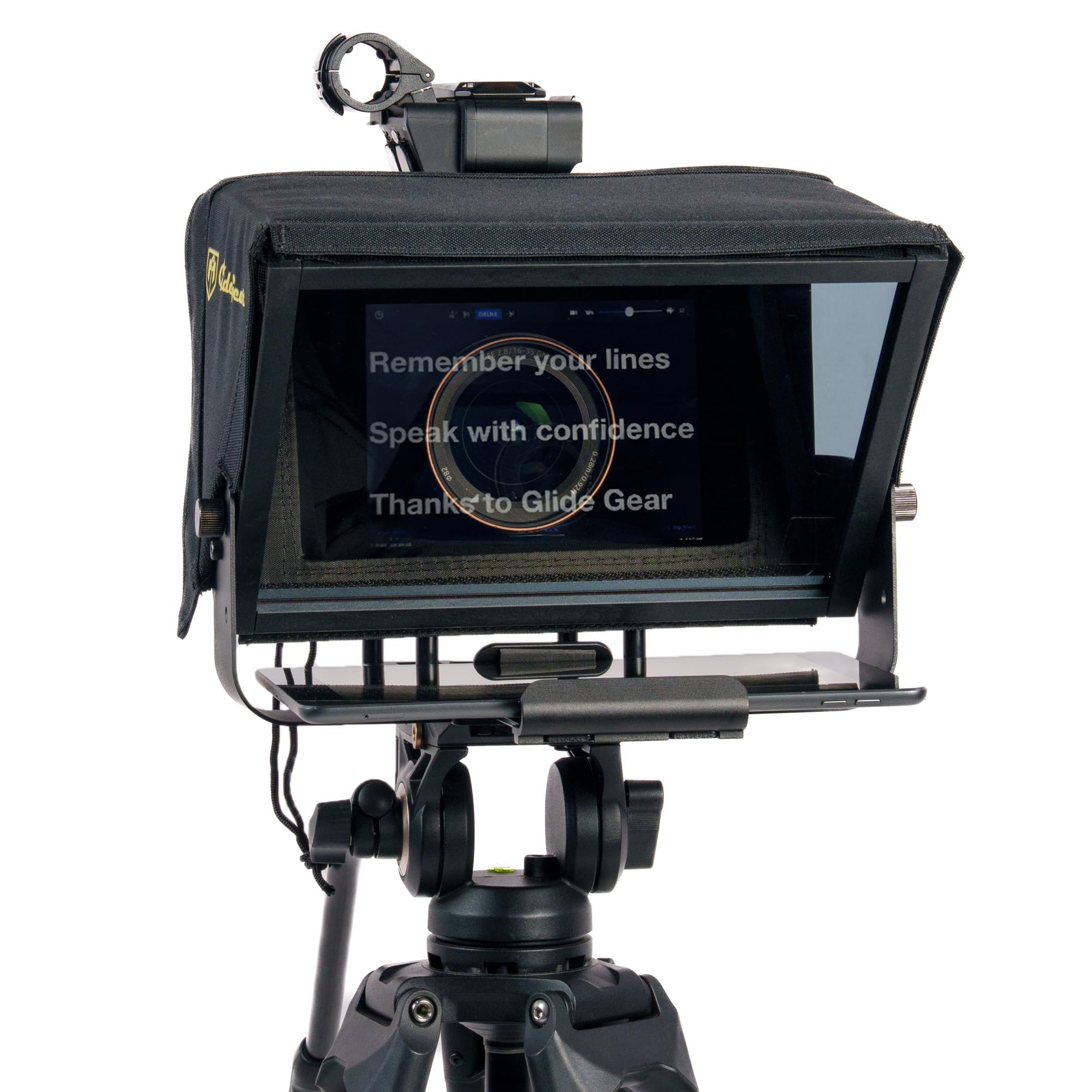
This teleprompter offers solid performance for content creators who need a reliable iPad or iPhone solution without spending a fortune.
Pros
- The 70/30 beam splitter glass delivers clear script visibility while maintaining sharp camera focus
- Collapsible design with protective hood makes transportation remarkably simple
- All-aluminum construction feels sturdy and professional during extended shooting sessions
Cons
- Physical size is larger than expected, which affects portability despite the folding design
- iPad Pro users need to look elsewhere since it won’t accommodate that device
- Assembly quality could be more refined given the price point
We found the Glide Gear TMP 100 incredibly straightforward to get running during our first shoot. Setting up our iPhone took less than five minutes, and the protective hood eliminated the glare issues we experienced with cheaper alternatives.
The beam splitter glass performed better than anticipated. Our footage showed no noticeable quality degradation, and reading scripts felt natural from a comfortable distance. The metal frame inspired confidence compared to plastic competitors we tested previously.
One surprise was the overall footprint when fully assembled. We needed more space on our desk than initially planned, though the folding mechanism partially compensates for this bulk. The included carry bag protects everything adequately during transport between locations.
Mounting options proved versatile with standard tripod threads. We appreciated being able to attach a small LED light to improve our setup without needing additional stands. The weight capacity handled our DSLR comfortably, though we wouldn’t push it with heavier cinema cameras.
Our Verdict
For creators seeking a dependable teleprompter solution, we recommend the Glide Gear TMP 100 as our top choice for iPhone users who value quality construction and reliable performance.
Elgato Prompter

This is an excellent choice for content creators who want a professional teleprompter solution that works seamlessly with their existing computer setup.
Pros
- The built-in 9-inch display eliminates the need for tablets or smartphones, simplifying your workflow
- Drag-and-drop functionality lets you move any window onto the screen like a secondary monitor
- Wide compatibility with DSLR cameras, webcams, and smartphones through included step-up rings
Cons
- Voice-tracking features have limited compatibility with certain Mac systems
- The bottom edge of the prompter screen can appear in frame with some wide-angle lenses
- The included software could benefit from additional refinement and features
We found the Elgato Prompter incredibly straightforward to set up right out of the box. Connecting it to our computer via USB-C took seconds, and the display immediately functioned as an extended monitor. The ability to simply drag our script window or video conferencing app onto the prompter screen felt natural and intuitive.
Build quality impressed us from the moment we unboxed it. The materials feel solid and durable, designed to handle regular studio use without wobbling or flexing. At 690 grams, it’s light enough to reposition easily but substantial enough to stay stable during recordings.
The Camera Hub software gives you control over text appearance, allowing adjustments to font size, scrolling speed, and contrast. We appreciated being able to customize these settings from our desktop rather than fiddling with a mobile app. Integration with Stream Deck adds another layer of convenience for streamers who already use that ecosystem.
Reading Twitch chat or Zoom participants while maintaining eye contact transformed our video calls and streams. Instead of looking away from the camera to check messages or see faces, everything appears directly in our line of sight. This creates a more engaging experience for viewers who notice the difference in eye contact immediately.
The included step-up rings cover lens sizes from 49mm to 82mm, accommodating most standard camera setups. We did notice that extremely wide lenses occasionally show a sliver of the prompter frame at the bottom of shots, though this rarely caused issues in practice.
Our Verdict
For content creators seeking a reliable teleprompter with iPhone compatibility, we recommend the Elgato Prompter as our top choice thanks to its built-in display, seamless computer integration, and professional build quality that justifies the investment.
NEEWER X11 Teleprompter
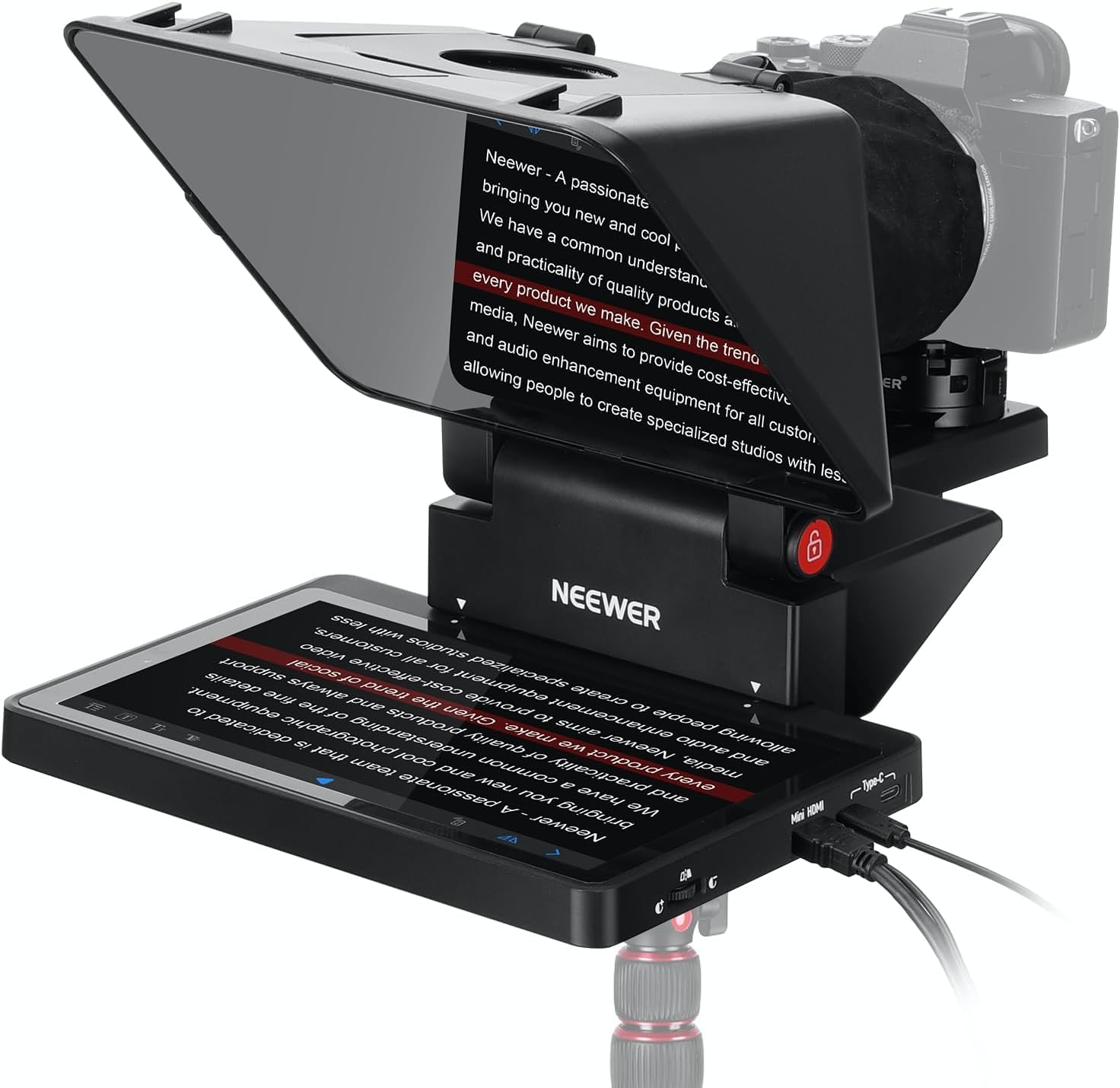
The NEEWER X11 delivers excellent value for iPhone users who want a professional teleprompter without relying on their phone as the display.
Pros
- Built-in 9-inch monitor eliminates the need to use your phone or tablet as a display
- The 11-inch beam splitter glass provides clear text visibility from up to 8 feet away
- Adjustable camera mount with 4 inches of horizontal and 1.2 inches of vertical movement
Cons
- Initial driver installation required when connecting via USB-A can be confusing
- The protective cover’s zipper allows some light leakage that affects contrast in bright conditions
- Limited to lenses between 35-200mm focal length with thread sizes up to 72mm
We found the X11’s built-in monitor to be its standout feature during our testing sessions. The screen mirroring works smoothly with iPhones that support the DP protocol, and setup takes just minutes once you have the right cable connected.
The beam splitter glass performs admirably with its 75% light transmission. Text remains sharp and readable even when we positioned ourselves a reasonable distance from the unit. The multiple coating does its job preventing ghosting, though we noticed the protective cover could use better light sealing along the zipper.
Camera positioning flexibility impressed us more than expected. Moving the mount horizontally by up to 4 inches let us dial in the perfect framing, while the Arca-type quick release plate made swapping between different setups fast and reliable.
The dual functionality as a second computer monitor adds practical value. We used it as an extended display during video calls, maintaining natural eye contact while reading notes. The 1024 x 768 resolution isn’t cutting-edge, but it’s perfectly adequate for displaying scrolling text.
Build quality feels solid at 20 ounces, striking a good balance between stability and portability. The included case makes transportation straightforward, and the compact folding design doesn’t eat up much storage space between shoots.
Our Verdict
For our top teleprompter recommendation, we suggest the NEEWER X11 as the best overall choice for iPhone users who want a complete solution with a built-in display that eliminates the hassle of mounting additional devices.
Buying Guide
When selecting a teleprompter for iPhone, we need to consider several key factors that affect performance and usability. The right choice depends on your specific filming needs and budget constraints.
Compatibility and Mounting
Your teleprompter must securely hold your iPhone model while providing stable mounting options. Look for adjustable clamps that accommodate different phone sizes and cases. We recommend checking weight capacity and ensuring the mount won’t obstruct your camera lens.
Display and Readability
The mirror or glass quality directly impacts text visibility. Consider these features:
| Feature | What to Look For |
|---|---|
| Mirror Quality | High-reflectivity glass for clear text |
| Size | Larger displays for greater reading distance |
| Anti-glare | Coating to reduce reflections from ambient light |
| Brightness | Adjustable screen brightness compatibility |
Portability and Build
We prioritize lightweight materials if you film on location frequently. Foldable designs offer convenient storage and transport. However, stability shouldn’t be sacrificed for portability.
App Integration
Check whether the teleprompter works with multiple prompter apps. Some models include proprietary software while others remain app-agnostic. We find versatility in app choice provides better long-term value.
Price vs Features
Entry-level options suit beginners and occasional users. Professional creators benefit from investing in models with superior optics and construction. Consider how often you’ll use the equipment before committing to a price point.
Our Top Pick: For the best overall performance, we recommend the Parrot Teleprompter. It delivers excellent build quality and compatibility at a reasonable price point.
Frequently Asked Questions
Choosing the right teleprompter for iPhone involves understanding app features, hardware compatibility, and workflow setup. Free apps offer basic functionality but often lack advanced controls found in paid versions.
What features should I look for in a teleprompter app for iPhone?
We recommend prioritizing adjustable scroll speed controls that let you fine-tune reading pace in real time. Mirror mode is essential for use with traditional teleprompter hardware setups.
Look for apps with customizable text size and font options to ensure readability at various distances. Rich text formatting support helps you add emphasis and visual cues to your scripts.
Background video recording is critical if you want to film yourself while reading from the teleprompter. Remote control compatibility through Bluetooth devices or secondary iOS devices adds flexibility for solo creators.
Which iPhone teleprompter apps work best with the rear camera while recording video?
PromptSmart Pro and Teleprompter Premium both support simultaneous rear camera recording while displaying scrolling text. These apps overlay controls on the screen while keeping the script visible.
Video Teleprompter Lite offers rear camera functionality in its free version with limited resolution. The paid upgrade removes recording restrictions and adds export options.
Bigvu positions itself specifically for rear camera use with its teleprompter-video combo interface. The app automatically captions videos based on your script after recording.
Are there reliable free teleprompter apps for iPhone, and what limitations do they typically have?
Teleprompter for Video by Cue Prompter provides basic scrolling functionality without cost. The free version limits script length and includes watermarks on recorded videos.
Video Teleprompter Lite offers unrestricted script lengths but caps video resolution at 720p. You’ll need to upgrade to access 4K recording and remove branding.
Most free teleprompter apps lack remote control support and cloud script storage. Advanced features like voice-activated scrolling and multi-device sync require paid subscriptions ranging from $5 to $15 monthly.
How do I set up a teleprompter workflow on iPhone for hands-free scrolling?
We use Bluetooth remote controls designed for smartphone camera shutters to manage scroll start and stop functions. Many teleprompter apps recognize these inexpensive remotes without additional configuration.
Voice-activated scrolling in apps like PromptSmart Pro eliminates the need for manual controls entirely. The app listens to your speech and adjusts scroll speed to match your reading pace.
For completely hands-free operation, set your script to auto-scroll at a predetermined speed during rehearsal. Fine-tune the words-per-minute setting until it matches your natural speaking rhythm.
What are the main differences between popular iPhone teleprompter apps like Teleprompter Pro and Teleprompter Premium?
Teleprompter Pro focuses on simplicity with basic scrolling controls and text customization for $5.99 one-time purchase. It lacks video recording capabilities built into the app itself.
Teleprompter Premium costs $14.99 annually and includes integrated video recording with front and rear camera support. The app adds cloud script storage and cross-device synchronization.
PromptSmart Pro uses proprietary voice-tracking technology priced at $19.99 one-time or $29.99 for the Plus version. This differs from competitors by automatically following your speech patterns rather than relying on fixed scroll speeds.
Do hardware teleprompters designed for phones, such as Parrot-style rigs, work well with iPhones?
The Parrot Teleprompter uses a beam splitter glass setup that works with any iPhone model. We’ve tested it with iPhone 12 through iPhone 15 Pro Max without compatibility issues.
These rigs require a separate teleprompter app running on your iPhone since they only provide the optical hardware. The mirrored glass reflects your script while keeping the camera lens unobstructed.
Phone-based teleprompter rigs like the Glide Gear TMP100 fold flat for transport and accommodate various iPhone sizes with adjustable mounts. Most cost between $50 and $150 depending on build quality and included accessories.
For our top recommendation, we suggest the Parrot Teleprompter for its reliable beam splitter design that delivers professional results with any iPhone teleprompter app.
What is the best teleprompter for iPhone if you want a built-in screen?
The NEEWER X11 has a built-in 9-inch monitor, so you do not need to use your phone as the display, and its 11-inch beam splitter glass stays readable from up to 8 feet away. Screen mirroring works with iPhones that support the DP protocol. The Elgato Prompter also has a built-in 9-inch display and connects to your computer over USB-C.

Trevor Fenner is an ecommerce entrepreneur and the founder of Ecommerce Paradise, a platform focused on helping entrepreneurs build and scale profitable high-ticket ecommerce and dropshipping businesses. With over a decade of hands-on experience, Trevor specializes in high-ticket dropshipping strategy, niche and product selection, supplier recruiting and onboarding, Google & Bing Shopping ads, ecommerce SEO, and systems-driven automation and scaling. Through Ecommerce Paradise, he provides free education via in-depth guides like How to Start High-Ticket Dropshipping, advanced training through the High-Ticket Dropshipping Masterclass, and fully done-for-you turnkey ecommerce services for entrepreneurs who want a faster, more hands-off path to growth. Trevor is known for emphasizing sustainable, real-world ecommerce models over hype-driven tactics, helping store owners build scalable, sellable, and location-independent brands.


