

Quick answer: WooCommerce has no dropshipping built in, so you add a plugin that imports supplier products and passes orders along. As of October 2026 the cheapest working routes are the free ALD plugin for AliExpress, DSers’ free Basic plan and the CJdropshipping connection, while Spocket and Syncee start at $39.99 a month for US and EU catalogs. A lean store costs about $149 in year one for hosting and a plugin, but hosting renewals and the 2.9% + 30 cent card fee are where the real money goes.
Most articles on the best WooCommerce dropshipping plugins give you a list of names and a price or two, then stop. They skip what it costs after the promo year, which plugins have mixed reviews, what the setup really involves, and whether WooCommerce is the right platform at all. This guide covers all of it, with prices read from each company’s own page.
I have been building online stores for over fifteen years, and through Ecommerce Paradise I teach the higher-priced version of this model. I explain it in my guide to what high-ticket dropshipping is. You will see both versions below: the cheap-product plugins most people search for, and what changes when your orders are $2,000 instead of $40.
Everything here is current as of October 2026. I have not built a store with every plugin in the table, so each price and feature comes from the company’s own page or its WordPress.org or WooCommerce.com listing, and I say when I could not confirm something. Where a number is my own arithmetic or an assumption, I label it. This is general information, not legal, tax or financial advice.
Start here: get my free high-ticket niches list. The product category you pick decides your margins more than any plugin does, so look at the options before you pay for hosting. Get the Free Niches List →
Prefer to watch? Here is my video on whether to start with low-ticket or high-ticket dropshipping.
What’s in This Guide
- What a WooCommerce dropshipping plugin actually does
- WooCommerce dropshipping setup, step by step
- WooCommerce dropshipping plugins compared
- Which plugin fits which store
- What it really costs: three builds priced out
- WooCommerce vs Shopify for dropshipping
- Pros and cons of WooCommerce dropshipping
- The high-ticket angle: dealers, MAP and quote requests
- Where to go next
- Frequently asked questions
What a WooCommerce Dropshipping Plugin Actually Does
WooCommerce is the free store plugin that turns a WordPress site into a shop. The WordPress.org listing showed more than 7 million active installations and a 4.5 star rating from 4,825 reviews when I read it. What it does not include is a supplier connection, which is why dropshipping stores add a second plugin on top. If you want the model explained first, my guide on what dropshipping is walks through how an order moves from click to doorstep.
A dropshipping plugin or connector usually does three jobs. It imports supplier products into your catalog with images and prices, it passes each paid order to the supplier, and it syncs tracking numbers, stock or prices back to your store. How much of that is automatic depends on the tool and the plan, and this is where free and paid versions differ most.
The tools in this guide fall into four groups, and mixing them up is the most common beginner mistake.
- AliExpress importers: ALD, AliDropship, WooDropship, DSers and the official WooCommerce Dropshipping extension pull in cheap overseas products.
- Supplier marketplaces: Spocket, Syncee and CJdropshipping give you a catalog of vetted suppliers, many with US or EU warehouses.
- Print on demand: Printful and Printify print and ship items with your design on them.
- Automation platforms: AutoDS handles ordering and monitoring across several sources.
WooCommerce Dropshipping Setup, Step by Step
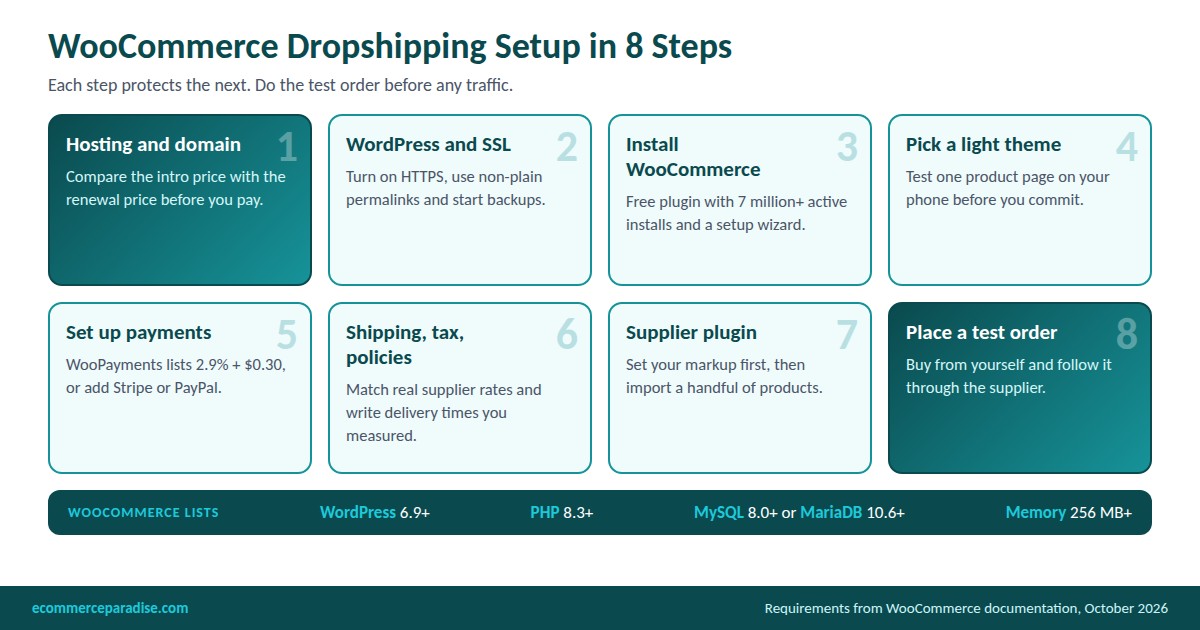
Here is the order I would follow. Each step protects the next one, and the numbers on the graphic come from the WooCommerce documentation and the plugin pages I cite below.
Step 1: Hosting and a domain
Hosting is the first real decision, because WooCommerce runs on a server you pay for. WooCommerce’s own server requirements page lists WordPress 6.9 or newer, PHP 8.3 or newer, MySQL 8.0 or MariaDB 10.6 or newer, and a 256 MB memory limit or higher. Any host worth paying for meets those, but check before you buy.
The headline price is not the price you will keep paying. These figures are from each host’s own plan page, read in October 2026.
| Host and plan | Intro price per month | Renewal per month | Note |
|---|---|---|---|
| SiteGround GrowBig | $4.99 | $29.99 | Prepaid 12 months, unlimited traffic listed |
| Bluehost eCommerce Essentials | $14.99 | $21.99 | 36 month term |
| ScalaHosting Entry Cloud | $14.95 | $39.95 | 2 cores, 2 GB RAM, term not stated per price |
| Cloudways Flexible (DigitalOcean) | $11 | $11 (billed hourly) | 2 GB RAM, 1 vCPU, 50 GB, 3-day trial |
| WordPress.com Commerce (managed) | $45 billed annually | Vendor says the same, confirm at checkout | Hosting plus WooCommerce bundled, $70 monthly |
Notice the SiteGround gap: $4.99 becomes $29.99, roughly six times higher in year two. I compare more hosts in my guide to the best WooCommerce hosting platforms. My WooCommerce pricing breakdown covers the WordPress.com plan, where I could not confirm a renewal price.
You will also need a domain. You can search and register one at Namecheap, though prices vary and I did not pull a current figure for this guide, so check the checkout page.
Disclosure: I may earn a commission if you sign up through my WordPress.com, SiteGround, Bluehost, ScalaHosting, Cloudways, Namecheap, DSers, Spocket, CJdropshipping, Syncee, AutoDS, Printify, Printful or Shopify links in this guide, at no extra cost to you. It does not change the prices I report or the downsides I list.
Step 2: Install WordPress, turn on SSL and set permalinks
Most hosts install WordPress in a few clicks. Switch on the free SSL certificate so your store loads over HTTPS, then go to Settings, Permalinks and choose anything other than Plain. This is not just cosmetic: the ALD plugin’s WordPress.org page says its order fulfillment needs SSL and non-plain permalinks.
Turn on automatic backups before you add a single product. A store that takes real orders needs a restore point, and on a self-managed host the backup schedule is your job to confirm.
Step 3: Install WooCommerce
In the WordPress dashboard, open Plugins, Add New, search for WooCommerce and activate it. The setup wizard asks for your country, industry and product types, then offers to install extras. Decline the extras you do not recognize, because every extra plugin is another thing to update and another way for something to break.
My longer walkthrough is in how to set up WooCommerce for a high-ticket dropshipping store. My WooCommerce review covers what the platform does well and badly.
Step 4: Pick a theme and keep it light
Pick a theme built for WooCommerce, then test one product page on your phone before you commit. Heavy themes and stacked page builders slow the store down, and a slow product page costs sales. I have not tested individual themes for this guide, so I will not name a winner. Look for recent updates, a clean product page and a clear checkout.
Step 5: Set up payments
You have three common options. WooPayments is Woo’s own processor and lists 2.9% + $0.30 for US cards in its fee documentation, per my reading in the WooCommerce pricing guide. Stripe and PayPal extensions are free downloads, and WooCommerce’s pricing page says it adds no fee for using a third-party payment solution.
Your processor still charges its own rate, and on a $2,000 order the fee is $58.30 at 2.9% + 30 cents (my arithmetic). Ask any processor how it treats larger tickets before you rely on it, because some hold funds or ask for extra paperwork on high-value orders.
Step 6: Shipping, tax and legal pages
Set shipping zones and rates that match what your supplier really charges. WooCommerce Tax can calculate sales tax for US stores, but it does not file or remit returns, so ask a CPA how your sales are treated. If you have not set up the company yet, my guide to business formation for dropshipping covers the order.
Your policy pages carry legal weight. The FTC’s Mail, Internet, or Telephone Order Merchandise Rule guide says the person soliciting the order is the seller, and that you need a reasonable basis for any shipping time you state. So write delivery times from a measured sample order, not from a supplier’s sales page.
Step 7: Install your supplier plugin and set the rules
Now you add the plugin from the comparison below. Before you import anything, set your pricing rule: a markup that covers the product, supplier shipping, the card fee and a refund allowance. Then import a handful of products, not hundreds, and edit the titles and descriptions yourself so the page reads like your store.
To choose products worth listing, my guide to the best dropshipping products and why they sell has a scorecard.
Step 8: Place a test order and plan your maintenance
Buy something from your own store. Check that the total, tax and shipping are right, that the order reaches the supplier, and that the delivery time matches what you promised. My dropshipping checklist for beginners is the list I would run through before launch.
Then schedule maintenance. On WooCommerce you own the updates, and that matters for security. Patchstack reported in October that hackers were exploiting flaws in two plugins to plant hidden admin accounts, which I covered in my note on the Ninja Forms flaw. Keep plugins few and current.
Want someone to check your store plan before you spend on hosting? Platform, supplier and pricing choices are cheaper to fix on paper than after launch, and one-on-one help can save weeks. Ask About Coaching →
WooCommerce Dropshipping Plugins Compared
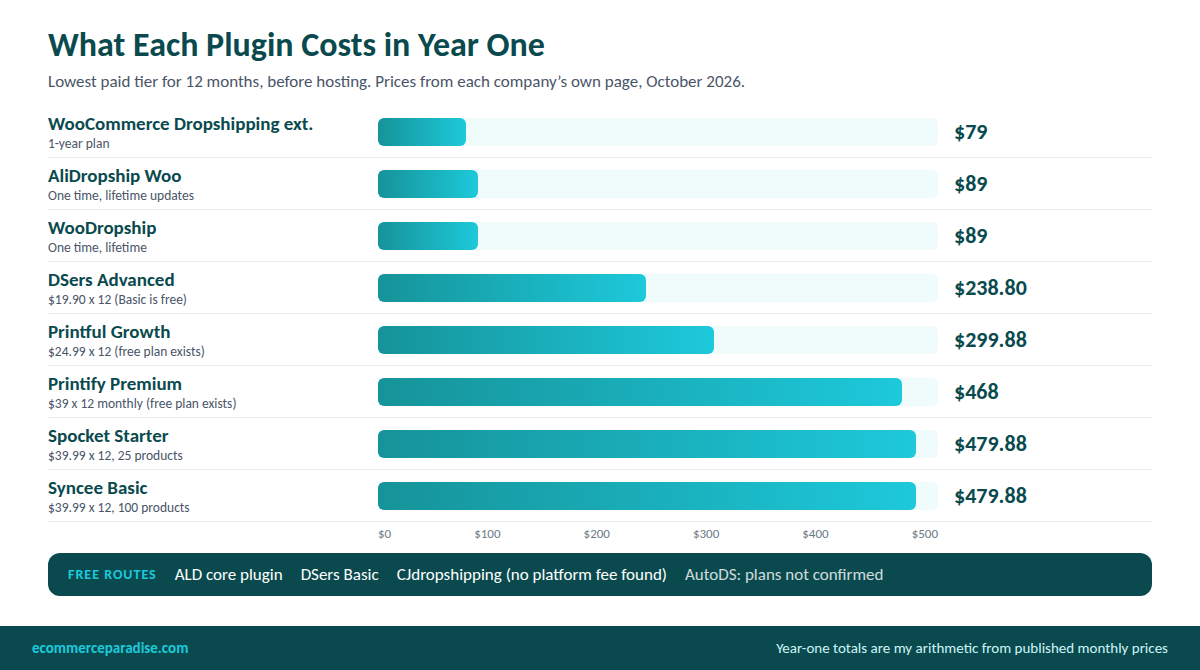
This table uses the price on each company’s own page or listing, read in October 2026. Several roundups I read online list older figures for the same tools, so treat any number you find elsewhere as a reason to check the live page. I left out tools I could not confirm work with WooCommerce.
| Plugin | What it connects | Price I found | The catch |
|---|---|---|---|
| ALD by VillaTheme | AliExpress | Free core. Pro price not shown on the listing | 3.7 stars from 138 reviews. Automatic fulfillment and price sync are Pro features |
| AliDropship Woo | AliExpress | $89 one time, lifetime updates, 30-day money back | Imports run through a Chrome extension, and the page lists no add-on prices |
| WooDropship | AliExpress | $89 one time, free trial with no card | The page lists no limits, and a separate $49 prebuilt-store offer sits beside it |
| WooCommerce Dropshipping extension | Your own suppliers, plus AliExpress through a Chrome extension | $79 for the 1-year plan | 2.8 stars from 39 reviews, 3K+ installs |
| DSers | AliExpress | Basic free, Advanced $19.90 a month, Pro $49.90 a month | Page does not say which plans include WooCommerce |
| CJdropshipping | CJ catalog and warehouses | No platform fee found on the pages I read | You pay product and shipping costs, and it links by API keys |
| Spocket | US and EU suppliers | Starter $39.99 a month for 25 products, Professional $59.99, Empire $99.99 | Plans cap how many unique products you can list |
| Syncee | Supplier marketplace | Free for 25 products, Basic $39.99 a month for 100, Pro $59.99 for 250 | WooCommerce works only on Marketplace plans, not DataFeed Manager |
| AutoDS | Several sources, with ordering automation | $0.99 for a 3-day trial. I could not confirm plan prices | Auto ordering is a $9.90 a month add-on on the page |
| Printful | Print on demand | Free plan, Growth $24.99 a month | Free integration, but you pay for each printed product |
| Printify | Print on demand | Free plan, Premium from $39 a month or $24.99 billed yearly | The Premium tier lists up to 20% off products |
Zendrop is not in the table because its pricing page lists Shopify, Wix, TikTok Shop and ClickFunnels as integrations and does not mention WooCommerce. If you are curious how it compares on Shopify, read my Zendrop review. You can also look at Zendrop’s plans directly.
The AliExpress importers
The cheapest tools are AliExpress importers, and the ALD plugin on WordPress.org is the free starting point. Its free version imports products, applies price rules and fulfills orders through a Chrome extension. The Pro version adds automatic price, quantity and tracking sync. The listing shows 9,000+ active installs and was updated October 8, so it is maintained, but its 38 one-star reviews out of 138 tell me to test before you trust it.
AliDropship and WooDropship both sell one-time licenses at $89, which is attractive next to a monthly app, though a one-time license does not remove your hosting bill. The official WooCommerce extension is a different animal, since it is built for managing your own suppliers and notifying them of orders. Its listing shows a 2.8 average, with 37% of its 39 reviews at one star and complaints about crashes on large catalogs and plugin conflicts.
The bigger risk is the source, not the plugin. Overseas shipping times are long, product quality varies, and the rules for small imports keep shifting. The $800 duty-free exemption was suspended effective August 29, 2025, according to CBS News, so ask your supplier in writing what the delivered price really is.
DSers is the one most people start with, partly because its Basic plan is free and allows 3,000 products and one sales channel. Its pricing page lists WooCommerce as a selling channel, but it did not say which plans include it, so confirm that inside the app. You can try DSers on its free plan to see the order flow.
The supplier marketplaces
Spocket and Syncee sell catalogs of suppliers, many with US or EU stock, and that usually means faster delivery than AliExpress. Both start at $39.99 a month for a small product count, so the cap on unique products is the number to check. My Spocket review goes deeper on the first. My Syncee review covers the second.
CJdropshipping works differently. It connects to WooCommerce through REST API keys that you create in WooCommerce settings and paste into CJ, as its own help article explains, and I found no platform fee on the pages I read. Your costs are the product, the shipping and any sourcing help, so it is cheap to try, and you can open a CJdropshipping account and compare a few shipping quotes.
Print on demand and automation
Printful and Printify handle printing and shipping for items with your design on them. Printful’s WooCommerce page says the integration is free with no setup fees, and Printify lists WooCommerce as supported. My Printful vs Printify comparison covers which one fits, and print on demand is a different business than sourcing branded goods.
AutoDS is the automation option. Its pricing page lists WooCommerce among supported stores, but the plan prices did not load for me, so I will not guess at them. The page does show a 3-day trial for $0.99, and my AutoDS review has more detail.
Which Plugin Fits Which Store
Match the tool to what you sell and how much you can lose. These are my picks, based on the prices and limits above, not a ranking from testing.
- Lowest cost, you accept slow shipping: ALD or DSers Basic, both free to start. Budget time to check every order by hand.
- Faster delivery from US and EU suppliers: Spocket or Syncee, which start at $39.99 a month. Check the product cap before you pay.
- Your own supplier relationships: the WooCommerce Dropshipping extension at $79, or a CSV import (more on that in the high-ticket section).
- Branded merchandise: Printful or Printify, once you have a design and an audience.
If you are unsure whether to start cheap or expensive, my guide on how to start dropshipping walks through the choice. Several of these tools also run on Shopify, and I price them in my guide to the best Shopify apps for dropshipping.
What It Really Costs: Three Builds Priced Out
Here is my own arithmetic for the first year, using the prices above. These exclude a domain, ads, samples, refunds and your time, and they are not quotes. I used SiteGround GrowBig at $4.99 a month for the lean build because it is the plan my pricing guide used.
| Build | What is in it | Year one | Year two |
|---|---|---|---|
| Lean AliExpress | SiteGround GrowBig ($59.88) and AliDropship Woo ($89) | $148.88 | $359.88 hosting at the $29.99 renewal |
| US and EU suppliers | SiteGround GrowBig ($59.88) and Spocket Starter ($39.99 x 12 = $479.88) | $539.76 | $839.76 |
| Managed and automated | WordPress.com Commerce ($45 x 12 = $540) and DSers Advanced ($19.90 x 12 = $238.80) | $778.80 | Same if the vendor’s price claim holds |
| Shopify reference | Shopify Basic at $29 x 12 annual billing, with DSers free | $348 | $348 if the price holds |
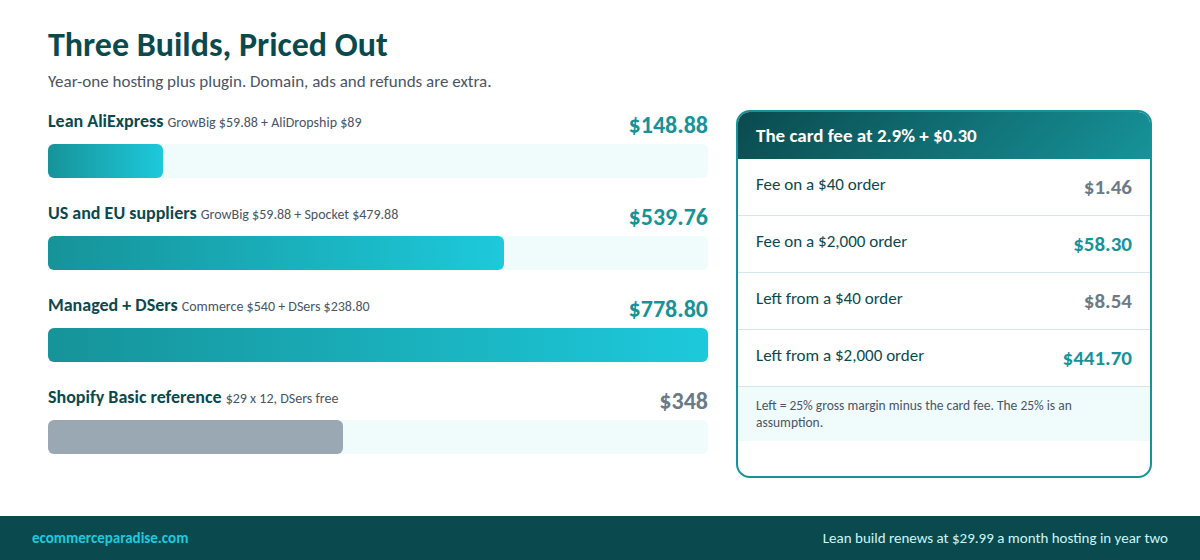
Two lessons stand out. The cheapest first year is the most misleading one, because the lean build’s hosting bill is six times higher the next year. And the software costs are small next to the payment fee on a larger order.
Take the 2.9% + 30 cent card rate that both WooPayments and Shopify’s Basic plan list. On a $40 order the fee is $1.46. On a $2,000 order it is $58.30. Assume a 25% gross margin, which is my illustration and not a measured average: you would keep $8.54 on the $40 order after the fee, but $441.70 on the $2,000 order. A $9 ad click that converts wipes out the first profit and barely dents the second.
For the wider picture, my total cost of a WooCommerce store guide covers the ownership costs I left out here.
Want the Whole Beginner Path in One Place?
The free mini course shows how the high-ticket model works, so you can compare it with the cheap-product route before you buy hosting or a plugin.
WooCommerce vs Shopify for Dropshipping
This is the question behind most searches for a WooCommerce plugin, so here is the plain comparison. I read Shopify’s plan prices on its pricing page, and the WooCommerce figures come from WooCommerce’s own pages and my earlier pricing guide.
| Factor | WooCommerce | Shopify |
|---|---|---|
| Platform price | $0 core plugin, you pay for hosting | Basic $39 monthly or $29 a month billed yearly |
| Card rate | WooPayments 2.9% + 30 cents (US) | 2.9% + 30 cents on Basic |
| Fee for an outside gateway | None from WooCommerce | 2% on Basic, 1% on Grow, 0.6% on Advanced |
| Trial | Free download, WordPress.com offers 14 days | 3 days free, then $1 a month for 3 months |
| Updates and security | You or your host handle them | Handled by Shopify |
| Dropshipping tools | Plugins and connectors, fewer polished options | Large app store; DSers, Spocket, Syncee and AutoDS also work here |
| Content and SEO | WordPress blogging is a real strength | Adequate blog, less flexible |
The fee row matters more than it looks. If you used an outside processor on Shopify Basic, a $2,000 order would carry a $40 platform fee on top of the processor’s fee, which is my arithmetic from the 2% rate. WooCommerce charges nothing for the choice of gateway, so stores that need a specific processor can come out ahead.
My read is the same as in my longer comparison. For most dropshippers, especially beginners, I would pick Shopify because it removes server work, and you can start a Shopify trial and build one product page to see for yourself. I lay out the reasoning in Shopify vs WooCommerce for dropshipping.
The wider field, including BigCommerce and others, is in my comparison of the best dropshipping platforms.
WooCommerce is the better choice in a few cases: you already run a WordPress site with traffic, you need custom catalog or quote logic, or you enjoy managing the technical side. If you have started on one and want the other, I wrote a guide to switching from Shopify to WooCommerce. My BigCommerce vs WooCommerce comparison covers the third option.
Pros and Cons of WooCommerce Dropshipping
What WooCommerce does well
- No platform subscription or revenue share. WooCommerce’s pricing page lists 0% revenue share and a free core.
- Free choice of payment processor. You are not charged extra for using a third-party gateway.
- Full control of the code and catalog. That matters for quote forms, custom fields and unusual shipping rules.
- Strong content and SEO footing. If organic search is your plan, WordPress is a good home for guides and buying advice.
Where it costs you
- Hosting renewals. Promo prices can jump four to six times in year two.
- Maintenance is yours. Updates, backups and security take real time, and outdated plugins are a known attack route.
- Plugin quality varies. The ratings on the tools above range from 2.8 to 4.5 stars, so read reviews first.
- Fewer polished dropshipping tools. Several of the best apps are built Shopify-first.
The High-Ticket Angle: Dealers, MAP and Quote Requests
Everything above is built around cheap products, but the thin margins in that world are why I teach the higher-priced version. High-ticket means products around $500 and up from established US brands that approve you as a dealer, which is my definition rather than an industry standard. The unit economics on a $2,000 order are very different, as the fee math above shows.
WooCommerce can suit this model better than people assume, because high-ticket stores often need things a basic app does not provide.
Dealer catalogs and the CSV importer
Brands that approve dealers usually send a spreadsheet or feed, not an app connection. WooCommerce’s built-in CSV importer imports products in bulk and can update existing ones by ID or SKU, and a column with a meta: prefix carries custom fields into the product. Its docs also warn that large files need batches and the core importer cannot edit image alt text.
For feeds that update often, some tools connect dealer catalogs directly. Inventory Source lists WooCommerce among its integrations, though its page publishes no price and says to contact them, so you can request an Inventory Source quote to see if your supplier is on it.
Before you chase any feed, my guide on how to find suppliers for high-ticket products covers dealer applications. My supplier directory lists places to start.
MAP pricing
Many brands set a minimum advertised price, and dealers who break it lose their account. I did not find a built-in MAP setting in WooCommerce core, so I would store each product’s MAP in a custom field through the importer and audit your prices against it. I explain the rules in my guide to MAP pricing in dropshipping.
Quote requests instead of Add to Cart
Buyers of a $3,000 product often want to ask a question first, and some brands do not allow public pricing. An extension such as Request a Quote for Price by Extendons hides prices and the Add to Cart button, lets buyers submit a quote list, and lets you convert approved quotes into orders. It was $29 for the 1-year plan when I read it, version 1.0.7, and the listing showed no rating yet, so test it before relying on it.
Freight and fraud
Large items ship by freight, so flat rates rarely work. The Table Rate Shipping extension at $119 for one year (from my pricing guide) sets rules by weight, destination and shipping class. High-value orders also attract fraud, so read how to protect a store in my guide on fraud and chargebacks for high-ticket stores.
My own assumed budget for this build is a $50 a month host ($600 a year), Request a Quote ($29) and Table Rate Shipping ($119), or $748 before the dealer feed tool and payment fees. The platform choice matters less than the supplier terms, and I weigh both in my comparison of the best platform for high-ticket dropshipping.
Prefer to learn the whole model yourself? The High-Ticket Dropshipping Masterclass has 18 modules, over 20 hours of training and 10 bonuses, and you choose how to join on the sales page. See the Masterclass →
If you want to see which categories fit this model, my high-ticket niches list is the place to start.
Where to Go Next
Start at the first row that fits you and stop wherever you have what you need.
| Where you are | Go here |
|---|---|
| Still choosing a niche | Free niches list |
| Want to learn it yourself, free | Free mini course or the beginner guide |
| Want the full training | High-Ticket Dropshipping Masterclass |
| Want help while you build | Coaching |
| Want a store built for you | Done-for-you build |
| Already selling and want to scale | Store management and ad management |
Frequently Asked Questions
What is the best WooCommerce dropshipping plugin?
It depends on what you sell. For the lowest cost, ALD or DSers’ free Basic plan are the starting points, for faster US and EU delivery Spocket and Syncee start at $39.99 a month, and for your own suppliers the official extension costs $79 a year. I have not ranked them by testing, so match the tool to your supplier source and check reviews.
Is there a free WooCommerce dropshipping plugin?
Yes. The ALD plugin on WordPress.org is free for AliExpress imports, DSers has a free Basic plan, and I found no platform fee for CJdropshipping. Free tiers still leave hosting, payment fees and your time, and automatic price and tracking sync often needs a paid version.
How much does WooCommerce dropshipping cost per month?
WooCommerce is $0, so the cost is hosting plus your plugin. By my arithmetic, a lean build is about $149 for the first year and a managed build with DSers Advanced is $778.80, before domain, ads and refunds. Hosting can rise sharply at renewal, so price year two as well.
Is WooCommerce or Shopify better for dropshipping?
For most beginners I would pick Shopify because it removes server work, and WooCommerce wins if you already run a WordPress site, need custom logic or want to avoid platform fees on outside gateways. The honest answer is that the supplier and product matter more than the platform.
Can I do high-ticket dropshipping on WooCommerce?
Yes, and it can work well because you control the catalog, quote forms and shipping rules. Most dealer relationships run on spreadsheets and feeds, so the built-in CSV importer matters more than an AliExpress plugin. Expect to apply to suppliers first and to follow any MAP policy they set.
Want a Working Store Instead of a Blank Dashboard?
My team builds a high-ticket dropshipping store and lines up suppliers, so you start with a working store and spend your time learning the business. Prefer to learn it yourself? Ask about coaching instead.
Related Articles
If you found this useful, these guides go deeper on related topics:
- WooCommerce Review 2026: Is It the Best Ecommerce Platform for Dropshipping Stores?
- Shopify vs WooCommerce: Which Platform Is Actually Better for Dropshipping in 2026?
- 10 Best WooCommerce Hosting Platforms in 2026
- How to Set Up WooCommerce for a High-Ticket Dropshipping Store
- How to Start Dropshipping: 9 Steps for Beginners in 2026
Trevor Fenner
Email: trevor@ecommerceparadise.com
Phone: (307) 429-0021
5830 E 2nd St, Ste. 7000 #715, Casper, WY 82609
About | Contact | Resources

Trevor Fenner is an ecommerce entrepreneur and world traveler from Seattle, Washington, and the founder of Ecommerce Paradise, a platform focused on helping entrepreneurs build and scale profitable high-ticket ecommerce and dropshipping businesses. With over a decade of hands-on experience, Trevor specializes in high-ticket dropshipping strategy, niche and product selection, supplier recruiting and onboarding, Google & Bing Shopping ads, ecommerce SEO, and systems-driven automation and scaling. Through Ecommerce Paradise, he provides free education via in-depth guides like How to Start High-Ticket Dropshipping, advanced training through the High-Ticket Dropshipping Masterclass, and fully done-for-you turnkey ecommerce services for entrepreneurs who want a faster, more hands-off path to growth. Trevor is known for emphasizing sustainable, real-world ecommerce models over hype-driven tactics, helping store owners build scalable, sellable, and location-independent brands.
He maintains homes in Seattle and Bali, spends most of the year overseas, and usually returns to Seattle for about a month each summer.


